windows server 2025
25 TopicsWindows Server Summit 2025
Windows Server Summit is now available, on demand! Improve your skills quick with deep dives and demos on the latest features and innovations. Get tips to help you strengthen security, build resiliency, improve performance, and simplify management. Hosted by Microsoft engineers, this virtual conference is also your opportunity to get answers to your questions. Day 1 - now on demand! Welcome to Windows Server Summit 2025! Upgrades made easy with Windows Server 2025 Modernize server management and connectivity with Azure Arc Harden security and build resiliency with Windows Server 2025 Securing Active Directory From on-premises to cloud with Azure File Sync What's next for advanced storage Assess cloud-readiness of your applications with Azure Migrate AD CS enhancements, innovations, and security Beyond the MCSE: Windows Server training and certification Day 2 - now on demand! Windows Server Hyper-V architecture, features, GPUs, and more! Migration and modernization: From VMware to the cloud SDN magic: Windows Server 2025 innovations Fine-tuned host networking for Windows Server 2025 Azure Arc-enabled management and pay-as-you-go for Windows Server Hotpatching and update management for Windows Server with Azure Arc What's new in 2025 with Windows Admin Center The support case files: Windows Server troubleshooting tips Highly available, always scalable: Failover clustering and S2D Enjoyed the Windows Server Summit? After you've viewed a few sessions, please share your feedback about what you'd like in the future via the QR code below.53KViews34likes42Comments
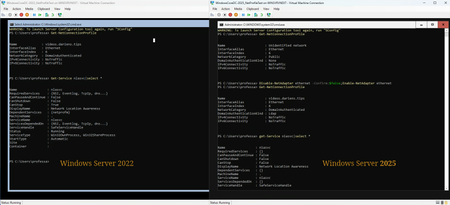
Server 2025 Core ADDS DC, Network Profile Showing as "Public" and not as "DomainAuthenticated"
OS: Windows Server 20225 Standard Core (no GUI), build 26085.1 Role: ADDS, DNS ForestMode: Windows2025Forest DomainMode: Windows2025Domain Platform: Hyper-V guest When standing up a clean Windows Server 2025 using server core and configuring it as a domain controller, the network category (profile) always shows as "public." A clean load of Windows Server 2022 with server core as a domain controller has the same behavior. However, in Server 2022, the fix is to add DNS as a required service to the nlasvc (Network Location Awareness) service. Once that is done, the network category reflects "DomainAuthenticed" and persists between reboots. In Server 2025, the nlasvc service does not have the same requiredservices as Windows Server 2022, and it does not start automatically. Even after configuring the nlasvc service the same way it is in Server 2022 and adding DNS as a required service, the network category still reflects "public." The only way to get the network category to properly reflect the "DomainAuthenticated" status is to disable and reenable the network adapter after each reboot.23KViews14likes85CommentsUpdate to 26052 stuck in restart
Windows Update offered 26052.1000 (ge_release), after it gets installed, it tries to reboot and get stuck in black screen with "Shutting down service: Update Orchestrator Service" for hours. I left the computer overnight and suddenly it restarted but the update was not applied.8.9KViews1like1Comment
Server 2025 26085 - AMD Radeon Graphics Driver?
Trying to install 2025 26085. Currently can only get the Microsoft generic display driver for AMD 7000 series CPU/GPU. In server 2022 I could update the video driver to 'AMD Radeon (TM) Graphics'. I am unable to do so in 2025. What magic do I need to do to get the AMD display driver in 2025?5.8KViews1like2Comments
WS2025 Preview (26100.1) fails to boot after joining WS2016 forest
I installed WS2025 Preview (Datacenter, 26100.1) in a virtual machine and after joining the domain, the box is rendered unbootable (boot loops). I can reinstall and do other tasks as a standalone server with no problem but joining the domain immediately bricks the VM, 100% of the time. The forest is running at functional level WS2016. I disabled all GPs and verified with gpresult they are not applied. Safe mode boots if you need me to poke around. Am working to get a kernel debugger attached. No memory dump is generated and disabling reboot on errors yields nothing.2.9KViews2likes11Comments
Unable to import WS2025 Container image on WS2025 Host VM
I am trying to import WS2025 container image (major version 26080) to WS2025 host (major version 26100) and getting this exception: ctr: failed to extract layer sha256:f7edee802958b0e48757365259e389019fdf788dde24558570930c19918cc97d: hcsshim::ProcessUtilityVMImage To use this container image, you must join the Windows Insider Program. Please see https://go.microsoft.com/fwlink/?[REDACTED] for more information.: unknown Importing the same container image on a host with the previous OS version 26063 works well, without this problem. This is happening during custom image building on Azure Image Builder subscription, where I have no GUI nor account. How I can workaround this?Solved1.8KViews0likes6Comments
Windows Server 2025 DC — LSASS handle leak identified via WinDbg — authz!AuthzpDeQueueThreadWorker
Hello All!! Im having a problem, LSASS crashes on a Windows Server 2025 Domain Controller, I identified what appears to be the root cause using WinDbg memory dump analysis. Sharing this hoping someone else has seen it or Microsoft can confirm. The Problem LSASS handle count grows continuously over time and eventually crashes with a 0xC0000005 access violation (Event ID 1015). After a reboot the cycle repeats. The growth rate correlates with authentication load and faster during peak hours, slower overnight. WinDbg Dump Analysis Captured LSASS dump at high handle count and ran !handle 0 f: Token handles: overwhelmingly dominant Everything else: negligible Every leaked token shows: GrantedAccess: 0x8 (TOKEN_QUERY only) PointerCount: overflowed to negative integer Running !findstack authz 2 shows multiple worker threads all sitting in: authz!AuthzpDeQueueThreadWorker What Was Tested And Eliminated Stopped or disabled each individually and measured handle growth rate — zero meaningful difference from any: - Antivirus (all components) - Backup software - Application services - VSS snapshots - Hardware management agents etc.. Environment OS: Windows Server 2025, fully patched with the latest updates including April LSASS update. Role: Domain Controller DNS PAM: Not active. Conclusion Token handles are opened with TOKEN_QUERY access inside authz!AuthzpDeQueueThreadWorker and never released. Reference counter overflows to negative integer. Growth rate scales directly with authentication load. Current workaround: reboots during off hours. Has anyone else seen this pattern on Windows Server 2025? Is there a known fix or Microsoft acknowledgment for this specific authz token handle leak?1.6KViews4likes5CommentsIssues restoring Windows 2025 domain controllers from snapshots
Build 26280.ge_prerelease.240824-1650 I am running the Windows 2025 domain controllers deployed on Hyper-V virtual machines. Hyper-V is installed on Standard D16s v3 Azure virtual machine. Scenario 1 When I create a Azure VM snapshot and then deploy a new Azure VM from that snapshot, the Windows 2025 Hyper-V based domain controllers won't boot (there is a back screen with infinite loading spinner). Scenario 2 - A Hyper-V checkpoint is created for Hyper-V based domain - The domain controller is restored from the checkpoint - The domain controller is backed up using Windows Server backup - The domain controller is restored to a new Hyper-V VM from Windows server backup - After the recovery, it won't boot with same back screen with infinite loading spinner as in Scenario 1 Both scenarios work well in all previous Windows versions.1KViews0likes3Comments