windows server 2022
30 TopicsInstall RD Web Client on Windows Server 2022 – Complete Setup Guide
To access Remote Desktop only via the browser, install the Web Client package --- Step 1: Export the Self-Signed Certificate * Open **Run** → type `certlm.msc` * Navigate to **Personal** → **Certificates** * Select the certificate created for the **RD Connection Broker** * Export the certificate (e.g., to `C:\temp\abcde.cer`) --- Step 2: Install and Publish Web Client Package Open Windows PowerShell 5.1 and run: powershell Install-Module PowerShellGet -Force Install-Module RDWebClientManagement Import-Module RDWebClientManagement # Clean up any stale IIS locks Reset-IISServerManager -Confirm:$false Remove-Module IISAdministration -ErrorAction SilentlyContinue Import-Module RDWebClientManagement # Install the Web Client Install-RDWebClientPackage # Import the exported certificate Import-RDWebClientBrokerCert "C:\temp\abcde.cer" # Publish the Web Client for production Publish-RDWebClientPackage -Type Production -Latest --- Step 3: Access the Web Client Visit: https://<your-serverFQDN>/RDWeb/webclient/index.html If the page does not appear: Restart the **Default Web Site** in **IIS Manager**. Ensure the **webclient** folder is present under the IIS site directory. Check if the correct certificate is applied under **Bindings** in IIS. If want Beginning from Remote access deployment- use this link - Remote Access via HTTPS RDP Web Client on Windows Server 2022 - Installation Issue Solved . | Microsoft Community Hub1.9KViews0likes0CommentsCan DHCP Server detect client windows version?
I have a DHCP server and several clients, some running Windows 10 and some Windows 7. I want the DHCP server to be able to identify the Windows version of the clients using the vendor class and assign the settings I've specified accordingly. Also, I don't want to configure anything on the clients; I want the DHCP server to be able to detect the Windows version by itself. Is there a way to do this?755Views0likes3CommentsWindows Server 2022 Hyper-V Cluster Network issues
Hi, I need help with Hyper-v Windows Server 2022. Recently Spinned up a new Cluster on Win 2022 and I am facing Network challenges with the VMs not seeing the Network. But only the ones deployed without Desktop Experience GUI. Every time I try to assign a static IP it gives me the Error below: Setting NIC to static IP… Failed to release DHCP lease. Result code: 83 Method name: ReleaseDHCPLease Attempted the workaround from this post: https://blog.cslim.nl/index.php/blog/sysadminning/17-windows-server/49-windows-server-core-failed-to-release-dhcp-lease But the issue still persist. I need Help779Views0likes1CommentMoving vb6 program windows via rdp with fixed resolution
Hello, we have the following problem. Environment: - Windows Server 2022 Terminal Server - VMWare 7 and 8 - Android Mobile Computer (Datalogic & Zebra) - Mobile app Remote RDP apk with resolution forced to 240x320 - VB6 programs Randomly while using the mobile computer when I open a new window or application it opens shifted relative to the others and also relative to the center. The connection does not go down you stay connected all the time. And being there fixed screen can not be moved. If I exit and re-enter everything is resolved. From what could be due VB6 programs for window management? I would like to point out that with Windows Server 2019 version it does not give any kind of problem. I ask for your help or advice466Views0likes0CommentsFailed to read sector 1 of KSR data volmgr
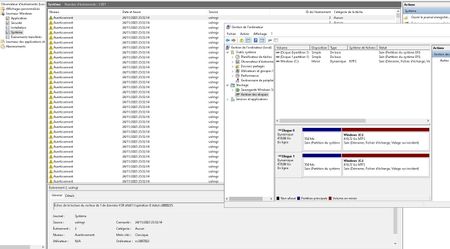
Hello, On a new installation from OVH i get many issues reported to eventviewer No dump file can be created, no hibernation mode also (if i don't use it then np) Many events (see picture) after a reboot or when refreshing disk management RAM & SSD tested chckdisk OK Here is the specs: Windows Server 2022 Standard 21H2 Intel(R) Xeon(R) CPU E3-1270 v6 @ 3.80GHz 3.80 GHz 32GO RAID INTEL SSD 450G Help from Microsoft would be appreciate related topics about this issue https://www.reddit.com/r/sysadmin/comments/ulsv9f/failed_to_read_ksr_data/ https://social.technet.microsoft.com/Forums/en-US/eef7e3c6-7621-431c-8392-430bc29cec10/windows-10-wont-hibernate-or-sleep-crash-dump-fails-45-crash-dump-init-fails-46?forum=win10itprogeneral2.3KViews0likes1CommentEvaluation Software (Any) (In particular Windows Server 2022)
Is there an ISO-build that is specifically for evaluation that can be installed on just a Desktop Client Machine? I do not have the resources to use a full server setup to evaluate. I understand that I would not have access to the modernest futures, but basically I could evaluate the most common usages.Solved1.6KViews0likes6CommentsError installation Windows Server 2022 Insider Preview - 0x80070001
Hello, I've got a new PC and I want to install Windows Server 2022 Insider Preview. I've tried to install it with a Ventoy Usb Key, that doesn't work so I tried with a new bootable usb key. But, when the process of installation begin, I have this error code : 0x80070001. I've searched on Google the solutions and I just found to reset the bios and I make it but the problem persists... I have a Lenovo ThinkCentre M73 with Intel CELERON G1820T 2.4GHZ 8GO RAM 320GO HDD Thanks in advance for your help Friezer2.8KViews1like5CommentsCan't enable StorageBusCache on Server 2022 | New-StorageBusCacheStore produces "Generic Failure"
Trying to create a tiered storage space on Server 2022 Datacenter - 4x HDDs, 2x SDDs. The following command shows all the correct drives as CanPool, True: PS C:\Users\Administrator> Get-PhysicalDisk Number FriendlyName SerialNumber MediaType CanPool OperationalStatus HealthStatus Usage Size ------ ------------ ------------ --------- ------- ----------------- ------------ ----- ---- 6 Samsung SSD 980 PRO 1TB 0025_38BA_1150_2DE1. SSD False OK Healthy Auto-Select ...B 1 WDC WD40EFZX-68AWUN0 WD-WXB2DA1PYZJA HDD True OK Healthy Auto-Select ...B 4 WDC WDS250G2B0A-00SM50 1820A5802535 SSD True OK Healthy Auto-Select ...B 0 WDC WD40EFZX-68AWUN0 WD-WX52D71DH899 HDD True OK Healthy Auto-Select ...B 3 WDC WD40EFZX-68AWUN0 WD-WXB2DA1PYU0Z HDD True OK Healthy Auto-Select ...B 5 WDC WDS250G2B0A-00SM50 1820A5805134 SSD True OK Healthy Auto-Select ...B 7 Samsung SSD 960 EVO 500GB 0025_3858_71B1_204B. SSD False OK Healthy Auto-Select ...B 2 WDC WD40EFZX-68AWUN0 WD-WX52D710HSJK HDD True OK Healthy Auto-Select ...B But when I take the next step of Enable-StorageBusCache, the script invokes the New-StorageBusCacheStore cmdlet producing an exception when calling "CreateSsdCacheStore" leading to generic failure. I assume that this failure leads to the proceeding failures on down the line. ' New-StorageBusCacheStore : Exception calling "CreateSsdCacheStore" : "Generic failure " At C:\WINDOWS\system32\WindowsPowerShell\v1.0\Modules\StorageBusCache\StorageBusCache.psm1:2409 char:13 + New-StorageBusCacheStore -Guid $cacheDevice.DeviceGuid + ~~~~~~~~~~~~~~~~~~~~~~~~~~~~~~~~~~~~~~~~~~~~~~~~~~~~~~ + CategoryInfo : NotSpecified: (:) [New-StorageBusCacheStore], MethodInvocationException + FullyQualifiedErrorId : WMIMethodException,New-StorageBusCacheStore New-StorageBusBinding : No cache store found on cache device At C:\WINDOWS\system32\WindowsPowerShell\v1.0\Modules\StorageBusCache\StorageBusCache.psm1:2941 char:17 + ... New-StorageBusBinding -CacheGuid $bindOrder[$nextCache] - ... + ~~~~~~~~~~~~~~~~~~~~~~~~~~~~~~~~~~~~~~~~~~~~~~~~~~~~~~~~~ + CategoryInfo : ObjectNotFound: (:) [New-StorageBusBinding], RuntimeException + FullyQualifiedErrorId : NotFound,New-StorageBusBinding New-StorageBusCacheStore : Exception calling "CreateSsdCacheStore" : "Generic failure " At C:\WINDOWS\system32\WindowsPowerShell\v1.0\Modules\StorageBusCache\StorageBusCache.psm1:2409 char:13 + New-StorageBusCacheStore -Guid $cacheDevice.DeviceGuid + ~~~~~~~~~~~~~~~~~~~~~~~~~~~~~~~~~~~~~~~~~~~~~~~~~~~~~~ + CategoryInfo : NotSpecified: (:) [New-StorageBusCacheStore], MethodInvocationException + FullyQualifiedErrorId : WMIMethodException,New-StorageBusCacheStore New-StorageBusBinding : No cache store found on cache device At C:\WINDOWS\system32\WindowsPowerShell\v1.0\Modules\StorageBusCache\StorageBusCache.psm1:2941 char:17 + ... New-StorageBusBinding -CacheGuid $bindOrder[$nextCache] - ... + ~~~~~~~~~~~~~~~~~~~~~~~~~~~~~~~~~~~~~~~~~~~~~~~~~~~~~~~~~ + CategoryInfo : ObjectNotFound: (:) [New-StorageBusBinding], RuntimeException + FullyQualifiedErrorId : NotFound,New-StorageBusBinding New-StorageBusCacheStore : Exception calling "CreateSsdCacheStore" : "Generic failure " At C:\WINDOWS\system32\WindowsPowerShell\v1.0\Modules\StorageBusCache\StorageBusCache.psm1:2409 char:13 + New-StorageBusCacheStore -Guid $cacheDevice.DeviceGuid + ~~~~~~~~~~~~~~~~~~~~~~~~~~~~~~~~~~~~~~~~~~~~~~~~~~~~~~ + CategoryInfo : NotSpecified: (:) [New-StorageBusCacheStore], MethodInvocationException + FullyQualifiedErrorId : WMIMethodException,New-StorageBusCacheStore New-StorageBusBinding : No cache store found on cache device At C:\WINDOWS\system32\WindowsPowerShell\v1.0\Modules\StorageBusCache\StorageBusCache.psm1:2941 char:17 + ... New-StorageBusBinding -CacheGuid $bindOrder[$nextCache] - ... + ~~~~~~~~~~~~~~~~~~~~~~~~~~~~~~~~~~~~~~~~~~~~~~~~~~~~~~~~~ + CategoryInfo : ObjectNotFound: (:) [New-StorageBusBinding], RuntimeException + FullyQualifiedErrorId : NotFound,New-StorageBusBinding New-StorageBusCacheStore : Exception calling "CreateSsdCacheStore" : "Generic failure " At C:\WINDOWS\system32\WindowsPowerShell\v1.0\Modules\StorageBusCache\StorageBusCache.psm1:2409 char:13 + New-StorageBusCacheStore -Guid $cacheDevice.DeviceGuid + ~~~~~~~~~~~~~~~~~~~~~~~~~~~~~~~~~~~~~~~~~~~~~~~~~~~~~~ + CategoryInfo : NotSpecified: (:) [New-StorageBusCacheStore], MethodInvocationException + FullyQualifiedErrorId : WMIMethodException,New-StorageBusCacheStore New-StorageBusBinding : No cache store found on cache device At C:\WINDOWS\system32\WindowsPowerShell\v1.0\Modules\StorageBusCache\StorageBusCache.psm1:2941 char:17 + ... New-StorageBusBinding -CacheGuid $bindOrder[$nextCache] - ... + ~~~~~~~~~~~~~~~~~~~~~~~~~~~~~~~~~~~~~~~~~~~~~~~~~~~~~~~~~ + CategoryInfo : ObjectNotFound: (:) [New-StorageBusBinding], RuntimeException + FullyQualifiedErrorId : NotFound,New-StorageBusBinding New-StorageBusCacheStore : Exception calling "CreateSsdCacheStore" : "Generic failure " At C:\WINDOWS\system32\WindowsPowerShell\v1.0\Modules\StorageBusCache\StorageBusCache.psm1:2409 char:13 + New-StorageBusCacheStore -Guid $cacheDevice.DeviceGuid + ~~~~~~~~~~~~~~~~~~~~~~~~~~~~~~~~~~~~~~~~~~~~~~~~~~~~~~ + CategoryInfo : NotSpecified: (:) [New-StorageBusCacheStore], MethodInvocationException + FullyQualifiedErrorId : WMIMethodException,New-StorageBusCacheStore New-StorageBusBinding : No cache store found on cache device At C:\WINDOWS\system32\WindowsPowerShell\v1.0\Modules\StorageBusCache\StorageBusCache.psm1:2941 char:17 + ... New-StorageBusBinding -CacheGuid $bindOrder[$nextCache] - ... + ~~~~~~~~~~~~~~~~~~~~~~~~~~~~~~~~~~~~~~~~~~~~~~~~~~~~~~~~~ + CategoryInfo : ObjectNotFound: (:) [New-StorageBusBinding], RuntimeException + FullyQualifiedErrorId : NotFound,New-StorageBusBinding New-StorageBusCacheStore : Exception calling "CreateSsdCacheStore" : "Generic failure " At C:\WINDOWS\system32\WindowsPowerShell\v1.0\Modules\StorageBusCache\StorageBusCache.psm1:2409 char:13 + New-StorageBusCacheStore -Guid $cacheDevice.DeviceGuid + ~~~~~~~~~~~~~~~~~~~~~~~~~~~~~~~~~~~~~~~~~~~~~~~~~~~~~~ + CategoryInfo : NotSpecified: (:) [New-StorageBusCacheStore], MethodInvocationException + FullyQualifiedErrorId : WMIMethodException,New-StorageBusCacheStore New-StorageBusBinding : No cache store found on cache device At C:\WINDOWS\system32\WindowsPowerShell\v1.0\Modules\StorageBusCache\StorageBusCache.psm1:2941 char:17 + ... New-StorageBusBinding -CacheGuid $bindOrder[$nextCache] - ... + ~~~~~~~~~~~~~~~~~~~~~~~~~~~~~~~~~~~~~~~~~~~~~~~~~~~~~~~~~ + CategoryInfo : ObjectNotFound: (:) [New-StorageBusBinding], RuntimeException + FullyQualifiedErrorId : NotFound,New-StorageBusBinding Update-StorageBusCache : Storage Bus has unbound capacity devices, autoconfiguration of pool not possible At C:\WINDOWS\system32\WindowsPowerShell\v1.0\Modules\StorageBusCache\StorageBusCache.psm1:1074 char:13 + Update-StorageBusCache + ~~~~~~~~~~~~~~~~~~~~~~ + CategoryInfo : InvalidOperation: (:) [Update-StorageBusCache], RuntimeException + FullyQualifiedErrorId : InvalidOperation,Update-StorageBusCache ' This sucks and I have no idea what to do about it. I checked out the MSscript quote in the error codes, but it's well above my pay grade. Anyone know what this is all about? EDIT: Sorry the formatting above is a mess. I don't know why it's not interpreting line breaks properly. 😕2.5KViews0likes0Comments