windows insider
114 TopicsAdd a Blur tool to the Snip & Sketch
There are many times when we need to take a screenshot and show it to someone but it contains other info, sensitive or personal, so we have to draw on them with colors and it makes it look ugly. please add a blur tool so we can be able to blur those details. also be able to change the thickness of blur tool. Please Upvote this feedback on Feedback hub app: https://aka.ms/AA6zag932KViews27likes9CommentsWindows 10, version 21H2 announced!
Windows continues to play an important role in people’s lives as they continue to work, learn and have fun in hybrid and remote environments. Our goal is to provide new features and functionality via a fast and reliable update experience to help keep people and organizations protected and productive. Version 21H2 will continue the recent feature update trend of being delivered in an optimized way using servicing technology, like the way we delivered version 1909 to devices running version 1903 and the way we delivered version 21H1 to devices running versions 2004 and 20H2. Our launch approach for Windows 10, version 21H2 continues to fully leverage the Windows Insider Program to obtain user feedback and data insights on quality. Today, we begin releasing 21H2 builds to Windows Insiders who were moved to the Release Preview channel from the Beta channel because their specific devices did not meet the hardware requirements for Windows 11. For more information on Windows 10, version 21H2, its feature set, how it's being delivered, and the Windows Insider channels, please see John Cable's blog here: Introducing the next feature update to Windows 10: 21H2 | Windows Experience Blog. --Joe. Follow me on Twitter: @LURIE_MSFT49KViews17likes57Comments
Windows 12 as far as i know?
As per this thread created, i got some information about Windows 12, which is: Windows 12 is coming about late 2024 or early 2025. Windows 12 is possibly already show up on Canary Channel although it is not officially confirmed. Several news sources say that HP give a hint if around October 2024, the Windows 11 version 24H2 (or Windows 11 2024 Update) is released, while HP is keep silent about Windows 12, which is possibly Windows 12 will be delayed a bit later after Windows 11 24H2 released. System requirements for Windows 12 is definitely higher than Windows 11. Windows 12 still require TPM 2, Secure Boot support, and processor that capable to use hardware accelerated VBS properly, such as processor that released on 2018 and later. Windows 12 require minimum 8 GB of ram and possibly still same 64 GB disk space, while SSD is becoming a mandatory. Actually, Windows 12 require special hardware named NPU (Neural Processing Unit) for all features in Windows 12 is working properly, but since the NPU is still very expensive to acquire (or basically you need an Intel Core Ultra 5 125U at least), so these requirements should be optional. Information about whether Windows 12 will be a subscription based operating system or not is still unclear, but most speculation says that Windows 12 is not required to subscribe to use. That's it from me. If you got any more further information about Windows 12, you can share here. Thanks to XDA that give me a big overview about Windows 12.1MViews7likes89CommentsIn the new Network status in build 18956, separate Internet usage by Upload and Download
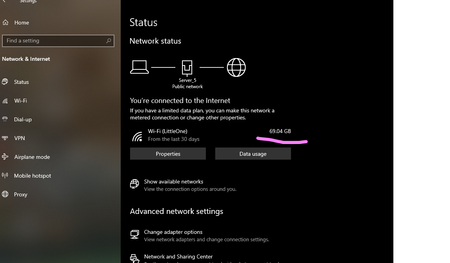
right now it shows us the combined number but I want to know exactly how much of it is uploaded and how much is downloaded. if you agree please upvote the feedback so Microsoft will notice it: https://aka.ms/AA5saye you can read more about this new feature her: https://blogs.windows.com/windowsexperience/2019/08/07/announcing-windows-10-insider-preview-build-18956/737Views4likes1CommentOur new Windows insider leader has spoken to us!
Moving the Windows Insider Program forward By Amanda Langowski / Principal Program Manager Lead Quote: " Hey Windows Insiders! How’s everyone holding up? I wanted to touch base, thank everyone for the warm welcome to the program, and share some of my initial thoughts on the program and where we want to take it forward. As mentioned in Panos’ blog post, I’ve had the amazing opportunity to work at Microsoft for most of my career working on Windows and devices powered by Windows, big and small, and like many of you, have watched Windows evolve to make great things, and learn some valuable lessons on the way. My most recent experience was driving the backend of the Windows Insider Program on the systems that make flighting ‘work’ and Flight Ops where we review data and make flighting decisions. Having been in these and other forums I saw how critical insight from Insiders was and how it directly impacted how we made release decisions in response. So, I’m very excited to pop over from behind the curtain to talk directly to Insiders and to be an interpreter between our engineers and our customers and help drive making Windows better. On a personal note, I have a crazy blended family with early elementary school aged triplets, two teens in high school, and a new goldendoodle pup that is chewing on everything including my last nerve, but he’s cute. I’m a Seattle native, introvert at heart, and get my energy by traveling and soaking up new cultures and landscapes and seeing live music. And, like many of you, my family and I are adjusting with the recent world events to juggle managing family, work, team and community. Sight Words, Geography, Algebra, BioMed and French lessons are interspersed between Teams calls, PowerPoint decks, emails and Feedback Hub triage throughout the day. It can be a lot and I can’t wait to stretch my legs again and explore, but I feel lucky to be safe and virtually connected to everyone. As the leader of the Windows Insider Program, I’ll be behind the scenes a little more than past leaders, but still working tirelessly on enhancing our listening systems, feature previews and engagement opportunities. My goal is to connect you more to the passionate and unique folks that design, code and monitor the quality experiences you most care about and provide clarity on how your feedback is informing the way we build amazing experiences for all our Windows 10 customers. I’ll be primarily engaging on the @WindowsInsider Twitter handle (^AL) and upcoming virtual events, and you will continue to see regular posts from the rest of the crew. Brandon LeBlanc (^BLB) and Jason Howard (^JH) will keep everyone looped in on the flights we are delivering to Insiders, with Eddie Leonard (^EL) providing support. We also have Jennifer Gentleman who is one of our top Community Champions for Windows as well as Community Champions from other areas. We are lucky to have a passionate group of people focused on driving and supporting the Windows Insider Program and will be featuring more folks in the future. In the first three weeks on the job, I’ve been learning a lot about what Insiders want and care about most (more access to new UI, quality flights, and insight into the feedback process to name a few) – but where we take this program forward is really up to you. Last week we sent out a link to our annual Windows Insider Survey to Insiders via email – my eyes and ears are open, so please take a moment to fill it out and let me know what you love and what you want to see improved with the program. I can tell you from my past experience that we spend TONS of time across the Windows org looking at the data from the surveys to inform our planning. We’ve made modifications to the frequency of flights, how folks register for the program and opt-in their PCs to receive flights, and adjusted the Fast ring to be closer to the latest code from our engineers, with more to come! In addition to the annual survey, we also offer more Pulse surveys each week via our Twitter handle to make sure that we are making progress on key elements of the program and listening more regularly. These Pulse surveys are a fantastic way of letting us know how you feel about the program each week. We look for patterns and things that pop to inform how things are going as we release new builds and engage on Twitter. Thank you for welcoming me aboard as the new Windows Insider Program lead and I’m looking forward to working with all of you to grow and enrich this program! Stay inside, Insiders 😉 Thanks, Amanda" Windows Insider Blog1.1KViews3likes0CommentsAdd a button to the Windows Explorer for Locking a BitLocker drive After unlocking it
There needs to be that button so we won't have to restart our computer in order to lock a drive. OR an auto-lock feature so the drive will get locked if not accessed for X minutes. Upvote this feedback if you agree: https://aka.ms/AA5ufg02.8KViews2likes3Comments
Green screen Inaccessible_boot_device
Hello, I have a problem with my computer since I launched a update yesterday evening I can not start my computer again. When I’m starting it I have a green screen saying that my computer with windows insider did not start well and it will restart. The stop code is « INACCESSIBLE_BOOT_DEVICE ». Then it restarts and show a blue screen with for the title I have « Recovery » (« recuperation » in French) with 3 options (code error : 0xc0000001) Enter to try again Esc to launch the recovery F8 to go to other 10 options (start in safe mode with command prompt for example) but each option gives the same thing a freezing black screen with the brand of the computer and sometimes one « please wait » depending which option I choose before that I had problems but I asked ChatGPT to help me and it did not help but I don’t have the same option as before. ( before I could do advanced settings and launch the comand prompt but now I’m not even able to access the command prompt even when I chose « safe mode with comand prompt ») can you help me please ? kind regards Tom2.5KViews2likes2Comments
Unable to unenroll device from insider program
Hi, I am seeming to run into a problem where I am unable to unenroll my device from the windows insider program. I am in the beta channel, and the slider is set to off. The option is greyed out, and I have tried a few things to help my case. I originally went to my windows account online and un-linked my account to the windows insider program and didn't see a noticeable change. I then tried the option which takes me to the reinstall windows page, and I chose the first option to reinstall windows while keeping my files. After this did not work, I attempted to try a solution I found on a windows forum, which involved going into the REGEDIT and changing certain values. After restarting, I seem to still be in the beta and the option is still greyed out. Today, I went to windows support, and they suggested opening a ticket here. Any help would be appreciated. I am on Windows Version 22H2 (OS Build 22622.290). ThanksSolved1.3KViews2likes2Comments