windows 11 pro update os issue
4 Topics
Windows 11 Build 22635.3936 Not Receiving Updates After Leaving Insider Program
Hello everyone, i'm having an issue with Windows Update on my main PC and would appreciate some advice. I'm currently running Windows 11 Pro, build 22635.3936 (23H2), which was originally released through the Windows Insider Beta Channel in July 2024. I left the Windows Insider Program while this build was still installed. Since then, my PC has remained on the same version and hasn't received any major Windows updates. Windows Update says my system is up to date, but it only installs occasional updates for Microsoft Defender, .NET Framework and other components. The Windows Insider settings now show the option to join the program again, so my PC no longer appears to be enrolled. What I've checked: Windows Update shows no errors. Updates are not paused. No TargetReleaseVersion restriction was found in the registry. The Insider registry settings don't show an active channel. The system is still running build 22635.3936. My question: Is there a way to upgrade to a current stable version of Windows 11 without losing my personal files, installed applications, games or settings? I've downloaded an official Windows 11 ISO from Microsoft but haven't started the installation yet. I don't currently have a complete backup available, so I'm particularly concerned about data loss and would prefer to avoid a clean installation. Has anyone experienced something similar, or can someone from the Windows Insider team recommend a supported upgrade method? Thank you for your help.36Views0likes1Comment
PC on Insider Preview 26H2 ... Windows Update tries to install 25H2 and fails
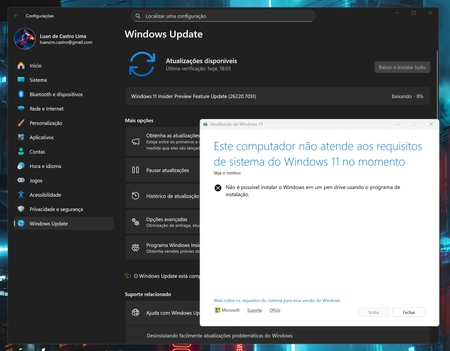
My PC is running Windows 11 26H2 build 26300.8935 with an expiration of 8/11/2026. Windows Update keeps trying to install 25H2 but fails with error code 0xc1900101. My BIOS and all drivers are up to date. I worked with Windows support .. case number 7106637314 ... and they were unable to help. Wondering if I need to use the 'Unenroll Device' button in the Windows Insider Program tab in settings. Will I need to install 25H2 via iso file as an in-place repair upgrade?618Views1like5Comments
Help needed after march 17 win 11 insider update
Hello frds, I have joined the community for first time . My name is Ronak and I m here to get suggestions on fixing my issue. 2-3 weeks back i had an win 11 insider update i had done download installed during restart it went to bluescreen troubleshoot , turnoff I just turn off and restarted again it worked . But yesterday on March 17 I got 2 updates KB5053143 & KB5053664 I have done same process download , install windows gave notification ready to restartnow or later I did later once finished worked I just restarted but this time after restart it keeps on going to bluescreen and not able to fix the issue tried uninstalling feature / quality update no luck. tried system repair no luck tried diff commands from cmd no luck atlast went thru Dell OS recovery Assist with that when it scan for repair boot files had issue which its not able to fix Now I just have option to RESET back to factory . Can anyone suggest what I can do to fix without loosing data. Like temp solution . once i get into desktop I can download all important files then reinstall new fresh windows.262Views0likes1Comment