win10
22 TopicsInternet Explorer to Microsoft Edge with IE mode blog series
Welcome! This blog series helps businesses looking for legacy browser support as they move from IE11 to Microsoft Edge with Internet Explorer mode. Each blog will focus on a different relevant topic to help you in your journey, from what to expect when setting up IE mode to what automated tools are available to help you with the transition. Blog 0: Internet Explorer 11 desktop app retirement FAQ Blog 1: Proven tools to accelerate your move to Microsoft Edge Blog 2: The dual engine advantage of Internet Explorer mode Blog 3: Host IE mode site lists in the cloud Blog 4: Modernize security with Microsoft Edge and IE mode Blog 5: New testing tools and tips to help prepare for IE retirement Blog 6: New enhancements to IE mode Blog 7: Don't wait until June 15th! Set your own IE retirement date You’ll know it’s a part of the series when you see this blue banner on either the blog tile or at the top of the blog itself. We’ll release these blogs periodically leading up to the IE11 desktop application retirement date of June 15, 2022 and add them to this post, so bookmark or subscribe -- or come back using https://aka.ms/IEtoEdge -- to stay up to date with the latest information.45KViews1like1Comment
Cant fully remove user profile Win10 Enterprise V2004
Hello everyone For years I have been able to recreate user profiles by rebooting the machine and then going to control panel and opening up the list of user profiles and deleting it. I would then confirm no trace of profile in registry here: HKEY_LOCAL_MACHINE\SOFTWARE\Microsoft\WindowsNT\CurrentVersion\ProfileList Now when I attempt this, things like recycle bin is still full and some onedrive files are left behind. We suspect the 2004 update may have altered how to recreate profiles. Does anyone know how to solve this? I have tried on 2 different machines with 2 different users with no luck. Thanks in advance.5.7KViews0likes12Comments
Browser problems
I use Hostgator and when I open and try to see my packages that tab will noy open. I talked to Hostgator techs change browsers which I did "Chrome" and it opened, I was using Firefox, so I thought it's Firefox, sent them info about it.....Then today tried Chrime and it did not work, when to IE and the first time it worked when I came back it did not, now I'm thinking it's win10 thing, did all the stuff like trouble shooting etc. and no luck, does anyone have any thoughts why this is happing? Sure is a pain! W Gary1.8KViews0likes2Comments
Check (and modify) network drive mappings as an admin for other users
It does not appear that admins can check/modify a user's network drive mappings (e.g. from `\\server\shares` to a drive letter) via powershell? The various `Smb-` commands seem to be per user, and as far as I can tell, there is no way to run a powershell command as a different user without using their credentials (which seems to be poor security hygiene to ask users for their passwords), even if you are an admin. Am I missing something, or is this not possible? In case it helps clarify things, what I am asking about is the Windows equivalent to `sudo -u some_user some_command`.1KViews0likes5Comments
Windows 10 1903 Autopilot Whiteglove Hybrid Join
Bit of a head scratcher. Has anyone managed to successfully get Auto Pilot White Glove working in Hybrid join with 1903? (with update kb4517211-x64). We're just seeing multiple errors and have had an open call with Unified Support for well over a week on this and getting no where. A google throws up multiple issues and we've been through everyone. Machine names, various Intune changes, dynamic goups, static groups. Just would love to hear someone has this working!918Views0likes0Comments
Windows 11 vs Windows 10 FTP Upload to UK Server mystery
hi there, So i have 2 accounts at hosting providers, one in the UK and one in Germany. I am myself located in Europe. From a long time i always had a relatively slow upload speed to the UK one compared to the Germany one, i thought server infrastructure was slower, more distance, etc .... Just recently they upgraded sever infra on the UK one and there was a nice upload speed increase, NICE! HOWEVER.................. Recently i've installed Win11 on a new high performance Desktop PC i built from scratch and i tested upload speed again to the UK server, to my great surprise, i was able to nearly max my 100 mbit upload speed (just like to the German server) - same fiber connection, etc which was great! Now i've rolled back to Win10 because i didn't like Win11 and upload speed is back to the "slower" one which is totally bizarre as i thought hey the new PC works better, etc. And even more bizarre is that the server in Germany has always the same "higher" speed whether it's Win10 or Win11. That leaves me with the fact that there's some setting on the UK server's infrastructure which works best with Win 11 settings or something like that?!?!? Just asked the host but is a mystery. Any ideas? Tweaks for the network card "Advanced" page ? you can disable like Efficient Ethernet etc - i use 1 GBPS ethernet connection on a 200/100 fiber optic. Someone on filezilla forum told me: "As you mentioned a high performance system, maybe the CPU has advanced hardware acceleration features that are utilized fully only under Win11 (due to the CPU coming after Win10). Or, the OS could actively use the TPM under Windows 11 to accelerate crypto algos (as Win11 lists TPM 2.0 as a system requirement). The difference between the servers could be explained by the German server using an older (or just different) cipher algo that does not require the new acceleration for running full speed, while the UK one does use a very new one that's performing slow in software mode only." So i was wondering if anyone at Microsoft can shed light on this dilemma for the "real" truth? I can handle it 🙂 My Win10 Systems run: Windows 10 Pro and Laptop Win10 Home 22H2 (exact same upload to the UK server) thank you! Gabrio800Views0likes0Comments
Windows 10 LTSC 21H2 Audio Error
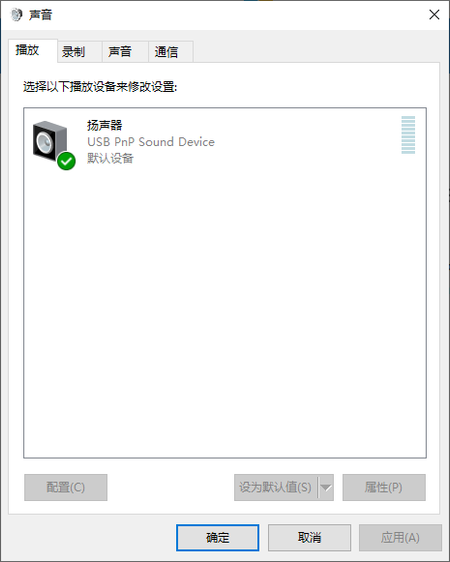
This night when I was listening to music, it suddenly didn't make any sound. I checked my Audio Settings(Right click the Speakers Icon). It didn't show my Realtek Sound Card Device, however, when I visit the DeviceManager, I could see the Realtek. How can I deal with it? I would appreciate it a lot if you could help me with the problem. Keenly anticipate your advices.699Views0likes2Comments