webinar
14 TopicsTeams Events Hosting Assistance (TEHA): Expert Guidance for Business-Critical Teams Events
Hosting a CEO Town Hall, CIO broadcast, company-wide announcement, webinar, or large-scale virtual event or a large meeting? TEHA provides direct access to Microsoft event specialists who help customers plan, prepare, deliver, monitor and optimize business-critical Teams events. From planning and technical readiness to live event monitoring and post-event analysis, TEHA works alongside your organization throughout the entire event lifecycle. How TEHA Can Help Event Planning and Readiness Event scoping and guidance Town Hall, Webinar, and Meeting selection Technical readiness assessments Network readiness reviews Microsoft eCDN guidance and validation Training and Rehearsals Producer and presenter training Moderator guidance Dry runs and event rehearsals Event production best practices Live Event Support Real-time event monitoring Operational guidance during the event Support for Town Halls, Webinars, and Meetings Assistance for executive broadcasts and large-scale events Post-Event Analysis Event summary reports Attendance and engagement insights Recording and playback guidance Quality and network observations Log analysis and issue investigation Recommendations for future events Who Typically Uses TEHA? Organizations frequently engage TEHA for: CEO and CIO Town Halls Leadership broadcasts Global employee communications High-visibility webinars Product launches and Critical meetings Company-wide announcements Business-critical virtual events How to Engage TEHA Customers with eligible Premier or Unified Support agreements can request assistance through the Microsoft Engage Centre: Teams Events Hosting Assistance Request Portal If the Engage Centre option is unavailable, contact your Customer Success Account Manager (CSAM) and request TEHA support for your upcoming event. For highly visible events, we recommend engaging early to maximize readiness and planning opportunities. Deliver your next Teams event with confidence.201Views0likes0Comments
Add Location to a Webinar
Hello! I appreciate Webinars are designed to be online - but does anyone know if it's possible to be able to add the Location field to Webinars? We often have hybrid meetings and it would be great to include Location. I have tried to add Location within Outlook after it's published, but this location does not then transfer down to those who register for the webinar. If I created a custom template (which I know requires Teams Premium) can I include Location on a custom template?462Views0likes2Comments
The webinar description has disappeared from the registration page.
Today I discovered that the seminar description has disappeared from the registration page for our seminar. The description itself is in the original form in Teams desktop, but it is missing from the registration page. The same thing happens on registration pages for events from other organizations. I'm attaching screenshots. For example https://events.teams.microsoft.com/event/001cac17-2954-48d0-9857-b3b1bc52a970@d52e4e8e-7dc3-45d9-a6c2-d0bc694268be. Please help us with a solution, we need to have a description of the event on the registration website.176Views0likes0Comments
Delayed emails when registering for a Webinar
We are seeing delays with receiving the emails with the meeting link after registering for a Webinar. It is taking around 7 minutes for the email to appear. This is the case with various email domains. Also, Gmail users are consistently receiving the email in their spam folder.177Views0likes0Comments
Webinar - Attendees Joined 3 Different Calls
Hello! I facilitate a monthly call and I've been instructed to schedule the call through my personal calendar as a TEAMS Webinar. The invitation is sent to 1500 colleagues. IT instructed me to send out three different Outlook invites due to the maximum limit of 500 recipients. I then take the webinar call details and I copy the call in details into the three separate outlook invites. This past week when colleagues started to join the call some called into the January meeting/started a chat, some called into the February meeting/started a chat and come called into the correct meeting. Those that dialed into the incorrect calls (January and February) were unable to join the correct March meeting. Even after I copied the event link in the Webinar invite they were unable to join. It asked them to register for the event, but then gave them an error. Even stranger, I set up the Outlook invite by business unit, the incorrect meeting chats for January and February each had colleagues from all three business units. Can you confirm, is the webinar the best application and is it true that I must set up the webinar in my personal email and copy it over to an outlook invite? In my research, it looks like the limit for a meeting invite is 5000 in outlook, not 500. Can you also confirm?349Views1like4Comments
Please introduce Recurring schedules for Webinar
Hi, We're moving towards using Teams more predominantly for virtual events and teaching. In some cases, it would be useful to use the registration features available in Webinar but have that govern a course which spans 10-12 weeks at a couple of hours per week. As registration has been removed as an option from Teams Meetings, can the ability to set recurring Webinars within Webinar Scheduling be introduced? Cheers Rich153Views1like0Comments
Enquire engagement rate of webinar invitations vs standard meeting invitations
I'm interested in hearing about similar cases involving the forwarding of a Teams webinar invitation with registration, as opposed to sending a conventional Teams meeting invitation for a specific event in a large company. Company employees are used to a simple click to accept the global invitation. However, due to the need to send the invitation to several people, we are considering trying something different - the webinar invitation. We fear that introducing an additional step, namely registration, may result in fewer registrations. Do you have any ideas or real-life examples to share on this subject? Thank you! Best regards, Bárbara Maia Silva359Views0likes0CommentsWebinar registration form for people in your org: why firstname, lastname, email mandatory?
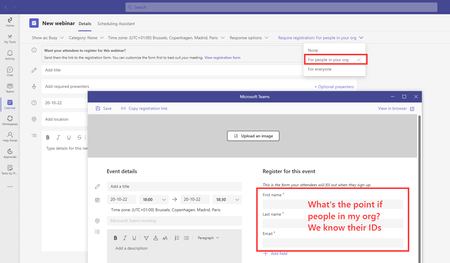
Hello dear community, I don't get why First name, Last name and Email are mandatory fields when creating a webinar for people in my org. From my unerstanding we already have the info and forcing them to double-encode their contact info is a waste of time. I would just want them to opt-in the webinar and maybe provide a glimpse on their expectation, but no dumb double encoding. Or at least we should have the information pre-filled... Or maybe am I missing something? Thanks!732Views0likes1Comment
Recording meeting send outside organisation
Hello, I am new to teams. I've started doing webinars and recording for people outside our organisation to view later. When I sent the link, it's asking them for a password. Are they able to view it? Where do I get the password from? Thanks for your help2.1KViews0likes1CommentCan I hide my icon on webinar recording?
I’m looking to record a panel discussion as a non-speaking moderator. Currently my icon shows in the webinar recording but would like the video to focus on the panelists. Can I turn my icon visibility off so I don’t show up in the webinar recording?1.6KViews0likes1Comment