voices of healthcare cloud
32 TopicsSecuring the Non-Human Identity Attack Surface
Cybersecurity teams often spend most of their efforts on securing and governing human identities: enforcing Multi-Factor Authentication (MFA), monitoring phishing campaigns, and tightening joiner-mover-leaver processes. Yet, lurking quietly inside every information technology environment is an entirely different population that frequently outnumbers employees: Non-Human Identities (NHI). These workload identities—which encompass applications, service principals, managed identities, CI/CD runners, and automated AI agents—are the connective tissue powering modern IT operations. They run deployment pipelines, automate resource provisioning, and pull data from cloud APIs. Unlike human users, however, they cannot complete an MFA prompt. When an attacker gets their hands on a service principal’s credentials, there is no push notification or phone call standing in the way. The Core Problem: Security & Governance Asymmetry Organizations routinely hold human users to rigorous security standards while letting NHIs operate with sprawling, unmonitored privileges. This disparity turns machine accounts into a high-value attack surface. Once compromised, an identity with broad infrastructure and application permissions grants immediate, high-speed execution capabilities. With AI agents proliferating, automated attacks are evolving. In late 2026, Microsoft published threat intelligence on “Storm-3168: Agentic-driven cloud attacks using compromised service principals” [1]. The immediate danger isn't a science-fiction swarm of sentient rogue AIs. Rather, it is machine-speed execution: scripts and agents performing rapid credential stuffing, instant permission discovery, and automated API reconnaissance through identities that bypass human friction. These modern threats need a modern and comprehensive solution for advanced cyber warfare. The Solution: Microsoft’s multi-layer defense mode: Entra Workload ID Premium + Defender for Cloud (Defender for Resource Manager) + Agent 365 Defending NHIs requires stopping unauthorized access at authentication and monitoring what the identity does once inside. Microsoft tackles this through a multi-layer defense strategy. Layer 1 | Control the Front Door with Microsoft Entra Workload ID Microsoft Entra Workload ID is designed specifically for non-human identities, it focuses on who gets a token and under what conditions: Conditional Access for workload identities — Restricts token issuance to specific public IP ranges and blocks requests when risk thresholds are crossed. Identity Protection for workloads — Detects risky service principals, including leaked credentials, and lets you investigate, confirm compromise, or disable the identity. App Health Recommendations — Flags stale, inactive service principals and expiring secrets before attackers exploit them. Access reviews — Forces scheduled recertification for service principals holding privileged directory roles. Layer 2 | Detect what Non-Human Identities do with Defender for Resource Manager Even with strict front-door checks, a legitimate secret can still be abused. Microsoft Defender for Resource Manager provides a behavioral detection layer for the Azure management plane, analyzing Azure Resource Manager (ARM) operations for suspicious activity that may indicate an identity has been compromised. For Non-Human Identities, Microsoft provides dedicated service-principal behavioral detections that look for suspicious use of high-risk Azure management operations. These detections span the attack lifecycle, including initial access, credential access, execution, persistence, privilege escalation, defense evasion, lateral movement, collection, and impact. This allows Defender to identify scenarios where a service principal may have valid credentials and legitimate Azure RBAC permissions, but begins using those permissions in ways consistent with an attacker. When suspicious behavior is detected, it is surfaced as a Defender for Cloud security alert, providing security teams with information about the detected activity, severity, and associated attack technique. Defender for Resource Manager can also detect surrounding indicators such as activity from suspicious IP addresses or TOR infrastructure, unusual privilege or role changes, abnormal resource creation, persistence activity, and known Azure exploitation techniques. Together, these signals help the SOC move beyond “Was this Non-Human Identity allowed to authenticate?” to the more important question: “After authentication, is this identity behaving like the expected workload or like an attacker?” A full list of the alerts provided by Microsoft Defender for Resource Manager is on the Defender for Cloud alerts reference page. [2] Layer 3 | Give AI agents an identity, governance, and security plane with Microsoft Agent 365 Unlike a traditional application that executes a relatively predictable workflow, an agent can reason, invoke tools, access corporate data, interact with other services, and take actions on behalf of a user or itself. Organizations therefore need controls that extend beyond simply authenticating the underlying application. Microsoft Agent 365 provides a control plane for discovering, governing, and securing agents across the organization: Agent registry and inventory: Establishes centralized visibility into registered agents so security and IT teams can identify agents operating across the environment rather than relying on individual development teams to track them. Connected platforms and the Agent 365 SDK extend visibility and management to agents built outside Microsoft's native agent platforms. Purpose-built agent identity with Microsoft Entra Agent ID: Gives agents a distinct identity foundation instead of treating every agent as an indistinguishable application or service principal. This allows security teams to apply controls to the agent itself and better understand which agent is requesting access. Agent ownership and sponsorship: Associates agents with accountable human sponsors. This creates an ownership model for non-human identities so an agent can be reviewed, governed, and ultimately disabled or removed when its sponsor, business purpose, or lifecycle changes. Lifecycle governance: Applies identity governance controls to agents so access does not have to become permanent simply because an agent was deployed. Organizations can govern the lifecycle from onboarding and access assignment through review and eventual removal. Governed resource access: Microsoft Entra governance capabilities such as access packages can be used to define which resources an agent should receive access to, who can request or approve that access, and how long the entitlement should remain. Conditional Access for agents: Agent-specific Conditional Access gives organizations another policy enforcement point for controlling how agent identities access protected resources. This helps move agent security away from implicit trust toward policy-based access. Agent-aware protection across Microsoft security: Agent 365 integrates the agent into Microsoft's broader security and compliance ecosystem, including Microsoft Defender and Microsoft Purview, so organizations can investigate agent-related threats, apply data security controls, and incorporate agents into existing security operations rather than creating a separate security program for AI. Activity and observability: Centralized agent visibility helps security and operations teams understand which agents exist, who sponsors them, what resources they can reach, and how they are interacting with the enterprise environment. This is critical when autonomous actions occur without a person directly initiating every transaction. Beyond outlining Microsoft's multi-layer defense controls that organizations can implement to protect their NHIs from modern threats, below are practical principles and actionable steps, alongside Microsoft's official mitigation and protection guidance for Storm-3168. Core Principles to Harden Non-Human Identities: Prefer secretless authentication — Use managed identities for Azure workloads, and Workload Identity Federation (OIDC) to swap short-lived tokens instead of storing static credentials. Apply least privilege — Give service principals only the specific roles and scopes they need. Avoid broad Owner or Contributor assignments. Own and review them — Assign clear owners. Regularly review privileged service principals and clean up unused apps and credentials. Watch for risk signals — Use Entra Workload ID Identity Protection features to detect leaked credentials and risky sign-in behavior, and pair that with monitoring of Azure resource operations. Treat them like privileged accounts — Even though they’re not people, high-privilege workload identities deserve the same rigor you apply to admin accounts: inventory, review, and rapid response. Practical Steps to Harden Entra Workload Identities: Secure access with adaptive policies: Apply Conditional Access policies to service principals using Conditional Access for workload identities. Enable real-time enforcement of Conditional Access location and risk policies using Continuous access evaluation for workload identities. Manage custom security attributes for an app Intelligently detect compromised identities: Detect risks (like leaked credentials), contain threats, and reduce risk to workload identities and agents using Microsoft Entra ID Protection. Simplify lifecycle management: Access Microsoft Entra protected resources without needing to manage secrets for workloads that run on Azure using managed identities. Access Microsoft Entra protected resources without needing to manage secrets using workload identity federation for supported scenarios such as GitHub Actions, workloads running on Kubernetes, or workloads running in compute platforms outside of Azure. Review service principals and applications that are assigned to privileged directory roles in Microsoft Entra ID using access reviews for service principals. Mitigation and Protection Guidance for Storm-3168: “Agentic-driven cloud attacks using compromised service principals” Enable appropriate Microsoft Defender for Cloud plans for critical Azure workloads. Consider enabling workload protections relevant to the resources in your environment, including Defender for Resource Manager, Defender for Storage, Defender for Key Vault, Defender for App Service and Defender for Databases. Learn more in the Microsoft Defender for Cloud overview. Protect and continuously assess application credentials and secrets. Avoid storing service principal credentials, storage keys, connection strings, and other secrets in source code, configuration files, public repositories, issues, or other locations where they might be inadvertently exposed. Learn more in the Microsoft Entra Workload ID documentation. Rotate compromised or exposed credentials immediately and establish credential lifecycle practices. Treat credentials that have been publicly exposed as compromised, even if the original location has subsequently been edited or deleted. Removing the content does not invalidate the credential or eliminate copies retained in edit history, caches, archives, logs, or other systems. Immediately revoke or rotate the affected credentials and investigate their historical use. Where supported, organizations should favor mechanisms that reduce reliance on long-lived credentials. Learn more about protecting secrets with Defender for Cloud. Apply least privilege to service principals and other workload identities. Review the Azure RBAC permissions assigned to service principals and restrict their privileges to the resources and operations required by their applications. Learn more about best practices for Azure RBAC. Protect backup and recovery infrastructure as part of ransomware resilience. Restrict access to backup and recovery resources and closely monitor attempts to modify or remove their protection controls. Learn more about Azure Backup security best practices. Scale investigation and response with agentic defenses. Use Project Perception to help defenders deploy AI agents that investigate and respond across large, complex environments at machine speed. Strengthen security posture for AI applications and agentic systems. Use Microsoft Defender for AI Security (codename MDASH) to discover AI assets, identify vulnerabilities and misconfigurations, and reduce exposure to AI-related attack paths. The Bottom Line Non-Human Identities are no longer just “service accounts.” They are first-class identities that attackers actively target. Because they can’t use MFA and often lack strong lifecycle management, a single leaked secret or compromised pipeline can give an attacker lasting, high-impact access. Microsoft provides the multi-layer security controls to inventory, review, risk-assess, and restrict these non-human identities. Combined with least-privilege access, secretless authentication, and monitoring of what NHIs actually do in Azure, organizations can significantly reduce their risk to these identity-based attacks. For additional details or assistance, please reach out to your Microsoft Representative. Learn More: For the latest security research from the Microsoft Threat Intelligence community, check out the Microsoft Threat Intelligence Blog. Review our documentation to learn how to prevent identity attacks, ensure least privilege access, unify access controls, and see how to enable them within your organization. Learn more about securing Copilot Studio agents with Microsoft Defender Evaluate your AI readiness with our latest Zero Trust for AI workshop. Microsoft 365 Copilot AI security documentation How Microsoft discovers and mitigates evolving attacks against AI guardrails Prompt injection protection in Microsoft Defender for Office 365 – official documentation of the prompt injection protection in Microsoft Defender for Office 365. How Microsoft discovers and mitigates evolving attacks against AI guardrails | Microsoft Security Blog Manipulating AI memory for profit: The rise of AI Recommendation Poisoning | Microsoft Security Blog – a related example of an AI-era technique observed in email traffic Defending the inbox against prompt injection attacks | Microsoft Defender for Office 365 Blog – feature announcement introducing prompt injection protection in Microsoft Defender for Office 365. Learn how Microsoft is reimagining the SOC for the agentic era with ISOC in Microsoft Defender Microsoft Entra News and Insights | Microsoft Security Blog Microsoft Entra documentation | Microsoft Learn References: [1] Microsoft Corporation. Storm-3168: Agentic-driven cloud attacks using compromised service principals | Microsoft Security Blog 2 Microsoft Corporation. Alerts for Resource Manager - Microsoft Defender for Cloud | Microsoft LearnModernizing radiology reporting—without disrupting care: A practical path to PowerScribe One
With growing imaging volumes, increasing complexity, and the rapid emergence of AI, healthcare organizations are reevaluating how their reporting environments support clinicians and strengthen operational performance. They are faced with how to modernize without interrupting the work that matters most. We developed our PowerScribe One solution and implementation approach with that reality in mind. In active production across a wide range of healthcare environments (including large integrated delivery networks, academic medical centers, independent radiology practices, and community hospitals), PowerScribe One reflects a solution that is both proven in practice and designed for what comes next. Over 250 organizations and 10,000+ radiologists use PowerScribe One to generate millions of reports each month. This scale is significant; it’s validation of what we bring through our solution and support. It reflects a system and team tested across diverse environments, integration landscapes, and operational models, performing reliably in real-world conditions. Combining the strength of our solutions with an experienced Microsoft team, we deliver a seamless implementation that minimizes disruption. Redefining the migration experience As I’ve worked with customers modernizing their reporting environments, I’ve noticed a consistent pattern of concern: how to modernize without disrupting the workflows teams rely on or the care they deliver. In my experience, even when a solution offers meaningful capabilities, customers still worry about the potential downsides of a prolonged migration. I understand that perspective. Many have worked with vendors who promise a “lift-and-shift” implementation but fall short of that expectation. Migrations can introduce real challenges, including downtime, retraining, and workflow disruption. Over time, we’ve seen that successful transformation is driven not only by the strength of the technology, but also by how effectively the transition is managed. With years of experience supporting PowerScribe environments, we’ve taken those insights and applied them to our approach. We defined what a successful PowerScribe One implementation looks like and developed a migration model designed to reduce risk while supporting adoption. Rather than viewing migration as a single milestone, PowerScribe One transitions are designed as a structured journey with clearly defined phases and timing: Discovery: Align on goals, workflows, and integration requirements Build: Preparing the technical and operational foundation Testing: Validating workflows end to end and addressing issues proactively Production: Supporting go-live with a focus on stability and adoption Each phase includes checkpoints and shared accountability to increase transparency and reduce uncertainty. Our Microsoft team works closely with our customers to build a project timeline that fits their needs while existing PowerScribe 360 workflows and content are leveraged, eliminating the need to rebuild from scratch. I’d also like to highlight at the center of this migration model is a parallel transition strategy. We enable PowerScribe 360 and PowerScribe One to operate side-by-side during our customer’s migration period. This approach provides organizations with the flexibility to: Introduce PowerScribe One to early adopters Validate workflows and integrations in a live environment Phase adoption across teams Maintain continuity throughout the transition In this measured approach, our customers can move forward with confidence, ensuring that systems, workflows, and teams are ready for successful adoption. The result is a model that is both repeatable and adaptable, capable of supporting organizations with varying levels of complexity. Our efforts to center our implementation process on the customer experience shows how migration work is not simply a technical capability proposition. This focus reflects our broader philosophy: transformation should be deliberate, not disruptive. From implementation to enablement Minimizing disruption doesn’t end with implementation. It extends into how teams are supported, trained, and enabled in their day-to-day workflows. Our focus on enablement is especially important in radiology, where even small workflow disruptions can have outsized impacts on productivity and the radiologist experience. With PowerScribe One, organizations not only gain access to a modern reporting solution but also support from teams with deep experience in radiology workflows, integrations, and large-scale deployments. With that in mind, I’ve seen firsthand how the healthcare landscape has radically changed over the last six years. Our customers tell us how workforce shifts in radiology means they are adapting their staffing models and workflows to include telework. With these changes in the workforce, organizations benefit from training and support models that are flexible, digital, and accessible remotely. We made live expert access (known to our customers as “drop-in help”) easily accessible through a simple QR code. It can be an ad hoc or scheduled engagement which ensures the offering aligns with a radiologist’s schedule. The feedback on this level of access we’ve received has been extremely positive and is resonating strongly with customers. I know that for any healthcare solution deployment to be successful, it requires a learning and support model that aligns with clinical schedules and operational realities. Modernizing radiology reporting is both a technical and operational effort with its success depending on advancing capability without disrupting clinical continuity. The transition to PowerScribe One shows this balance is achievable through phased adoption, low-disruption deployment, and strong user readiness. Organizations can modernize without affecting day-to-day care delivery with our structured approach, proven expertise and a focus on provider experience and patient outcomes. If you want to learn more about our approach or PowerScribe One, I’ll be at SIIM26, June 10-12, please stop by the Microsoft booth at 630-632. You can also discover how we partner with our customers why they decided to move to PowerScribe One by reading our Industry Blog.
Transforming Clinical Workflows with Microsoft Dragon Copilot’s Partner-Driven AI Innovations
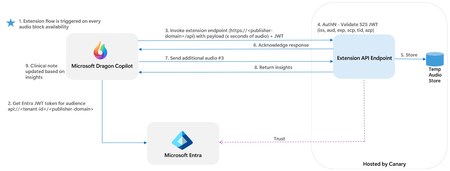
Healthcare software integration is notoriously complex, demanding technical rigor, regulatory compliance, organizational alignment, and workflow transformation. Clinicians face an overwhelming cognitive load—during a typical primary care visit, a physician may juggle over 150 discrete data points and make a dozen crucial decisions in less than 15 minutes. In this environment, AI must do more than offer intelligence—it must deliver the right information, at the right time, without increasing administrative burden or disrupting the clinician’s focus on patient care. Microsoft is expanding Dragon Copilot by enabling an open ecosystem of developer-built AI solutions for specific tasks and specialties, allowing healthcare organizations to access clinical intelligence at the point of care while further streamlining workflows, reducing administrative burden, boosting productivity, and enhancing revenue integrity. Dragon Copilot’s partner-driven AI extensibility empowers technology providers to deliver specialized solutions directly into clinical workflows, accelerating AI adoption at the point of care and enabling better outcomes for patients and clinicians. By opening Dragon Copilot, Microsoft enables the creation of seamless, scalable solutions that help clinicians reduce administrative tasks and improve patient care. Developers gain an opportunity to collaborate with industry leaders, shape healthcare technology, and deliver impactful AI applications for clinicians and patients. Partner Success Spotlight: Canary Health’s Innovative Solution Canary Speech is a Utah-based, AI-powered voice biomarker health tech company, utilizing patented real-time vocal analysis to screen for mental health and neurological disorders. Canary’s technology swiftly captures and analyzes speech data supporting clinicians in identifying cognitive and behavioral changes. Recently, Canary Speech launched Canary Ambient™, an API-first solution for real-time voice analysis in healthcare and contact centers. This software provides actionable insights from patient-clinician conversations by tracking speech patterns for real-time assessments of cognitive and behavioral health conditions. Canary Speech advances speech and language applications across health systems, payers, and pharmaceutical markets. The collaboration with Dragon Copilot is seamless and secure. Canary Speech receives patient audio—ideally during the encounter—via infrastructure designed to enable HIPAA compliance and newly developed endpoints. Their AI processes the audio, then surfaces summarized cognitive and behavioral assessments using Microsoft’s Adaptive Card framework. These interactive cards appear natively within Dragon Copilot, enabling clinicians to quickly review findings and to initiate follow-up assessments or treatment plans—all without leaving their workflow. The Canary Speech solution with Dragon Copilot is currently and being validated with real clinicians and patients. It demonstrates how Dragon Copilot can share not only encounter audio, but also clinical notes, patient context, and relevant history with trusted partners—expanding the universe of AI-powered insights available at the point of care. How AI Applications Work: Technical Enablement for Continuous Innovation Dragon Copilot’s extensibility framework supports partners in surfacing AI insights and enrichments at multiple points in the clinical workflow: Pre-encounter – Provide AI-generated insights to clinicians before they see the patient, supporting preparation and personalized care planning. During encounter – Surface real-time, contextual recommendations while the provider is examining the patient, ensuring decisions are timely and informed. Post-encounter – Deliver follow-up insights after the clinical note is generated, enabling comprehensive care coordination and outcome tracking. Microsoft’s Adaptive Card framework makes it easy for developers to build interactive platform-agnostic content blocks that integrate directly into Dragon Copilot. These cards support rich text, reference links, action buttons, and in-card feedback, creating a unified and intuitive user experience for clinicians. The following diagram shows the data flow between Microsoft Dragon Copilot and partner endpoints that provides extensions such as Canary, via infrastructure designed to enable HIPAA compliance, access to the encounter audio data. In addition to audio, other data elements such as turn transcript and the clinical note can also be made available to extensions. Driving Innovation Together through Partnership Our commitment to driving innovation through collaboration is sustained by actively engaging with partners and continually analyzing the market to keep our solutions effective and aligned with evolving needs. At this time, we have a growing list of early partners that have signaled interest in bringing their solutions to the point of care, through Dragon Copilot and help to represent the leading edge of healthcare technology, each bringing specialized expertise and transformative solutions to the table. Their work exemplifies how collaborative innovation can address real-world challenges across the care continuum. Artisight’s Smart Hospital Platform, brings hands-free, device-free documentation directly to the bedside. By pairing a clinician’s unique voice profile with their secure RTLS badge, Artisight eliminates logins and shared device interactions to allow care teams to focus on patients, not paperwork. Ambient documentation runs seamlessly in the background, generating accurate clinical notes while freeing clinicians to deliver more meaningful, face-to-face care. This integration streamlines workflows, reduces administrative burden, and drives measurable improvements in efficiency, compliance, and the overall patient experience. Atropos Health is the leader in translating real-world clinical data into personalized real-world evidence (RWE) and insights. Atropos Health is the developer of GENEVA OS®, the operating system for rapid healthcare evidence across a robust network of real-world data. Healthcare and life science organizations work with Atropos Health to close evidence gaps from bench to bedside, improving individual patient outcomes with data-driven care, expediting research that advances the field of medicine, and more. We aim to transform healthcare with timely, relevant real-world evidence. Cohere Health’s prior authorization application automates care requests, eliminating the administrative burden for clinicians and enabling real-time care approvals. Cohere's solution provides critical transparency right at the point of care while collecting relevant clinical documentation, patient summaries, and orders. It shares prior authorization requirements and offers in-the-moment guidance to physicians, helping them secure faster approvals and ensure patients receive the care they need more quickly. Elsevier's ClinicalKey AI delivers fast, reliable clinical insights at the point of care—combining proprietary medical content, leading textbooks, top scientific journals, government publications, and clinical guidelines into one trusted platform. Powered by advanced AI and backed by expert human review, it ensures answers are clinically relevant and backed by research. With privacy built in and citations clinicians can trust, ClinicalKey AI helps healthcare professionals make confident, informed decisions faster. Ensemble’s revenue cycle intelligence engine, EIQ, helps health systems proactively prevent payment denials, improve revenue integrity, and accelerate cash flow. Drawing on insights from more than 80,000 denial audit letters and 80 million annual claim transactions, EIQ analyzes clinical documentation against historic payer patters to detect nuanced issues that could trigger DRG downgrades or medical necessity rejections. It flags issues for operator intervention with context-aware prompts designed to ensure diagnoses are backed by precise clinical evidence and meet payer documentation requirements. Beyond denial prevention, EIQ strengthens the documentation foundation needed for downstream audits, ensuring that every claim is defensible and complete. hellocare.ai is a leading provider of AI-assisted virtual care solutions. Headquartered in Clearwater, FL, the company supports more than 80 health systems across the U.S. and is rapidly expanding globally. hellocare.ai helps health systems deliver high-quality, patient-centered care while improving clinical efficiency and staff wellbeing. Its fully integrated platform includes AI-Assisted Virtual Nursing, Virtual Sitting, Patient Engagement, Digital Whiteboard, Digital Room Signage, Ambient Documentation, Hospital-at-Home, Remote Patient Monitoring (RPM), and Digital Clinic, seamlessly embedding into existing healthcare EHRs, infrastructure, and care delivery models to power the next generation of healthcare. Humata Health is revolutionizing clinical clearance, moving beyond the narrow confines of traditional prior authorization to address the entire patient journey, from referrals and specialty drugs to post-acute care. By bringing providers and payers together on a single, shared infrastructure, its technology uses powerful AI and automation to streamline fragmented approvals. This collaborative approach unlocks faster, smarter, and more confident decisions, ensuring patients receive the appropriate care they deserve, exactly when they need it. Driven by a vision to see care move forward, Humata Health is built for yes. Lightbeam Health Solutions helps healthcare organizations manage and scale population health programs to improve performance within risk-based contracts. Leveraging clinical, health plan, and social determinants of health data, Lightbeam identifies and delivers actionable insights to clinicians and patients for proactive intervention. Proven outcomes include quality improvement, risk adjustment accuracy, reduced cost of care and avoidable utilization, and a better experience for clinicians and patients alike. Optum is collaborating with Microsoft to integrate ambient listening technology into clinical settings with Optum Real, helping physicians reduce documentation time and focus more on patient care. This integration supports smarter, real-time clinical workflows through AI-powered automation. Pangaea Data’s AI platform helps close care gaps by finding untreated and under-treated patients – including those who are undiagnosed, misdiagnosed, or miscoded – across hard-to–diagnose conditions. Seamlessly integrated with electronic health record (EHR) systems, the platform processes patient’s medical records along with their conversation with the treating clinician at the point of care, empowering clinicians to address care gaps without disrupting workflows. This enables better outcomes, lower costs through earlier diagnosis, smarter triaging, and more appropriate levels of revenue through faster pre-authorizations and treatment initiation. Built and deployed on Microsoft Azure, the platform ensures full compliance with privacy standards. Press Ganey turns patient-clinician conversations into actionable insights. By analyzing both content and tone alongside patient experience data, the platform helps organizations address concerns early and gives clinicians a more complete understanding of their patients. As AI reshapes healthcare, Regard is working towards its mission to ensure every patient receives exceptional care while giving physicians more time with their patients. Regard’s Proactive Documentation platform reviews all data in the medical record, and from physician-patient conversations, to recommend diagnoses to providers and surface critical clinical context. This diagnosis-first approach delivers accurate documentation at the point of care, supporting both clinical and revenue cycle teams, by ensuring no critical information is missed. Rhyme eliminates prior authorization through touchless workflows and a new sustainable approach to gold carding. They help 89 of the largest hospital systems and over 300 payers work together to process over 5 million auths per year, save millions of dollars, reduce claim denials, lower patient costs, and accelerate time to care. RhythmX AI enables clinicians to deliver hyper-personalized treatments that expand access and capture measurable value. The platform optimizes medical economics in both fee-for-service and value-based care settings. Built on more than $1B in R&D and validated through coding reviews and 25,000+ clinical assessments, it unifies 8+ data sources – including clinical, financial, payer, and formulary data – and can incorporate health system–specific guidelines and pathways into real-time care recommendations. RhythmX AI drives care orchestration across primary, specialty, and emergency settings, enabling comprehensive diagnoses, optimized specialist referrals and measurable ROI (e.g., $57M annually for 200 PCPs). With access to 300M patient records, 4.4B annual claims, 1.8M clinicians and 300K facilities, the platform provides broad data coverage, consistent accuracy in suspected condition identification and scalable precision-care capabilities across diverse care environments. Through these strategic collaborations, Dragon Copilot continues to expand its reach and deepen its impact, supporting a dynamic environment where developers, clinicians, and organizations can thrive. The collective expertise of our partners is not only shaping the future of healthcare technology but also driving meaningful change for patients and clinicians everywhere. Join Us in Shaping the Future of Healthcare AI Enabling partner-driven AI applications into Dragon Copilot ushers in a transformative period of collaborative innovation in healthcare. Through Dragon Copilot’s extensibility framework, we’re accelerating the delivery of clinical intelligence, reducing friction, and ensuring that every provider has the insights they need to deliver the highest quality care. Whether you’re building the next breakthrough AI application or seeking to bring transformative solutions to clinicians worldwide, we invite you to join our community. Ready to shape the future of healthcare AI? Explore our developer resources, connect with our team, and become a Dragon Copilot extensibility partner today. Read through our documentation on how extensions for Dragon Copilot work and how to build your own - https://learn.microsoft.com/en-us/industry/healthcare/dragon-copilot/extensions Check out the sample repo with sample code, and more – https://github.com/microsoft/dragon-copilot-extension-samples Contact dragon_extensions@microsoft.com Medical device disclaimer: Microsoft products and services (1) are not designed, intended or made available as a medical device, and (2) are not designed or intended to be a substitute for professional medical advice, diagnosis, treatment, or judgment and should not be used to replace or as a substitute for professional medical advice, diagnosis, treatment, or judgment. Customers/partners are responsible for ensuring solutions comply with applicable laws and regulations. Generative AI Disclaimer: Generative AI does not always provide accurate or complete information. AI outputs do not reflect the opinions of Microsoft. Customers/partners will need to thoroughly test and evaluate whether an AI tool is fit for the intended use and identify and mitigate any risks to end users associated with its use. Customers/partners should thoroughly review the product documentation for each tool.Voices of Healthcare Cloud brings you “Patient Referral Automation”
For this session, Matt Anderson, a Healthcare Architect at Microsoft (LinkedIn), will discuss the importance of automating patient referrals. We have heard too many stories of admins taking hours to manually look at faxes or emails and physically entering this data into a system to be processed. This story is just 1 of many.Voices of Healthcare Cloud brings you "Enhance your Employee Experience with MS Viva"
Voices of Healthcare Cloud is a webinar series hosted by myself, Vasu Sharma & Joshua Thompson. My name is Shelly Avery, I am currently a Dir Healthcare Specialist for Health and Life Sciences focusing on the largest Payor and Provider customers in the US, Vaus is a Sr Customer Success Manager for Microsoft 365 for Health and Life Sciences & Josh is an Account Executive for Healthcare. Our goal of this webinar series is to showcase how Healthcare is seeing positive business and clinical outcomes with cloud technology. We will be bringing new and creative solutions to you at least once a month so we hope you tune in live or catch the on-demand series after the session is completed.4.7KViews2likes0CommentsHealthcare Shorts: MedPolicy AI Assistant
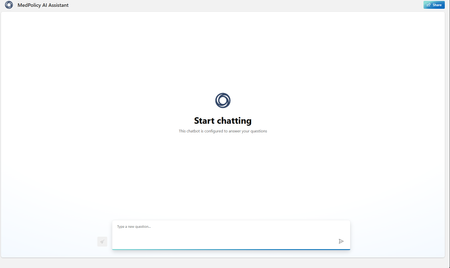
Large healthcare payers have complex contact centers where agents need detailed information about claims, cases, and medical policies. An AI assistant knowledgeable about medical policies can help these agents assist providers and members more efficiently. The main challenges include high turnover, extensive training needs, and dispersed information, leading to poor customer service and agent frustration. Implementing a medical policy AI chatbot can improve response times, first-time call resolution, member satisfaction, and reduce call center expenses. The solution involves using Azure AI Studio, Azure OpenAI models, Azure Blob Storage, APIs, Azure API Management, and Azure App Services.
Microsoft expands Azure scalability for Healthcare Organizations
Microsoft has expanded Azure's scalability for running Epic's Chronicles Operational Database (ODB) to 65 million global references per second (GRefs/s). This enhancement, utilizing the new Mbv3 VM series with Azure Boost and Ultra Disk, covers 94% of the Epic market and significantly boosts performance for large health care providers using Epic on Azure.1.9KViews1like0CommentsVoices of Healthcare Cloud brings, "Boosting FLW Productivity with Microsoft, IGEL and Imprivata"
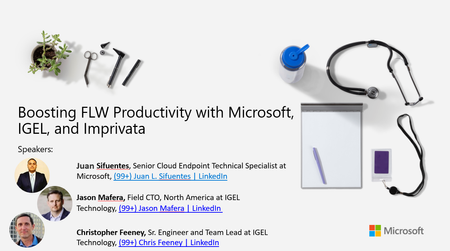
For this session, Juan Sifuentes, a Senior Cloud Endpoint Technical Specialist at Microsoft, will be joined by Jason Mafera, CTO of North America at IGEL, and Christopher Feeney, Sr. Engineer and Team Lead at IGEL. They will discuss the partnership between IGEL, Imprivata, and Microsoft, and how we're collaborating together to create a more streamlined login experience for front line clinical workers that is also much easier to manage for IT teams.4.1KViews0likes0CommentsVoices of Healthcare Cloud: “How to help boost FLW productivity by reducing login timeframes"
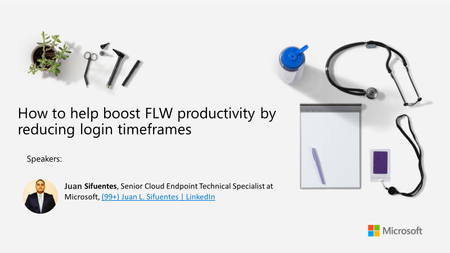
For this session, Juan Sifuentes, a Senior Cloud Endpoint Technical Specialist at Microsoft, will discuss a major gap in the Healthcare industry that was recently unblocked with "Tap & Go login experience for Windows 365 Cloud PC." This is a developed solution focused on FLW clinicians to help boost their productivity by reducing login timeframes (e.g.. 10 seconds) compared to traditional VDI "username/pw" ranges from 50-60 second login times, and to enable a "Fast User Switching" login experience between doctors and nurses.1.8KViews0likes0Comments