viva engage
100 TopicsAn Update to Viva Engage Email Delivery
Good communication is not just about sending more messages. It is about using the right channel for the right person at the right moment. The best notification system is not the one that tries every possible route. It is the one that knows which routes are real. For many information workers, email is still part of the communications mix. For other employees, especially frontline or mobile-first workers, Teams, mobile, and in-product experiences may be the more reliable path into Engage. Until now, Engage could still attempt to send email notifications to users who did not have a supported mailbox or routable email destination. Those attempts could create retries and extra processing across email systems, even though the recipient could not receive the message by email. Going forward, before attempting to send an email notification, Engage will check whether the recipient has a supported, routable email destination. If they do, email notifications continue as expected. If they do not, Engage will suppress the email notification instead of sending it into a channel that cannot receive it. The goal is simple: send email when email is available and avoid unnecessary delivery attempts when it is not. This update closes that loop. It helps reduce unnecessary email traffic while preserving the Engage experiences employees already use. Please see Message ID MC1309743 for earlier communications on this update. When will this happen General Availability, Worldwide: Rollout will begin by mid-October 2026 and is expected to be completed by the end of December 2026. The change will be enabled automatically, and organizations may begin observing the updated behavior at different points during the rollout period. How this affects Engage email notifications Before sending an Engage email notification, the service will check whether the recipient has a supported email destination available through Microsoft 365 services. If a supported email destination is available, Engage will continue processing eligible email notifications. If no supported email destination is available, Engage will suppress the email notification rather than attempting delivery. This change applies to all Engage-generated email notifications for users without a supported, routable email destination. Depending on the user's notification preferences and eligibility, this may include: Community activity notifications. Community announcements. Post and reply notifications. Storyline notifications. Digest emails. Other supported Engage notification emails. Existing email notification preferences will continue to apply for users with supported email destinations. This change adds an email eligibility check before an email notification proceeds to delivery. Supported mailbox scenarios Scenario What happens What stays true User has a supported mailbox or routable email destination Eligible Engage email notifications continue to be processed for delivery. This includes active Exchange Online mailboxes and other supported, routable email destinations. Existing notification preferences continue to apply. User does not have a supported email destination Engage suppresses the email notification instead of attempting to send it. Users can continue accessing Engage through supported non-email experiences. Users on frontline licenses Users without a supported email destination will no longer receive Engage email notifications. Users with a supported destination will continue receiving eligible notifications. Access to Engage remains unchanged. Other supported notification channels, including Teams, remain available. License type alone does not determine email delivery. Users in hybrid Exchange environments Users with supported on-premises Exchange mailboxes, hybrid or remote mailbox configurations, or other supported routable destinations will continue receiving eligible email notifications. Supported hybrid configurations remain eligible for email delivery. Test, staging, automation, or service accounts Email notifications are suppressed for accounts without a supported email destination, reducing unnecessary delivery attempts. Account access to Engage remains unchanged. Accounts with supported email destinations continue receiving eligible notifications. How to prepare Most organizations do not need to take action. Organizations with users who do not have active mailboxes or supported email destinations may observe: Fewer Engage email delivery attempts. Fewer retries for notifications that cannot be delivered. Reduced unnecessary email traffic. Reduced processing across organizational email systems and gateways. No change for users with supported email destinations. Admins may want to review the following: Review mailbox provisioning - Identify users who are expected to receive Engage email notifications and confirm that they have a supported, routable email destination. Do not rely only on license assignment - An Engage license does not necessarily indicate whether a user can receive email. Users with the same license may have different Exchange or mailbox configurations. If email delivery is required for a user, verify the user's actual mailbox and email configuration. No action needed for users with supported mailboxes - If users already have supported, routable email destinations, there is no action required. Eligible Engage email notifications will continue to be delivered as they are today. FAQ Will this remove anyone's access to Viva Engage? No. This update only affects Engage email delivery. It does not change access to Viva Engage through the web, mobile app, or Microsoft Teams. Will Teams notifications still work? Yes. Notifications delivered through Microsoft Teams are not changed by this update. Will users with valid mailboxes still receive email notifications? Yes. If a user has a supported, routable email destination, eligible Engage email notifications continue to be processed as they are today. Does license type determine whether email is sent? No. This change is based on whether a supported email destination is available for the recipient. Users with similar licenses can have different mailbox configurations. Do admins need to configure anything? Most organizations do not need to take action. Admins may want to review users who are expected to receive Engage email notifications and confirm their mailbox configuration.208Views0likes0CommentsRecording Available: Starting Point - First 30 days with Viva Engage
If your organization already works in Microsoft Teams, Viva Engage can feel like one more place to post. Engage gives leaders, communicators, community managers, and employees a place for conversations that need broader visibility, participation, and reuse across the organization. That is the focus of Starting Point: First 30 Days with Viva Engage, a practical webinar for customers who are new to Engage or bringing Engage communities into the flow of work in Teams. TLDR... Teams and Engage do different jobs. Teams is where known groups coordinate work. Engage is where broader communities connect, ask questions, learn, and build knowledge over time. Leaders create early momentum. A leader post, a clear question, visible replies, and a close-the-loop follow-up can make Engage feel active from the start. Communities need purpose before scale. Start with a few places people can understand, not a long list of spaces they have to decode. Roles work differently in Engage. Leaders, delegates, corporate communicators, community admins, and community experts shape reach, moderation, trust, and reusable knowledge. The first 30 days are about habits. Teach people when to use Engage, why to come back, and what happens when they participate. Need some more details? Check out the Communities in Microsoft Teams playbook – Microsoft Adoption! Slides at attached at the bottom of this blog! What if we already use Teams? Teams helps people work with the people they already know. Engage helps people discover leaders, experts, communities, and conversations across the organization. That difference matters when a message or conversation needs to live beyond a chat, meeting, or project channel. A Teams chat can move fast, but it is easy for context to disappear. A meeting can create alignment, but the discussion often ends when the call ends. A channel can organize a workstream, but it may not be the best home for broad employee participation or long-running community knowledge. Engage fills a different gap: visible conversation at organizational scale. In the webinar, we will talk through when to use: Use this When the goal is Teams chat or channel Coordinate work with a known group Teams meeting Align people live and make decisions together Viva Engage community Build participation, Q&A, knowledge sharing, culture, support, or adoption around a shared purpose Leader storyline Help a leader or expert communicate personally and invite visible dialogue Outlook Send targeted, formal, or confidential messages What is different about an Engage community? An Engage community is not just a bigger Teams channel. A channel organizes work. A community builds participation around a purpose. That purpose might be employee Q&A, Copilot adoption, a frontline community, a leadership conversation, an employee resource group, or a support space where answers should be easy to find later. The best starting point is not, "How many communities can we launch?" It is, "Which few communities will help employees know where to go, what to ask, and why to return?" For the first 30 days, start small: Define your company-wide or All Company space. Identify a few official communities with clear owners. Seed useful conversations before inviting everyone in. Make it obvious what belongs in Engage versus Teams or Outlook. Review what people respond to, then adjust. How should leaders show up? Leader involvement is one of the fastest ways to make Engage feel useful, but leaders do not need a full communications campaign to begin. A simple 30-day pattern works: Week Leader action Week 1 Post a welcome message that explains why Engage matters and what employees can expect Week 2 Ask one specific question and respond to comments Week 3 Host an AMA, office hours thread, or lightweight discussion Week 4 Close the loop by sharing what they heard and what happens next This is where Engage is different from email. Leaders get reach, because the message can travel beyond a distribution list. They get dialogue, because employees can react, comment, and learn from each other. They get insight, because analytics and responses show what landed and where follow-up is needed. Trust is the outcome. Reach, dialogue, and insight are the operating model. Which Engage roles should we understand first? If you are coming from Teams, Engage roles may look unfamiliar because they do more than manage access. In Teams, owners and members usually define who can enter and manage a workspace. In Engage, roles also shape communication, leadership presence, moderation, community health, and trusted knowledge. Role Why it matters Leader Communicates visibly, invites dialogue, and uses insight to understand what landed Delegate or delegate manager Helps leaders stay present without making every post a burden Corporate communicator Plans announcements, campaigns, targeting, and measurement across audiences Community admin Manages purpose, membership, settings, moderation, and engagement rhythm Community expert Helps mark useful answers and make knowledge easier to trust and reuse The webinar will not turn this into an admin deep dive. We will focus on what each role helps customers do differently in Engage. We have lots of resources for admins to dive in deep about roles and how to set them up. First 30-day launch path... The first 30 days are not about launching everything. They are about teaching the right habits. The goal is not a perfect launch. The goal is a launch people can understand, join, and return to. We will walk through a practical launch path: Timing Focus Week 1 Set ownership, choose starter communities, clarify guardrails, and prepare leaders Week 2 Launch with a leader post, useful prompts, seeded questions, and clear participation guidance Week 3 Create momentum through Q&A, polls, recognition, AMAs, and featured answers Week 4 Review analytics, identify what worked, close the loop, and choose the next community or campaign Learn more before or after the webinar Use these Microsoft resources to go deeper: Introducing Microsoft Viva Engage Viva Engage help and learning Viva Engage adoption center Viva Engage admin center overview Get started with Microsoft 365 Copilot in Viva Engage Communities in Microsoft Teams playbook Join the customer community! Bring a real launch question, a community you are thinking about creating, or a leadership scenario you want to get right. We will help you connect what you already know to what makes employee conversations and communities work. The best Engage launch is not the one with the most communities. It is the one where people know where to go, why to participate, and what happens next. FAQ Should every Teams channel become an Engage community? No. Create an Engage community when the conversation needs broader participation, discovery, or long-term knowledge value. Keep project coordination and team-specific work in Teams. What should we launch first in Viva Engage? Start with a clear company-wide space, a few official communities with named owners, and one practical use case that gives employees a reason to participate. How often do leaders need to post? Leaders do not need to post constantly. A useful first-month pattern is one welcome post, one specific question, one visible discussion or AMA, and one close-the-loop follow-up. What should we measure after the first month? Look at reach, reactions, comments, unanswered questions, active communities, leader engagement, and the themes people raise. The point is to learn what employees respond to and what you should adjust next.450Views0likes1CommentNew publishing updates help Engage posts land the way you intend
Engage is introducing a series of publishing improvements designed to help communicators, leaders, and employees publish with greater confidence. New capabilities make it easier to preview posts before publishing, identify file permission issues before readers encounter them, and track announcement delivery after publication.991Views5likes0CommentsFrom Leadership Engagement, Town Halls to Communities: Put Viva Engage to Work at Comms Camp
The best way to learn Viva Engage is not by watching someone else publish another perfectly prepared demo post. It is by starting with a real communications challenge. Maybe you are planning a leadership campaign and want employees to do more than simply read an update. Perhaps you are trying to build a community with a clear purpose, improve an AMA, make a town hall part of an ongoing conversation, or understand what employee questions are telling you. Bring that challenge to Comms Camp, a free, hands-on workshop coming to: Seattle, Washington Sydney and Melbourne, Australia Houston, Texas Mexico City, Mexico More locations in the new year! Comms Camp is designed for corporate communications teams and the IT, adoption, employee experience, and community partners who support them. Participants will use Viva Engage, Microsoft 365 Copilot, and practical agent patterns to turn real communications scenarios into reusable plans and workflows. Start with the outcome, not the feature Viva Engage can support leader visibility, employee conversation, community building, campaigns, events, and knowledge sharing. But successful communications programs rarely begin with a list of product features. They begin with questions: Who needs to understand or do something differently? What does meaningful participation look like? Which leader, community, or conversation can create trust? What should happen after employees respond? Which signals will tell us whether the communication worked? Where can AI help without replacing the communicator’s judgment? At Comms Camp, you will start with those questions and use Viva Engage as part of a practical communications plan. What you will work through The workshop takes participants through a complete communications scenario, from the original ask to activation and measurement. Choose your challenge and bring a scenario or select a sample. Define your audience, intended outcome, risks, and the action you want employees to take. Design the Viva Engage activation Determine how Viva Engage, Copilot and other Microsoft products can support the communication. Depending on your scenario, that could include: A leader or executive communication A community activation A campaign moment An AMA or event An employee prompt designed to encourage useful participation A follow-up plan that keeps the conversation moving Turn conversations into signals Publishing is not the finish line. Employee questions, comments, reactions, and event inputs can provide important context about what people understand, what remains unclear, and what should happen next. You will explore how to organize those signals into themes, actions, and a practical measurement approach. Share what you built Participants will share their developing playbooks, learn from one another, and get feedback they can apply when they return to their organizations. Explore Copilot and agent workflows Identify where AI could save time or improve consistency across planning, drafting, summarizing, and follow-up. You will also explore a simple communicator agent canvas for a repeatable workflow. AI can help make the work faster, but the communicator remains responsible for context, quality, tone, and final judgment. Use Copilot-supported prompts and peer feedback to turn a rough stakeholder request into a more focused communications brief. What you will take home Comms Camp is designed to create reusable outputs, not just inspiration. Depending on your chosen scenario, you can leave with: A strategic communications brief A Viva Engage activation plan Copilot prompts and workflows A leader communication, event, AMA, campaign, or community plan A communicator agent canvas A signal and measurement plan A reusable communications playbook You will also leave with ideas from other communicators who are navigating many of the same challenges, including channel complexity, leader visibility, responsible AI adoption, employee participation, and demonstrating impact. Who should attend? Comms Camp is intended for: Corporate and employee communications professionals Leader and executive communications teams Viva Engage community managers Change and adoption professionals Employee experience leaders IT partners supporting communications and communities Organizations may send multiple participants, and communications and technology partners are encouraged to attend together. Participants should have access to Microsoft 365 and Viva Engage. Microsoft 365 Copilot access is recommended. Register for Comms Camp The workshop is free, and registration is required. Explore the Comms Camp experience: https://adoption.microsoft.com/comms-camp Seattle/Redmond, Washington October 12–13, 2026 Register: https://aka.ms/CommsCamp/Joinus Melbourne, Australia October 20, 2026 Register: https://aka.ms/CommsCamp/Mel Sydney, Australia October 21, 2026 Register: https://aka.ms/CommsCamp/Syn Houston, Texas December 8, 2026 Register: https://aka.ms/CommsCamp/Houston Mexico City, Mexico December 10, 2026 Register: https://aka.ms/CommsCamp/MexCity Comms Camp is planned as a multi-city experience. Visit the Comms Camp site to learn when more locations are announced. Tell us where you want us to bring camp next! Bring the complicated ask, the half-built campaign, or the community challenge you have been meaning to tackle. We will help you turn it into something you can use. Learn. Share. Build.476Views1like0Comments
Viva Engage: posting announcements as delegate
Hi. As a delegate (e.g. for a senior leader), I used to be able to post announcements on their behalf in a community where I am an administrator. Now, I can only do that if they are an administrator themselves. Am I getting this wrong? Is there another way to get people able to post announcements without being an admin? If not, can this be fed back to the Viva Engage product owners please? I'd often want to post an announcement on their behalf, without them being a community admin (with the permissions and request emails that entails).183Views0likes0CommentsRelevance is the new reach: modern leadership communications in Viva Engage
Leadership communication has never been more important... Or more complex. Leaders want to communicate clearly and consistently, but every message comes with a risk. Broadcast it broadly, and employees tune out. Narrow it manually, and someone important gets left out. This isn’t a leadership or strategy gap. It’s a tooling gap. Most platforms still force you to choose between reach and relevance. But research from Viva Engage UX Researcher Paula Wellings, shared during Viva Engage Masterclass Season Two: Session 3 – Campaigns & Storytelling, confirms what corporate communicators have long suspected: Employees don't ignore leadership communication because they're disengaged. They ignore it because it doesn't apply to them. When messages aren't tied to an employee's role, location, or reporting chain, they're not just ignored. They create active disengagement and information anxiety. That's why precision targeting is no longer optional. It's a prerequisite for engagement. That insight is exactly why Viva Engage is investing in a next generation of capabilities designed specifically for leadership communication through Storyline. How Storyline targeting changes the game By enabling Leaders, and their Delegates, to define audiences directly at publish time using existing organizational attributes like reporting chain, department, or role, Storyline announcements make it easier to confidently notify the right audience without relying on static distribution lists or organization‑wide alerts. This allows leadership teams to move from volume‑based communication to relevance‑based reach — ensuring that the most important updates are delivered with precision, not noise. Storyline announcements = Precision, not volume Real‑world example: targeted HR updates without the overhead Scenario: HR needs to share a benefits update that applies only to employees in the United States. Before Build and maintain a US-only distribution list Or send org-wide and create confusion for EMEA/APAC teams Rely on email, with no visibility into reach or engagement With Storyline announcements: Select Country = United States at publish time 2,400 relevant employees notified automatically, with optional notification channel delivery customization (Engage, e-mail, Teams) Engagement tracked through analytics No list management required Targeting isn’t just about who sees a message, it’s also about how they’re notified and whether that audience can be reused. With Storyline Announcements, leaders and their delegates can customize notification channels and save audiences for reuse, making repeat communications faster and more consistent over time. And soon with smart notifications for Storylines, Engage will send alerts to an employee’s preferred delivery channel first, helping reduce duplicate notifications across Teams, email, and Engage. Why use Storyline announcements (instead of sending another email)? Storyline gives Leaders a direct, measurable channel for communicating with their audiences, while still supporting dialogue and participation. Unlike email broadcasts, Storyline posts: Appear across Teams, Outlook, mobile, and desktop Support engagement and feedback Can be measured using audience analytics Allow Delegates to manage communications on behalf of the Leader Leaders’ Storyline posts can complement community‑based communications, and the same principle applies more broadly across corporate communications: the best tool depends on both the audience and the level of amplification a message needs. Cascading messages with added relevance Reinforcing organizational priorities Sharing context and perspective Building leadership visibility and authenticity This makes Storyline an ideal channel for business updates, organizational changes, initiative rollouts, policy notifications, campaign reinforcement, event reminders, or action‑oriented leadership messages - all delivered to the people who actually need them. To explore these upcoming Storyline announcement targeting capabilities, sign up for the public preview and read more about Storyline announcements. Another way to increase reach without extra noise Featured conversations offer another way to increase reach without adding noise. For posts in public communities, communicators can now choose whether to feature a conversation to everyone in the network or to community members only. That makes featuring a useful option when the goal is to increase visibility without defaulting to a broad notification for every message. Featured conversations and storyline announcements are separate capabilities in Viva Engage, but they reflect the same principle: giving communicators more control over how broadly a message is amplified. Storyline announcements remain the right fit for targeted leader communications, while featured conversations give corporate communicators another way to match reach to relevance in community-based campaigns and updates. Learn more about featuring a conversation in Viva Engage. How analytics help communicators measure leader reach Analytics in Viva Engage help communicators understand whether a message reached the right audience and resonated once it got there. Understand a post’s reach across audiences and platforms Measure reactions, replies, and shares to understand engagement Extract important themes and sentiment from comments Now, the Frequent contributors leaderboard view in network analytics can help communicators understand which leaders’ posts are catching employee attention and compare engagement trends across leaders and top creators. Note: Storyline announcements, targeting, frequent contributors, and related capabilities described in this blog post are available with a Premium Viva Engage license (for example, Viva Employee Communications & Communities or Viva Suite).657Views0likes0CommentsIntroducing agents in Viva Engage communities: Your AI-powered community expert
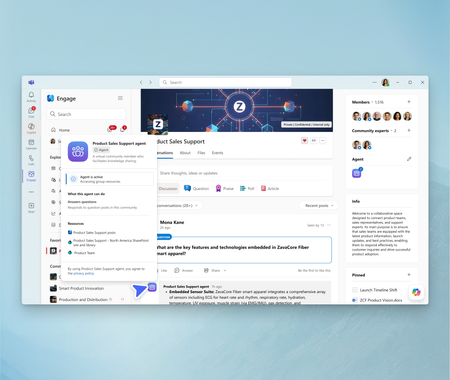
Launching in Public Preview today, Microsoft 365 Copilot can give every Engage community its own agent, grounded in the conversations and content that matter most to your community. It’s designed to provide time-savings, facilitate trusted knowledge sharing, and make expertise readily available in organizations so that communities can thrive with less effort. Read on to discover how an AI-powered community expert can foster community engagement and growth.8KViews3likes17CommentsBuild your own Engage Governance agent
The best governance guidance often comes from real conversations with customers: the questions they ask, the decisions they are working through, and the practices they have already built. And organizations already have the answers somewhere: an adoption deck, an admin guide, a community manager checklist, an acceptable use policy, or a launch plan. That is where a Governance for Viva Engage Agent can help. Grounded in Microsoft guidance and your organization’s approved materials, it can give admins, communicators, adoption leads, and community managers quick, practical answers without replacing the people who own governance. Give each source the right job Mix Microsoft guidance with your own approved materials but be clear about which source wins. Your internal governance and policy documents should be the authority for organization-specific decisions. Microsoft Learn explains admin capabilities and roles. Microsoft Support covers the end-user experience. Microsoft Adoption offers planning and adoption best practices. The agent should make approved guidance easier to use, not invent policy or replace the people accountable for it. Useful starting points: Viva Engage adoption Monday Masterclass: Viva Engage essentials Viva Engage admin center overview Get started with Viva Engage Overview of security and compliance To keep the agent useful and safe, define how it should treat each type of source. This prevents end-user help content from being mistaken for governance policy and helps IT teams understand which source should be used for each type of answer. Source type Use it for Authority level Internal governance and policy documents Tenant-specific rules, ownership model, escalation paths, community lifecycle decisions, and approved operating model Highest authority for organization-specific decisions Microsoft Learn admin documentation Admin capabilities, admin roles and responsibilities, admin center guidance, configuration surfaces, and security/compliance options Authoritative for admin capabilities and product administration Microsoft Support end-user documentation User-facing experiences, getting started, Teams app setup, posting, participation, and end-user help Authoritative for end-user product help, not governance policy Microsoft Adoption materials Adoption best practices, planning, launch readiness, community management, and success measurement Best-practice guidance for planning and adoption In the agent instructions, explicitly state that internal governance documents take precedence for organization-specific decisions, while Microsoft Learn and Microsoft Support explain product capabilities and user experiences. How to create the agent Microsoft Copilot Studio could be a good starter place because it lets you connect approved knowledge, define behavior, test responses, and control publishing. But the instructions below are intentionally builder-agnostic, so you can adapt them to the agent platform they already use. Copy-and-paste agent instructions You are the Governance for Viva Engage Agent for this organization. Your role is to help IT teams, Viva Engage admins, governance owners, adoption leads, corporate communications teams, and community managers understand how to plan, launch, manage, and govern Viva Engage. Use the connected knowledge sources as your primary source of truth. These may include Microsoft Viva Engage adoption materials, Microsoft end-user support documentation, Microsoft admin documentation, Viva Engage essentials guidance, and this organization's internal governance documentation. Source authority hierarchy: 1. Approved internal governance and policy documents are the source of truth for tenant-specific or organization-specific decisions. 2. Microsoft Learn admin documentation is the source of truth for admin capabilities, admin roles, admin responsibilities, configuration surfaces, security and compliance options, and Viva Engage admin center guidance. 3. Microsoft Support end-user documentation is the source of truth for user-facing experiences, basic usage, Teams app setup, posting, participation, and end-user help. 4. Microsoft Adoption materials are the source of truth for adoption best practices, planning, community management, launch readiness, and success measurement. 5. Do not treat end-user support documentation as governance policy. Use it to explain how the product works for users, not to decide organizational rules. Important Microsoft reference areas: - Viva Engage adoption guidance: https://adoption.microsoft.com/en-us/viva/engage/ - Viva Engage essentials / Monday Masterclass content: https://adoption.microsoft.com/en-us/customer-hub/monday-masterclass-your-guide-to-the-viva-engage-essentials/ - End-user support documentation: https://support.microsoft.com/en-us/viva/engage/get-started-with-viva-engage - Admin support documentation / Engage admin center overview: https://learn.microsoft.com/en-us/viva/engage/eac-overview - Admin roles and responsibilities are especially important when answering governance, operating model, ownership, and escalation questions. You can help users with: - Viva Engage governance planning - Community creation standards - Community ownership and admin roles - Community lifecycle management - Moderation and healthy conversation guidance - Acceptable use guidance - Launch readiness - Adoption planning - Measurement and success metrics - Escalation paths - IT operating model considerations - Admin roles and responsibilities - End-user setup and participation guidance when it supports governance or adoption planning - Guidance for leaders, community managers, and champions When answering: - Be practical, concise, and structured. - Assume the audience is technical or IT-adjacent unless told otherwise. - Reference the relevant source material when possible. - Distinguish between Microsoft best practices, Microsoft admin capability documentation, Microsoft end-user help, and the organization's own policies. - Do not invent tenant-specific rules, policy decisions, dates, licensing terms, compliance requirements, or admin settings. - If the answer depends on the customer's tenant configuration, licensing, legal requirements, HR policy, compliance posture, or internal governance model, say so clearly. - Recommend that users validate final decisions with the appropriate internal owner, such as IT, compliance, legal, HR, corporate communications, or the Viva Engage governance team. - Do not provide legal, HR, regulatory, or compliance advice. Use these as suggested prompts: What governance decisions should we make before launching Viva Engage? What roles are needed to govern Viva Engage? What should IT own versus communications or business owners? How should we decide when to create a new community? What should our community lifecycle model include? How should inactive communities be reviewed or retired? What should be included in a community manager checklist? How should moderation and escalation work? What technical controls should IT consider before rollout? What metrics should IT and adoption leads monitor? Create a launch readiness checklist for Viva Engage governance. Create a sample operating model for Viva Engage governance. Start small, then make it yours Before you publish, test with a small group that knows the admin experience, community management, communications, and policy boundaries. Ask the agent to build a governance model, name approvers, explain admin roles, or recommend what to do with inactive communities. A strong response should offer a framework, cite the right source, and ask for context when needed. It should never turn a best practice into a made-up company rule. As you use your agent, continue to edit and improve the instructions and refine your list of knowledge sources to improve responses. The best governance agent is not the one with the longest instructions. It is the one people trust enough to use. Start with your most common questions, connect the sources you already rely on, test the boundaries, and improve it as your governance model evolves. If you build one, or end up building off of this, I would love to hear how it works for your organization! Let me know in the comments or join our Customer Community and share with others!596Views1like0CommentsWhat’s new and next in Engage: June 2026
Stay up to date with the latest innovations coming to Viva Engage in June 2026. This update highlights new capabilities designed to enhance community engagement, streamline leadership communication, and empower employees to connect, share, and collaborate more effectively across your organization.3.2KViews6likes1Comment