version
21 Topics[FIXED] Why Edge on Android is using super old Chromium engine?
Edge on Android is now on the latest version, the same as Edge desktop, everything is new and up to date. https://techcommunity.microsoft.com/t5/discussions/new-edge-canary-mobile-version-available-now-updated-chromium/m-p/2275690 I'm using Edge beta on Android 9. the Chromium version in it is version 77. right now the latest stable version is 80, Beta is 81 so naturally, just like Google chrome itself, Edge Beta should have Chromium 81 but in reality it is using a very old Chromium version 77. Why is that? p.s I detected the engine version using multiple websites that are made to detect browser engines in browsers.10KViews3likes11CommentsWhat do these flags to exactly? [XPS and GDI printing]
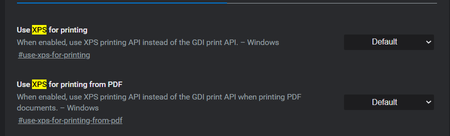
I found these information so far https://mspoweruser.com/google-chrome-uses-xps-print-api/ https://docs.microsoft.com/en-us/windows/win32/printdocs/about-xps-print-api https://docs.microsoft.com/en-us/windows/win32/printdocs/gdi-printing but I can see no difference in Edge insider latest version with those flags enabled and disabled Version 81.0.375.0 (Official build) canary (64-bit)6.1KViews0likes0CommentsWhy Edge Canary isn't updated Daily/Nightly?
For years, I've used Chrome Canary and Firefox Nightly, they both receive at least one update every day/night (every 24 hours at least). sometimes 2 times in 1 day. Chromium source receives multiple updates every day, it's hourly updated. But I'm not talking about Chromium, I want to know why Microsoft Edge can't receive updates daily/night/every 24 hours, just like Firefox and Google? currently, Canary channel receives updates roughly every 2-3 days, in weekends there is no updates either. I've been on Edge canary channel since launch, it's been always like this. I thought after the stable channel is released, this would change, but nope, it's still the same. on the front page: https://www.microsoftedgeinsider.com/en-us/download/ it's written that Canary channel is updated "daily" but in reality it's not happening.Solved3.8KViews0likes8CommentsTab entries in the Vertical tabs are a bit too small
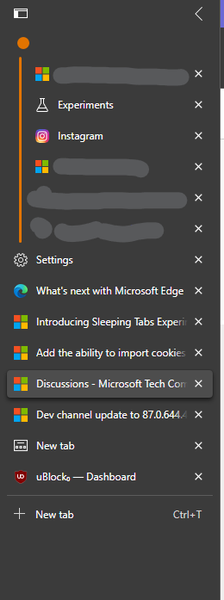
I'd like those rectangles to be more fat (vertically) to be easier to click on. It's just, I've been using horizontal tab strips my entire life and changing it to vertical (which I really like) makes me want them to be a bigger of a rectangle than what I currently see. the horizontal width is good and doesn't need to widen the vertical tab sidebar anymore. this is on Edge Dev Version 87.0.644.42.9KViews1like5CommentsLet's discuss Microsoft decision for choosing version 79 as first stable release
I think I know why Microsoft has decided to stay behind Google Chrome's release cycle and it is actually pretty smart and good. Let's discuss this everyone, I do hope that developer team or Microsoft employees correct me if I'm being wrong. So I think Microsoft decided to release version 79 as the first stable channel for the new Edge insider browser, and to be intentionally behind Google Chrome's release cycle, so that Microsoft browser will be more stable than Google Chrome stable. In case you're not aware, Microsoft marked version 79 to be the first release of stable channel for the new Edge insider browser due to release in 15 January 2020. while Google Chrome stable version 79 was released December 10 2019. This gives Microsoft a 35 days gap where they can hold on and wait for more bug fixes to be released for each version of Chromium from Google before they include it in their own browser. Because when Google releases their stable builds, they always release some other minor updates for it later, mostly minor bug fixes and such. Microsoft can wait for all of them to be released and include then in their version before stable release. Because Microsoft is dealing with lots of companies and enterprises so their Browser is more important and mission critical than others. Another good thing and advantage that I can think of about this 35 days gap is that Microsoft is not exactly following Google's features and road map. Microsoft has a different road map for their exclusive features that we, the users, ask through feedbacks, so it doesn't really mean that Microsoft is behind Google Chrome in terms of available features and abilities.2.6KViews5likes4CommentsNext Version of Windows 10 Teams
When is the next version of Windows 10 Teams coming out? There are a couple of apps, I'd like to use with it plus curios to see what new is coming to Windows 10 on the Hub. I don't want to join Windows Insider on the two Hubs since they are in regular production. Does anyone know when this next version is due to roll out????? THANKS!2.6KViews0likes3Comments
How to display latest document set version number?
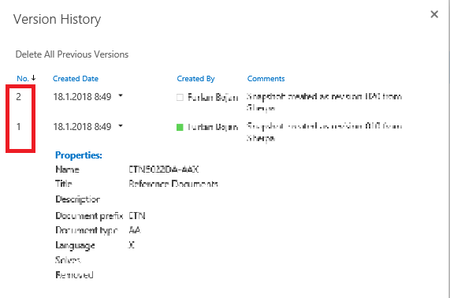
From what I know about SharePoint (and that is just the basics), Document sets have two types of versioning. One is version (major, minor style) that is common to Document and Document Set, while the other is used to make snapshots of Documents versions within (see attached picture with these version numbers in a red block). In a view that lists the items in a library I am able to display the first one (column named Version), but I see no way to display the other. Am I missing something? Kind regards Bojan2.3KViews0likes1CommentLesson Learned #28: Why does SQL SERVER Management Studio report that my Azure SQL Database version is 12?
First published on MSDN on Aug 07, 2017 Very often, our customers are asking about why does SQL Server Management Studio report that my Azure SQL Database versions is 12? Does it mean that I'm using SQL SERVER 2014? Why does it mean that is not updated?The explaination is that if your application check the version of SQL using select @@version the information reported will be wrong, because, right now, to identify the version of Azure SQL Database, we use the combination of edition and ProjectMayorVersion ( select SERVERPROPERTY('edition'), select SERVERPROPERTY('ProductMajorVersion').1.8KViews0likes0CommentsBoosting Performance with the Latest Generations of Virtual Machines in Azure
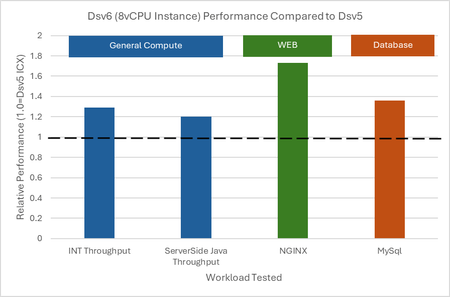
Microsoft Azure recently announced the availability of the new generation of VMs (v6)—including the Dl/Dv6 (general purpose) and El/Ev6 (memory-optimized) series. These VMs are powered by the latest Intel Xeon processors and are engineered to deliver: Up to 30% higher per-core performance compared to previous generations. Greater scalability, with options of up to 128 vCPUs (Dv6) and 192 vCPUs (Ev6). Significant enhancements in CPU cache (up to 5× larger), memory bandwidth, and NVMe-enabled storage. Improved security with features like Intel® Total Memory Encryption (TME) and enhanced networking via the new Microsoft Azure Network Adaptor (MANA). By Microsoft By Microsoft Evaluated Virtual Machines and Geekbench Results The table below summarizes the configuration and Geekbench results for the two VMs we tested. VM1 represents a previous-generation machine with more vCPUs and memory, while VM2 is from the new Dld e6 series, showing superior performance despite having fewer vCPUs. VM1 features VM1 - D16S V5 (16 Vcpus - 64GB RAM) VM1 - D16S V5 (16 Vcpus - 64GB RAM) VM2 features VM2 - D16ls v6 (16 Vcpus - 32GB RAM) VM2 - D16ls v6 (16 Vcpus - 32GB RAM) Key Observations: Single-Core Performance: VM2 scores 2013 compared to VM1’s 1570, a 28.2% improvement. This demonstrates that even with half the vCPUs, the new Dld e6 series provides significantly better performance per core. Multi-Core Performance: Despite having fewer cores, VM2 achieves a multi-core score of 12,566 versus 9,454 for VM1, showing a 32.9% increase in performance. VM 1 VM 2 Enhanced Throughput in Specific Workloads: File Compression: 1909 MB/s (VM2) vs. 1654 MB/s (VM1) – a 15.4% improvement. Object Detection: 2851 images/s (VM2) vs. 1592 images/s (VM1) – a remarkable 79.2% improvement. Ray Tracing: 1798 Kpixels/s (VM2) vs. 1512 Kpixels/s (VM1) – an 18.9% boost. These results reflect the significant advancements enabled by the new generation of Intel processors. Score VM 1 VM 1 VM 1 Score VM 2 VM 2 VM 2 Evolution of Hardware in Azure: From Ice Lake-SP to Emerald Rapids Technical Specifications of the Processors Evaluated Understanding the dramatic performance improvements begins with a look at the processor specifications: Intel Xeon Platinum 8370C (Ice Lake-SP) Architecture: Ice Lake-SP Base Frequency: 2.79 GHz Max Frequency: 3.5 GHz L3 Cache: 48 MB Supported Instructions: AVX-512, VNNI, DL Boost VM 1 Intel Xeon Platinum 8573C (Emerald Rapids) Architecture: Emerald Rapids Base Frequency: 2.3 GHz Max Frequency: 4.2 GHz L3 Cache: 260 MB Supported Instructions: AVX-512, AMX, VNNI, DL Boost VM 2 Impact on Performance Cache Size Increase: The jump from 48 MB to 260 MB of L3 cache is a key factor. A larger cache reduces dependency on RAM accesses, thereby lowering latency and significantly boosting performance in memory-intensive workloads such as AI, big data, and scientific simulations. Enhanced Frequency Dynamics: While the base frequency of the Emerald Rapids processor is slightly lower, its higher maximum frequency (4.2 GHz vs. 3.5 GHz) means that under load, performance-critical tasks can benefit from this burst capability. Advanced Instruction Support: The introduction of AMX (Advanced Matrix Extensions) in Emerald Rapids, along with the robust AVX-512 support, optimizes the execution of complex mathematical and AI workloads. Efficiency Gains: These processors also offer improved energy efficiency, reducing the energy consumed per compute unit. This efficiency translates into lower operational costs and a more sustainable cloud environment. Beyond Our Tests: Overview of the New v6 Series While our tests focused on the Dld e6 series, Azure’s new v6 generation includes several families designed for different workloads: 1. Dlsv6 and Dldsv6-series Segment: General purpose with NVMe local storage (where applicable) vCPUs Range: 2 – 128 Memory: 4 – 256 GiB Local Disk: Up to 7,040 GiB (Dldsv6) Highlights: 5× increased CPU cache (up to 300 MB) and higher network bandwidth (up to 54 Gbps) 2. Dsv6 and Ddsv6-series Segment: General purpose vCPUs Range: 2 – 128 Memory: Up to 512 GiB Local Disk: Up to 7,040 GiB in Ddsv6 Highlights: Up to 30% improved performance over the previous Dv5 generation and Azure Boost for enhanced IOPS and network performance 3. Esv6 and Edsv6-series Segment: Memory-optimized vCPUs Range: 2 – 192* (with larger sizes available in Q2) Memory: Up to 1.8 TiB (1832 GiB) Local Disk: Up to 10,560 GiB in Edsv6 Highlights: Ideal for in-memory analytics, relational databases, and enterprise applications requiring vast amounts of RAM Note: Sizes with higher vCPUs and memory (e.g., E128/E192) will be generally available in Q2 of this year. Key Innovations in the v6 Generation Increased CPU Cache: Up to 5× more cache (from 60 MB to 300 MB) dramatically improves data access speeds. NVMe for Storage: Enhanced local and remote storage performance, with up to 3× more IOPS locally and the capability to reach 400k IOPS remotely via Azure Boost. Azure Boost: Delivers higher throughput (up to 12 GB/s remote disk throughput) and improved network bandwidth (up to 200 Gbps for larger sizes). Microsoft Azure Network Adaptor (MANA): Provides improved network stability and performance for both Windows and Linux environments. Intel® Total Memory Encryption (TME): Enhances data security by encrypting the system memory. Scalability: Options ranging from 128 vCPUs/512 GiB RAM in the Dv6 family to 192 vCPUs/1.8 TiB RAM in the Ev6 family. Performance Gains: Benchmarks and internal tests (such as SPEC CPU Integer) indicate improvements of 15%–30% across various workloads including web applications, databases, analytics, and generative AI tasks. My personal perspective and point of view The new Azure v6 VMs mark a significant advancement in cloud computing performance, scalability, and security. Our Geekbench tests clearly show that the Dld e6 series—powered by the latest Intel Xeon Platinum 8573C (Emerald Rapids)—delivers up to 30% better performance than previous-generation machines with more resources. Coupled with the hardware evolution from Ice Lake-SP to Emerald Rapids—which brings a dramatic increase in cache size, improved frequency dynamics, and advanced instruction support—the new v6 generation sets a new standard for high-performance workloads. Whether you’re running critical enterprise applications, data-intensive analytics, or next-generation AI models, the enhanced capabilities of these VMs offer significant benefits in performance, efficiency, and cost-effectiveness. References and Further Reading: Microsoft’s official announcement: Azure Dld e6 VMs Internal tests performed with Geekbench 6.4.0 (AVX2) in the Germany West Central Azure region.1.8KViews0likes0Comments