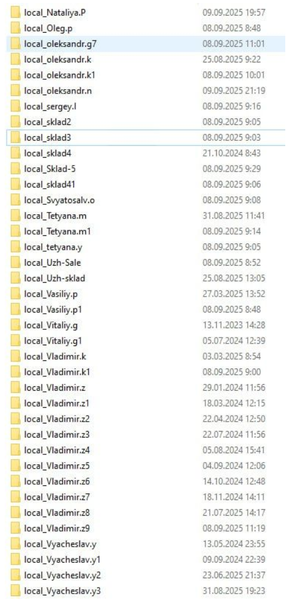
user profiles
67 Topics
Support Live Session Migration for Windows 11 Enterprise Multi-Session AVD Hosts
Description Azure Virtual Desktop administrators regularly encounter maintenance scenarios where a Windows 11 Enterprise Multi-Session session host must be removed from service to apply urgent patches, investigate platform issues, replace a host, or perform emergency maintenance. The current approach requires placing the session host into drain mode and waiting for active user sessions to disconnect or forcing user logoff, which can disrupt productivity and user experience. It would be valuable if Azure Virtual Desktop supported live migration of active user sessions between Windows 11 Enterprise Multi-Session hosts within the same host pool, similar to the way virtual machine live migration minimises downtime during infrastructure maintenance. This capability would allow administrators to move active sessions from one session host to another without requiring user disconnection or application interruption. This feature would provide significant operational benefits, including: Reduced user disruption during planned and emergency maintenance. Faster remediation of unhealthy or degraded session hosts. Improved patching and update operations. Reduced dependency on large maintenance windows. Improved service availability for business-critical AVD environments. Better support for future hot patching and rolling maintenance scenarios. While Windows 11 Enterprise Multi-Session differs significantly from Windows Server and traditional VM live migration technologies, the ability to seamlessly relocate active user sessions between healthy hosts in a host pool would be a major enhancement for enterprise Azure Virtual Desktop deployments operating at scale.168Views5likes0Comments
Allow swapping Alt+PageUp / Alt+PageDown direction in Windows App (AVD)
a { text-decoration: none; color: #464feb; } tr th, tr td { border: 1px solid #e6e6e6; } tr th { background-color: #f5f5f5; } Product: Windows App (Azure Virtual Desktop client) Description: When using Azure Virtual Desktop through the Windows App (especially in windowed mode), Alt+PageUp and Alt+PageDown are the only supported shortcuts for switching between remote applications. The direction of these shortcuts is opposite of intuitive and inconsistent with common task‑switching expectations (Alt+Tab, browser tab switching, virtual desktop navigation, etc.). There is currently no way to: remap these shortcuts reverse the navigation direction customize keyboard behavior per user This significantly impacts usability for power users who spend all day inside AVD sessions. Requested enhancement: Add a configurable keyboard mapping option in the Windows App to: swap Alt+PageUp / Alt+PageDown direction or allow user‑defined key mappings for remote app switching Why this matters: Reduces cognitive friction and user error Improves accessibility and ergonomics Brings Windows App closer to parity with legacy mstsc.exe and competing VDI clients (e.g., Citrix) Workarounds today: Users must rely on third‑party tools (AutoHotkey) to fix this locally, which should not be required for a basic UX issue.76Views0likes1CommentAllow copy and paste directly to local desktop
Hello Microsoft I came across an issue , where the user wanted to copy and paste a file from their AVD session desktop to their local desktop on their computer. However the paste option was not grayed out(not available), due to microsoft not supporting it. I would like to have this option available for them rather than having drive redirection enabled and having them go to the c drive users\desktop and then pasting the file. Please implement the option to copy/paste files DIRECTLY onto their local desktop for future AVD updates/implementations Kind regards331Views1like0Comments
Fslogix. Add a command line to release the profile.
Hello. Add a command line with arguments to be able to release frozen folders in FSlogix. If you don't want to fix the problem, let me automate it myself. In large RDS installations, constant freezes and further duplication of local_%username% folders cause problems.108Views1like0Comments
Bug with profile picture on AVD / Windows 11 Multi-User
My organization has seen multiple occurrences where a different user's profile picture/icon is shown besides their own. This has been seen in the OS under Start (lower left corner) as well as in Settings -> Accounts. No issues have been seen with Teams or Outlook only the profile picture shown within the OS. Have not seen anything similar with our on-premise Citrix machines. Not a high priority issue obviously but would like to raise awareness. If anyone has ideas, please let me know what information I can gather to start troubleshooting! Thank you.4.8KViews19likes16CommentsFSLogix - 48v35 error at Microsoft login prompt in AVD
I'm resposting from this thread to hopefully create more attention for this problem: https://answers.microsoft.com/en-us/outlook_com/forum/outlk_win-outtop_new-outsub_ofb/outlook-error-message-somehting-went-wrong-48v35/97d7ff71-8a58-40c8-8726-adf3d1f095b8 Me and other admins (from reposted thread) have specific users who experience M365 authentication problems after upgrading to the latest FSLogix version(s) that offers support for New Teams. The error occurs in the Azure Virtual Desktop environment, when a user tries to open a Microsoft application (Outlook, OneDrive etc.). Not all users have the problem that they need to reauthenticate, or can't authenticate at all, with the 48v35 error. The users who do however, repeatedly get the same error after a few days or a week. We tried multiple things, like removing the Microsoft.AADBrokerPlugin directory or creating a completely new FSLogix profile, but the problem stays for these users. In my case I am using the FSLogix setting RoamIdentity=1. Is there any news from FSLogix on this issue? Or does anyone have workarounds to share? I would like to update more customer environments to use the New Teams, but with these issues I would rather wait.30KViews6likes13Comments
FSLogix - Automatically fix RW.vhdx corruption
When the RW.vhdx is corrupt, the user ends up with an read only profile. Manual intervention is required to remove the RW file which can't be merged into the base profile to restore R/W access to the profile. The following error is logged in the event viewer: "Open vDisk Failed, file:<path to RW.vhdx> (The chain of virtual hard disks is corrupted) There is a mismatch in the identifiers of the parent virtual hard disk and differencing disk." Feature Request: Automatically remove a corrupt RW file when detected. As it can't be recovered anyway, deleting the corrupt file will at least restore functionality (R/W access to profile).4.4KViews6likes2Comments
CCD Locations Syntax
I would recommend changing the information regarding the syntax in the documentation for "CCDLocations" when file shares/SMB is in use from "type=smb,name="WINDOWS SMB PROVIDER",connectionString=\\<server-name>\<share-name>" to "type=smb,connectionString=\\<server-name>\<share-name>." I have had no success using the "WINDOWS SMB PRVIDER" in the syntax for CCDLocations.