user profiles
74 Topics
Support Live Session Migration for Windows 11 Enterprise Multi-Session AVD Hosts
Description Azure Virtual Desktop administrators regularly encounter maintenance scenarios where a Windows 11 Enterprise Multi-Session session host must be removed from service to apply urgent patches, investigate platform issues, replace a host, or perform emergency maintenance. The current approach requires placing the session host into drain mode and waiting for active user sessions to disconnect or forcing user logoff, which can disrupt productivity and user experience. It would be valuable if Azure Virtual Desktop supported live migration of active user sessions between Windows 11 Enterprise Multi-Session hosts within the same host pool, similar to the way virtual machine live migration minimises downtime during infrastructure maintenance. This capability would allow administrators to move active sessions from one session host to another without requiring user disconnection or application interruption. This feature would provide significant operational benefits, including: Reduced user disruption during planned and emergency maintenance. Faster remediation of unhealthy or degraded session hosts. Improved patching and update operations. Reduced dependency on large maintenance windows. Improved service availability for business-critical AVD environments. Better support for future hot patching and rolling maintenance scenarios. While Windows 11 Enterprise Multi-Session differs significantly from Windows Server and traditional VM live migration technologies, the ability to seamlessly relocate active user sessions between healthy hosts in a host pool would be a major enhancement for enterprise Azure Virtual Desktop deployments operating at scale.168Views5likes0Comments
Allow swapping Alt+PageUp / Alt+PageDown direction in Windows App (AVD)
a { text-decoration: none; color: #464feb; } tr th, tr td { border: 1px solid #e6e6e6; } tr th { background-color: #f5f5f5; } Product: Windows App (Azure Virtual Desktop client) Description: When using Azure Virtual Desktop through the Windows App (especially in windowed mode), Alt+PageUp and Alt+PageDown are the only supported shortcuts for switching between remote applications. The direction of these shortcuts is opposite of intuitive and inconsistent with common task‑switching expectations (Alt+Tab, browser tab switching, virtual desktop navigation, etc.). There is currently no way to: remap these shortcuts reverse the navigation direction customize keyboard behavior per user This significantly impacts usability for power users who spend all day inside AVD sessions. Requested enhancement: Add a configurable keyboard mapping option in the Windows App to: swap Alt+PageUp / Alt+PageDown direction or allow user‑defined key mappings for remote app switching Why this matters: Reduces cognitive friction and user error Improves accessibility and ergonomics Brings Windows App closer to parity with legacy mstsc.exe and competing VDI clients (e.g., Citrix) Workarounds today: Users must rely on third‑party tools (AutoHotkey) to fix this locally, which should not be required for a basic UX issue.76Views0likes1CommentAllow copy and paste directly to local desktop
Hello Microsoft I came across an issue , where the user wanted to copy and paste a file from their AVD session desktop to their local desktop on their computer. However the paste option was not grayed out(not available), due to microsoft not supporting it. I would like to have this option available for them rather than having drive redirection enabled and having them go to the c drive users\desktop and then pasting the file. Please implement the option to copy/paste files DIRECTLY onto their local desktop for future AVD updates/implementations Kind regards331Views1like0Comments
Fslogix. Add a command line to release the profile.
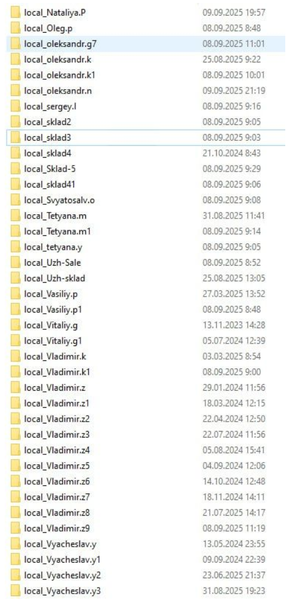
Hello. Add a command line with arguments to be able to release frozen folders in FSlogix. If you don't want to fix the problem, let me automate it myself. In large RDS installations, constant freezes and further duplication of local_%username% folders cause problems.108Views1like0Comments
Bug with profile picture on AVD / Windows 11 Multi-User
My organization has seen multiple occurrences where a different user's profile picture/icon is shown besides their own. This has been seen in the OS under Start (lower left corner) as well as in Settings -> Accounts. No issues have been seen with Teams or Outlook only the profile picture shown within the OS. Have not seen anything similar with our on-premise Citrix machines. Not a high priority issue obviously but would like to raise awareness. If anyone has ideas, please let me know what information I can gather to start troubleshooting! Thank you.4.8KViews19likes16CommentsUserProfile Management with PowerShell
We have an issue where quarterly Nessus scans enumerate vulnerability findings for every user profile on an endpoint. This started me on a path to remove obsolete user profiles to reduce the noise from Nessus. I need to accomplish three things in my final script: 1. set the execution policy to bypass; 2. reset the NTUser.dat to the last write time (if this is not done, the third criteria will not return any hits); 3. find all user profiles older than 60 days and delete them. I did try the GPO to delete profiles older than a certain number of days, but it never removes all of them. I pieced together a script from a couple diff sources and came up with the below. My PowerShell-fu is not that advanced so I am looking for suggestions to make it more efficient. The script works, but I noticed that empty user profile folders at C:\Users\ were left behind. Please advise. Is this a candidate to be made into a function? $ErrorActionPreference = "SilentlyContinue" $Report = $Null $Path = "C:\Users" $UserFolders = $Path | GCI -Directory $currentDate = Get-Date $ageLimit = 60 $userProfiles = Get-ChildItem -Path $Path Set-ExecutionPolicy Bypass -Force ForEach ($UserFolder in $UserFolders) { $UserName = $UserFolder.Name If (Test-Path "$Path\$UserName\NTUSer.dat") { $Dat = Get-Item "$Path\$UserName\NTUSer.dat" -force $DatTime = $Dat.LastWriteTime If ($UserFolder.Name -ne "default") { $Dat.LastWriteTime = $UserFolder.LastWriteTime } } } ForEach ($profile in $userProfiles) { $lastWriteTime = $profile.LastWriteTime $profileAge = ($currentDate - $lastWriteTime).Days If ($profileAge -ge $ageLimit) { Remove-Item -Path $profile.FullName -Recurse -Force } }1.8KViews0likes4Comments
User Profile Deletion
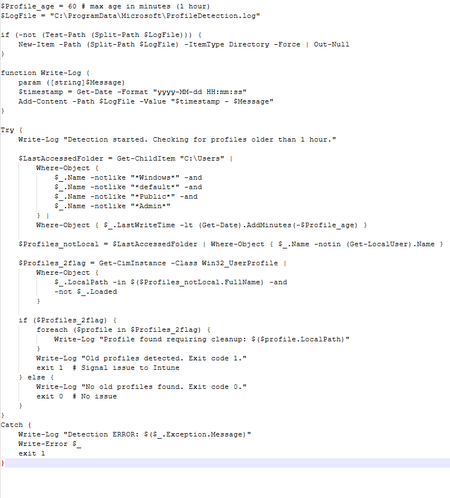
Hi, I just wanted to pick anyone's brains, in case they have also encountered this or would have any idea why this is the case. I am fairly new to Intune and script writing, to clarify. Basically, we have been working on a Detect and Remediation script that is deployed via Intune (Devices >Ssni Script and Remediations) to Windows 10 (Ent 22H2) and Windows 11 (Ent 24H2) devices. On any fresh enrolled devices, it detects and deletes user profiles completely fine, but fails to even detect profiles on devices that were enrolled a while ago. However, if we run an Autopilot reset on those devices, the script works again. What difference would a freshly built/enrolled device have to an older one, when they also run other scripts fine. The script targets profiles that are older than 1 hour as we want to keep on top of removing profiles consistently to keep disk space low, especially on lower spec laptops. It will exclude SYSTEM profiles and also any *Admin* user folders - as that has a separate script to only delete LAPSAdmin on an evening, when the workplace is closed (8pm UK). This LAPSAdmin script worked fine on the older enrolled devices. Some of the profiles on the machines go back to 2023, is the '1 hour' target not effective against that old of a profile - has it become stale?SS Like I said, I am fairly new to this and have used bits and pieces from different locations to help muster up a script. I thought I had it nailed as it was working on test devices that were just enrolled purely for testing, until I was asked to put it onto another group. Intune doesn't say the script fails - indicating there are no errors. However, I am not saying there isn't. Detect: Remediate: Thanks for your time, Dean1.1KViews0likes4CommentsFSLogix - 48v35 error at Microsoft login prompt in AVD
I'm resposting from this thread to hopefully create more attention for this problem: https://answers.microsoft.com/en-us/outlook_com/forum/outlk_win-outtop_new-outsub_ofb/outlook-error-message-somehting-went-wrong-48v35/97d7ff71-8a58-40c8-8726-adf3d1f095b8 Me and other admins (from reposted thread) have specific users who experience M365 authentication problems after upgrading to the latest FSLogix version(s) that offers support for New Teams. The error occurs in the Azure Virtual Desktop environment, when a user tries to open a Microsoft application (Outlook, OneDrive etc.). Not all users have the problem that they need to reauthenticate, or can't authenticate at all, with the 48v35 error. The users who do however, repeatedly get the same error after a few days or a week. We tried multiple things, like removing the Microsoft.AADBrokerPlugin directory or creating a completely new FSLogix profile, but the problem stays for these users. In my case I am using the FSLogix setting RoamIdentity=1. Is there any news from FSLogix on this issue? Or does anyone have workarounds to share? I would like to update more customer environments to use the New Teams, but with these issues I would rather wait.30KViews6likes13Comments