update
20 Topics
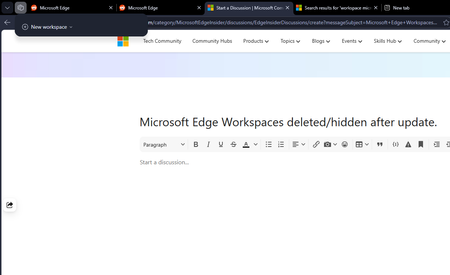
Microsoft Edge Workspaces deleted/hidden after update.
All my workspaces in Edge are hidden and/or are deleted. I updated my windows yesterday night (the restart also updated Edge which was pending) and noticed this issue this morning. I had 10+ workspaces and none of them are here to be found. Tried restarting the browser but no luck there.269Views0likes2Comments
Favicons for bookmarks broken since Edge v149 update
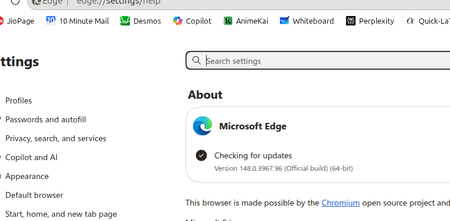
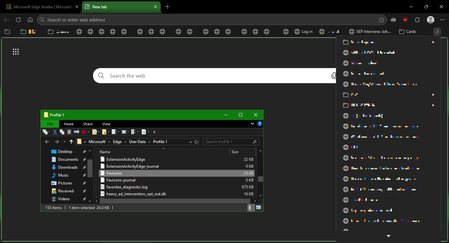
I've recently had Edge update to the v149.0.4022.52 stable-channel releases, and ALL my bookmarks now have no favicons. When I visit any webpage, Edge successfully loads the favicon for the tab of that website. But when I visit a bookmark, the favicon doesn't get updated after it has loaded for the site. And new bookmarks I add also don't show a favicon. If I go into my Edge profile-folder (which can found via edge://profile-internals/ , clicking the heading, then looking next to "Profile Path"), then it is still creating the "Favicon" and "Favicons-journal" files, but I assume isn't populating them with anything? I've tried deleting both files, restarting my PC, but even after Edge recreates them, no bookmarks are gaining any favicons. Is anyone else getting this issue...? OS: Windows 10 Home 22H2 x64 (OS Build: 19045.7291 : May 2026 ESU)Solved4.2KViews4likes23CommentsNext Update for Edge not compatible with my mac
Hi, so I'm so sorry if this isn't the right place or if I'm doing this wrong, but I'm kind of freaking out. So I use Edge on an older mac that cannot be updated as mac no longer supports updates for it. I was previously using Edge Dev and after an update got a message saying that the next update won't be compatible with my mac and I tried not to update but at some point Edge Dev restarted and thus updated and then it wouldn't open on my mac, so I switched back to regular Edge. After the last update on regular Edge, I got the same pop up saying that the next update won't be compatible with my mac and now I'm terrified that when that update comes out at some point Edge will restart and update and then I will lose my ability to use Edge. I love Edge as a browser and have so much stored in it. I have exported my passwords just in case, but am still super scared that I'll lose all the work I've put into Edge and that I'll just lose Edge as it's such a superior browser that I've come to rely on. Does anyone have any suggestions on what I should do? I can't afford to get a new computer right now and as I mentioned my Mac doesn't support updates. Any help would be unbelievably appreciated. Thanks in advance.167Views0likes0Comments
Update disabling when?
Did this thing update by itself again around one week ago? Because for about a week now when I try to updaload a video to youtube I get the blue screen of death. Out of nowhere it started doing that; it happens only when it is a new video being uploaded so I have to crash the pc once and then I can restart and continue the upload like normal. And then crash again every new video. Also all previous updates have been fully detrimental and replacing functionality instead of allowing you to choose how you actually want the experience (like the favourites/historic/download shortcut being those hateful and useless dropdowns insteaf of opening the page, or the 'end' and 'home' button no longer working etc). So, any way to disable those trashy updates or go to an older version yet?1.3KViews0likes3CommentsHow does Edge determine which PWA is not important to the user for auto browser restart?
Enable PWAs to automatically restart to apply a pending browser update. When a browser update is pending and only PWAs are running, this feature will restart PWAs to apply the update if they are considered not important to the user. – Mac, Windows #edge-enable-web-app-upgrade-controller Flag exists in Edge Version 88.0.692.0 (Dev) and 86.0.622.68 (stable) How does Edge determine which open PWA is not important to the user? based on usage? inactivity at that moment? or other heuristic behavior analyzing? and the default value is as always unknown, not showing whether this is enabled or disabled, by default.Solved1.2KViews1like2Comments
Error Installing/updating New Microsoft Edge
I was trying to use google meet and it said that i need to update my Microsoft Edge browser. I downloaded the new update and installed it but it showed the error: "Failed to cache the downloaded installer 0x8007......" i don't remember the rest. I searched up the microsoft support page only to get more confused so i tried clearing my temporary files and tried installing it again and it is still showing error but a different one "There was a problem downloading the required files. Error: 0x80070070" Is there any way to fix this? Is my browser too outdated? I have the Microsoft Edge version 25.10586.672.0 Any help would be great11KViews0likes1CommentNewly added Flags in: Edge canary version 84.0.484.0
Delay initial navigation for EMIE list download When the browser is launched, delay the initial navigation until the EMIE Sitelist has been downloaded and parsed to ensure that the initial page is placed in IE mode if needed. – Windows #edge-delay-initial-navigation-for-sitelist-download more info: https://docs.microsoft.com/en-us/internet-explorer/ie11-deploy-guide/export-your-enterprise-mode-site-list-from-the-enterprise-mode-site-list-manager Media Foundation playback for Windows 10 If enabled, Microsoft Edge will use Media Foundation for media playback. This feature requires Windows 10. – Windows #edge-mf-clear-playback-win10 (What Edge was using prior to Media Foundation for playback?) Enable Trust Tokens Enables the prototype Trust Token API (https://github.com/wicg/trust-token-api). – Mac, Windows #trust-tokens edge://flags/12KViews0likes12Comments