universalprint
7 Topics
Universal Print configured and accepting jobs but Ricoh printer does not find the print job
Hi, currently we have Universal Print enabled and some printers configured in this. The printer on which I am testing is shared and shows as accepting jobs and is in the ready state. I have configured the printer on my own laptop and I am able to send a print job to the Universal Print. The job will show as completed in Universal Print itself, but then when I walk to the printer and authenticate with my badge, it shows no print jobs that are ready for me to be printed. The printer in question is a Ricoh printer and is also configured in Streamline NX. I am fairly new to working with printers like this in general. Does anyone have an idea of what perhaps could be the issue? Could it be something firewall related that the printer is blocking the incoming jobs? Thanks in advance!!Solved4KViews0likes8Comments
Printers not automatically provisioned after remove
Hello Community. I have a problem with Universal Print and I suspect it has to do with the fact that I removed the printer once. I have a policy, this applies to my Azure Virtual Desktops users. It also shows me that the policy deployment was successful. I was impatient but manually added the Universal Print printer once in my session and did my tests. Now I wanted to try the policy but no printer comes into my user profile automatically anymore. Now I tried to speed this up with a printers.csv. So I created the printers.csv but after running the UPPrinterInstaller.exe (which is in newer Windows 11 version in system32) no printer appears in my session either. I also can't find a log in the event viewer on the Azure Virtual Desktop. What I really want is to make sure that each user automatically has the correct printers immediately upon login without having to search for them each time. By the way, the manual installation via Add Printer works without problems. Only the automatic provisioning does not work at all. I was wondering if the system automatically adds the printers only once. I hope someone can help me because I am at my wit's end. Update: I Installed the UniversalPrintProvisioning 0.1.0 manually and adding the printer via csv now works. Is it normal that the Policy does not recreate the printer? Thanks a lot Dob3.9KViews1like6Comments
Not able to Register Universal Print ready printers
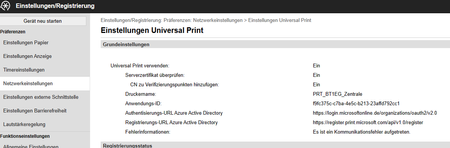
Hello, we have purchased three Canon C1333iF printers to use Microsoft Universal Print. These printers are Universal Print ready printers. We get an error message when we click register on the printer's online portal. Information such as the App ID, registration URL, and authentication URL are pre-populated by Canon. Canon support says that the error is with Microsoft. Attached I am sending a screenshot of the printer's Universal Print setting configuration. We can rule out the following: We can rule out a license and permissions issue, as we can't even get to the user account prompt. We can also rule out a network problem, as we have already tested this via a mobile hotspot. I would be very grateful for any hints and tips. regards Lucas3.8KViews0likes11Comments
Using universal print with industrial label printer ?
Hello, I am working on a project with a client where I need to print a label from azure data factory to an industrial label printer. We are thinking about using print universal to do so. The printer is a DATAMAX Oneil Mark III that is not connected in network but connected at a PC, so not directly accessible. Is it possible to use Print Universal with this printer as it's not within the list of recommended printers ? Can we use print universal with a industrial label printer ? If not what printer would you recommend ? Thank you for you help, Marion500Views0likes1Comment
18th Aug Update - Secure release is now broken for common Intune MAM and BYOD scenarios
Universal Print product managers, please take notice of the real-world impact created by retiring QR-code secure release from the Microsoft 365 Copilot app. The Microsoft 365 Copilot app provided a seamless secure-release experience for staff, regardless of whether they used: A fully managed mobile device An Intune MAM-protected BYOD device iOS or Android A Windows or MacBook workstation Users could print from their device, walk to the printer, scan the QR code within an already managed Microsoft application, and release the job. It was simple, secure and worked within existing Intune App Protection Policies. The replacement Universal Print Portal creates a significant regression. Microsoft has removed the only secure-release workflow that operated entirely within a managed Microsoft application. The browser-based replacement conflicts with common Intune App Protection configurations, introduces managed-browser requirements, and creates a poor experience for MacBook and BYOD users. The iOS PWA recommendation does not solve the problem On iOS, users are encouraged to install the Universal Print Portal as a Progressive Web App. However: The PWA installation experience is available through Safari. Our Intune MAM policies require organisational authentication and work links to use managed Microsoft Edge. Safari therefore cannot complete the work authentication flow. Edge can satisfy the MAM requirement, but it cannot provide the recommended Safari PWA installation experience. This creates a circular and unusable experience. Safari can install the PWA but cannot authenticate. Edge can authenticate but cannot provide the equivalent installed PWA experience. MAM and BYOD users do not necessarily want to make Edge their default browser merely to release a print job. The Microsoft 365 Copilot app avoided that problem because it was already a standalone, managed Microsoft application. There is no replacement managed Universal Print mobile app There is currently no equivalent Universal Print release application available through the Apple App Store or Google Play Store that can be protected through Intune MAM and provide the same experience as the Microsoft 365 Copilot app. This affects real mixed-device workplaces containing: Windows and macOS computers iPhones and Android devices MAM-only BYOD devices Fully managed corporate devices A MacBook user cannot conveniently scan a physical QR code using their laptop. Secure release therefore still depends on a practical mobile workflow, and Microsoft has removed the workflow that previously worked. Requested action Please either: Restore Universal Print QR-code release within the Microsoft 365 Copilot app until a suitable replacement exists; or Provide a dedicated Universal Print mobile app for iOS and Android that supports Intune App Protection Policies and MAM-only enrolment. Moving secure release from the Microsoft 365 Copilot app to a web portal is not a simplification for managed enterprise environments. It is a substantial backwards step that can make secure release impractical or unusable for MAM and BYOD users.300Views1like9CommentsUnversal print & Azure virtual desktop (pooled/multisession)
Hello all, We have Univeral print(UP) setup, and i want to introduce it into our AVD setup that is running 24h2-multisession. Now normally a UP printer is mapped via Intune or GPO as i understood. But in multisession OS the Intune user configuration is not applicable to the multisession OS... and GPO is not a option here. so i was thinking of creating a scripted action to map the univeral printer(s) but i cant find any way to map a univeral printer via scripting(thinking to run it as-user) Redirection of printer from local device is not a option here https://learn.microsoft.com/en-us/universal-print/fundamentals/universal-print-avd any help is much appreated300Views2likes2Comments
Can't Manage the scanner of my HP smart tank 790 printer/scanner
Recently, I'm not able to operate the scanner of my HP Smart Tank printer which is connected by USB. I'm have HP i7 Pavilion x36-dh1004nx running Windows 11 Ver. 26H2 (OS Build 26300.9550. The Setting app, list the scanner as not appearing, while the printer is working Able to scan directly from the printer, but from Window.40Views0likes1Comment