unified catalog
5 Topics
Purview Data Governance: Grant access to business consumers search Unified Catalog "Data products"
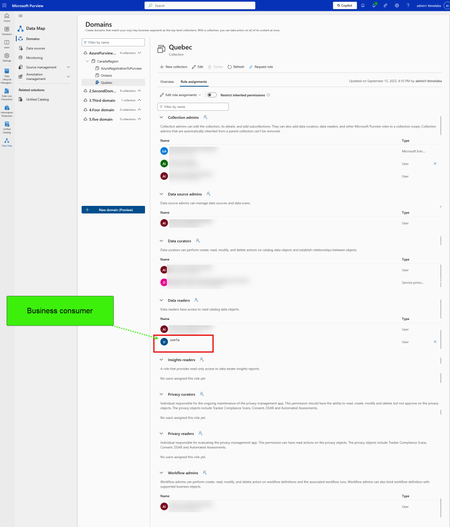
Hello Team, I am in Microsoft purview as regular users (business Consumer) to search in Unified Catalog for organization data associated to customers. The administrator told me they granted me the following roles: Data Map collection: Data Reader Governance Domain: Local Catalog Reader. Governance domain Published Data product published: I am able to connect to Purview unified catalog > Discovery > Data Asset and see all the data asset in the data map collections. however, When I try to access Purview Unified Catalog > Discovery > Data Product > search keyword "Customers" which is a published data products, I got error 403. Please see the images for the context. the Microsoft documentation is very confusing about how business consumer can access the data products. How can I grant access to regular users to search corporate data in Purview Unified catalog for data products?400Views0likes3Comments
Workaround Enabling Purview Data Quality & Profiling for Cross-Tenant Microsoft Fabric Assets
The Challenge: Cross-Tenant Data Quality Blockers Like many of you, I have been managing a complex architecture where Microsoft Purview sits in Tenant A and Microsoft Fabric resides in Tenant B. While we can achieve basic metadata scanning (with some configuration), I hit a hard wall when trying to enable Data Quality (DQ) scanning. Purview's native Data Quality scan for Fabric currently faces limitations in cross-tenant scenarios, preventing us from running Profiling or applying DQ Rules directly on the remote Delta tables. The Experiment: "Governance Staging" Architecture rather than waiting for a native API fix, I conducted an experiment to bridge this gap using a "Data Staging" approach. The goal was to bring the data's "physicality" into the same tenant as Purview to unlock the full DQ engine. The Solution Steps: Data Movement (Tenant B to Tenant A): Inside the Fabric Workspace (Tenant B), I created a Fabric Data Pipeline. I used this to export the critical Delta Tables as Parquet files to an ADLS Gen2 account located in Tenant A (the same tenant as Purview). Note: You can schedule this to run daily to keep the "Governance Copy" fresh. Native Scanning (Tenant A): I registered this ADLS Gen2 account as a source in Purview. Because both Purview and the ADLS account are in the same tenant, the scan was seamless, instantaneous, and required no complex authentication hurdles. Activating Data Quality: Once the Parquet files were scanned, I attached these assets to a Data Product in the Purview Data Governance portal. The Results: The results were immediate and successful. Because the data now resides on a fully supported, same-tenant ADLS Gen2 surface: ✅ Data Profiling: I could instantly see column statistics, null distributions, and value patterns. ✅ DQ Rules: I was able to apply custom logic and business rules to the data. ✅ Scans: The DQ scan ran successfully, generating a Data Quality Score for our Fabric data. Conclusion: While we await native cross-tenant "Live View" support for DQ in Fabric, this workaround works today. It allows you to leverage the full power of Microsoft Purview's Data Quality engine immediately. If you are blocked by tenant boundaries, I highly recommend setting up a lightweight "Governance Staging" container in your primary tenant. Has anyone else experimented with similar staging patterns for Governance? Let's discuss below.Solved399Views2likes3Comments
Auto classifcation policy - Sensitivity Lables - SIT - Fabric Delta Tables
Hi Everyone, Can you please anyone confirm, Can I apply sensitivity labels (Through Auto classification Policy) on Fabric Lakehouse delta tables using Purview Data Map. Its quite urgent, could you please confirm it. Regards, BanuMuraliSolved287Views0likes5CommentsCross-Tenant Purview Scan of Fabric Lakehouse fails to ingest Sub-items (Delta Tables)
Environment: Tenant 1 (Consumer): Azure Purview (Microsoft Purview Data Map). Tenant 2 (Provider): Microsoft Fabric (Capacity + Workspaces). Architecture: Purview in Tenant 1 is scanning Fabric in Tenant 2 via the "Fabric" Data Source using Azure Auto-Resolve Integration Runtime. The Issue: I can successfully scan and see Item-level metadata (e.g., Workspace Name, Lakehouse Name). However, I am getting Zero sub-item visibility. No Delta Tables, no Columns, and no sub-item lineage are being ingested into Purview. Configuration Verified: Service Principal (SPN): Created an App Registration in Tenant 2 (Fabric Tenant). Permissions: The SPN is a Member (and I tested Admin) of the target Fabric Workspace. Fabric Admin Settings (Tenant 2): Allow service principals to use read-only admin APIs: Enabled for the SPN's Security Group. Enhance admin APIs responses with detailed metadata: Enabled. Enhance admin APIs responses with DAX and mashup expressions: Enabled. My Specific Questions for the Product Team / MVPs/Members: Authentication Flow: For sub-item ingestion (Delta Tables) to work cross-tenant, is it sufficient for the SPN to be a standard App Registration in Tenant 2 (Provider), or does Fabric require the "Cross-Tenant Access" (Guest User) flow where a shadow SPN is created via the specific trusted external tenants configuration? API Limitation: Is the "Enhanced Metadata" API payload (metadata/subartifacts) restricted to Same-Tenant calls only during the current Preview? I suspect the API is returning a standard payload instead of the enhanced one due to the cross-tenant boundary. Workaround: Has anyone successfully forced ingestion of Delta Tables cross-tenant by using the Apache Atlas REST API to manually inject the schema entities, or is there a specific hidden toggle in the Fabric Admin Portal (perhaps specifically for "External Principals") that I am missing?199Views1like1Comment
# Seeking Feedback – Microsoft Purview Governance Domain Metamodel
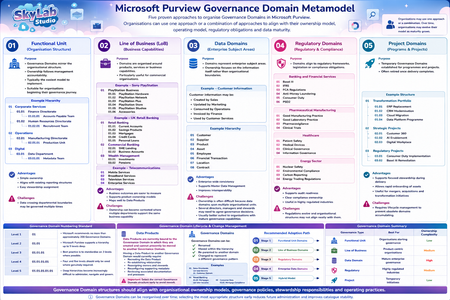
I've been working on a proposed metamodel for some time to help organisations decide how to structure Governance Domains within Microsoft Purview and would appreciate feedback from others who have implemented Purview at scale. The intention is not to prescribe a single approach, but to describe several governance patterns that seem to emerge in practice. Some additional assumptions I've made: * Numeric prefixes such as `01.01.01` help maintain sort order and readability. * Standardising on three levels appears easier to manage, although Purview supports five levels. * Microsoft guidance suggests keeping Governance Domains to approximately 200. * Governance Domains themselves are relatively flexible and can be renamed or repositioned within the hierarchy. * Data Products currently appear to be bound to the Governance Domain in which they are created and cannot presently be reassigned to another Governance Domain, making early design decisions more important. I'm interested in hearing from organisations already using Governance Domains in production. A few questions for discussion: Have you adopted one of these patterns, or a hybrid approach? Are there Governance Domain types missing from this metamodel? Is the recommendation of standardising on three hierarchy levels sensible, or have you found deeper structures manageable? Are there any Microsoft best practices, roadmap items or implementation experiences that would suggest a different approach? I've attached an infographic illustrating the proposed metamodel and would welcome any thoughts, criticism or lessons learned from real-world implementations.101Views0likes1Comment