ui bug
8 Topics
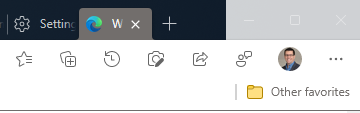
Regression: Vertical tabs no longer collapse in fullscreen (F11) after latest Edge update
After the latest Microsoft Edge update, the vertical tab sidebar no longer collapses when entering fullscreen mode (F11). Previously, when fullscreen was enabled, the vertical tabs would automatically collapse or hide, allowing the webpage to use the full screen space. Now the vertical tab bar remains visible, reducing usable screen area. Steps to reproduce: Enable Vertical Tabs in Microsoft Edge Open any website Press F11 to enter fullscreen mode Observe that the vertical tab sidebar remains visible Expected behavior: Vertical tabs should collapse or automatically hide in fullscreen mode, as they did in earlier versions. Actual behavior: The vertical tab sidebar stays visible during fullscreen instead of collapsing. Additional testing: Tested in a Guest profile (fresh profile with default settings); issue still occurs Happens across different websites Restarting Edge does not fix the issue Edge version: 145.0.3800.58 (Official build) (64-bit)861Views6likes7Comments
Microsoft Managed Home Screen: Unwanted Samsung One UI 8.0 Elements Appearing
Hello Tech Community, Our organization is currently deploying a configuration in Microsoft Intune using a Corporate-owned dedicated device enrollment profile. We’ve applied a device restriction policy to configure Samsung tablets in Multi-app Kiosk mode, with Managed Home Screen set as the launcher. Instead of using an app configuration policy, Managed Home Screen is configured through the device restrictions policy. We’ve left the device navigation options unconfigured, which should hide the following UI elements: Android Overview button Android Home button Android App drawer Once all policies and required apps are installed, Managed Home Screen successfully acts as the launcher for end-users to sign in. Overall, this works well; however, we’ve encountered an intermittent issue: After multiple lock/unlock cycles, the navigation bar sometimes reappears, showing the Overview, Home, and App Drawer buttons. This allows users to access background apps that are not exposed through Managed Home Screen, which defeats the kiosk experience. Device details: Samsung Galaxy Tab S10 FE Android 16, One UI 8.0 Managed Home Screen version: 2.2.0.107721 Has anyone experienced this behavior or have recommendations to prevent these UI elements from reappearing? I’ll gladly provide additional details about our configuration if needed. Thank you!764Views6likes2Comments
Steps initially show only first line of text
Currently and for the past year+ on Microsoft To Do Web, after selecting any List, the initial view of the Steps within a Task, only shows the first line of text in each Step. If I select a different Task within the same List and then reselect the original Task, the Steps within display all of the lines of wrapped text. This occurs using both MS Edge and Google Chrome. I rebuild my computer from a new Windows 11 ISO after stripping my SSD to zero partitions last week and this is still a problem. It would be really great if we could get this fixed.358Views0likes5CommentsUI Bug: Microsoft Teams Apps page slider issue
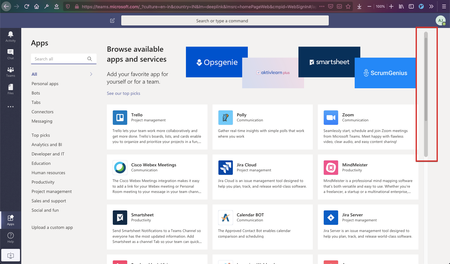
I was browsing through the Microsoft teams on Firefox v76.0.1 on macOS Mojave 10.14.6 On the `Apps` page the slider behaved abnormally. Initially, the scroller is out of bounds. Scrolling to the bottom leads to this. The scroller component disassociates itself with the component below it. This does not looks good and should be fixed1.5KViews0likes1CommentBug in UI of the Focus Mode in Edge Insider
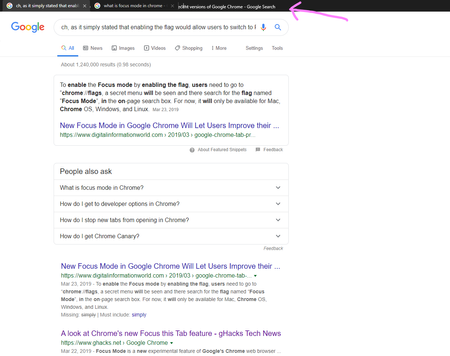
There is a UI bug when using Focus Mode in Edge insider Canary Version 78.0.257.0 (Official build) canary (64-bit) you can see it in the pictures: unfortunately smiley button is not available in Focus Mode and we can't attach custom screenshots to the feedbacks... how to produce? enable Focus Mode flag, go to Focus Mode and type in a long sentence to searchSolved1.1KViews2likes1Comment