troubleshooting
4 Topics
Windows Update fails with “Something went wrong – Undoing changes” unless installed via ISO
Hi everyone, I'm facing a strange issue with Windows Update on my laptop and I wanted to know if anyone else experienced something similar. Problem: When I install updates through Windows Update, the update downloads normally and during restart it goes up to 100%, but then I get the message: Something went wrong. Undoing changes. After that, Windows rolls back the update. Observation: Interestingly, updates that start directly from the “You're there” stage sometimes install correctly. Policy change I made: Previously Windows would automatically download and install updates and frequently ask for restarts. Because of that behavior, I changed the policy to manual download and install so updates would not start installing automatically. Thermal precaution I tried: Since my laptop has a faulty CPU fan, I also limited the maximum CPU state to 99% in Power Options to prevent aggressive turbo boosting and reduce potential thermal throttling during the update process. Another important observation: If I install the same update using a Windows ISO (in-place upgrade / repair install), the update installs successfully and does not fail at 100%. Possible hardware issue: My laptop currently has: A broken battery A faulty CPU fan So I'm wondering if the update process might be failing due to power or thermal issues during the installation phase. System info: OS: Windows 11 Pro Insider Preview Channel: Release Preview Current build: 26200.7840 Update that fails: KB5077241 (Build 26200.7922) Questions: Can hardware issues like a damaged battery or faulty CPU fan cause Windows Update installation failures? Why would updates succeed when installing from an ISO but fail through Windows Update? Which logs should I check to identify the exact cause? (CBS.log, WindowsUpdate.log, etc.) Any suggestions, troubleshooting steps, or similar experiences would be appreciated. Thanks!706Views0likes4Comments
Recovering windows 10 password
While attempting to remove antivirus that slow downs my windows., it prompted to restart. It took long to restart but the processing sign was working.. after a while when it restarted windows it was stuck on boot screen for a while and I had to force shutdown. I tried couple of times but same result. Windows recovery was activated and it showed options to recover and it prompted for the password that I had long forgotten as I used to sign-in through pin. And the password was local not associated with Microsoft account. So I'm locked out and I can't loose the data.. please can anyone any genius help me !!!278Views0likes1Comment
Windows Update Failing
Hello, So I was updating Windows to Windows 11 Insider Preview 10.0.26120.461 (ge_release), however when I finish downloading and try to install, it fails with the error code 0x80070032. Not sure if anyone else has ran into this issue, and if you have, how did you resolve it? I cant update due to this issue. Please let me know. Thanks!1.1KViews0likes4Comments
Microsoft Account Troubleshooter: not updated since Oct. 2013
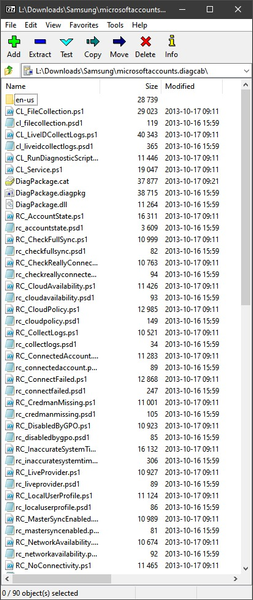
Hi! I downloaded today (2020-07-14) the tool ( https://social.technet.microsoft.com/wiki/contents/articles/13976.how-to-troubleshoot-microsoft-account-issues.aspx ) and opened it with 7-zip. The files there are from Oct. 2013. It means that the tool might not know about changes to account authentication. Therefore, it may report wrong conclusions/detections. I may be wrong but it seems to me that the tool needs some updating.5.6KViews1like5Comments