troubleshooting
72 TopicsUpdated Copilot app doesn't work with Work account
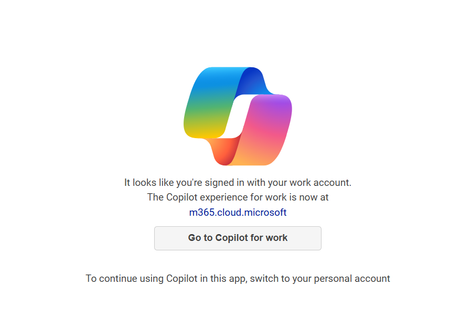
There was an update to the Copilot app on Oct 3, 2024 (1.0.4.0), and now the app is acting weird on my Copilot+PC work laptop. I press the dedicated Copilot button and expect to have Copilot open from the right. Instead I get a centered screen (which by the way is this address: https://copilot.microsoft.com/?dpwa=1 ) telling me "It looks like you're signed in with your work account. The Copilot experience for work is now at copilot.cloud.microsoft." There is also a button "Go to Copilot for work" which goes to this address https://copilot.cloud.microsoft/?fromCode=pwa, but funny enough, it doesn't redirect within the window but instead opens the address in the Edge browser!? 🤷♂️ In comparison opening https://copilot.microsoft.com/ in the browser navigates directly to the new address for the Copilot experience for work, no issues. Why doesn't the app just redirect directly to the new address for work accounts so I can use the Copilot button as intended? Thanks!19KViews9likes12Comments
Microsoft CoPilot error message - Something went wrong
I have asked an open-ended question for copilot in MS Word to write a research report using the company's financial statements as a reference file. I provided the financial statements in Word format as a reference file (In MS Word format and its approximately 77 pages of text, numbers, images etc. so its large). It generated content for about 3.5 pages and then stopped and displayed an error message. When I try to regenerate I get the message below: Its like it 'times out' or the job is too big for it to process. Can anyone explain what the cause for this is and if you experience the same issue when referencing a large file?6KViews1like4Comments
Copilot not loading in desktop Mac Excel
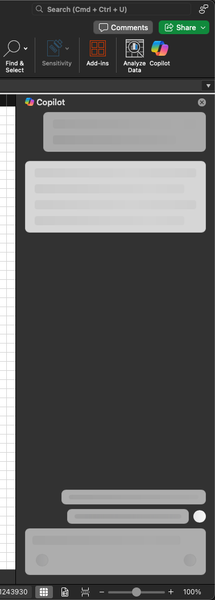
When trying to load the Copilot sidebar in the Mac desktop version of Microsoft Excel Version 16.91 (24111020), all I get is a loading animation (see screenshot). I've got a Microsoft 365 Subscription, and Copilot for Microsoft 365 license. Copilot works fine in Word. The document I'm working with is saved in a SharePoint team through my OneDrive app, and is formatted as a table.1.4KViews3likes8Comments
Microsoft copilot stops while giving a response.
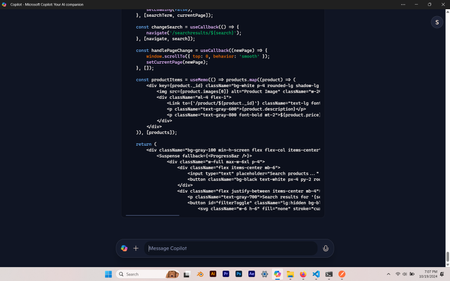
Why is this happening? Is there a solution for this? It just stops while giving response. And it has happened several times. And you can't even give prompt to continue from there. You should restart it. Does anyone have a solution for this? and I have restarted and reinstalled it 1000 times.11KViews1like18Comments
New copilot app can't switch from work to personal account
I installed the app from the Windows 11 store yesterday, and it was working fine just like it did on my mobile app. I made sure I signed in with my personal Microsoft account on both. Today, when I attempted to use it again on my Windows 11 PC, it seems like it signed in with my work account and no matter how many times I sign out and back in with my personal account it keeps displaying "It looks like you're signed in with your work account". I've terminated the app, uninstalled it, not sure what else to do? It is signed in with my personal account now but still not working.Solved35KViews17likes47Comments
Copilot Studio: Can't change primary language when creating agent
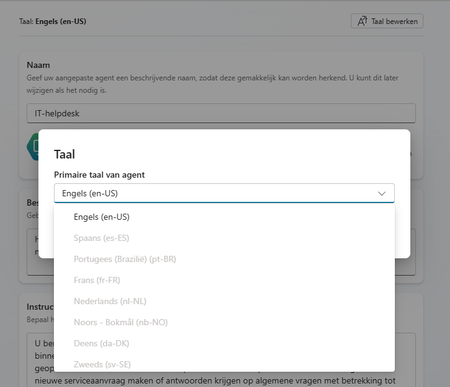
Hi! I want to create an agent with primary laguage Dutch (Nederlands). However, when I'm creating the agent I cannot select any other language then English: Does anyone know why and/or what I can do to select the correct language? Thanks in advance! Merel2.6KViews0likes4CommentsCopilot connection to Powerbi
Hi Everyone. Currently trying to make a connection to our PowerBi platform through Copilot Studios. So far i keep getting a connection failure. I have tried to adjust our security settings in Active Directory. I have tried adjusting the permission on the workspace and access to the datasheet. When i use the Json query to extract on the columns in the giving table i just get a connection error. even though the connection seems valid. Any suggestions on how to proceed?263Views1like1CommentCopilot Studio custom copilot has has wrong date
I'm building a simple custom Copilot in Copilot Studio to retrieve weather information from weather.com/weather.gov. I noticed the answers regarding weather data were not accurate. I finally typed the prompt "What is today's date?" and the Copilot responded with October 10, 2023. Today is September 24, 2024. I have no idea where this date came from. I created a new blank Copilot and the same thing is happening. Has anyone else experienced this?2.2KViews2likes6Comments