troublehooting
21 TopicsIdentify Which Process Is Blocking a File in Windows
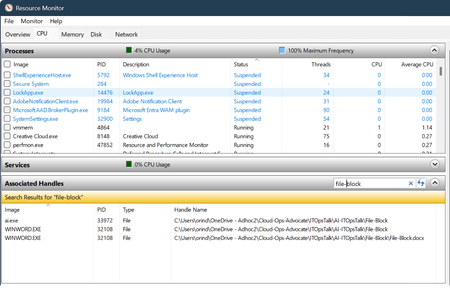
When you see the error "The process cannot access the file because it is being used by another process," you can use several built-in or free tools to find out which process is locking the file or folder. Using Resource Monitor Resource Monitor is built into Windows: Press Win + R, type resmon, and press Enter. This will open Resource Monitor. Go to the CPU tab. In the Associated Handles section, use the search box to enter part of the file or folder name. The results will show which processes are using the file. Check the Image and PID columns to identify the process. You can right-click the process and select End Process if necessary (be cautious when ending processes). Using Process Explorer Process Explorer is a free tool from Microsoft Sysinternals: Download and run Process Explorer as administrator. You can acquire Process Explorer using the following WingGet command: Winget install Microsoft.Sysinternals.ProcessExplorer In Process Explorer, Press Ctrl + F or go to Find > Find Handle or DLL. Type part of the file or folder name and click Search. The tool will list all processes currently using the file. Click an entry to highlight the process in the main window. You can right-click the handle and select Close Handle to release the file (use with caution). Using Command Line Tools openfiles: Run openfiles /query in Command Prompt (may require enabling with openfiles /local on and a restart). This shows which files are open and by which process. You’d have to enable the local on option before the file got locked of course. handle.exe: Download from Sysinternals. You can acquire Handle.exe with the following WinGet command: winget install Microsoft.Sysinternals.Handle Run handle.exe <filename> to list processes using the file.42KViews5likes2Comments
Please Remove Daily Cap Usage for Free Copilot Text Chat
Dear Microsoft Copilot Team, I am writing to express my disappointment with the new daily usage caps on Microsoft Copilot, particularly for ordinary text-based conversations. In the past, I could use Copilot freely for everyday questions, learning, research, brainstorming, and general conversations without constantly worrying about reaching a daily limit. The newer restrictions have made the experience significantly more frustrating and less useful. I understand that running AI services requires computing resources and that Microsoft must manage operating costs. However, I believe ordinary text chat should remain uncapped, especially when it was previously possible to use Copilot much more freely. Text conversations are a fundamental part of the service, and users should not have to stop in the middle of a useful discussion because they have exhausted a daily allowance. The move toward a unified Copilot experience should make the product simpler, more consistent, and more useful—not make existing users feel that they have lost access to a service they have come to rely on. I am therefore asking Microsoft to: Remove daily usage caps entirely for ordinary text-based Copilot conversations, including for free users. Keep basic text chat freely accessible without arbitrary daily cutoffs or lengthy waiting periods. If stricter limits are necessary for resource-intensive features such as image generation or advanced research, apply those limits separately rather than restricting ordinary text conversations. Clearly communicate any usage policies and reconsider changes that negatively affect the experience of long-time users. Unlimited text chat would help preserve user trust, encourage continued engagement, and distinguish Copilot as an accessible AI assistant for everyone. Restricting basic conversations risks pushing loyal users toward competing services that offer a more suitable experience. I hope Microsoft will take this feedback seriously and reconsider the current daily cap policy. Please restore uncapped text chat so users can rely on Copilot whenever they need assistance, without worrying about running out of messages. People on Reddit and online have been criticizing these changes ever since Copilot was unified under one product between enterprise and personal, If you guys dont do anything now it might reduce user trust and might be bad business decisions so please fix Copilot Thank you for your time and consideration. I look forward to seeing Microsoft make Copilot more accessible and user-friendly again.421Views4likes2Comments
Agent Builder agents require Microsoft 365 Copilot license for users without a license?
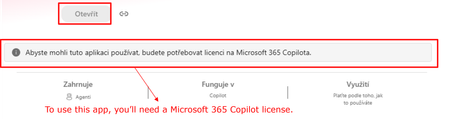
Hi all, Has anyone noticed a recent change in how Copilot Agent Builder (in Copilot Chat) agents work for users without a Microsoft 365 Copilot license? Our setup is: Agent created by a user with a Microsoft 365 Copilot license Created directly in Agent Builder, not published through Copilot Studio The agent is published and available within our tenant Some consumers do not have a Microsoft 365 Copilot license Copilot Credits are available (also for the environment where the agent is) and have not been exhausted This setup was working normal ly just two days ago. Unlicensed users could use the shared agents and usage was covered by Copilot Credits. Now those same users are getting a message saying that a Microsoft 365 Copilot license is required. Has anyone else started seeing this? I’m trying to understand whether we are looking at a configuration issue in our tenant or whether something has recently changed in the service/licensing behavior. Thanks for experiences!297Views1like4Comments
Long chats receive 504 gateway timeout in new copilot UI
I understand this has been an issue for a lot of people. I have read multiple posts across other platforms. The new copilot UI no longer uses pagination like the old one and attempts to call upon the entire chat at once for easy navigation scrolling all the way to the top or bottom. However, for chats like mine with months of worldbuilding and character notes accumulating 2000+ messages, it does not have enough time to load them all before reaching a gateway timeout. I want to ask if anyone knows of any fixes that may be coming for this in the future since it is a pretty big issue when it comes to user satisfaction. The same chat has several different error states. Sometimes it will say 'Unable to load content'. Sometimes it will have a stable but blank page. Sometimes it will go to a white screen with the Error 504 timeout. I have attached images of all the different failure states I have seen. Basic error on white screen version of the bug. It fails to load preview and response data in this state. A screenshot of the timing window to show where it is stalling. Sometimes it will show me this general unable to load content screen. Refreshing is what leads to the white screen errors shown above. Here is a screenshot of the stable-but-blank version that sometimes shows up. Note how it is offering autocompletes like it is my first time messaging this chat. And here is a screenshot of the inspect element of this stable but blank version of the long running chat. Can anyone explain to me why this chat is having so many different failure states and what they mean and if a fix is possibly being rolled out in the future for this? I'm really sad I lost such a long important chat with so much lore.346Views1like5CommentsFix all annoying Copilot bugs
I’m experiencing an issue with Microsoft Edge on Android. Starting today (September 22, 2026), whenever I try to visit copilot.microsoft.com, Edge automatically redirects me to the Google Play Store to install the Copilot app. I prefer using Copilot in the browser and do not want to install the app. And even when i try to install the copilot app it does not let me do anything and thinks I need a license or subscription to access it like copilot is litterly supposed to be free and also even when i try to get rid of the app redirection it for some dumb reason it redirects me to from copilot.microsoft.com to copilot.com and they put in restrictions like after a lot of chats you must wait for a specific time period and a couple months ago you guys removed the ability to use copilot without registration like come on that is so dumb I want Microsoft Copilot to be fixed revert how copilot was before how is this consumer friendly401Views1like2Comments