teams
231 TopicsPreview the new Microsoft 365 LTI® for your LMS
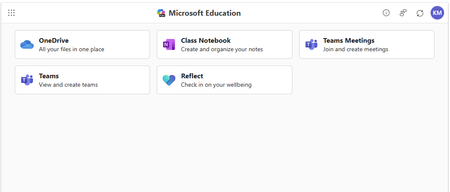
Enhance your LMS with the power of Microsoft 365 We are excited to announce the public preview of Microsoft 365 LTI. Experience the full potential of Microsoft 365 directly within your Learning Management System (LMS) through a simple to integrate learning tool interoperability (LTI). Microsoft 365 LTI makes LMS integrations simple, with a powerful tool designed to introduce new capabilities to streamline and simplify deployment. Deploy and access the new Microsoft 365 LTI in your LMS with the overview and deployment guides. At-a-glance: The Microsoft 365 LTI is now in Public Preview, bringing all your favorite Microsoft Education tools into a single, seamless experience inside your LMS. No more juggling multiple integrations - just streamlined access to everything educators and students need, right where they work. This includes: Unified access to OneDrive, Teams, Class Notebook, Reflect, and more, directly in your LMS Add content, create assignments, and schedule meetings - all from one place No need to enable multiple tools separately or clutter your LMS menus Replaces deprecated Teams Meetings and Team Classes LTI tools Expanding support for Microsoft Assignments, OneDrive, OneNote Class Notebooks, and Reflect Available for Canvas, Schoology, Blackboard, D2L Brightspace, Moodle, and more Let’s dive into the new Microsoft 365 LTI to streamline your learning management system experience We are bringing our Microsoft Education capabilities for learning management systems together into a single tool and streamlined user experience. Educators will be able to access Learning Accelerators, Reflect, OneDrive, Teams, and more in their LMS courses, without having to enable multiple tools separately, and without overcrowding menus where LTI tools are surfaced. Whether adding content to a module, creating an assignment, or scheduling a meeting for a class, you will be able to easily access Microsoft Education related features directly in your LMS workflow. Microsoft 365 LTI debuts with replacements for the deprecated Teams Meetings and Team Classes LTI tools that sunset on 9/15/2025. The capabilities of Microsoft Assignments, OneDrive, OneNote Class Notebooks, and Reflect will also be added to the Microsoft 365 LTI in preview, and those existing LTIs will continue to be supported as their capabilities transition. Microsoft 365 LTI will be available for all currently supported LMS platforms, including Canvas by Instructure, PowerSchool Schoology Learning, Blackboard by Anthology, D2L/Brightspace, and Moodle™, and for any LTI 1.3 Advantage compliant platform. Learning Accelerators and AI-enhanced assignments in your LMS (without Microsoft Teams) With the Microsoft 365 LTI, you will be able to use Learning Accelerators, multiple-document submissions, AI rubric and instructions generation, AI-assisted feedback, auto-graded Forms and other Microsoft Education assignment capabilities directly within your learning management system (LMS), without the need to create and sync a Microsoft Team for your class. Assignments in Microsoft 365 LTI no longer require Teams, enabling more LMS users to benefit from advanced, AI-enhanced capabilities that were formerly exclusive to Microsoft Teams for Education. Assignments can be created, managed, completed, and graded, without leaving your LMS, and grades and feedback will sync automatically to the LMS gradebook. This capability is included automatically in the new Microsoft 365 LTI tool. Existing, Teams-based assignments will continue to work and can be copied to new courses, so no migration is necessary. This enhancement will apply to all currently supported LMS platforms, including Canvas, Schoology, Blackboard, D2L Brightspace, and Moodle. Teams and Teams Meetings Microsoft 365 LTI replaces the former Teams Classes LTI and Teams Meetings LTI tools, with improved user experience. Users can easily schedule, manage, and launch meetings from directly within their LMS course. The tool provides streamlined views of future and past meetings, consolidated attendance reports, and a new “Meet Now” capability. Automatic rostering in Class Notebooks returns with the Microsoft 365 LTI In March, we announced the retirement of automatically adding newly rostered students and co-educators to OneNote Class Notebooks provisioned through the LMS using the LTI 1.1 integration. This much-loved feature is back in the new Class Notebook app in Microsoft 365 LTI. Any instructor in the LMS course can create a Class Notebook and all co-educators and students automatically added to the notebook, even as the LMS roster changes. In addition, the new integration enables OneNote with the benefits of LTI 1.3 conformance and a modernized provisioning flow for educators to easily deploy new Class Notebooks for their courses. Existing notebooks created in the LTI 1.1 integration will continue to work, and sections and pages can be easily copied to new notebooks. OneDrive and Microsoft 365 files with embedded editors and new placements The new Microsoft 365 LTI tool expands beyond the capabilities of the existing OneDrive LTI tool. The full capabilities of Word, PowerPoint, and Excel, including Microsoft 365 Copilot, are now available within the LMS experience for attaching content resources, collaborative documents (including Collaborations for Canvas Courses and Groups!), and students editing and submitting Microsoft 365 documents as an assignment without leaving the LMS. Documents can be embedded or linked into courses and other LMS activities like discussions, announcements, pages, with proper management of permissions to prevent oversharing, and with dedicated course-level storage to support proper document lifecycle management, assignment workflows, and use of Microsoft 365 Copilot. Easily add Reflect to your classroom toolset Microsoft 365 LTI provides easy access to Microsoft Reflect to support student wellbeing in the classroom. Educators can create check-ins, view responses, and monitor trends within an LMS course. Users can access activities from Microsoft and partners such as Calm to support physical and mental wellbeing. For more information, and to keep up with future product announcements Please visit the Microsoft Tech Community Education Blog and subscribe to keep up with what’s new in Microsoft Education. We also hold bi-monthly office hours every first and third Thursday where lots of LMS + Microsoft 365 customers come to discuss scenarios and get assistance from peers, please join us! Microsoft 365 LTI Office Hours 1 st and 3 rd Thursday of each month @11am EST Join link: https://aka.ms/LTIOfficeHours We can’t wait to hear your feedback! Try out the preview today. How to get help or send feedback For any issues deploying the integration, our Education Support team is here to help. Please visit https://aka.ms/EduSupport Once deployed, the Teams Assignments integration has links to Contact Support and Send Feedback from right within the app. These can be found in the user voice menu in the upper right on any view that appears within the LMS. Learn more about Microsoft feedback for your organization. Learning Tools Interoperability® (LTI®) is a trademark of the 1EdTech Consortium, Inc. (1edtech.org) The word Moodle and associated Moodle logos are trademarks or registered trademarks of Moodle Pty Ltd or its related affiliates.11KViews3likes8CommentsHands on webinar: Build Student Skills with Learning Accelerators in Microsoft Teams
Join us on Wednesday, September 16th @ 8am Pacific Time and discover how Learning Accelerators in Microsoft Teams for Education can help students build foundational and future ready skills while giving educators actionable insights to personalize instruction. In this webinar, we’ll explore the latest capabilities across the Learning Accelerators suite, including: 📖 Reading Progress - Help students build reading fluency with personalized practice and AI-powered feedback 🎤 Speaker Progress – Develop confident presentation and communication skills with real-time coaching ➗ Math Progress – Create, assign, and review math practice while gaining deeper insight into student understanding 🔎 Search Progress – Teach students how to search effectively, evaluate sources, and build information literacy skills 📊 Education Insights – Turn learning activity into actionable data to identify trends and better support individual students We’ll walk through practical classroom scenarios, demonstrate key features, and share tips for getting the most from Learning Accelerators in Microsoft Teams. Join us to see how Learning Accelerators can help educators save time, personalize learning, and give every student more opportunities to practice, improve, and succeed. Wednesday, September 16th @ 8am Pacific time: Register here: https://df.events.teams.microsoft.com/event/df.2cc31453-8761-4442-9b9e-eceb4a80859f@72f988bf-86f1-41af-91ab-2d7cd011db47?source=copyLinkOneEventsShareDialog Mike Tholfsen Group Product Manager Microsoft Education362Views0likes0CommentsSet clear AI expectations for every assignment with Student AI Guidelines
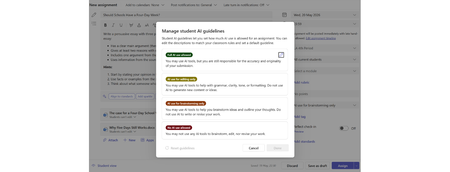
The challenge: students don't know where they stand with AI Every educator has a different approach to AI in their classroom. Some want students using it freely. Others want AI limited to brainstorming or editing. Some assignments shouldn't involve AI at all. The problem? Students are left guessing. Educators have been piecing together workarounds — writing AI policies into assignment instructions, referencing school handbooks, or adding disclaimers to rubrics. None of these are built into the assignment itself, and students often miss them entirely. Student AI Guidelines in Assignments Student AI Guidelines give educators a structured way to set AI expectations directly inside an assignment in Microsoft Teams. When creating an assignment, educators now see a new option to set a guideline level with suggested text: Full AI use allowed. Students can use Copilot for any part of the assignment. AI for editing only. Students write their own work first, then use Copilot to polish, revise, or check grammar. AI for brainstorming only. Students can use Copilot to generate ideas or explore topics, but the final work should be their own. No AI. The assignment should be completed without AI assistance. Student AI Guidelines are available for all grade levels, on desktop and mobile. All students in the assignment see the same guideline. A note on what these guidelines are — and aren't. Student AI Guidelines are a communication tool, not a lockdown. They set clear expectations that students see in the assignment, but they don't technically block access to AI tools. They work the same way a teacher's verbal instruction does: "Here's what I expect for this assignment." The value is in making that expectation visible, consistent, and built into the assignment itself. These are starting points, not fixed rules. Each level comes with suggested text that educators can edit freely to match their school's policies, terminology, or classroom norms. If your school uses different language around AI use — or has its own framework — update the text to reflect that. The feature adapts to your school, not the other way around. Even if your school hasn't enabled Copilot, Student AI Guidelines give you a structured way to communicate AI expectations to students — whether that's encouraging responsible AI use or formalizing a no-AI policy. What students see When an educator sets a guideline, students see it in their assignment view — no hunting through instructions or attachments. The guideline card shows the educator's expectations and, for levels that allow AI use, a direct button to launch Copilot Chat. The Copilot launch button appears for students aged 13 and older at schools where an IT admin has enabled Copilot. If your school hasn't set up Copilot yet, check out the Copilot setup guide for IT admins to get started. If Copilot isn't enabled, students still see the guideline — just without the launch button. If no guideline is set, nothing changes — the student experience stays exactly as it is today. Save time: set a default and reuse across classes Two features help you avoid repeating setup work: Set as default. Any guideline level — including "No AI" — can be set as the default for all new assignments you create. If your school's policy is that most assignments should restrict AI use, set that as your default and you're covered. You can always override it on individual assignments when you want to allow more (or less) AI use. Import Settings. Once you've configured your Student AI Guidelines in one class, you can apply those same settings to other classes using Import Settings. This copies your guideline levels and custom text across classes so you don't have to re-create them each time. Learn more: Import Settings in Assignments and Grades. Why this matters This feature sits at the intersection of two things educators have been asking for: clarity around AI use, and an easy on-ramp to Copilot. Instead of competing with third-party AI tools through restriction, Student AI Guidelines give educators a way to channel AI use purposefully — on their terms, per assignment, with clear communication to students. Resources Set Student AI Guidelines on and assignment in Microsoft Teams Manage Student AI Guidelines in Assignments2.3KViews0likes2Comments
What’s the best way to differentiate a SaaS offer from a Teams offer in Microsoft Marketplace?
Hey community! Our app is transactable, and we currently have two offers live in Marketplace: Saas and MS Teams offers. However, some of our customers find it confusing and aren’t sure which one they should choose. We also always prefer them chosing Saas so we can track everything via Partner center. What’s the recommended way to structure or differentiate the two offers so the choice is clear for customers? For example, should we use different naming, descriptions, or positioning for each offer? Would really appreciate any best practices or examples from others who have faced it!What's New in Microsoft EDU - Back to School 2026 webinar
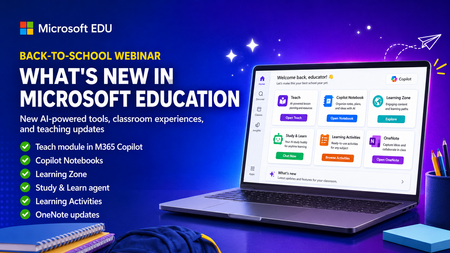
Get ready for back to school (Northern Hemisphere) with the latest product updates from Microsoft Education. In this webinar, we’ll showcase new AI-powered tools, teaching resources, and product updates designed to help educators save time, personalize learning, and support every student. You’ll see what’s new across Microsoft 365 Copilot, Teams for Education, OneNote, and more, including: ✅ Teach module in Microsoft 365 Copilot ✅ Copilot Notebooks ✅ Study and Learn agent ✅ Learning Zone ✅ Teams for EDU updates ✅ The latest OneNote EDU updates And more! Join us for practical demonstrations, helpful tips, and new ideas you can put to work as you prepare for a successful school year. And don't worry if you can't make it live, we will be recorded and posting this on the Microsoft Education YouTube channel afterwards. 📅 When: Wednesday, August 26th @ 8am Pacific Time 🔗 Register here: https://df.events.teams.microsoft.com/event/df.8c4f06fc-399f-4603-8023-f5fd92601bd1@72f988bf-86f1-41af-91ab-2d7cd011db47?source=copyLinkOneEventsShareDialog Mike Tholfsen Group Product Manager Microsoft Education729Views1like1CommentCalling all IT Admins - webinar on configuring Copilot Chat and updates for Students 13+
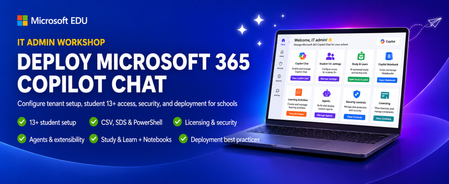
This IT Admin-focused workshop walks through how to configure Microsoft 365 Copilot Chat, from your tenant all the way to the end-user experience. When you enable Copilot Chat for students 13+, they will also get access to the new Study & Learn agent, Copilot Notebooks, Learning Activities and more. We cover the latest features that are available — including the new 13+ student configuration options, CSV, SDS and Powershell uploads, Copilot agents & extensibility, and updated licensing & security controls. By the end, you’ll be able to confidently deploy, manage, and optimize Copilot Chat in your environment so your users can safely harness AI productivity from day one. This 45-minute webinar will be led by Bill Sluss Principal Product Manager from the Microsoft Education team. When: Wednesday, August 19th @ 8am Pacific time Register: https://df.events.teams.microsoft.com/event/df.95feda23-419a-4d99-bfad-f7e4fd52a498@72f988bf-86f1-41af-91ab-2d7cd011db47?source=copyLinkOneEventsShareDialog Mike Tholfsen Group Product Manager Microsoft Education414Views0likes0Comments
Microsoft Mesh Education Licensing
Microsoft Education and Product Teams, I am writing to advocate for the inclusion of Microsoft Mesh (Immersive Spaces and Events) within the Microsoft 365 Education SKU family (A1, A3, and A5). Currently, Mesh is available across nearly every commercial license family, from Teams Essentials to E5 Enterprise, but is explicitly excluded from Education tenants. As documented in several Learn Q&A threads and service plan manifests, the MESH_IMMERSIVE_FOR_TEAMS service plan is simply not provisioned for EDU customers. The current state is one of silent exclusion, creating several critical hurdles: Pedagogical: Immersive technology is one of the most requested features for remote and hybrid learning to combat "Zoom fatigue" and increase student engagement. Education is a high-value use case for 3D immersion. Parity: Universities and K-12 institutions on A5 licenses pay for "top-tier" features but are denied the innovative tools available to a "Business Basic" user. If you are a small business on a basic plan, you have Mesh. If you are a world-class University on A5, you are blocked. This isn't a "procurable" add-on; it is a licensing eligibility wall. Implementation: Current Microsoft guidance suggests schools move to Business or Enterprise licensing to access Mesh. This is not a viable solution for institutions with thousands of users, complex compliance requirements, and student-data privacy frameworks built specifically around EDU SKUs. We aren’t asking for a discount; we are asking for eligibility. We urge the product team to: Add the Mesh Immersive service plan to the A3 and A5 EDU license entitlements. Provide a clear roadmap for when Education tenants can expect feature parity with Commercial tenants. Education should be the vanguard of immersive collaboration, not an afterthought. We would appreciate a formal update on when this licensing barrier will be removed.407Views2likes1CommentHands-on webinar: Set up your classroom in Teams for Education plus the new Study and Learn Agent
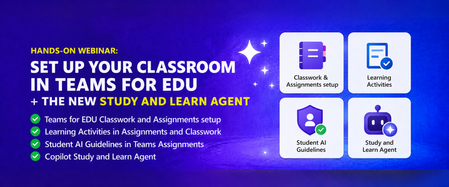
Join us on Wednesday, August 5th at 8:00 AM Pacific Time for a practical, 60-minute webinar to get your Microsoft Teams classroom ready for the new school year in the Northern hemisphere. Get your class set up in Assignments and Classwork, learn about new tools like Learning Activities, use Student AI Guidelines to set the right expectations for your students, and see how the Study and Learn Agent can be a study partner for your students. Follow along with your own Microsoft 365 Education account as we walk through each one. Register here: https://aka.ms/August5Training The session will be recorded and posted to the Microsoft Education YouTube channel so you can watch it later or share it with colleagues. Agenda - Get your Teams EDU classroom ready and learn about the Study and Learn Agent. ✅ Teams EDU Classwork / Assignments setup ✅ Learning Activities in Assignments and Classwork ✅ Student AI Guidelines in Teams Assignments ✅ Copilot Study and Learn Agent We look forward to seeing you on August 5th! Also, be sure to check out and sign up for our Microsoft Elevate Educator community. Mike Tholfsen Group Product Manager Microsoft Education288Views0likes0CommentsMaking Academic Standards More Accessible
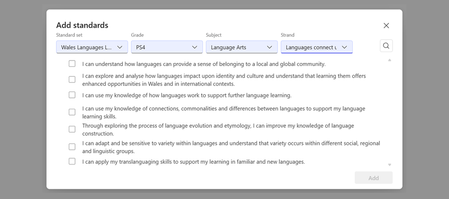
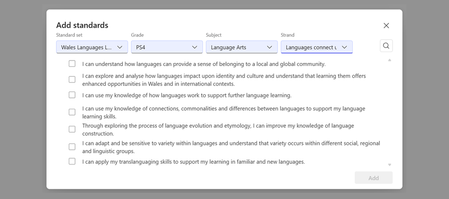
Why standards matter Academic standards are the shared language that connects curriculum, instruction, and assessment. When educators can easily access and apply them: Lesson planning becomes more intentional. You design instruction around clear learning goals rather than guessing what to cover. Assessment aligns with instruction. Quizzes, rubrics, and assignments reflect what students are actually expected to demonstrate. AI-powered tools become more relevant. AI-generated content is grounded in real curriculum expectations, not generic suggestions. Collaboration improves. Teachers across grade levels and departments can speak the same language about what students should know and do. How Microsoft Education uses standards Standards are woven into the experiences educators use every day. In the Teach module and Microsoft 365 LTI, educators can align lesson plans to specific standards by location, subject, and grade band, use the "Align to Standards" tool to refine lesson instructions, and generate quizzes and rubrics grounded in standards. In Assignments in Teams for Education and Microsoft 365 LTI, educators can tag assignments with curriculum expectations, build standards-aligned rubrics, and create a clear thread from instruction to assessment. Across AI-powered workflows, standards can serve as grounding data that helps make generated lesson plans, quizzes, and rubrics more relevant to real curriculum expectations. This reflects Microsoft’s broader approach to AI in education: using AI to support educators with useful, contextual assistance while helping institutions maintain alignment with their instructional goals, policies, and professional judgment. Educators can select standards by location, subject, and language. Expanding coverage through partnership with EdGate Making standards useful in digital tools globally requires more than a large catalog. It requires structured, machine-readable data, ongoing maintenance, and a partner with deep expertise in education standards. EdGate has spent years building and maintaining one of the largest catalogs of digitized standards in education technology. Microsoft partnered with EdGate to help make that infrastructure more accessible inside the workflows educators and institutions already use. Through this partnership, Microsoft has significantly expanded the set of standards EdGate offers, especially internationally. Together, we have grown coverage to include: All 50 U.S. states, including Common Core, NGSS, and state-specific frameworks 70+ countries, with international standards covering core subjects, vocational education, and qualification frameworks Hundreds of supplemental frameworks, from career and technical education to world languages and the arts We continue to expand coverage with new international standards rolling out regularly. EdGate offers access to over 5 million standard statements, aggregating and normalizing global standards for consistent delivery across platforms. Their capabilities include a comprehensive standards catalog, standards authoring tools used by ministries of education, API-based access for platform integration, and certified CASE 1.1 compliance. Microsoft and EdGate are partnering to make a select set of standards freely available to education institutions, lowering barriers for educators and developers who want to explore standards-aligned workflows without a commercial commitment. To expand the impact even further, EdGate is piloting a project in 1EdTech's CASE Global Ecosystem initiative, to demonstrate how interoperable, machine-readable frameworks can improve the discoverability, alignment, and portability of learning and credentialing data across platforms, institutions and borders. The CASE format: Why it matters CASE stands for Competencies and Academic Standards Exchange, an open standard from 1EdTech that defines how learning outcomes and standards are represented in a machine-readable, interoperable format. Why does CASE matter? Machine-readability: Platforms, AI tools, and learning management systems can read, search, and apply standards programmatically. Interoperability: Standards move between systems. An assignment tagged with a standard in Microsoft Teams can be understood by an LMS, a reporting tool, or a curriculum mapping platform without manual re-entry. Cross-region equivalence: CASE enables comparing and mapping standards across countries and frameworks. EdGate is a certified CASE 1.1 provider, meaning the standards they deliver to Microsoft (and to the broader ecosystem) follow this open, interoperable format. The expanded catalog we have built together benefits not just Microsoft's products, but the entire ecosystem of education technology that relies on structured standards data. A shared commitment to open standards Microsoft is proud to be a Contributing Member of 1EdTech, the organization that stewards CASE and other critical interoperability standards for education technology, including LTI, OneRoster, and Open Badges. By collaborating with fellow 1EdTech members like EdGate, we ensure that investments in standards infrastructure benefit educators everywhere, regardless of which platforms or tools they use. When standards are open, structured, and interoperable, everyone wins: educators spend less time on manual alignment, developers can build smarter tools, and students benefit from instruction that is intentionally connected to what they are expected to learn. What this means for educators Within Microsoft Education, you do not need to think about CASE or data formats to benefit from this work. What you will see is: More standards available in the Teach module and Assignments, covering more countries, subjects, and grade bands AI-powered experiences that are better grounded in your actual curriculum Less manual work translating curriculum documents into classroom materials We are committed to continuing this investment: expanding coverage, improving the experience, and working with partners like EdGate and the 1EdTech community to make standards-aligned teaching easier for educators everywhere. Helpful links Getting started with Teach Modify content: Align to Standards Microsoft Teams for Education Microsoft 365 LTI International standards currently available through EdGate Request additional standards in Microsoft Education About 1EdTech About CASE (Competencies and Academic Standards Exchange) Have questions or feedback about standards in Microsoft Education? Drop a comment below or submit a request through our Standards Feedback form.545Views0likes0CommentsMore standards are coming to the Teach Module and Teams for Education!
Hi everyone! As educators, you have told us that aligning lessons, assessments, and classroom materials to the standards you actually use is one of the most important parts of making AI-powered teaching tools useful in practice. When standards are available and easy to apply, it becomes much faster to create materials that fit your local curriculum and instructional goals. That is why we are continuing to expand the standards experience across Microsoft Education. We are excited to share a new wave of international standards coming to the standards experience in Teach and in Teams for Education. These standards will support experiences in the Teach module across Lesson Plans, Quizzes, and Rubrics, and they are also coming to Assignments in Teams for Education. If you don't see your country listed, you can request more standards at this link. In this post, we will share what is coming this week, what is planned over the next two months, what we are targeting for summer, and how we plan to keep you updated going forward. Why this matters Standards alignment helps you spend less time translating curriculum requirements into classroom materials and more time supporting student learning. Whether you are building a lesson plan, generating a quiz, creating a rubric, or preparing future assignments workflows in Teams for Education, access to the right standards makes those experiences more relevant and easier to use. Our goal is to keep expanding coverage so more educators can work with the standards they already know and trust, in more countries, subjects, and grade bands. New standards added in 2025 In 2025, we expanded standards coverage with a new set of international additions, including: Austria Canada - Ontario Early Language Learners Health & PE Technology Education Art Canada - Quebec Francophone Canada - Ontario World Languages French as a Second Language Native Languages American Sign Language as a Second Language Classical Studies and International Languages Egypt England Arts Education Health & PE World Languages Technology Education Career Technical Education Finland Kuwait UK GCE AS and A Level Qualifications across a broad range of subject areas These additions helped expand standards coverage beyond core national frameworks and into more subject-specific and qualification-based experiences. Recently added We have already started rolling out new international standards this spring. Recent additions include: Czech Republic UK additions, including recent support for Scotland, Wales, and UK GCE AS and A Level qualifications New Brunswick - Technology Standards Kuwait - Language Arts, Math, Social Studies Estonia - Language Arts, Math, Science Estonia - Social Studies Latvia New Brunswick - Language Arts, Math, Science, Social Studies These recent additions laid the groundwork for the next wave of standards now arriving across Teach and Teams for Education. Coming this week This week, we are adding the following standards to the standards experience in Teach and Teams for Education: Finland Lithuania Norway Romania These additions continue our recent rollout of international standards and expand access for educators who want to align AI-assisted lesson creation and assessment workflows to local curriculum expectations. Coming in the next two months Over the next two months, we expect to continue expanding standards coverage with the following additions: Slovakia Sweden Egypt Canada - Quebec Francophone Standards India NCERT - Hindi Language Arts India NCERT - Sanskrit Language Arts Bahrain Lebanon Oman Qatar Greece We also have additional standards in progress that are on the roadmap, with timing still being finalized: Austria Kuwait - Science India NCERT - Urdu Language Arts Australia ACARA National Technology Education Health & PE Art Languages Canada - New Brunswick additional subject expansion Health & PE Art Languages Norway vocational standards As these become available, they will light up the same standards-backed experiences across Teach and Teams for Education. Planned for summer Looking ahead, we are planning an even broader set of standards expansions over the summer. This work is designed to add more international coverage across core subjects and additional curriculum frameworks. The following are planned for summer: Belgium - Flemish Catholic Network Standards (VVKSO) Language Arts, Math, Science, Social Studies Canada, British Columbia ADST (Entrepreneurship & Marketing) Career Education (Career-Life Education, Career-Life Connections) Core Competencies Canada: Ontario Business Studies Canadian & World Studies Co-op Ed Guidance & Career Ed Ontario Catholic expectations (ICE) CEFR (Common European Framework of Reference for Languages) Language Arts Portugal Language Arts, Math, Science, Social Studies Germany: NRW State Kernlehrplan Language Arts, Math, Science, Social Studies Hong Kong Language Arts, Math, Science, Social Studies Turkey Language Arts, Math, Science, Social Studies Vietnam Language Arts, Math, Science, Social Studies Costa Rica Language Arts, Math, Science, Social Studies Peru Language Arts, Math, Science, Social Studies Guatemala Language Arts, Math, Science, Social Studies Morocco Language Arts, Math, Science, Social Studies Croatia Language Arts, Math, Science, Social Studies Kenya Language Arts, Math, Science, Social Studies Bolivia Language Arts, Math, Science, Social Studies Chile Language Arts, Math, Science, Social Studies Pakistan Language Arts, Math, Science, Social Studies Panama Language Arts, Math, Science, Social Studies This planned summer wave reflects our continued focus on expanding standards coverage in ways that are useful for real classroom workflows across regions. Where you will see these standards As standards coverage expands, educators will see the impact across several experiences: Teach module - Lesson Plans Teach module - Quizzes Teach module and Teams for Education – Rubrics Teams for Education – Assignments Instructions (Coming soon) This means more opportunities to use standards as part of lesson creation, assessment design, and classroom workflows without having to start from scratch. What this means for educators As more standards become available, you will be able to: Align lesson materials to more local and regional curriculum requirements Build quizzes and rubrics that better reflect what students are expected to know and do Use standards-backed workflows in Teach across more countries and subject areas Prepare for future standards-aligned experiences in Assignments in Teams for Education For educators working across multiple countries, languages, or curriculum systems, this expanded coverage can help reduce manual work and make AI-generated outputs more relevant to your teaching context. We plan to keep sharing updates We also plan to share regular blog updates roughly every quarter so you can see what standards are newly available, what is rolling out next, and where we are continuing to expand coverage. Our goal is to make these updates easier to track so educators, school leaders, and partners can stay current on what is available in the standards experience across Microsoft Education. Helpful links Getting started with Teach Modify content - Align to Standards Microsoft Teams for Education International standards currently available through EdGate Request additional standards Share feedback with us by joining our EDU Insider Program Have questions or want to let us know which standards you would like to see next? Drop a comment below or submit a request through our Standards Feedback form. We would love to hear what curriculum frameworks matter most in your classrooms. Until next time, Samantha Fisher · Microsoft Education1.6KViews2likes4Comments