teams
8 Topics
Microsoft Mesh Education Licensing
Microsoft Education and Product Teams, I am writing to advocate for the inclusion of Microsoft Mesh (Immersive Spaces and Events) within the Microsoft 365 Education SKU family (A1, A3, and A5). Currently, Mesh is available across nearly every commercial license family, from Teams Essentials to E5 Enterprise, but is explicitly excluded from Education tenants. As documented in several Learn Q&A threads and service plan manifests, the MESH_IMMERSIVE_FOR_TEAMS service plan is simply not provisioned for EDU customers. The current state is one of silent exclusion, creating several critical hurdles: Pedagogical: Immersive technology is one of the most requested features for remote and hybrid learning to combat "Zoom fatigue" and increase student engagement. Education is a high-value use case for 3D immersion. Parity: Universities and K-12 institutions on A5 licenses pay for "top-tier" features but are denied the innovative tools available to a "Business Basic" user. If you are a small business on a basic plan, you have Mesh. If you are a world-class University on A5, you are blocked. This isn't a "procurable" add-on; it is a licensing eligibility wall. Implementation: Current Microsoft guidance suggests schools move to Business or Enterprise licensing to access Mesh. This is not a viable solution for institutions with thousands of users, complex compliance requirements, and student-data privacy frameworks built specifically around EDU SKUs. We aren’t asking for a discount; we are asking for eligibility. We urge the product team to: Add the Mesh Immersive service plan to the A3 and A5 EDU license entitlements. Provide a clear roadmap for when Education tenants can expect feature parity with Commercial tenants. Education should be the vanguard of immersive collaboration, not an afterthought. We would appreciate a formal update on when this licensing barrier will be removed.407Views2likes1Comment
Project Based Learning with Teams
At Renton Prep we have a secondary math course we run with 7th through 10th grade students, simply titled Integrated Math. We have effectively used Teams assignments to implement this project based learning (PBL) course. Here's an example of a recent PBL Math Investigation we used this year. https://discomath.com/activity/details/8/255-animal-vision?student=1 Full List: https://discomath.com/activities?math_activities___type=Investigation940Views1like1CommentUser adoption podcast for education
Hi Everyone, Just wanted to make you aware of some community resources we have created to help education users adopt Office 365 from a strategic level. We also create guides on our blog and YouTube channel for end users. YouTube Channel: https://www.youtube.com/channel/UCi3gSRmDtbEE4ozmqykAa2w We have a podcast series on YouTube: https://www.youtube.com/playlist?list=PL-eZHO0ywIIBIDOpcTkWFFb-8N7JEx_TO Also a community blog area on our website: https://www.clouddesignbox.co.uk/blog Any my own personal blog: https://www.tonyishere.co.uk/ I hope its of use to you, you can also reach out to me on Twitter https://twitter.com/TonyMSTeams Thanks, Tony816Views3likes0Comments
Anonymous guest sharing in Teams
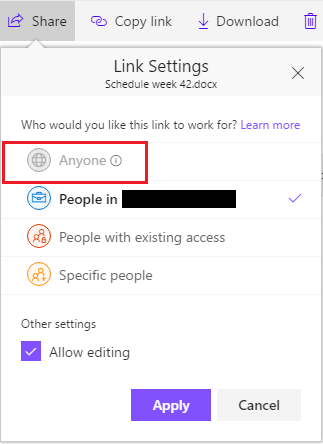
Ever wanted to share folders or documents, like the weekly schedule, homework etc., with anonymous guests like parents? For the sake of clarity, these are not guests invited to the actual team, but rather anyone receiving or accessing the link, by email, a text message or from a webpage. Unfortunately, when a team is created, the underlying SharePoint site has a default SharingCapability of ExternalUserSharingOnly. We can find the SharingCapability by logging onto Sharepoint Online with PowerShell, as an admin user with the appropriate permissions: Connect-SPOService Get-SPOSite -Identity siteurl | select SharingCapability SharingCapability : ExternalUserSharingOnly We can see in the https://www.google.no/url?sa=t&rct=j&q=&esrc=s&source=web&cd=1&cad=rja&uact=8&ved=0ahUKEwjfm_Kl6OjXAhXkHJoKHSDIDkUQFggnMAA&url=https%3A%2F%2Ftechnet.microsoft.com%2Fen-us%2Flibrary%2Ffp161394.aspx&usg=AOvVaw1CVYoc09JwUiQgJ_BpPNfq that ExternalUserSharingOnly allows external user sharing (share by email), but not guest link sharing. What we need is ExternalUserAndGuestSharing, where both external user sharing, and guest link sharing are enabled; Check out my post on https://Teams.rocks to see how we can acomplish that using powershell: https://teams.rocks/2017/10/03/guestsharing/5KViews1like1Comment
Re-use all Team (class) settings from semester to semester
I saw this post (https://techcommunity.microsoft.com/t5/Education/Option-to-duplicate-a-team-and-reuse-its-assignments/m-p/151523#M157) about re-using assignments; my question is similar but not quite the same. We are getting feedback that teachers don't want to start using Teams if it means they have to setup their Team every semester; they want to set up a team once and then re-use the same links, documents, assignments, etc. every semester. What is the best option for doing this? If they use Class Notebook in Teams and put everything in there, will they be able to copy their Class Notebook to each new Team/class that gets setup for them via SDS? I don't think that assignments and Team documents are currently available to copy (from the related post I linked above), but if at least the majority of their online class can be copied to each class, that would be a big help. What does everyone else do?2.2KViews1like2CommentsOffice 365 A3 for faculty not recognized by Teams as Education
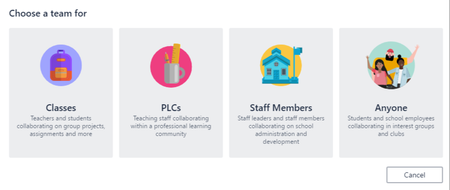
We recently signed a new license agreement with Microsoft and went with Microsoft 365 Education A3. When we license users with the Office 365 A3 for faculty licenses, Teams does not recognize them as education users. There are no templates when creating new teams (Classes, PLCs, Staff Members), no class notebook etc. Users still licensed with Office 365 A1 for faculty get the "Teams for Education experience". Anyone used Teams for Education with Office 365 A3?2.1KViews0likes1CommentOption to create different types of teams is missing?
Hi, I was working with a different school yesterday to help them set something up on OneNote. I noticed that when I created a new team there was no option to create the different types of team (PLC, classes, etc) as shown in the picture. I was worried that it had been withdrawn but when I checked it out it is still available in teams on my home school. Anyone know why a school might not have access to this? I checked all the admin settings but I couldn't see anything obvious. ThanksSolved2.4KViews0likes1Comment