teams
58 Topics
Make an alert icon of new messages from other accounts/Orgs on top right in TEAMs
The icon of activity in other accounts and orgs moved to bottom left sucks, user would easily miss noticing new messages from other accounts/org. It's better to keep an alert icon next to user icon on top right for easier notification.154Views0likes0Comments
Unable to get custom Teams app supported in shared channel
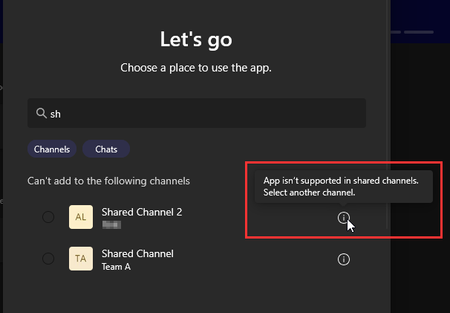
Hello everyone, I'm developing a Teams app which is working fine apart that I cannot the app supported in Teams shared channels. The app is a configurable tab app with no bots and no personal / static tabs Here is my manifest file: { "$schema": "https://developer.microsoft.com/en-us/json-schemas/teams/v1.23/MicrosoftTeams.schema.json", "manifestVersion": "1.23", "version": "1.6.5", "id": "135a5af5-6bf3-XXXX-XXXX-XXXXXXXXXXXX", "developer": { "name": "COMPANY", "websiteUrl": "https://www.company.com/", "privacyUrl": "https://www.company.com/privacy", "termsOfUseUrl": "https://www.company.com/termsofuse", "mpnId": "XXXXXXX" }, "icons": { "color": "color.png", "outline": "outline.png" }, "name": { "short": "APP name", "full": "Full app name" }, "description": { "short": "A useful configurable Teams app", "full": "useful Teams app" }, "accentColor": "#FFFFFF", "configurableTabs": [ { "configurationUrl": "https://app.example.com/setup", "canUpdateConfiguration": true, "scopes": [ "team" ], "context": [ "channelTab" ] } ], "supportedChannelTypes": [ "privateChannels", "sharedChannels" ], "webApplicationInfo": { "id": "e11ad337-b136-XXXX-XXXX-XXXXXXXXXXXX", "resource": "api://app.example.com/e11ad337-b136-XXXX-XXXX-XXXXXXXXXXXX" }, "bots": [], "composeExtensions": [], "permissions": [ "identity" ], "validDomains": [ "app.example.com" ] } Does anyone have a similar issue? I've also tried to recreate the app using the Teams Developer Portal, but with no luck. Thank you Tobias122Views0likes0Comments
Enabling Cross-Tenant Authentication for Teams Apps with Single-Tenant Bot
Hello Team, I am working on implementing authentication for a Teams application using the Microsoft 365 Agents SDK. Following Microsoft’s current guidance, I have: Registered a single-tenant Azure AD bot. Integrated Azure AD authentication. Prepared for AppSource distribution as the long-term supported method for cross-tenant availability. However, I am still facing challenges in reliably enabling sign-in for external users from other tenants. Specifically: The cross-tenant sign-in flow remains unclear. Validating authentication across multiple tenants is difficult without official end-to-end guidance. Existing samples and documentation primarily address single-tenant or internal-only scenarios. As of now, authentication for external users is still difficult to get working and validate consistently across tenants. Could you provide detailed guides, samples, or best practices for: Enabling authentication for external users in this single tenant + AppSource distribution model. Recommended patterns for testing cross-tenant authentication before AppSource submission. Any roadmap considerations for simplifying this scenario. This would help ensure Teams apps can meet compliance requirements while still delivering a smooth sign-in experience for users across organizations. Thank You, ChetanSolved410Views0likes6Comments
Getting a 401 when trying to create a conversation
Hello ! Using the node botbuilder SDK, I am trying to setup my bot to proactively create a conversation in a public channel on Teams. However, I keep getting 401 responses from the API, with no further details. You can find my code attached bellow: const adapter = new CloudAdapter( new ConfigurationBotFrameworkAuthentication( { MicrosoftAppId: process.env.MS_BOT_APP_ID, MicrosoftAppTenantId: process.env.MS_CLIENT_ID, }, new ConfigurationServiceClientCredentialFactory({ MicrosoftAppId: process.env.MS_BOT_APP_ID, MicrosoftAppPassword: process.env.MS_BOT_CLIENT_SECRET, MicrosoftAppTenantId: process.env.MS_CLIENT_ID, }), ), ); await adapter.createConversationAsync( process.env.MS_BOT_APP_ID!, Channels.Msteams, "https://smba.trafficmanager.net/teams/", null, { activity: { type: "message", text: "This is a test message", textFormat: "markdown", }, bot: { id: `28:${process.env.MS_BOT_APP_ID}`, name: "Zygon" }, isGroup: true, tenantId: process.env.MS_TENANT_ID, channelData: { channel: { id: channelId } }, }, console.log, );1.1KViews0likes9CommentsCSS Properties being stripped from Teams Chat messages from Bot
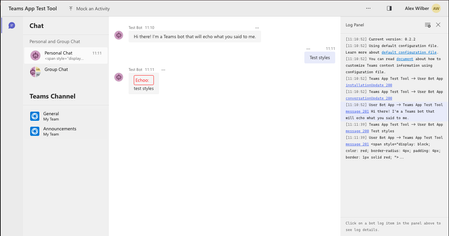
Hi Team, We've noticed that certain CSS properties are no longer appearing in HTML messages when sent to Teams Chat. Previously, our bot styled messages using display and border properties, but now these properties are missing from the HTML when we inspect the page. Steps to Reproduce: Start the Echo bot from the sample templates (I used Teams Toolkit to deploy it to Teams or run it in the Test tool). In the TeamsBot.ts file, modify the onMessage function by replacing await context.sendActivity(...) with the following code. This example adds styling to an echo message. const a: Partial<Activity> = { text: `<span style="display: block; color: red; border-radius: 4px; padding: 4px; border: 1px solid red; ">Echoo:</span> <span style="display: block;">${txt}</span>`, textFormat: TextFormatTypes.Xml }; await context.sendActivity(a); Note: I also tried sending the HTML directly with context.sendActivity(...) without setting the textFormat property in the Activity, and observed the same result. Run the bot in the Test tool and Teams to compare behavior. Observed behavior: In the Test tool: All styles are applied as expected. In Teams: Only the color property is applied, while display, padding, and border properties are ignored (stripped out of the HTML). Here’s an example of the HTML output in Teams: <div dir="auto" id="content-1730973548675" aria-label="Echoo: test styles properties" class="fui-Primitive ___16zla5h f1oy3dpc fqtknz5 fyvcxda"> <span style="color: red;">Echoo:</span> <span>test styles properties</span> </div> Could you provide insights on whether this change is intended, and if there are any workarounds for preserving these CSS properties in Teams messages? Thank you!1.6KViews11likes4Comments
Publish teams bot only to some customers
We have a teams bot that we would like to be installable only by our customers. Is it possible to publish a bot to the teams store and only allow a set of organization / people install it ? As far as I know, bots published to teams store are public and installable by anyone.568Views0likes1Comment
Cannot interact with screen while Teams Annotation is on.
Hey, so in the past I've taken a lot of advantage of other apps' screen-share annotation features. Unfortunately, Teams implements it in a way that isn't very useful for us. The presenter needs to be able to still operate/ navigate their machine while participants annotate. The "cursor tool" in annotation mode is a little puzzling to me, but if there could be an additional cursor that return the pc to "normal mode" for the sharer, and does not interact with the overlay, it would be an extremely useful feature. Thanks, Tom.885Views0likes1CommentMentioning of a user is split in first and lastname
I just discovered that from somewhere in December I do not get a mentioned user in a message as one mention any longer but splitted into two mentions with first and lastname. Is this a bug or is it by intention? This is how the JSON message to the bot for the message: @bot Sarah Johnson mentioning looked like until December: { "text": "<at>bot</at> <at>Sara Johnson</at> mentioning", "textFormat": "plain", ... "recipient": { "id": "...", "name": "bot" }, "entities": [ { "mentioned": { "id": "xxx", "name": "bot" }, "text": "<at>bot</at>", "type": "mention" }, { "mentioned": { "id": "123", "name": "Sarah Johnson" }, "text": "<at>Sarah Johnson</at>", "type": "mention" }, ... ], ... } And this is how it looks today. { "text": "<at>bot</at> <at>Sara</at> <at>Johnson</at> mentioning", "textFormat": "plain", ... "recipient": { "id": "...", "name": "bot" }, "entities": [ { "mentioned": { "id": "xxx", "name": "bot" }, "text": "<at>bot</at>", "type": "mention" }, { "mentioned": { "id": "123", "name": "Sarah" }, "text": "<at>Sarah</at>", "type": "mention" }, { "mentioned": { "id": "123", "name": "Johnson" }, "text": "<at>Johnson</at>", "type": "mention" }, ... ], ... } The mentioning is split in first and lastname with the same userid. Is that the intended behaviour?825Views0likes4Comments