sync
61 Topics
Edge sync fails after restart — MSA key error
Edge sync works after signing in, but gets stuck on “Initializing” after reopening — persists after Windows repair and testing with a new Windows user Hi everyone, Microsoft Support suggested that I post here for further help. My personal Microsoft account syncs successfully when I first sign in to Edge. However, after closing and reopening the browser, sync gets stuck on “Initializing” / “Setting up sync.” Signing in again can temporarily restore it, but the problem returns after restarting Edge. The issue also reproduces under a newly created Windows local user account. Environment Microsoft Edge: 156.0.4314.58 Windows 11 Home China, version 26H2, build 26300.9711, 64-bit Account type: Personal Microsoft account (MSA), not a work or school account The same Microsoft account has been syncing successfully on my phone Steps to reproduce Sign in to Edge with my Microsoft account and enable sync. Sync works successfully. Close and reopen Edge. Sync remains stuck on “Initializing,” and all data types show “Not Running.” Current edge://sync-internals results Transport State: Initializing User Actionable Error: None Disable Reasons: None Sync Feature Enabled: true Setup In Progress: false Sync Consent: true Auth Error: OK since browser startup MainSyncToken: Last Token Request Result: OK Has Token: true Last Token Error: None KeyDataToken: Last Token Request Result: OK Has Token: true Last Token Error: None MSA Account Key Status: Download Key Result: Fail Set Key Result: Fail Net Error Code: n/a HTTP Response Code: n/a Process Key Result: n/a Encryption: Cryptographer Ready To Encrypt: false Cryptographer Has Pending Keys: true Has Keystore Key: false Passphrase Required: false Passphrase Type: kKeystorePassphrase Server Connection: not attempted Sync Engine: Backend Status: Initialized BlockReason: None Syncer: Unset DataType Manager: Stopped All data types: Not Running Updates Downloaded / Successful Commits: 0 No enabled sync-blocking policies are shown. Troubleshooting already completed Tested with a separate Edge user-data directory: initial sign-in synced successfully, but reopening reproduced the issue. Tested with extensions disabled: no improvement. Tested the separate Edge instance with --no-proxy-server: no improvement. This does not rule out system-level network filtering. Tested --enable-features=msForceOneAuthWAM: no improvement, although I did not independently verify whether the authentication library actually switched. Tried stopping sync while keeping data, then enabling it again: no improvement. Completed DISM repair successfully. Subsequent SFC and component-store checks reported no remaining corruption. Completed a Windows ISO in-place repair, keeping personal files and applications: the sync problem persisted. Created a new standard Windows local user and tested Edge there: first sync succeeded, but reopening Edge reproduced the same failure. Authentication tokens appear to be obtained successfully, while the sync encryption-key stage remains unsuccessful. I understand that the n/a HTTP and network fields do not establish whether a request was sent or rejected. Questions Is this a known issue affecting personal-account sync in this Edge version? What diagnostic logs would help distinguish a startup/key-loading problem from an account-side sync issue? Is there a supported workaround or fix that preserves existing browser data and cloud sync data? I can provide additional sanitized diagnostics. I would prefer to avoid further profile deletion or cloud-sync resets unless the logs indicate that they are necessary. Thank you for your help.344Views2likes3Comments
Edge Sync stuck in Initializing with Backend Uninitialized
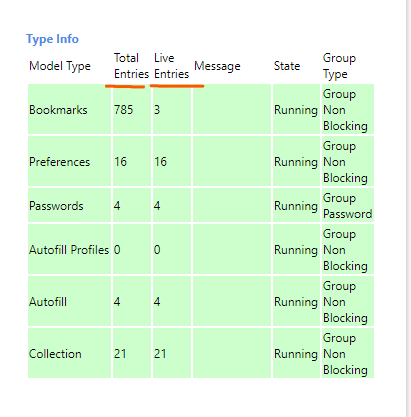
Hello, I am hoping to get feedback from people familiar with Edge Sync internals, synchronization failures, or similar cases. OVERVIEW Around October 13, 2026, I discovered that my Favorites and saved Passwords were no longer visible in Microsoft Edge. The issue is present on both my desktop PC and my laptop using the same personal Microsoft account. Approximately two weeks later, the issue remains unchanged. What makes this case unusual is that authentication appears to work correctly, Edge Sync servers respond successfully, and encryption keys download successfully, yet the sync engine never completes initialization. ENVIRONMENT Microsoft Edge Windows 11 Personal Microsoft account Desktop PC Laptop The same symptoms occur on both devices. SYNC INTERNALS edge://sync-internals consistently reports: Transport State = Initializing Sync Engine State = Stopped Backend Status = Uninitialized Sync Feature Enabled = True Bookmarks = 0 Passwords = 0 Additional values: Download Key Result = Fail Set Key Result = Fail SIGN-IN STATUS edge://signin-internals reports: Successful authentication Successful token retrieval No authentication errors There is no indication of a Microsoft account sign-in problem. SYNC DIAGNOSTICS sync_diagnostic.log repeatedly shows: SyncState after authenticated = FeatureCanStart Try to start sync engine Load and connect Nigori controller Update key data credentials Reset engine The sync engine repeatedly attempts initialization but never reaches a running state. SERVER COMMUNICATION cv_debug.log reports: SYNC_SERVER_OK EncryptionKeysFetcher.DownloadKeys = Success Key count = 10 SetEncryptionKeys = Success This confirms that sync servers respond and encryption keys can be downloaded successfully. One unusual observation is that Sync Internals reports: Download Key Result = Fail Set Key Result = Fail while the logs simultaneously report successful key download and processing. PROFILE VERIFICATION Active profile: ...\Microsoft\Edge\User Data\Default During troubleshooting, a file named "Bookmarks" could not be located within the active profile. The following sync-related components remain present: Sync Data LevelDB Nigori.bin Logs MULTI-DEVICE IMPACT The same behavior is present on both desktop and laptop using the same Microsoft account. This makes a single-device profile corruption scenario seem less likely. NEW OBSERVATION After the initial failure, I created a new Favorites folder named: After Edge Sync Failure 20261013 The folder appeared correctly in the Favorites Bar. After Microsoft Edge and Windows were closed and restarted, the folder was no longer present. This suggests the issue may still be actively affecting local Favorites persistence and is not limited to historical sync data. ACTIONS NOT PERFORMED Based on recommendations received in Microsoft Q&A, I have intentionally avoided: Reset Sync Deleting the Edge profile Clearing all Edge data Reinstalling Edge The goal has been to avoid overwriting potentially recoverable sync data. PRIMARY QUESTION My main question is not whether synchronization currently works. My main question is whether the original Favorites and Password records may still exist within the Edge Sync service and whether there is any supported way to determine that before attempting potentially destructive recovery actions. QUESTIONS Has anyone seen this exact combination of Transport State = Initializing, Sync Engine State = Stopped, and Backend Status = Uninitialized persisting for weeks? Can a corrupted Nigori or encryption-key state cause Favorites and Passwords to report zero items despite successful authentication and successful key download? Has anyone recovered Favorites or Passwords after a similar state? Is there any supported method to determine whether the original sync data still exists on the sync backend before attempting Reset Sync? Does this pattern suggest an account-level sync corruption, backend corruption, or another known Edge Sync failure mode? Any technical insight would be greatly appreciated. Thank you.427Views0likes1Comment
Edge on Android: Syncs personal data (e.g. history, payment methods), despite me turning them off
Sync settings chosen during first-run setup are ignored. All sync types get turned on. Steps taken Install Outlook. (Link: https://play.google.com/store/apps/details?id=com.microsoft.office.outlook ) Sign in to Outlook. Uninstall and re-install Edge. (Link: https://play.google.com/store/apps/details?id=com.microsoft.emmx ) Choose whether to set Edge as default browser. Tap the tiny blue text, which says "Sync settings". (Not the tiny blue text immediately underneath, which says "Microsoft Privacy Statement"). All sync types are turned on by default. Turn off all sync items except one, e.g. Passwords. Dismiss "Sync settings" Re-open "Sync settings", to confirm your settings are still there. Then dismiss it again. Sign in, or "Continue". Continue setting up Edge. Open the Edge menu. Tap your account Tap Sync. Result: ALL sync items are turned on, despite having turned them off in step 6. Request Is this bug fixed, in a later version of Edge? Note: This bug does not fit in the official feedback method for Edge for Android. I am hoping the helpful elves at the other end of the Edge feedback form are reading this question. Because I have sent them the link to https://learn.microsoft.com/en-us/answers/questions/6035494/edge-on-android-syncs-personal-data-history-paymen. My environment Google Pixel 10a Android 17 Edge version 155.0.4283.48 (also reproduced with earlier version: 154.0.4258.38) OR Edge Canary version 157.0.4338.0 (Downloaded 2026-10-19)134Views0likes0Comments
Edge sync with Google Account
Hello! So, I've been using Chrome for like 10 years, and now I've heard about Edge from a friend, and I wanted to switch browsers. But all my passwords, bookmarks and history stuff are synced with my google account. I also have an android phone, which came with Chrome and Google apps, and I like the fact that Google from desktop brings me all the passwords and others on my phone. The question is if I can sync all Edge things in my google account, to keep them present everywhere. It is pretty hard to me to break up with all the google services, since I'm using Gmail, Google Drive, Youtube and others, and bing gives me poor searching results in romanian, comparing to google. Sorry if the whole thing sounded like an ad for google, but I'm wondering if I can sync edge with a google account. Peace!279KViews8likes11CommentsAdd Syncing of PWAs between devices | sites that are installed as apps in Edge browser
I usually add a bunch of sites and social medias to Edge as PWA and install them in Edge: edge://apps/ I would like them to sync with my Microsoft account and to be available on all of my devices, other Windows and Mac devices, so I won't have to install them one by one again.Solved7.5KViews8likes19CommentsRestoring extensions and the invenient experience.
Hello Everyone! How are you? You've all gone through or will go through the experience of launching a Chromium-based browser at some point (especially Edge in this case) And see that when you reinstall your extensions through the automatic process (importing from your browser or your account) You're faced with THOUSANDS of extensions in your browser, with settings for extensions or welcome or anything like that! This isn't really a problem, but it can be really inconvenient sometimes when you're typing a text or looking for something and suddenly you're moved to a new tab or something. The question is: Why not just put a floating bubble under the extensions icon warning you that "Hey you have new extensions, click here and configure it!" This could be a great idea and would aid in a smoother and smoother experience that is less invasive and clearer! But let me know, what do you think of it?446Views0likes0Comments
Sync Favorites in Edge Chromium
Hello There was a problem syncing favorites in Edge (105.0.1343.42): There are 4 devices using the same Microsoft account to sync. For some time now, synchronization between devices has partially stopped working. It is noticed that one part of the favorites is synchronized between one pair of devices, another part is synchronized between the second pair. It seems that somewhere there is a setting, what should be synchronized between what. Profile settings in Edge are set to the same settings.568Views0likes0Comments