survey
708 Topics
Microsoft Forms appears with an error message, and my respondents and I no longer have access to it.
Hi, Customer service directed me to post my question on this tech community board. My Microsoft Forms are showing the error message in the title: "Form can no longer be accessed. The account associated with this form has been blocked." The message includes a session ID and a correction ID, and I’m not sure whether it’s safe to post them on this forum. I can share them if you advise me to. Thank you in advance for your help. Kind regards, Marcus116Views0likes0Comments
I am Facing Microsoft form related issue
I am Facing Microsoft form related issue, I can see when I am downloading a Excel copy some columns are blank. This is my survey form, and I cannot add manually however this will reflect manipulation in data, as this is technical glitch need assistant from your side on urgent basis387Views0likes1Comment
Insights from Copilot have stopped working for us
We're all licensed (verified) with M365 Copilot, and for about the last week, one of our workhorse intake forms has stopped working with regards to the "Insights from Copilot" feature. When we attempt to refresh the insights, it presents the message, "Your form has XX responses. Copilot is analyzing the data to provide insights.", then spins for about 30 seconds, and then presents the error, "The insights haven't been generated successfully. Please try again." We're syncing responses to an Excel workbook, and that seems fine, but after about a week these "insights" just started failing in this fashion. We've done basic troubleshooting like trying InPrivate browsing, cache clearing, and since we are only at about 100 responses for this particular small form we're not hitting any limits. Regardless, it's wedged stuck in this state. I reported it via the M365 Admin portal and received the usual "No issues found" reply. 🙄 Anyone else seeing this problem? Does anyone actually use this feature? 😜607Views0likes2Comments
Form does not exist
I recently printed some leaflets with the QR code and URL to my forms and had 40+ responses. I had made some minor changes to the form and the outcome of the blue when you scan the form you get an error message that read "the form does now exist".... The thing is ,it does exist. It's not in the deleted bin it's active, it's just upon further exploration I can see the QR code and URL has changed. I have been using the tick box that says make URL shorter...could it be that? Does this change the URL and QR Code every time you press it?254Views0likes1CommentDirect Reports under different manager
As a company, we recently made an acquisition for a headcount of 83 in last month. All the members are tagged to TA manager for time being to get the onboarding and their email domains, system integration etc. So finally, as the Glint Survey is the snapshot of the time on that day they were tagged to the wrong manager and the very next day they were tagged to the right one. I raised a support request today. Can we retroactive update so that they go under rightful managers?.159Views0likes0Comments
Survey Intake Form
Hi all, I am hoping to create a survey intake form, for which subjects will have to fulfil certain criteria. I would like for a message to pop up if a person was to click a particular option in response to a question. For example: Are you aged 18 or over? Yes/No If no, message pops up with further information and the form is then over for the subject. I do not want to use the "quiz" format as I do not want subjects to receive a "score". Does this require premium? Thanks all.142Views0likes1CommentNew survey - Windows Server application survey!
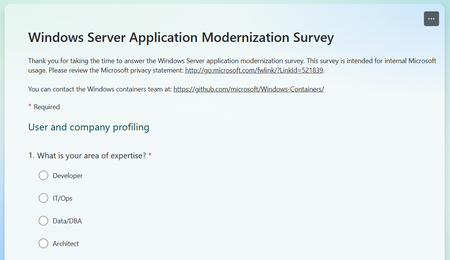
Happy new year everyone! With the new year, it's time to make plans and goals for the new cycle. At Microsoft, we're always planning for what's ahead, what we want to accomplish, and how can we delight our customers. That planning and the resulting prioritization is based on what we hear from our customers. So, from time to time we publish surveys to get a broader sense of what customers are thinking, how our products can help them succeed, and make sure we align our goals. Today, I'm here to ask for your input - we just released a new survey focused on understanding how customers approach Windows Server application modernization. This survey is focused on understanding how customers approach modernization of Windows Server apps, what are the challenges, how they think about the modernization process, what spins up the process, etc. This is of immeasurable value to us and will help us prioritize the work for the coming years. To answer the survey, please access: https://aka.ms/WSAppModSurvey. Feel free to share the link above with anyone and thank you in advance for your support!523Views1like3Comments
Problems sharing results
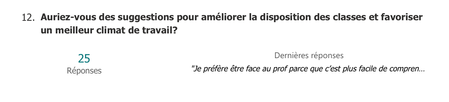
Hi! I need to share the results of a Microsoft Forms survey, and the Summary link doesn't include the written answers to one of my questions. As you can see, I have 25 written responses that I’d like to share along with the graphs, but those answers are missing: Additionally, is there a way to customize the appearance of the shared responses? Thank you! Chris.264Views0likes1Comment
Issue: Mouse clicking can select wrong answers
Hi, I just completed an exam on Microsoft Forms and noticed that it was very easy to accidentally click the wrong answer, and one of my answers was marked wrong as a result. How does it happen? The current implementation allows users to click the whole line rather than just the radio button or checkboxes. Since I sometime click inadvertently on the screen, it will change my answer to the wrong one even if I didn't intend to click an answer. If you only allow clicking on the radio button or checkbox instead of the full line, this wouldn't happen. Thanks!173Views0likes1Comment