surface laptop
16 Topics
Brand new Surface Laptop 3 Fingerprint-like smudges
hello I recently bought the new surface laptop 3 which I bought a few days ago. In these days, we tend to clean our devices more regularly. I cleaned my Surface Laptop 3 with a 70% Alcohol spray and cleaning it with a 100% cloth after i removed it from the box(microsoft suggestions in their website). These weird smudge does not get off and I when I touch it there is no feel to the touch. The weird thing is it just the lid although I cleaned every part of the device... I have never dropped this device and there's no water got inside the device and I always keep it in a safe environment with normal temperatures. Please see the image to get what I mean. What should I do with this?1.6KViews0likes0Comments
Surface Laptop 3 - applications starts up slow and with delay
Problem Description: Every application starts up with a delay of 1-2 seconds. Opening another screen of an running program does initalize instantly though.. Build and Firmware I'm running the 20H2 build 19042.685 and have the Surface Laptop 3 firmware from november 2020 installed (SurfaceLaptop3_Win10_18362_20.101.8577.0) Examples: - Applies to any application, offline tooling such as Draw.io, command prompt - Opening a new tab in Chrome is instantly, but when I go to an URL it tends to take seconds before the page is initialized to actually perform and connect to the designated URL. - Opening Git bash takes 2 seconds and then it takes up to a minute to load its content before I can perform any commands Does anyone have any experience regarding my current state?1.5KViews0likes3Comments
Surface 3 laptop hardware issue
I have just returned a brand new Surface 3 laptop bought 2 days ago. It kept turning itself off constantly. Tech support at the HQ of the store I purchased it from spent considerable time trying to diagnose the problem over the phone. In the end it was diagnosed as a hardware problem not a software. This is very disappointing for a laptop of this quality which surely cannot have passed stringent quality control tests (assume China). I hope my replacement next week is going to be OK.1.5KViews0likes1Comment
Surface Laptop 5 not recognizing USB A or USB C ports - have tried everything
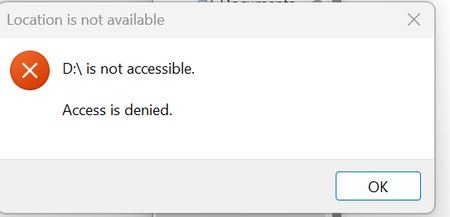
Brand new Surface Laptop 5 - Brand new Windows 10 - upgraded to Windows 11 - ran all software, OS and firmware updates, multiple times. Also disabled/re-enabled all USB options in Device Manager, but nothing works. I need to set this laptop up for work, but I don't know what to do next. Please help. I keep getting this message. I have verified that this USB works on other PCs/laptops.1.1KViews0likes5Comments[REQUEST] Surface Laptop 3 - Auto Power-on
Hi, At the office, I regularly use my surface laptop 3 with the surface dock. Every morning I plug my surface, I open the laptop and press the power button to launch my pc. Would it be possible to add a power option in the bios allowing to Power-on automatically the surface laptop when it's plugged on the Surface Dock (even the laptop closed) ? It would be a wonderful functionality !1.1KViews0likes0Comments
Surface Laptop 4 heats up with minimal use or idle, even more when charging
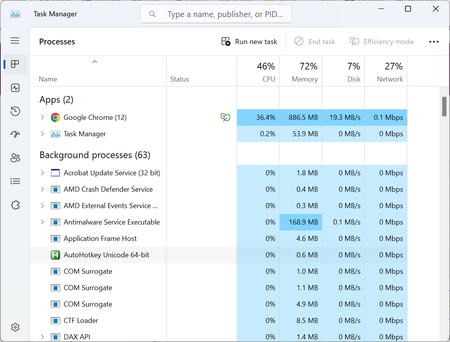
A couple of months ago, I started noticing the fans on my laptop spinning up during pretty light use. Normally they never turned on, except for during heavy use. Now the fans are on by default and the bottom of the chassis is constantly warm, and when charging it's almost too hot to touch. I don't recall having installed something around the same time this started happening. I've never opened the laptop or cleaned the fans. When I open the task manager it's nothing crazy (this is while the fans are very audibly on and the bottom of the laptop is very hot) Any suggestions are more than welcome, thanks! PS Device specifications Processor AMD Ryzen 5 Microsoft Surface (R) Edition 2.20 GHz Installed RAM 8.00 GB (7.45 GB usable) System type 64-bit operating system, x64-based processor Windows specifications Edition Windows 11 Home Version 22H2 Installed on 23/09/2022 OS build 22621.3007 Experience Windows Feature Experience Pack 1000.22681.1000.0852Views0likes0CommentsBattery Report Summary – Surface Laptop 7 (Snapdragon X Elite)
Report Date: November 27, 2025 Device: Microsoft Surface Laptop 7, Snapdragon X Elite Charge Cycles: 9 1. Key Data Battery Name: SurfaceBattery Manufacturer: SWD Design Capacity: 52,330 mWh Full Charge Capacity: 53,850 mWh Cycle Count: 9 2. Usage Observations Despite the battery being new (only 9 cycles), the report shows abnormally fast discharge. Examples from the report: On November 25, the battery dropped from 30% (16,340 mWh) to 23% (12,520 mWh) in ~20 minutes of use. On November 27, during “connected standby,” the battery fell from 77% (41,200 mWh) to 55% (29,440 mWh) within about one hour. These behaviors are inconsistent with expectations for a new device with full capacity. . Technical Analysis Battery authenticity: The data indicates the battery is original (manufacturer SWD, capacity matches design). Primary issue: The discharge rate is unusually fast and unstable, which is not normal for a battery with so few cycles. Possible causes: Defect in the Battery Management System (BMS). Internal cell imbalance. Firmware/driver issue affecting power management. 4. Conclusion and Request The Surface Laptop 7 is showing abnormal battery behavior despite being new and original. Any idea where this problem comes from? Any solution? Thanks in advance!800Views0likes3Comments
Trouble Activating Ultimate Performance Plan on My Surface Laptop
Hi everyone, I’m trying to enable the Ultimate Performance power plan on my Surface device. I’ve already used the command powercfg -duplicatescheme e9a42b02-d5df-448d-aa00-03f14749eb61, and it shows up in my system. However, when I try to activate it using powercfg /setactive [GUID], I get an “Invalid Parameters” error—even though the GUID matches exactly what was listed under powercfg /list. My current active plan is “High performance” (custom-made). Has anyone else encountered this issue on a Surface laptop? Is this plan blocked or incompatible with certain Surface models, or am I missing a step? Would appreciate any insights or tips! Thank you so much for your attention and participation.800Views0likes2Comments
Microsoft Surface Laptop model 2037
Recently, I purchased a Surface Laptop 7 (model 2037). When I connect the standard charger, the trackpad or mouse often freezes or stops responding. I tested with another Surface Laptop charger, but the problem persisted. After researching, I discovered it might be a grounding power delivery driver interaction issue. To work around it, I've been charging the laptop solely with a Type-C cable. Is anyone else experiencing this problem with their Surface Laptop 7? Is there a solution besides using 2 Type-C ports to charge the Surface Laptop 7? The "MagSafe" charging feature on the laptop I looked forward to using has a toddler who loves to play with cables and pull on them, so I can't use the feature with the standard Microsoft Surface Laptop charging brick.401Views0likes1CommentSurface Laptop 7, will not boot after system restore
Brand new Surface 7 13.8", just received the package yesterday. I've set it up for my wife, but shortly after network just started timing out querying the router's DNS server (Router is fine, multiple other phones, windows 10 & 11, linux, mac machines work without a hitch). Tried some fixes to no avail, and decided on a system restore just in case I've messed something up during setup. System restore looked like it worked, but laptop restarted and ended up with a bluescreen (something kernel something). System restore is there just fir that, right? Well, I've started it nine hours ago. Now it's just boot looping with the "preparing" bit and then shuts back down. It's been like that the whole day. I've even tried to get a USB stick to have the requisite livecd/recovery media, but it doesn't the new Surface ARM-based processor. What can we even do at this point?400Views0likes1Comment