statistics
10 TopicsLessons Learned #562: Measuring the Work Behind Statistics Updates in Azure SQL Database
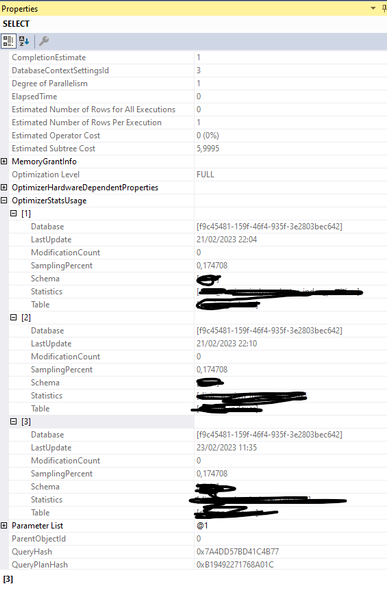
A few extra milliseconds during a stress test While working on a support case, our customer was running stress tests against an Azure SQL Database. They noticed a small but interesting variation: occasionally, a query took a few milliseconds longer and appeared to use slightly more CPU. They wanted to understand what was happening during those executions. The difference was small, but the question was useful. What additional work was being performed during those periods, and could we measure it? While reviewing Query Store, I came across queries containing a familiar pattern: SELECT StatMan(...). They reminded me of an article I had written some time ago, Lesson Learned #498: Understanding the Role of STATMAN in SQL Server and Its Resource Consumption, about the internal work involved in statistics updates. Recognizing that pattern gave me a starting point: I could use the execution statistics recorded in Query Store to investigate how much time, CPU, and I/O those statements had consumed during the stress test I would like to share what I found and the query I used to inspect that work. It provides a way to measure the duration, CPU, and reads attributed to recorded StatMan executions, and then compare their activity with the period being investigated. Finding that statistics calculation consumed resources is one part of the investigation. Establishing how much it contributed to the customer's extra milliseconds requires correlating those records with the affected workload. The sections below explain both what we can measure and how to interpret it. Looking beyond the last update time sys.dm_db_stats_properties provides the last update time and sampling information, but does not preserve the duration or resource consumption of the update. The workload query plan identifies statistics loaded during compilation through OptimizerStatsUsage, but does not provide a separate runtime measurement for each statistics calculation. Because Query Store already contained these internal statements in our test, we could inspect their historical resource consumption without configuring a new Extended Events session. Finding StatMan in Query Store StatMan is used internally during statistics calculation. Its query text can include the table and columns being processed and an alias such as _MS_UPDSTATS_TBL. We are inspecting recorded engine-generated statements, not invoking StatMan directly. The following read-only query was tested successfully in our Azure SQL Database. Run it in the database being investigated and adjust the UTC dates. It returns statistics by query, plan, interval, and execution type. Query Store must already contain the relevant statements and runtime data. Query Store inspection query DECLARE @FromUtc datetimeoffset = '2026-10-20T00:00:00+00:00'; DECLARE @ToUtc datetimeoffset = '2026-10-26T00:00:00+00:00'; ;WITH RuntimeStats AS ( SELECT rs.plan_id, rs.runtime_stats_interval_id, rs.execution_type_desc, MIN(rs.first_execution_time) AS first_execution_end_utc, MAX(rs.last_execution_time) AS last_execution_end_utc, SUM(rs.count_executions) AS executions, SUM(rs.avg_duration * rs.count_executions) AS total_duration_us, MAX(rs.max_duration) AS max_duration_us, SUM(rs.avg_cpu_time * rs.count_executions) AS total_cpu_us, SUM(rs.avg_logical_io_reads * rs.count_executions) AS total_logical_reads, SUM(rs.avg_physical_io_reads * rs.count_executions) AS total_physical_reads FROM sys.query_store_runtime_stats AS rs JOIN sys.query_store_runtime_stats_interval AS i ON i.runtime_stats_interval_id = rs.runtime_stats_interval_id WHERE i.start_time < @ToUtc AND i.end_time > @FromUtc GROUP BY rs.plan_id, rs.runtime_stats_interval_id, rs.execution_type_desc ) SELECT q.query_id, p.plan_id, q.is_internal_query, i.start_time AS interval_start_utc, i.end_time AS interval_end_utc, r.execution_type_desc, r.first_execution_end_utc, r.last_execution_end_utc, r.executions, r.total_duration_us / NULLIF(r.executions, 0) / 1000.0 AS avg_duration_ms, r.max_duration_us / 1000.0 AS max_duration_ms, r.total_duration_us / 1000000.0 AS total_duration_seconds, r.total_cpu_us / 1000000.0 AS total_cpu_seconds, r.total_logical_reads, r.total_physical_reads, qt.query_sql_text FROM RuntimeStats AS r JOIN sys.query_store_plan AS p ON p.plan_id = r.plan_id JOIN sys.query_store_query AS q ON q.query_id = p.query_id JOIN sys.query_store_query_text AS qt ON qt.query_text_id = q.query_text_id JOIN sys.query_store_runtime_stats_interval AS i ON i.runtime_stats_interval_id = r.runtime_stats_interval_id WHERE qt.query_sql_text LIKE N'%StatMan%' AND qt.query_sql_text NOT LIKE N'%query_store%' ORDER BY total_duration_seconds DESC; Reading the results Start by checking query_sql_text to confirm that a returned row is an actual SELECT StatMan(...) statement. The text filter is a search aid, not a definitive classification. The second predicate excludes common diagnostic queries that reference Query Store while searching for StatMan. executions shows the number of recorded executions for that plan, interval, and execution type. avg_duration_ms is the execution-count-weighted average duration. max_duration_ms identifies the slowest recorded execution within the group. total_duration_seconds and total_cpu_seconds estimate accumulated execution duration and CPU from the recorded averages multiplied by execution counts. total_logical_reads and total_physical_reads estimate accumulated page reads from the recorded averages. Query Store reports these reads as counts of 8 KB pages. is_internal_query identifies whether Query Store marks the query as internally generated. Inspect execution_type_desc to distinguish regular, aborted, and exception executions. Query Store reports runtime duration and CPU in microseconds. The query converts them to milliseconds or seconds as indicated by the output names. Its grouping also accounts for multiple runtime-statistics rows that can exist for the active interval. Interpreting the time window The date filter selects intervals that overlap the requested window. Those intervals are included in full, including executions outside the precise requested boundaries. Use interval boundaries aligned with your investigation when possible. first_execution_end_utc and last_execution_end_utc identify execution completion times, not start times. Query Store aggregates executions. When executions is greater than one, a row does not describe one individual update. Summed durations are not an end-to-end wall-clock measurement, especially when operations overlap. CPU can also exceed elapsed time when execution is parallel. From recorded consumption to workload impact The results quantify the recorded work attributed to StatMan. A high total can justify investigating its contribution to CPU or I/O during the same period, but does not by itself prove that it caused application latency or blocking. Correlate those observations with workload performance and resource metrics. The StatMan statement need not include every phase of the surrounding statistics update. Its text alone does not establish whether the update was automatic or explicitly requested. If the query returns no rows, it does not prove that statistics were not updated. The relevant statements may not have been captured or retained, or their runtime data may not be available in the selected window. Extended Events as an alternative We also observed StatMan through sp_statement_completed in a database-scoped Extended Events session during testing. Extended Events can provide individual statement observations when a suitable capture is available. Lessons learned When StatMan is present in Query Store, we can examine historical duration, CPU, and reads for the statistics-calculation statements already recorded. This provides a practical starting point for understanding their resource consumption while preserving the distinction between internal statement cost, the full statistics update, and impact on the workload. References Query Store runtime statistics Query Store query metadata Statistics in SQL Server and Azure SQL Database Lesson Learned 498 Understanding the Role of STATMAN in SQL Server and Its Resource Consumption231Views2likes0CommentsLessons Learned #558: What an Execution Plan XML Can Tell Us in Azure SQL Database
During a performance investigation in Azure SQL Database, we requested the execution plan to understand what the query was doing. While reviewing the evidence, the customer asked a broader question: when you open the XML of an execution plan, what do you usually look for? It was a useful question. The graphical plan helps us follow the flow of data, but the XML contains details about parameters, statistics, warnings and execution that can explain why the query behaved as it did. I do not read every attribute. I start with a few checks that help connect the customer symptom to the work performed by the query. In this article, I will walk through those checks: the type of plan, parameter values, estimated versus actual rows and statistics, missing indexes and implicit conversions, and reasons for a serial plan. The XML fragments below are simplified examples that use invented values or are adapted from examples discussed in previous articles in the Lessons Learned troubleshooting series. First check whether the plan contains execution evidence Plan What we can inspect Estimated plan Optimizer choices and estimates; the query has not executed Actual plan Plan plus available counters and warnings from that execution Cached or Query Store plan Compiled plan; normally no operator actuals for the incident For the checks involving actual rows, I request an actual execution plan. In SSMS, use Include Actual Execution Plan, or capture it using SET STATISTICS XML. Choose one method. The latter executes the query and returns its plan. The account needs the permissions to run the statement and SHOWPLAN permission. SET STATISTICS IO ON; SET STATISTICS TIME ON; SET STATISTICS XML ON; -- Execute the SELECT being investigated here. SET STATISTICS XML OFF; SET STATISTICS TIME OFF; SET STATISTICS IO OFF; Save the plan as a .sqlplan file and keep the Messages output. Record when it was captured, the parameters and the reported symptom. An execution captured later may not represent the incident. Review query literals, parameter values and object names before sharing the file. Check the right statement and its parameters A procedure or batch may contain several statements. I locate the relevant StmtSimple and its QueryPlan before interpreting a warning. StatementId and operator NodeId help keep the observations attached to the correct statement and operator; NodeId is not a stable identifier across different compilations. Next, I look at ParameterList. When available, it shows both the value used when the plan was compiled and the value used during the captured execution. <ParameterList> <ColumnReference Column="@CustomerId" ParameterDataType="int" ParameterCompiledValue="(42)" ParameterRuntimeValue="(900)" /> </ParameterList> Here, the plan was compiled with CustomerId 42 and executed with CustomerId 900. If one customer has a few orders and another has thousands, I would compare their data distribution and actual plans. Different values are a reason to investigate parameter sensitivity; they do not prove that plan reuse caused the problem. A missing runtime value means this capture did not provide it. It does not mean the runtime value was the same as the compiled value. Also, eligible queries can intentionally use different plan variants through Parameter Sensitive Plan optimization. Make the comparison match the application If the query is slow in the application but fast in SSMS, I compare the SQL text, parameter types and values, database context and session options. StatementSetOptions records options associated with compilation. <StatementSetOptions ARITHABORT="true" ANSI_WARNINGS="true" ANSI_NULLS="true" QUOTED_IDENTIFIER="true" ANSI_PADDING="true" CONCAT_NULL_YIELDS_NULL="true" NUMERIC_ROUNDABORT="false" /> A difference in context can help explain why the application and SSMS use different cached plans. I capture both rather than assuming that a fast SSMS execution represents the application. The difference itself still needs to be connected to the measured performance. Compare estimated and actual rows then inspect statistics I follow the rows through the plan and look for the first useful difference between what the optimizer expected and what the operator actually processed. <RelOp NodeId="3" PhysicalOp="Index Seek" LogicalOp="Index Seek" EstimateRows="100"> <RunTimeInformation> <RunTimeCountersPerThread Thread="0" ActualRows="20000" ActualRowsRead="80000" ActualExecutions="1" /> </RunTimeInformation> <!-- Access details omitted --> </RelOp> In this single-execution example, the operator estimated 100 rows and returned 20,000: a 200-fold underestimate. It also read 80,000 rows. I would ask why the estimate was inaccurate, and why the operator read substantially more rows than it returned. These are separate questions. For repeated or parallel operators, account for executions and threads before comparing totals. Do not add the rows from every operator to calculate the query result size. The next question is often whether the statistics were out of date. OptimizerStatsUsage identifies statistics consulted during compilation, where that information is exposed. <OptimizerStatsUsage> <StatisticsInfo Schema="[PlanXmlLab]" Table="[Orders]" Statistics="[IX_Orders_CustomerId]" LastUpdate="2026-10-10T07:00:00" SamplingPercent="20" ModificationCount="15000" /> </OptimizerStatsUsage> I check the relevant statistics object, its LastUpdate, SamplingPercent and ModificationCount together. An old timestamp or a low sampling percentage alone does not prove that it caused the estimate. Updated statistics cannot explain every discrepancy; parameter values, predicates and data distribution also matter. The XML describes the statistics consulted at compilation. To check their current state, I use sys.dm_db_stats_properties, as shown next. A subsequent update does not rewrite the evidence in an already saved plan. Check when the statistics were last updated -- Run in the affected database and set the actual table name. SELECT st.name AS statistics_name, sp.last_updated, sp.rows, sp.rows_sampled, sp.modification_counter FROM sys.stats AS st OUTER APPLY sys.dm_db_stats_properties( st.object_id, st.stats_id) AS sp WHERE st.object_id = OBJECT_ID(N'PlanXmlLab.Orders'); last_updated identifies the latest statistics update; rows and rows_sampled describe the population and sample at that update. modification_counter counts modifications to the leading statistics column since the update. Metadata visibility and permissions can affect the output. Compare this information with the same statistics object in the plan. Timestamps alone do not tell us whether the update was automatic or manual. If an update is justified, validate it in a controlled comparison using the same query and representative parameters, and capture a newly compiled plan. Read the access path alongside the row counts An Index Seek can still read many rows. I inspect SeekPredicates, any residual Predicate and ActualRowsRead where available. A broad seek range followed by filtering can explain why the rows read greatly exceed the rows returned. Likewise, a Key Lookup may be inexpensive once but expensive when repeated for thousands of rows. A scan can be the right choice when a large part of the table qualifies. The operator name is a starting point; the amount of work tells us more. For the customer, the useful explanation is concrete: this operator returned many more rows than expected, these were the statistics used, and this is the next comparison that will help establish why. That is more informative than recommending a statistics update from the timestamp alone. Read missing indexes and conversion warnings as clues Missing-index messages are easy to notice. I inspect the suggestion, but I also check whether it fits the query and the existing indexes. <MissingIndexes> <MissingIndexGroup Impact="85.0"> <MissingIndex Schema="[PlanXmlLab]" Table="[Orders]"> <ColumnGroup Usage="EQUALITY"> <Column Name="[CustomerId]" ColumnId="2" /> </ColumnGroup> <ColumnGroup Usage="INCLUDE"> <Column Name="[Amount]" ColumnId="3" /> </ColumnGroup> </MissingIndex> </MissingIndexGroup> </MissingIndexes> This example suggests a key on CustomerId with Amount included for coverage. EQUALITY and INEQUALITY describe predicate columns, while INCLUDE describes covering columns. The suggestion does not settle every detail of index design. Impact is an estimated reduction in optimizer cost. A value of 85 does not promise an 85% reduction in elapsed time. The XML may contain more suggestions than the graphical plan displays. Review existing indexes and write overhead, then measure the candidate change. Check which side of the predicate is converted <Warnings> <PlanAffectingConvert ConvertIssue="Seek Plan" Expression="CONVERT_IMPLICIT(nvarchar(50),[dbo].[Customers].[Code],0)" /> </Warnings> In this separate example, I would inspect the Code column type and the application parameter declaration. A varchar column compared with an nvarchar parameter can introduce a conversion on the column side because nvarchar has higher type precedence. The warning identifies something that may affect the plan, not a measured root cause. Whether a conversion prevents an efficient seek depends on the types, collation and expression. Test an appropriate parameter declaration while preserving required character semantics, and compare results, reads and CPU. A conversion in the projection is different from one in a search predicate. Look for an explicit reason when the plan is serial Customers sometimes ask why a query does not run in parallel when the database has multiple vCores. I look for NonParallelPlanReason in QueryPlan before assuming that more resources or a higher MAXDOP will change the result. <QueryPlan DegreeOfParallelism="0" NonParallelPlanReason="TSQLUserDefinedFunctionsNotParallelizable"> <!-- Other properties omitted --> </QueryPlan> Reason What I inspect next MaxDOPSetToOne Effective MAXDOP setting or query hint TSQLUserDefinedFunctionsNotParallelizable Scalar UDF and its inlining behavior NonParallelizableIntrinsicFunction The specific intrinsic function referenced A serial plan can be appropriate. The attribute can identify a restriction, but its absence does not fully explain the optimizer decision. Scalar UDF inlining can remove a restriction without guaranteeing parallel execution. DegreeOfParallelism="1" does not demonstrate parallel work. In Azure SQL Database, check database-scoped MAXDOP and query hints. More vCores do not override every restriction or guarantee selection of a parallel plan. Lessons learned The answer to the customer was a reading process: identify the statement and capture type, inspect parameters, compare estimated and actual work, and investigate the relevant statistics and warnings. Each observation should help us ask a better question and select a useful test. For a before-and-after comparison, preserve the query, parameters, data and relevant settings. Compare returned results, logical reads, CPU and duration. A plan describes one compilation or execution; Query Store can help establish whether the behavior changed over time. A short checklist Confirm that the plan belongs to the affected statement and execution. Check parameter values and the application context. Compare estimated and actual rows, accounting for repeated work. Inspect compilation statistics and their current update metadata. Review missing indexes, implicit conversions and serial-plan reasons. Validate the explanation with a measured comparison.Lessons Learned #547:Some SQL DB Statistics Remain Outdated While Others Are Automatically Updated
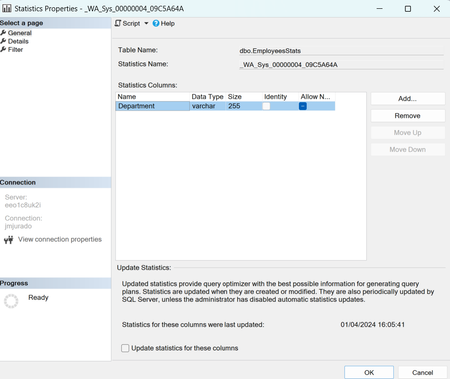
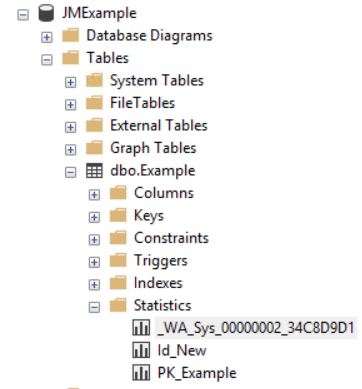
During the analysis of a SQL Server performance case, we observed an interesting statistics update pattern on a large table. Several statistics had recently been updated at different times, while a group of automatically created _WA_Sys_ statistics still showed: An older last_updated date. A high modification_counter. A row count significantly lower than the current number of rows in the table. At first glance, this could suggest that AUTO_UPDATE_STATISTICS was not working correctly. However, a closer review showed that this pattern can be completely consistent with the expected behavior of SQL Server. 1. Types of statistics in SQL Server SQL Server can maintain several types of statistics. Automatically created column statistics When AUTO_CREATE_STATISTICS is enabled, SQL Server can automatically create a single-column statistic when the Query Optimizer needs cardinality information for a column used in a query predicate. These statistics normally use names such as: _WA_Sys_00000002_47A6D5E5 The name can be interpreted as: _WA_Sys_<column_id in hexadecimal>_<object_id in hexadecimal> For example: 00000002 hexadecimal = column_id 2 47A6D5E5 hexadecimal = table object_id The most reliable way to identify the associated column is not to decode the name manually, but to query the SQL Server catalog views: DECLARE @TableName sysname = N'dbo.CustomerTransactions'; SELECT s.stats_id, s.name AS statistics_name, sc.stats_column_id, c.column_id, c.name AS column_name, s.auto_created, s.user_created, s.no_recompute FROM sys.stats AS s INNER JOIN sys.stats_columns AS sc ON sc.object_id = s.object_id AND sc.stats_id = s.stats_id INNER JOIN sys.columns AS c ON c.object_id = sc.object_id AND c.column_id = sc.column_id WHERE s.object_id = OBJECT_ID(@TableName) AND s.name = N'_WA_Sys_00000002_47A6D5E5' ORDER BY sc.stats_column_id; Statistics associated with indexes When SQL Server creates an index, it also creates a statistics object associated with the index. For example: CREATE INDEX IX_CustomerTransactions_ClientId ON dbo.CustomerTransactions(ClientId) this creates an index statistics object normally named: IX_CustomerTransactions_ClientId when a statistics object corresponds to an index, its stats_id matches the index's index_id. User-created statistics Statistics can also be created explicitly: CREATE STATISTICS ST_CustomerTransactions_ClientId_Status ON dbo.CustomerTransactions ( ClientId, StatusId ); This object is identified in sys.stats with: user_created = 1 auto_created = 0 and AUTO_UPDATE_STATISTICS applies to index statistics, automatically created single-column statistics, manually created statistics and filtered statistics. 2. Statistics are not updated together Assume that a table has these statistics: _WA_Sys_00000002_xxxxxxxx for ClientId _WA_Sys_00000003_xxxxxxxx for StatusId IX_CustomerTransactions_CreatedDate for CreatedDate PK_CustomerTransactions and TransactionId After a large data load, several or all of them could become eligible for an automatic update. However, SQL Server does not immediately update all eligible statistics. Before compiling a query, the Query Optimizer identifies the statistics that could be relevant to the query predicates and checks whether those statistics are outdated. Consider this query: SELECT TransactionId, ClientId, Amount FROM dbo.CustomerTransactions WHERE ClientId = 100; The optimizer might need a histogram on ClientId. If the corresponding statistics object is outdated and has crossed its update threshold, SQL Server may update that specific statistics object. It does not need to update unrelated statistics on: StatusId CreatedDate As a result, statistics on the same table can legitimately have different update times: PK_CustomerTransactions 2026-07-22 10:53 IX_CustomerTransactions_ClientId 2026-07-22 10:50 IX_CustomerTransactions_CreatedDate 2026-07-22 10:13 _WA_Sys_00000003_47A6D5E5 2026-07-19 10:00 This pattern can be evidence of demand-driven automatic updates rather than evidence of a malfunction. 3. What does modification_counter represent? The modification_counter returned by sys.dm_db_stats_properties represents the number of modifications made to the leading statistics column since that statistics object was last updated. This definition is especially important for multicolumn statistics. For example: CREATE INDEX IX_CustomerTransactions_ClientId_Status ON dbo.CustomerTransactions ( ClientId, StatusId ); The associated statistics object contains: Histogram: ClientId Density information: ClientId ClientId, StatusId The histogram and modification_counter are based on the leading column, ClientId. If only StatusId is modified: UPDATE dbo.CustomerTransactions SET StatusId = 2 WHERE TransactionId = 100; this does not have the same statistics impact as changing ClientId, because ClientId is the leading histogram column. SQL Server statistics contain only one histogram, built on the first key column. Multicolumn statistics additionally contain density information for column prefixes. 4. Why do multiple statistics sometimes have similar modification counters? This commonly happens after an insert operation. For example: INSERT INTO dbo.CustomerTransactions ( TransactionId, ClientId, StatusId, Amount, CreatedDate ) SELECT TransactionId, ClientId, StatusId, Amount, CreatedDate FROM dbo.StagingCustomerTransactions; Each inserted row introduces a value for every populated column. Consequently, multiple single-column statistics may show similar increases in their modification counters. This is particularly visible after a large ETL operation: Table rows before the load: 487,673 Rows inserted by the ETL: 515,244 Current approximate row count: 1,002,917 Several statistics could then show modification counters close to the number of inserted rows. That does not mean SQL Server must update all those statistics immediately. They become candidates for updating, but an update is normally triggered when query optimization requires them. 5. Does automatic updating apply only to _WA_Sys_ statistics? AUTO_UPDATE_STATISTICS applies to: Automatically created _WA_Sys statistics Index statistics Primary-key index statistics User-created statistics Each statistics object is evaluated independently. Therefore, SQL Server might update: PK_CustomerTransactions while leaving this object unchanged: _WA_Sys_00000003_47A6D5E5 The reverse is also possible. The behavior depends on which statistics are considered relevant during compilation or cached-plan validation. 6. What happens when a _WA_Sys_ statistic and an index statistic cover the same column? This is one of the most interesting scenarios. Assume SQL Server originally created: _WA_Sys_00000002_xxxxxxxx for ClientId. Later, someone creates this index: CREATE INDEX IX_CustomerTransactions_ClientId ON dbo.CustomerTransactions(ClientId); The table now has two statistics objects with histograms on ClientId: _WA_Sys_00000002_xxxxxxxx and IX_CustomerTransactions_ClientId Conceptually: _WA_Sys statistic Histogram on ClientId Index statistic Histogram on ClientId For a query such as: SELECT * FROM dbo.CustomerTransactions WHERE ClientId = @ClientId; the optimizer can have more than one potentially relevant statistics object. It may rely on the index statistics object rather than the older _WA_Sys_ object. In that case: IX_CustomerTransactions_ClientId Updated recently _WA_Sys_00000002_xxxxxxxx Old last_updated value High modification_counter This does not necessarily mean that automatic statistics updating has failed. It can mean that the _WA_Sys_ statistic has become redundant and has not been required by recent compilations. However, this should be presented carefully: The Query Optimizer is not publicly documented as always preferring an index statistic over an equivalent _WA_Sys_ statistic. The statistics selected can depend on: Query. Predicates. Available indexes. Filtered versus unfiltered statistics. Statistics freshness. Sampling quality. Multicolumn density information. Cardinality Estimator behavior. Existing cached plans. The correct conclusion is that the scenario is possible and plausible, but the execution plan should be inspected before claiming that a specific statistics object was used. As we wrote down in multiple articles in our blog (below), identify redudant statistics is part of DBA work to avoid this situation, also, in other situations, I saw that the maintenance plan is taking too much time because we are updating statistics that we are not using or migth be duplicated. The following script identifies statistics whose leading columns overlap: DECLARE @TableName sysname = N'dbo.CustomerTransactions'; ;WITH LeadingStatisticsColumns AS ( SELECT s.object_id, s.stats_id, s.name AS statistics_name, s.auto_created, s.user_created, s.no_recompute, s.has_filter, s.filter_definition, sc.column_id, c.name AS leading_column, i.index_id, i.name AS index_name FROM sys.stats AS s INNER JOIN sys.stats_columns AS sc ON sc.object_id = s.object_id AND sc.stats_id = s.stats_id AND sc.stats_column_id = 1 INNER JOIN sys.columns AS c ON c.object_id = sc.object_id AND c.column_id = sc.column_id LEFT JOIN sys.indexes AS i ON i.object_id = s.object_id AND i.index_id = s.stats_id WHERE s.object_id = OBJECT_ID(@TableName) ) SELECT leading_column, statistics_name, CASE WHEN index_id IS NOT NULL THEN N'INDEX STATISTICS' WHEN auto_created = 1 THEN N'AUTO-CREATED _WA_SYS' WHEN user_created = 1 THEN N'USER-CREATED STATISTICS' ELSE N'OTHER' END AS statistics_type, index_name, has_filter, filter_definition, no_recompute, COUNT(*) OVER ( PARTITION BY column_id ) AS statistics_on_same_leading_column FROM LeadingStatisticsColumns ORDER BY leading_column, statistics_type, statistics_name; This does not automatically mean that one object should be deleted. It only identifies an overlap. 7. Script The following example demonstrates how an automatically created statistic can coexist with a later index statistic. DROP TABLE IF EXISTS dbo.CustomerTransactions; GO CREATE TABLE dbo.CustomerTransactions ( TransactionId int NOT NULL, ClientId int NOT NULL, StatusId tinyint NOT NULL, Amount decimal(12,2) NOT NULL, CreatedDate datetime2(0) NOT NULL, CONSTRAINT PK_CustomerTransactions PRIMARY KEY CLUSTERED (TransactionId) ); GO Insert sample data ;WITH Numbers AS ( SELECT TOP (200000) ROW_NUMBER() OVER ( ORDER BY (SELECT NULL) ) AS n FROM sys.all_objects AS a CROSS JOIN sys.all_objects AS b ) INSERT INTO dbo.CustomerTransactions ( TransactionId, ClientId, StatusId, Amount, CreatedDate ) SELECT n, n % 5000, n % 5, CONVERT(decimal(12,2), n % 10000), DATEADD ( minute, -(n % 100000), SYSUTCDATETIME() ) FROM Numbers; GO Ensure that automatic statistics creation and updating are enable ALTER DATABASE CURRENT SET AUTO_CREATE_STATISTICS ON; GO ALTER DATABASE CURRENT SET AUTO_UPDATE_STATISTICS ON; GO Trigger automatic statistics creation on ClientId SELECT COUNT_BIG(*) FROM dbo.CustomerTransactions WHERE ClientId = 100 OPTION (RECOMPILE); GO Check the statistics created for ClientId SELECT s.stats_id, s.name AS statistics_name, s.auto_created, s.user_created, c.name AS column_name FROM sys.stats AS s INNER JOIN sys.stats_columns AS sc ON sc.object_id = s.object_id AND sc.stats_id = s.stats_id INNER JOIN sys.columns AS c ON c.object_id = sc.object_id AND c.column_id = sc.column_id WHERE s.object_id = OBJECT_ID(N'dbo.CustomerTransactions') AND c.name = N'ClientId' ORDER BY s.stats_id; Create an index on the same column CREATE INDEX IX_CustomerTransactions_ClientId ON dbo.CustomerTransactions(ClientId); The table can now have: Modify the data significantly UPDATE dbo.CustomerTransactions SET ClientId = ClientId + 10000 WHERE TransactionId <= 100000; Review the counters again SELECT s.name AS statistics_name, sp.last_updated, sp.rows, sp.rows_sampled, sp.modification_counter FROM sys.stats AS s OUTER APPLY sys.dm_db_stats_properties ( s.object_id, s.stats_id ) AS sp WHERE s.object_id = OBJECT_ID(N'dbo.CustomerTransactions') ORDER BY s.stats_id Force a new compilation using ClientId SET STATISTICS XML ON; GO SELECT COUNT_BIG(*) FROM dbo.CustomerTransactions WHERE ClientId = 10100 OPTION (RECOMPILE); GO SET STATISTICS XML OFF; GO After the query, review: The actual execution plan XML. The StatisticsInfo elements. last_updated. modification_counter. The exact object updated is an optimizer decision and can vary by SQL Server version, build, compatibility level and query shape. The test should therefore be used to observe the behavior rather than to assume a fixed preference. Finally, as you could see SQL Server choose _WA_Sys_00000002_151102AD instead of IX_CustomerTransactions_ClientId to update. In some situations, depending on execution plan, SQL Server might choose IX_CustomerTransactions_ClientId to update instead of _WA_Sys_00000002_151102AD and for this reason, doesn't mean that SQL Server is not updating the statistics it is depending that it is choosing one of them that the column is involved. My lessons learned, a statistic can be outdated without being relevant, and it can be relevant without being the only available source of cardinality information. Before interpreting an old last_updated value as an automatic statistics failure, identify the leading column, look for overlapping statistics, inspect the execution plan and determine whether there is a real estimation or performance problem. Articles: Lesson Learned #482: Identifying Potential Duplicate Statistics | Microsoft Community Hub Lesson Learned #324: Query Recompilation in Azure SQL | Microsoft Community Hub Lessons Learned #537: Copilot Prompts for Troubleshooting on Azure SQL Database | Microsoft Community Hub Lesson Learned #498:Understanding the Role of STATMAN in SQL Server and Its Resource Consumption | Microsoft Community Hub Disclaimer: The scripts included in this article are provided for demonstration and educational purposes only. They create a sample table, insert a significant number of rows, create indexes and statistics, modify data, and change automatic statistics settings in the current database. Run the complete demonstration only in a test or non-production environment. Review and adapt the database name, object names, row volume, and statements before execution. The results may vary depending on the SQL Server version, database compatibility level, existing configuration, data distribution, and workload. Always test the scripts in a representative environment before applying any conclusion or change to a production system.353Views0likes0CommentsLesson Learned #482: Identifying Potential Duplicate Statistics
Some time ago, we encountered a support case where a customer experienced significant delays in updating auto-created and user-created statistics. I would like to share the insights gained from this experience, including the underlying causes of the issue and the potential solutions we identified and implemented to address the problem effectively.
MS Teams Get-CsCallQueue Statistics field is blank again...
We has been using the Get-CsCallQueue cmdlet that comes in the Teams module to get the Number of Calls In Queue statistic for our call queues. As of a few days ago, this field has been coming back blank for all our queues. Does anyone know what causes this? A search of the web shows other people have had this issue over the last few years but I don't know if there is a solution on our end or if it is some change in Azure that is causing it.909Views2likes1CommentReporting Meeting Room Statistics with PowerShell and the Microsoft Graph
This article explains how to use the Microsoft Graph API and PowerShell to extract meeting data from the calendars of room mailboxes to generate statistics. The idea is that you can use the data to figure out how busy meeting rooms are in a world when hybrid working might make the idea of a conference room less attractive. https://practical365.com/report-room-mailbox-statistics/13KViews1like0Comments
Meeting Statistics Excel
Hi, I have an issue concerning statistics in Microsoft Teams, I administrate a school with different students and classes, and they need to have every connection time and duration of every class they're doing. There is an "HR guy" who's job is to monitor theses information. Right now I know two options to have this information : - The first one is to go to the teacher's user page in the Teams Administration Center, then go to call history, and click on the meeting I want to see, (see screenshot1) this method is not ergonomic because when the "HR" guy match the students presence and delay, the names are disordered and when a student have a disconnection, we need to add every connection time one by one and it makes it very long when you have multiple class and lots of disconnections. - The second way would be that at the end of a class, the teacher need to go to the attendee list and download the attendee list so he can get an excel of who disconnected when and order people by name (see screenshot2), which solve my two problems said earlier, but the method to get that excel file is to complicated and some teacher might forget to do it, I would need to have this excel file by anytime. So, do you know any better and simpler way to do that ? Thank you for any advice. Gabriel1.2KViews0likes0Comments
Statistical models in Excel
Hi Guys, I am trying to see how I can build a simple statistical model in Excel. Let's say I have 10 salespeople. For each of them, they have sold X amount of the year. I want to see the relationship between data I've collected about their differing sales experience, industry experience, calls, demos and see whether there is a correlation in positively affecting their sales performance for that year. I haven't used statistical modeling in Excel very much. Does anyone have an indication how I can set it up in Excel? Any tips would be huge. Many thanks in advance.4.4KViews0likes1Comment