sqlserversecurity
169 TopicsStrengthen SQL Server security on Azure Local with confidential VMs (In Preview)
SQL Server holds some of the most sensitive data an organization runs, including the business data that local AI applications and agents query. Azure Local provides a Microsoft-managed, distributed infrastructure platform for running SQL Server in virtual machines at customer locations, so data can stay on premises. Data at rest and in transit is commonly protected, but while SQL Server processes queries, the data it works with sits in memory. Confidential virtual machines (CVMs) on Azure Local help protect it there. Protecting SQL Server requires more than securing the database engine. With a standard VM, the host operating system, the hypervisor, and anyone with administrative access to the host all sit inside the trust boundary of the workload. At edge and remote sites with less physical control, that is a lot of trust to place in the infrastructure. CVMs on Azure Local, now generally available on AMD processors and in preview on Intel processors, bring hardware-based memory encryption and attestation to customer-owned edge infrastructure. They provide hardware-based isolation between the VM, the hypervisor, and host management code. SQL Server 2025 runs on Ubuntu 24.04 inside the CVM. For SQL Server workloads, the value is straightforward: help keep data confidential while it is in use, even from the infrastructure it runs on. Where confidential VMs fit Consider CVMs when SQL Server data should stay private from the people and systems that operate on the underlying infrastructure, such as regulated and sovereign data, edge and remote sites, hosted or partner-run clusters, and local AI applications that query sensitive business data. Protect SQL Server data while it is in use CVMs on Azure Local use AMD SEV-SNP or Intel TDX to encrypt guest memory in hardware, so SQL Server's buffer pool and in-memory data stay encrypted and isolated from the host and its administrators. CVMs don't protect against sophisticated physical side-channel attacks, so pair them with physical safeguards at the site. Data on disk, in backups, and in transit still needs SQL Server's own protections. The following table shows how they fit together. What you're protecting Threat Protection SQL Server memory, including the buffer pool Host administrators or a compromised host CVM memory encryption (AMD SEV-SNP or Intel TDX) Operating system disk and boot chain Host-side tampering Integrity-protected image Data, log, and tempdb files A copy of the data disk taken from the host TDE with keys in Azure Key Vault Backups Copies stored outside the VM Backup encryption Network traffic Interception between clients and SQL Server Encrypted connections (TLS) Sensitive columns Privileged database users Always Encrypted Start from an integrity-protected image CVMs follow a clean-room, image-driven model. You build a hardened Ubuntu 24.04 image with SQL Server 2025 installed and enable integrity protection, which helps protect the guest operating system disk and boot chain from host-side tampering. The root file system is read-only, so SQL Server databases, logs, and tempdb live on a separate writable data disk. To maintain the security boundary, guest management isn't supported, so plan guest changes, including SQL Server updates, as new image builds rather than in-place changes. Plan availability around confidential VMs CVMs don't support live migration or failover between nodes in an Azure Local cluster, so plan maintenance around the CVMs on each node, build availability into the database design, and keep regular SQL Server backups outside the VM. Verify the environment with attestation Attestation helps you confirm that SQL Server is running in a genuine confidential environment before you trust it with sensitive data. The CVM produces a hardware-rooted attestation report that Microsoft Azure Attestation validates, so plan cloud connectivity from the site. Get started with SQL Server on confidential VMs Prepare a CVM-ready cluster. Deploy Azure Local 2607 or later on validated AMD or Intel hardware with confidential VMs enabled by following the Azure Resource Manager template guidance. Hardware partners for both include Dell, HPE, and Lenovo. Find specific validated systems in the Azure Local solutions catalog. Build the SQL Server image. Use the integrity-protected CVM image builder in the AzureStack-Tools repository to create an Ubuntu 24.04 image, add SQL Server 2025, and point SQL Server at a separate data disk. Create the confidential VM. Create the CVM from your image with the data disk attached by following the CVM creation and connection guidance. Verify and connect. Verify the CVM with attestation and connect your applications. For detailed guidance, see Deploy SQL Server on Azure Local. Review the confidential VM overview for current limitations. Frequently asked questions How is this different from Always Encrypted? Always Encrypted protects selected columns from anyone without the column keys, including database administrators. A CVM protects all of SQL Server's memory from the host and infrastructure operators. They address different threats, so use both when you need protection from both groups. Can I convert an existing VM into a confidential VM? No. CVMs are created from a purpose-built, integrity-protected image. Create a new CVM and move your databases into it with backup and restore. Does it support SQL Server on Windows? Not yet. This release supports Ubuntu 24.04 guests only. A stronger foundation for sensitive database workloads When SQL Server runs in a confidential VM on Azure Local, its memory is encrypted and isolated from the host, the hypervisor, and infrastructure operators, and attestation provides evidence of that protection before applications connect. That brings confidential computing to SQL Server workloads that need to stay on premises.155Views2likes0Comments
BULKADMIN role support for SQL Server on Linux is now Generally Available
Starting with SQL Server 2025 CU9 and SQL Server 2022 CU27, SQL Server on Linux supports the bulkadmin fixed server role and the ADMINISTER BULK OPERATIONS permission for performing bulk data import operations without requiring users to be members of the sysadmin fixed server role. This capability enables you to use operations such as BULK INSERT and OPENROWSET(BULK...) while following a least-privilege security model. Previously on SQL Server on Linux, these operations required sysadmin membership. With this GA (Generally Available) release, organizations running SQL Server on Linux can provide users with the permissions required for bulk data loading without granting broader sysadmin privileges, improving alignment with the principle of least privilege. The feature applies to SQL Server on Linux, including on-premises, SQL Server on Azure VMs and container deployments. Learn more: BULK INSERT (Transact-SQL) - SQL Server | Microsoft Learn Announcing Preview of bulkadmin role support for SQL Server on Linux | Microsoft Community Hub258Views0likes0CommentsAnnouncing Microsoft.Data.SqlClient 7.0.2 and 6.1.6
We are pleased to announce the release of Microsoft.Data.SqlClient 7.0.2 and 6.1.6, stable servicing updates now available on NuGet. Both releases include: WAM broker support for supported Microsoft Entra ID authentication modes on Windows TDS parsing security hardening with strict data-length bounds checks Key bug fixes, including a SqlDataReader null-reference path and an Always Encrypted signature verification cache fix Install or update from NuGet: dotnet add package Microsoft.Data.SqlClient --version 7.0.2 or dotnet add package Microsoft.Data.SqlClient --version 6.1.6 Full release notes: 7.0.2: https://github.com/dotnet/SqlClient/releases/tag/v7.0.2 6.1.6: https://github.com/dotnet/SqlClient/releases/tag/v6.1.6 What's in these releases WAM broker support for supported Entra ID authentication modes (Windows) Both servicing releases add support for the Web Account Manager (WAM) broker in supported Entra ID authentication flows on Windows. This enables OS-brokered token handling, better single sign-on behavior with the signed-in Windows account, and improved support for Conditional Access and Windows Hello scenarios. For application code, this is exposed through ActiveDirectoryAuthenticationProviderOptions, including the UseWamBroker property. Hardened TDS token parsing The TDS parser now validates declared token data lengths against the available input buffer before reading. This improves resilience against malformed or hostile protocol payloads and helps prevent out-of-bounds token parsing behavior. For well-formed SQL Server responses, behavior is unchanged. SqlDataReader null-reference fix These releases include a fix for a SqlDataReader null-reference path in buffer-based reads. Calls that previously could fail with NullReferenceException now correctly surface argument validation errors. Always Encrypted signature-cache fix The Always Encrypted column master key signature verification cache logic was corrected so cached verification results are read and applied using the correct key and value. This prevents stale or mismatched cache outcomes from being treated as valid signature verification results. Additional note for 7.0.2 users Starting with version 7.0.2, Microsoft.Data.SqlClient and companion extension packages are version-aligned to 7.0.2. If your application references extension packages (for example Microsoft.Data.SqlClient.Extensions.Azure), upgrade them to the same version for compatibility. Getting started If you are new to Microsoft.Data.SqlClient, check out the introduction documentation: https://learn.microsoft.com/sql/connect/ado-net/introduction-microsoft-data-sqlclient-namespace For users of System.Data.SqlClient, see the porting cheat sheet: https://github.com/dotnet/SqlClient/blob/main/porting-cheat-sheet.md If you encounter any issues, please report them on GitHub: https://github.com/dotnet/SqlClient/issues800Views0likes0CommentsMicrosoft Django backend for SQL Server - mssql-django 1.7.3 is now available
We are happy to announce the release of mssql-django 1.7.3. This release improves SQL Server connection compatibility for modern authentication scenarios and fixes a subclassing edge case in backend server-property caching. Highlights 1) Authentication parsing and connection string handling improvements We fixed how extra_params authentication settings are interpreted and now parse ODBC-style key/value segments more robustly. What changed: Authentication mode is parsed from extra_params using a spec-aligned parser. Trusted_Connection and SSPI injection now respects explicit Authentication= modes. Password injection behavior is driven by authentication mode, so password-based modes still receive PWD correctly. Parser behavior is hardened for cases like braced values, embedded semicolons, escaped braces, whitespace, and empty values. Why it matters: Prevents invalid combinations such as appending Trusted_Connection=yes when an explicit authentication mode is provided. Avoids ODBC driver failures (including FA001) in authentication flows such as ActiveDirectoryIntegrated. Improves predictability for advanced connection-string configurations. 2) Server-property cache fix for DatabaseWrapper subclasses We fixed a KeyError when subclassing DatabaseWrapper and accessing server-property cached values. What changed: Replaced mutable default-argument cache patterns with explicit class-level cache dictionaries. Added regression coverage for subclass access paths. Why it matters: Custom backend wrapper subclasses now behave correctly when reading cached server properties. Prevents runtime failures in extensibility scenarios. Upgrade pip install --upgrade mssql-django==1.7.3 If you are building an application that uses Entra authentication, you'll want this as your minimum version. Compatibility 1.7.3 continues the same compatibility range introduced in 1.7.x: Django 3.2 through 6.0 Python 3.8 through 3.14 All supported versions of Microsoft SQL Thank You Thank you to everyone who reported issues, validated fixes, and contributed improvements. As always, please open an issue if you hit regressions or have connection/authentication scenarios you want us to look into.264Views0likes0CommentsAnnouncing the release of Microsoft OLE DB Driver 19.4.2 for SQL Server
We're pleased to announce the general availability (GA) release of Microsoft OLE DB Driver 19.4.2 for SQL Server. This is a maintenance update to the 19.4 line that improves TLS handling, raises a long-standing connection redirection limit, refreshes the bundled authentication library, and fixes accessibility issues in the UDL dialog. Download x64 / Arm64 installer x86 installer The 64-bit MSI continues to install the appropriate binary (x64 or Arm64) automatically based on the OS platform. MSOLEDBSQL 19 installs side by side with MSOLEDBSQL 18. Prerequisite: the Microsoft Visual C++ Redistributable must be installed before running the driver installer. What's new in 19.4.2 Features added Feature Details SSL/TLS improvements Improved SSL/TLS handling for better security and performance. 10 redirects per connection The driver no longer caps connection redirections at 2, which removes a long-standing failure mode for workloads that hit redirection-heavy topologies (for example, certain Azure SQL routing scenarios). Bugs fixed Fix Details UDL accessibility defects Fixed accessibility issues in the Universal Data Link (UDL) dialog. Updated authentication library Microsoft SQL Driver Authentication library (mssql-auth.dll) updated to version 1.1.3. mssql-auth.dll is the ADAL replacement introduced in 19.4.1 and is installed as part of the driver setup. Supported languages 19.4.2 is available in: Chinese (Simplified), Chinese (Traditional), Czech, English (United States), French, German, Italian, Japanese, Korean, Polish, Portuguese (Brazil), Russian, Spanish, and Turkish. Direct per-language download links are available in the Release notes and the Download page. Upgrading If you're on 19.4.1 or earlier in the 19.x line, an in-place upgrade is supported. As always, we recommend validating in a non-production environment first, especially if your application depends on the redirection or TLS behaviors touched in this release. Feedback Please file issues and feature requests on the Microsoft OLE DB Driver for SQL Server feedback site or via your usual support channel. Thanks to everyone who reported the UDL accessibility and redirection-limit issues that drove this release.1KViews0likes0Commentsmssql-python 1.6: Unblocking Your Threads
The last two mssql-python releases shipped big features: Bulk Copy in 1.4 for high-throughput data loading, and Apache Arrow in 1.5 for zero-copy analytics. Version 1.6 is about what happens next: you take those features into production, scale up your thread pool, and find out where the driver was quietly holding you back. This release unblocks your threads during connection setup, fixes crashes and incorrect results in common cursor patterns, and hardens security for passwords with special characters and log file paths. pip install --upgrade mssql-python Your threads can run while connections are opening If you're running mssql-python behind Flask, FastAPI, Django, or any WSGI/ASGI server with thread-based workers, this one matters. Opening a database connection is slow. There's DNS resolution, a TCP handshake, TLS negotiation, and SQL Server authentication. In previous versions, every other Python thread in your process was frozen while that happened, because the driver held the Global Interpreter Lock (GIL) during the entire operation. One thread opening a connection meant no other thread could serve requests, process data, or do anything at all. Version 1.6 releases the GIL during connect and disconnect. Your other threads keep running while the network round-trip completes. If you have a multi-threaded web server handling concurrent requests, this removes a serialization bottleneck you may not have realized you had. The connection pool was also reworked to stay safe under this change. Previously, the pool held an internal lock while calling connect, which would have created a deadlock now that connect releases the GIL. The pool now reserves a slot first, connects outside the lock, and rolls back the reservation if the connection fails. Decimal parameters work with setinputsizes If you use cursor.setinputsizes() to declare parameter types for performance-sensitive batch inserts, you may have hit a crash when specifying SQL_DECIMAL or SQL_NUMERIC. This is fixed. Decimal values now bind correctly whether you're using execute() or executemany(): cursor.setinputsizes([ (mssql_python.SQL_WVARCHAR, 100, 0), (mssql_python.SQL_INTEGER, 0, 0), (mssql_python.SQL_DECIMAL, 18, 2), ]) cursor.executemany( "INSERT INTO Products (Name, CategoryID, Price) VALUES (?, ?, ?)", [ ("Widget", 1, Decimal("19.99")), ("Gadget", 2, Decimal("29.99")), ], ) Iterating catalog results with fetchone() If you've used cursor.tables(), cursor.columns(), or other catalog methods and tried to walk the results with fetchone(), you may have gotten incorrect data. Row tracking was broken for catalog result sets. This now works the way you'd expect: cursor.tables(tableType="TABLE") while True: row = cursor.fetchone() if row is None: break print(row.table_name) This also applies to primaryKeys(), foreignKeys(), statistics(), procedures(), and getTypeInfo(). Reusing prepared statements without reset If you call cursor.execute() with reset_cursor=False to reuse a prepared statement across calls, this no longer raises an "Invalid cursor state" error. Passwords with special characters stay masked in logs If your SQL Server password contains semicolons, braces, or other ODBC-special characters (e.g., PWD={Top;Secret}), previous versions could accidentally leak part of it in sanitized log output. The password masking logic has been rewritten to correctly handle all ODBC connection string formats. If the connection string can't be parsed at all, the entire string is now redacted rather than partially exposed. The logging system also now rejects log file paths that attempt directory traversal, preventing setup_logging(log_file_path="../../somewhere/else.log") from writing outside the intended directory. Better type checker support for executemany If your type checker flagged executemany() when you passed dictionaries as parameter rows, that warning is gone. The type annotations now correctly accept Mapping types, matching the DB API 2.0 spec for named parameters. Get started pip install --upgrade mssql-python For questions or issues, file them on GitHub or email mssql-python@microsoft.com.442Views0likes0CommentsMicrosoft ODBC Driver 18.6.2 for SQL
What Is the Microsoft ODBC Driver for SQL? The Microsoft ODBC Driver for SQL provides native connectivity from Windows, Linux, and macOS applications to SQL Server, Azure SQL Database, Azure SQL Managed Instance, and Microsoft Fabric. It is the recommended driver for new application development using the ODBC API, and it supports , Always Encrypted, distributed transactions, and modern authentication methods including Microsoft Entra ID (formerly Azure Active Directory). Whether you're building high-throughput data pipelines, managing enterprise databases, or developing cloud-native applications on Microsoft Fabric, the ODBC driver is a foundational component of the SQL Server connectivity stack. What's New in 18.6.2 Improved Vector Parameter Handling for Prepared Statements Version 18.6.2 improves the handling of output and input/output vector parameters when using prepared statements. This enhancement benefits applications that rely on parameterized queries with array bindings — a common pattern in batch processing and high-performance data access layers. Microsoft Fabric Redirection Support (Up to 10 Redirections) The driver now allows up to 10 server redirections per connection attempt, up from previous limits. This change directly supports Microsoft Fabric redirection scenarios, where connections may be transparently routed through multiple endpoints before reaching the target workspace. If your applications connect to Fabric SQL endpoints, this update ensures more reliable connectivity in complex routing topologies. Alpine Linux Packaging Improvements Architecture detection and packaging have been improved for Alpine Linux environments, making it easier to deploy the driver in lightweight, container-based workloads that use Alpine as a base image. Bug Fixes This release addresses several important issues reported by the community and identified through internal testing: Parameter Array Processing SQL_ATTR_PARAMS_PROCESSED_PTR accuracy — Fixed an issue where the number of processed parameter sets was not reported correctly when executing parameter arrays. Applications that inspect SQL_ATTR_PARAMS_PROCESSED_PTR after batch execution will now see the correct count. SQL_PARAM_IGNORE handling — Fixed SQL_ATTR_PARAMS_PROCESSED_PTR and row counting when SQL_PARAM_IGNORE is used within parameter arrays, ensuring that ignored parameters are accounted for properly. Crash Fixes SQLNumResultCols segmentation fault — Resolved a segfault that occurred when calling SQLNumResultCols in describe-only scenarios where no parameter bindings are present. Table-valued parameter (TVP) NULL handling — Fixed a segmentation fault triggered by NULL values in TVP arguments. Applications passing TVPs with nullable columns should no longer experience unexpected crashes. bcp_bind Consecutive Field Terminators (Known Issue from 18.6.1) bcp_bind fix — Corrected bcp_bind to properly handle consecutive field terminators without misinterpreting them as empty fields. This resolves a known issue introduced in version 18.6.1, where consecutive terminators were incorrectly interpreted as NULL values instead of empty strings. If you deferred upgrading to 18.6.1 because of this issue, 18.6.2 is the recommended target version. Linux Packaging Debian EULA acceptance — Fixed Debian package installation to correctly honor EULA acceptance and complete successfully, eliminating a friction point for automated deployments. RPM side-by-side installation — Fixed RPM packaging rules to allow installing multiple driver versions side by side, which is important for environments that need to maintain backward compatibility or perform staged rollouts. Distributed Transactions XA recovery — Fixed XA recovery to compute transaction IDs correctly, avoiding scenarios where recoverable transactions could be missed during the recovery process. This is a critical fix for applications using distributed transactions with XA transaction managers. Upgrading from Older Versions If you are upgrading from a version prior to 18.6.1, you will also benefit from the features introduced in that release: Vector data type support — Native support for the vector data type (float32), enabling AI and machine learning scenarios directly through ODBC. ConcatNullYieldsNull property — Connection-level control over null concatenation behavior. New platform support — Azure Linux 3.0 ARM, Debian 13, Red Hat 10, and Ubuntu 25.10. Version 18.6.2 builds on these additions with the stability and correctness fixes described above. Download & Installation Windows Platform Download Link x64 Download x86 Download ARM64 Download Linux & macOS Installation packages for supported Linux distributions and macOS are available on Microsoft Learn: Download ODBC Driver for SQL Server (Linux/macOS) Documentation & Release Notes For the full list of changes, platform support details, and known issues, see the official release notes: Windows Release Notes Linux & macOS Release Notes Bug Fixes Get Started We encourage all users to upgrade to version 18.6.2.1 to take advantage of the fixes and improvements in this release — particularly if you are using parameter arrays, table-valued parameters, bcp operations, or connecting to Microsoft Fabric endpoints. As always, we welcome your feedback. If you encounter issues, please report them through the SQL Server feedback channel or open an issue on the Microsoft ODBC Driver GitHub repository. Happy coding!5.3KViews0likes3CommentsIntroducing Pacemaker HA Agent v2 for SQL Server on Linux (In Preview)
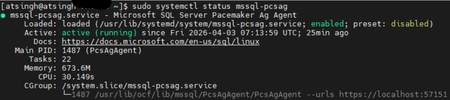
We are excited to introduce the next generation of high availability (HA) Agent for SQL Server on Linux: Pacemaker HA Agent v2. This release is a major step forward, designed to reduce planned and unplanned failover times, compared to the previous agent, based on internal engineering improvements. Why Pacemaker Is Required for SQL Server HA on Linux For users new to Linux, it’s important to understand how high availability works on this platform. On Windows Server, Always On availability groups use an underlying Windows Server Failover Cluster (WSFC) to: Monitor node health Detect failures Orchestrate automatic failovers Always On availability groups on Linux rely on an external cluster orchestrator for health monitoring and failover coordination, with Pacemaker HA Agent being one of the cluster orchestrators, responsible for: Monitoring node and application health Coordinating failover decisions Helping mitigate split‑brain scenarios through improved write‑lease evaluation Managing resources such as availability groups and listeners The Pacemaker HA Agent is the integration layer that allows Pacemaker to understand SQL Server health and manage availability groups safely. Evolution of the SQL Server Pacemaker HA Agent With SQL Server 2025 CU3 and later, Pacemaker HA Agent v2 is available in preview for Red Hat Enterprise Linux and Ubuntu through the mssql-server-ha package. Pacemaker HA agent v2 uses a service‑based architecture. The agent runs as a dedicated system service named mssql-pcsag, which is responsible for handling SQL Server–specific high availability operations and communication with Pacemaker. You can manage mssql-pcsag service by using standard system service controls to start, restart, status and stop this service by using the operating system's service manager (for example, systemctl). # Start the mssql-pcsag service sudo systemctl start mssql-pcsag # Restart the mssql-pcsag service sudo systemctl restart mssql-pcsag # Check the status of the mssql-pcsag service sudo systemctl status mssql-pcsag # Stop the mssql-pcsag service sudo systemctl stop mssql-pcsag Limitations of Pacemaker HA Agent v1 While the original agent enabled SQL Server HA on Linux, customers running production workloads encountered several challenges: Failover delays of 30 seconds to 2 minutes during planned or unplanned events Limited health detection, missing conditions such as I/O stalls and memory pressure Rigid failover behavior, unlike the flexible policies available on Windows (WSFC) Incomplete write‑lease handling, requiring custom logic No support for TLS1.3 for Pacemaker and SQL Server communications How Pacemaker HA Agent v2 Addresses These Gaps Pacemaker HA Agent v2 is a ground‑up improvement, designed to improve the reliability characteristics of SQL Server HA on Linux. 1. Faster & Smarter Failover Decisions The new agent introduces a service‑based health monitoring architecture, moving beyond basic polling. This allows SQL Server to report detailed diagnostic signals - improving detection speed and helping reduce failover delays in supported configurations. 2. Flexible Automatic Failover Policies inspired by the WSFC health model Pacemaker HA Agent v2 supports failure‑condition levels (1–5) and health‑check timeout model aligned with those available in Always On availability groups on Windows. This provides: Fine‑grained control over failover sensitivity, allowing administrators to tune when failover should occur. Improved detection of internal SQL Server conditions, such as memory pressure, internal deadlocks, orphaned spinlocks, and other engine‑level failures. Failover decisions are now driven by detailed diagnostics from sp_server_diagnostics, enabling faster and more accurate response to unhealthy states and providing enhanced resiliency capabilities for SQL Server AG on Linux. You can configure the failure condition level and health check timeout using the following commands: -- Setting failure condition level ALTER AVAILABILITY GROUP pacemakerag SET (FAILURE_CONDITION_LEVEL = 2); -- Setting health check timeout ALTER AVAILABILITY GROUP pacemakerag SET (HEALTH_CHECK_TIMEOUT = 60000); After applying the configuration, validate the setting using the sys.availability_groups DMV: 3. Robust Write Lease Validity Handling To prevent split‑brain scenarios, SQL Server on Linux uses an external write‑lease mechanism. In v1, lease information was not fully integrated into failover decisions. In v2, the agent actively evaluates the write-lease validity, before initiating transitions. This supports controlled role changes and improved data consistency behavior during failover events, depending on cluster configuration. 4. TLS 1.3 Support Pacemaker HA agent v2 includes design updates to support TLS 1.3–based communication for health checks and failover operations, when TLS 1.3 is enabled. Supported Versions & Distributions Pacemaker HA Agent v2 supports: SQL Server 2025 CU3 or later RHEL 9 or later Ubuntu 22.04 or higher. Preview upgrade & migration guidance for non-production environments New or existing non-prod deployments running SQL Server 2025 (17.x) can migrate from Pacemaker HA Agent v1 to v2 using following approach: Drop the existing AG resource sudo pcs resource delete <NameForAGResource> This temporarily pauses AG synchronization but does not delete the availability group (AG). After the resource is recreated, Pacemaker resumes management and AG synchronization automatically. Create a new AG resource using the v2 agent (ocf:mssql:agv2) sudo pcs resource create <NameForAGResource> ocf:mssql:agv2 ag_name=<AGName> meta failure-timeout=30s promotable notify=true Validate cluster health sudo pcs status Resume normal operations References Create and Configure an Availability Group for SQL Server on Linux - SQL Server | Microsoft Learn Thank You, Engineering: David Liao Attinder Pal Singh747Views2likes3CommentsMicrosoft.Data.SqlClient 7.0 Is Here: A Leaner, More Modular Driver for SQL Server
Today we're shipping the general availability release of Microsoft.Data.SqlClient 7.0, a major milestone for the .NET data provider for SQL Server. This release tackles the single most requested change in the repository's history, introduces powerful new extensibility points for authentication, and adds protocol-level features for Azure SQL Hyperscale, all while laying the groundwork for a more modular driver architecture. If you take away one thing from this post: the core SqlClient package is dramatically lighter now. Azure dependencies have been extracted into a separate package, and you only pull them in if you need them. dotnet add package Microsoft.Data.SqlClient --version 7.0.0 The #1 Request: A Lighter Package For years, the most upvoted issue in the SqlClient repository asked the same question: "Why does my console app that just talks to SQL Server pull in Azure.Identity, MSAL, and WebView2?" With 7.0, it doesn't anymore. We've extracted all Azure / Microsoft Entra authentication functionality into a new Microsoft.Data.SqlClient.Extensions.Azure package. The core driver no longer carries Azure.Core, Azure.Identity, Microsoft.Identity.Client, or any of their transitive dependencies. If you connect with SQL authentication or Windows integrated auth, your bin folder just got dramatically smaller. For teams that do use Entra authentication, the migration is straightforward. Add one package reference and you're done: dotnet add package Microsoft.Data.SqlClient.Extensions.Azure No code changes. No configuration changes. You can also now update Azure dependency versions on your own schedule, independent of driver releases. This is something library authors and enterprise teams have been asking for. Pluggable Authentication with SspiContextProvider Integrated authentication in containers and cross-domain environments has always been a pain point. Kerberos ticket management, sidecar processes, domain trust configuration: the workarounds were never simple. Version 7.0 introduces a new public SspiContextProvider API on SqlConnection that lets you take control of the authentication handshake. You provide the token exchange logic; the driver handles everything else. var connection = new SqlConnection(connectionString); connection.SspiContextProvider = new MyKerberosProvider(); connection.Open(); This opens the door to scenarios the driver never natively supported: authenticating across untrusted domains, using NTLM with explicit credentials, or implementing custom Kerberos negotiation in Kubernetes pods. A sample implementation is available in the repository. Async Read Performance: Packet Multiplexing (Preview) One of the most community-driven features in 7.0 is packet multiplexing, a change to how the driver processes TDS packets during asynchronous reads. Originally contributed by community member Wraith2, this work delivers a significant leap in async read performance for large result sets. Packet multiplexing was first introduced in 6.1 and has been refined across the 7.0 preview cycle with additional bug fixes and stability improvements. In 7.0, it ships behind two opt-in feature switches so we can gather broader real-world feedback before making it the default: AppContext.SetSwitch("Switch.Microsoft.Data.SqlClient.UseCompatibilityAsyncBehaviour", false); AppContext.SetSwitch("Switch.Microsoft.Data.SqlClient.UseCompatibilityProcessSni", false); Setting both switches to false enables the new async processing path. By default, the driver uses the existing (compatible) behavior. We need your help. If your application performs large async reads (ExecuteReaderAsync with big result sets, streaming scenarios, or bulk data retrieval), please try enabling these switches and let us know how it performs in your environment. File your results on GitHub Issues to help us move this toward on-by-default in a future release. Enhanced Routing for Azure SQL Azure SQL environments with named read replicas and gateway-based load balancing can now take advantage of enhanced routing, a TDS protocol feature that lets the server redirect connections to a specific server and database during login. This is entirely transparent to your application. No connection string changes, no code changes. The driver negotiates the capability automatically when the server supports it. .NET 10 Ready SqlClient 7.0 compiles and tests against the .NET 10 SDK, so you're ready for the next major .NET release on day one. Combined with continued support for .NET 8, .NET 9, .NET Framework 4.6.2+, and .NET Standard 2.0 (restored in 6.1), the driver covers the full spectrum of active .NET runtimes. ActiveDirectoryPassword Is Deprecated: Plan Your Migration As Microsoft moves toward mandatory multifactor authentication across its services, we've deprecated SqlAuthenticationMethod.ActiveDirectoryPassword (the ROPC flow). The method still works in 7.0, but it's marked [Obsolete] and will generate compiler warnings. Now is the time to move to a stronger alternative: Scenario Recommended Authentication Interactive / desktop apps Active Directory Interactive Service-to-service Active Directory Service Principal Azure-hosted workloads Active Directory Managed Identity Developer / CI environments Active Directory Default Quality of Life Improvements Beyond the headline features, 7.0 includes a collection of improvements that make the driver more reliable and easier to work with in production. Better retry logic. The new SqlConfigurableRetryFactory.BaselineTransientErrors property exposes the built-in transient error codes, so you can extend the default list with your own application-specific codes instead of copy-pasting error numbers from source. More app context switches. You can now set MultiSubnetFailover=true globally, ignore server-provided failover partners in Basic Availability Groups, and control async multi-packet behavior, all without modifying connection strings. Better diagnostics on .NET Framework. SqlClientDiagnosticListener is now enabled for SqlCommand on .NET Framework, closing a long-standing observability gap. Connection performance fix. A regression where SPN generation was unnecessarily triggered for SQL authentication connections on the native SNI path has been resolved. Performance improvements. Allocation reductions across Always Encrypted scenarios, SqlStatistics timing, and key store providers. Upgrading from 6.x For most applications, upgrading is a package version bump: dotnet add package Microsoft.Data.SqlClient --version 7.0.0 If you use Microsoft Entra authentication, also add: dotnet add package Microsoft.Data.SqlClient.Extensions.Azure If you use ActiveDirectoryPassword, you'll see a compiler warning. Start planning your migration to a supported auth method. Review the full release notes in release-notes/7.0 for the complete list of changes across all preview releases. Thank You to Our Contributors Open-source contributions are central to SqlClient's development. We'd like to recognize the community members who contributed to the 7.0 release: edwardneal · ErikEJ · MatthiasHuygelen · ShreyaLaxminarayan · tetolv · twsouthwick · Wraith2 What's Next We're continuing to invest in performance, modularity, and modern .NET alignment. Stay tuned for updates on the roadmap, and keep the feedback coming. Your issues and discussions directly shape what we build. NuGet: Microsoft.Data.SqlClient 7.0.0 GitHub: dotnet/SqlClient Issues & Feedback: github.com/dotnet/SqlClient/issues Docs: Microsoft.Data.SqlClient on Microsoft Learn4.7KViews2likes5Comments