sqlserversecurity
166 TopicsAnnouncing Microsoft.Data.SqlClient 7.0.2 and 6.1.6
We are pleased to announce the release of Microsoft.Data.SqlClient 7.0.2 and 6.1.6, stable servicing updates now available on NuGet. Both releases include: WAM broker support for supported Microsoft Entra ID authentication modes on Windows TDS parsing security hardening with strict data-length bounds checks Key bug fixes, including a SqlDataReader null-reference path and an Always Encrypted signature verification cache fix Install or update from NuGet: dotnet add package Microsoft.Data.SqlClient --version 7.0.2 or dotnet add package Microsoft.Data.SqlClient --version 6.1.6 Full release notes: 7.0.2: https://github.com/dotnet/SqlClient/releases/tag/v7.0.2 6.1.6: https://github.com/dotnet/SqlClient/releases/tag/v6.1.6 What's in these releases WAM broker support for supported Entra ID authentication modes (Windows) Both servicing releases add support for the Web Account Manager (WAM) broker in supported Entra ID authentication flows on Windows. This enables OS-brokered token handling, better single sign-on behavior with the signed-in Windows account, and improved support for Conditional Access and Windows Hello scenarios. For application code, this is exposed through ActiveDirectoryAuthenticationProviderOptions, including the UseWamBroker property. Hardened TDS token parsing The TDS parser now validates declared token data lengths against the available input buffer before reading. This improves resilience against malformed or hostile protocol payloads and helps prevent out-of-bounds token parsing behavior. For well-formed SQL Server responses, behavior is unchanged. SqlDataReader null-reference fix These releases include a fix for a SqlDataReader null-reference path in buffer-based reads. Calls that previously could fail with NullReferenceException now correctly surface argument validation errors. Always Encrypted signature-cache fix The Always Encrypted column master key signature verification cache logic was corrected so cached verification results are read and applied using the correct key and value. This prevents stale or mismatched cache outcomes from being treated as valid signature verification results. Additional note for 7.0.2 users Starting with version 7.0.2, Microsoft.Data.SqlClient and companion extension packages are version-aligned to 7.0.2. If your application references extension packages (for example Microsoft.Data.SqlClient.Extensions.Azure), upgrade them to the same version for compatibility. Getting started If you are new to Microsoft.Data.SqlClient, check out the introduction documentation: https://learn.microsoft.com/sql/connect/ado-net/introduction-microsoft-data-sqlclient-namespace For users of System.Data.SqlClient, see the porting cheat sheet: https://github.com/dotnet/SqlClient/blob/main/porting-cheat-sheet.md If you encounter any issues, please report them on GitHub: https://github.com/dotnet/SqlClient/issues602Views0likes0CommentsMicrosoft Django backend for SQL Server - mssql-django 1.7.3 is now available
We are happy to announce the release of mssql-django 1.7.3. This release improves SQL Server connection compatibility for modern authentication scenarios and fixes a subclassing edge case in backend server-property caching. Highlights 1) Authentication parsing and connection string handling improvements We fixed how extra_params authentication settings are interpreted and now parse ODBC-style key/value segments more robustly. What changed: Authentication mode is parsed from extra_params using a spec-aligned parser. Trusted_Connection and SSPI injection now respects explicit Authentication= modes. Password injection behavior is driven by authentication mode, so password-based modes still receive PWD correctly. Parser behavior is hardened for cases like braced values, embedded semicolons, escaped braces, whitespace, and empty values. Why it matters: Prevents invalid combinations such as appending Trusted_Connection=yes when an explicit authentication mode is provided. Avoids ODBC driver failures (including FA001) in authentication flows such as ActiveDirectoryIntegrated. Improves predictability for advanced connection-string configurations. 2) Server-property cache fix for DatabaseWrapper subclasses We fixed a KeyError when subclassing DatabaseWrapper and accessing server-property cached values. What changed: Replaced mutable default-argument cache patterns with explicit class-level cache dictionaries. Added regression coverage for subclass access paths. Why it matters: Custom backend wrapper subclasses now behave correctly when reading cached server properties. Prevents runtime failures in extensibility scenarios. Upgrade pip install --upgrade mssql-django==1.7.3 If you are building an application that uses Entra authentication, you'll want this as your minimum version. Compatibility 1.7.3 continues the same compatibility range introduced in 1.7.x: Django 3.2 through 6.0 Python 3.8 through 3.14 All supported versions of Microsoft SQL Thank You Thank you to everyone who reported issues, validated fixes, and contributed improvements. As always, please open an issue if you hit regressions or have connection/authentication scenarios you want us to look into.179Views0likes0CommentsAnnouncing the release of Microsoft OLE DB Driver 19.4.2 for SQL Server
We're pleased to announce the general availability (GA) release of Microsoft OLE DB Driver 19.4.2 for SQL Server. This is a maintenance update to the 19.4 line that improves TLS handling, raises a long-standing connection redirection limit, refreshes the bundled authentication library, and fixes accessibility issues in the UDL dialog. Download x64 / Arm64 installer x86 installer The 64-bit MSI continues to install the appropriate binary (x64 or Arm64) automatically based on the OS platform. MSOLEDBSQL 19 installs side by side with MSOLEDBSQL 18. Prerequisite: the Microsoft Visual C++ Redistributable must be installed before running the driver installer. What's new in 19.4.2 Features added Feature Details SSL/TLS improvements Improved SSL/TLS handling for better security and performance. 10 redirects per connection The driver no longer caps connection redirections at 2, which removes a long-standing failure mode for workloads that hit redirection-heavy topologies (for example, certain Azure SQL routing scenarios). Bugs fixed Fix Details UDL accessibility defects Fixed accessibility issues in the Universal Data Link (UDL) dialog. Updated authentication library Microsoft SQL Driver Authentication library (mssql-auth.dll) updated to version 1.1.3. mssql-auth.dll is the ADAL replacement introduced in 19.4.1 and is installed as part of the driver setup. Supported languages 19.4.2 is available in: Chinese (Simplified), Chinese (Traditional), Czech, English (United States), French, German, Italian, Japanese, Korean, Polish, Portuguese (Brazil), Russian, Spanish, and Turkish. Direct per-language download links are available in the Release notes and the Download page. Upgrading If you're on 19.4.1 or earlier in the 19.x line, an in-place upgrade is supported. As always, we recommend validating in a non-production environment first, especially if your application depends on the redirection or TLS behaviors touched in this release. Feedback Please file issues and feature requests on the Microsoft OLE DB Driver for SQL Server feedback site or via your usual support channel. Thanks to everyone who reported the UDL accessibility and redirection-limit issues that drove this release.773Views0likes0Commentsmssql-python 1.6: Unblocking Your Threads
The last two mssql-python releases shipped big features: Bulk Copy in 1.4 for high-throughput data loading, and Apache Arrow in 1.5 for zero-copy analytics. Version 1.6 is about what happens next: you take those features into production, scale up your thread pool, and find out where the driver was quietly holding you back. This release unblocks your threads during connection setup, fixes crashes and incorrect results in common cursor patterns, and hardens security for passwords with special characters and log file paths. pip install --upgrade mssql-python Your threads can run while connections are opening If you're running mssql-python behind Flask, FastAPI, Django, or any WSGI/ASGI server with thread-based workers, this one matters. Opening a database connection is slow. There's DNS resolution, a TCP handshake, TLS negotiation, and SQL Server authentication. In previous versions, every other Python thread in your process was frozen while that happened, because the driver held the Global Interpreter Lock (GIL) during the entire operation. One thread opening a connection meant no other thread could serve requests, process data, or do anything at all. Version 1.6 releases the GIL during connect and disconnect. Your other threads keep running while the network round-trip completes. If you have a multi-threaded web server handling concurrent requests, this removes a serialization bottleneck you may not have realized you had. The connection pool was also reworked to stay safe under this change. Previously, the pool held an internal lock while calling connect, which would have created a deadlock now that connect releases the GIL. The pool now reserves a slot first, connects outside the lock, and rolls back the reservation if the connection fails. Decimal parameters work with setinputsizes If you use cursor.setinputsizes() to declare parameter types for performance-sensitive batch inserts, you may have hit a crash when specifying SQL_DECIMAL or SQL_NUMERIC. This is fixed. Decimal values now bind correctly whether you're using execute() or executemany(): cursor.setinputsizes([ (mssql_python.SQL_WVARCHAR, 100, 0), (mssql_python.SQL_INTEGER, 0, 0), (mssql_python.SQL_DECIMAL, 18, 2), ]) cursor.executemany( "INSERT INTO Products (Name, CategoryID, Price) VALUES (?, ?, ?)", [ ("Widget", 1, Decimal("19.99")), ("Gadget", 2, Decimal("29.99")), ], ) Iterating catalog results with fetchone() If you've used cursor.tables(), cursor.columns(), or other catalog methods and tried to walk the results with fetchone(), you may have gotten incorrect data. Row tracking was broken for catalog result sets. This now works the way you'd expect: cursor.tables(tableType="TABLE") while True: row = cursor.fetchone() if row is None: break print(row.table_name) This also applies to primaryKeys(), foreignKeys(), statistics(), procedures(), and getTypeInfo(). Reusing prepared statements without reset If you call cursor.execute() with reset_cursor=False to reuse a prepared statement across calls, this no longer raises an "Invalid cursor state" error. Passwords with special characters stay masked in logs If your SQL Server password contains semicolons, braces, or other ODBC-special characters (e.g., PWD={Top;Secret}), previous versions could accidentally leak part of it in sanitized log output. The password masking logic has been rewritten to correctly handle all ODBC connection string formats. If the connection string can't be parsed at all, the entire string is now redacted rather than partially exposed. The logging system also now rejects log file paths that attempt directory traversal, preventing setup_logging(log_file_path="../../somewhere/else.log") from writing outside the intended directory. Better type checker support for executemany If your type checker flagged executemany() when you passed dictionaries as parameter rows, that warning is gone. The type annotations now correctly accept Mapping types, matching the DB API 2.0 spec for named parameters. Get started pip install --upgrade mssql-python For questions or issues, file them on GitHub or email mssql-python@microsoft.com.360Views0likes0CommentsIntroducing Pacemaker HA Agent v2 for SQL Server on Linux (In Preview)
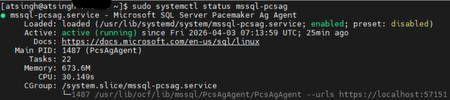
We are excited to introduce the next generation of high availability (HA) Agent for SQL Server on Linux: Pacemaker HA Agent v2. This release is a major step forward, designed to reduce planned and unplanned failover times, compared to the previous agent, based on internal engineering improvements. Why Pacemaker Is Required for SQL Server HA on Linux For users new to Linux, it’s important to understand how high availability works on this platform. On Windows Server, Always On availability groups use an underlying Windows Server Failover Cluster (WSFC) to: Monitor node health Detect failures Orchestrate automatic failovers Always On availability groups on Linux rely on an external cluster orchestrator for health monitoring and failover coordination, with Pacemaker HA Agent being one of the cluster orchestrators, responsible for: Monitoring node and application health Coordinating failover decisions Helping mitigate split‑brain scenarios through improved write‑lease evaluation Managing resources such as availability groups and listeners The Pacemaker HA Agent is the integration layer that allows Pacemaker to understand SQL Server health and manage availability groups safely. Evolution of the SQL Server Pacemaker HA Agent With SQL Server 2025 CU3 and later, Pacemaker HA Agent v2 is available in preview for Red Hat Enterprise Linux and Ubuntu through the mssql-server-ha package. Pacemaker HA agent v2 uses a service‑based architecture. The agent runs as a dedicated system service named mssql-pcsag, which is responsible for handling SQL Server–specific high availability operations and communication with Pacemaker. You can manage mssql-pcsag service by using standard system service controls to start, restart, status and stop this service by using the operating system's service manager (for example, systemctl). # Start the mssql-pcsag service sudo systemctl start mssql-pcsag # Restart the mssql-pcsag service sudo systemctl restart mssql-pcsag # Check the status of the mssql-pcsag service sudo systemctl status mssql-pcsag # Stop the mssql-pcsag service sudo systemctl stop mssql-pcsag Limitations of Pacemaker HA Agent v1 While the original agent enabled SQL Server HA on Linux, customers running production workloads encountered several challenges: Failover delays of 30 seconds to 2 minutes during planned or unplanned events Limited health detection, missing conditions such as I/O stalls and memory pressure Rigid failover behavior, unlike the flexible policies available on Windows (WSFC) Incomplete write‑lease handling, requiring custom logic No support for TLS1.3 for Pacemaker and SQL Server communications How Pacemaker HA Agent v2 Addresses These Gaps Pacemaker HA Agent v2 is a ground‑up improvement, designed to improve the reliability characteristics of SQL Server HA on Linux. 1. Faster & Smarter Failover Decisions The new agent introduces a service‑based health monitoring architecture, moving beyond basic polling. This allows SQL Server to report detailed diagnostic signals - improving detection speed and helping reduce failover delays in supported configurations. 2. Flexible Automatic Failover Policies inspired by the WSFC health model Pacemaker HA Agent v2 supports failure‑condition levels (1–5) and health‑check timeout model aligned with those available in Always On availability groups on Windows. This provides: Fine‑grained control over failover sensitivity, allowing administrators to tune when failover should occur. Improved detection of internal SQL Server conditions, such as memory pressure, internal deadlocks, orphaned spinlocks, and other engine‑level failures. Failover decisions are now driven by detailed diagnostics from sp_server_diagnostics, enabling faster and more accurate response to unhealthy states and providing enhanced resiliency capabilities for SQL Server AG on Linux. You can configure the failure condition level and health check timeout using the following commands: -- Setting failure condition level ALTER AVAILABILITY GROUP pacemakerag SET (FAILURE_CONDITION_LEVEL = 2); -- Setting health check timeout ALTER AVAILABILITY GROUP pacemakerag SET (HEALTH_CHECK_TIMEOUT = 60000); After applying the configuration, validate the setting using the sys.availability_groups DMV: 3. Robust Write Lease Validity Handling To prevent split‑brain scenarios, SQL Server on Linux uses an external write‑lease mechanism. In v1, lease information was not fully integrated into failover decisions. In v2, the agent actively evaluates the write-lease validity, before initiating transitions. This supports controlled role changes and improved data consistency behavior during failover events, depending on cluster configuration. 4. TLS 1.3 Support Pacemaker HA agent v2 includes design updates to support TLS 1.3–based communication for health checks and failover operations, when TLS 1.3 is enabled. Supported Versions & Distributions Pacemaker HA Agent v2 supports: SQL Server 2025 CU3 or later RHEL 9 or later Ubuntu 22.04 or higher. Preview upgrade & migration guidance for non-production environments New or existing non-prod deployments running SQL Server 2025 (17.x) can migrate from Pacemaker HA Agent v1 to v2 using following approach: Drop the existing AG resource sudo pcs resource delete <NameForAGResource> This temporarily pauses AG synchronization but does not delete the availability group (AG). After the resource is recreated, Pacemaker resumes management and AG synchronization automatically. Create a new AG resource using the v2 agent (ocf:mssql:agv2) sudo pcs resource create <NameForAGResource> ocf:mssql:agv2 ag_name=<AGName> meta failure-timeout=30s promotable notify=true Validate cluster health sudo pcs status Resume normal operations References Create and Configure an Availability Group for SQL Server on Linux - SQL Server | Microsoft Learn Thank You, Engineering: David Liao Attinder Pal Singh576Views2likes3CommentsMicrosoft ODBC Driver 18.6.2 for SQL
What Is the Microsoft ODBC Driver for SQL? The Microsoft ODBC Driver for SQL provides native connectivity from Windows, Linux, and macOS applications to SQL Server, Azure SQL Database, Azure SQL Managed Instance, and Microsoft Fabric. It is the recommended driver for new application development using the ODBC API, and it supports , Always Encrypted, distributed transactions, and modern authentication methods including Microsoft Entra ID (formerly Azure Active Directory). Whether you're building high-throughput data pipelines, managing enterprise databases, or developing cloud-native applications on Microsoft Fabric, the ODBC driver is a foundational component of the SQL Server connectivity stack. What's New in 18.6.2 Improved Vector Parameter Handling for Prepared Statements Version 18.6.2 improves the handling of output and input/output vector parameters when using prepared statements. This enhancement benefits applications that rely on parameterized queries with array bindings — a common pattern in batch processing and high-performance data access layers. Microsoft Fabric Redirection Support (Up to 10 Redirections) The driver now allows up to 10 server redirections per connection attempt, up from previous limits. This change directly supports Microsoft Fabric redirection scenarios, where connections may be transparently routed through multiple endpoints before reaching the target workspace. If your applications connect to Fabric SQL endpoints, this update ensures more reliable connectivity in complex routing topologies. Alpine Linux Packaging Improvements Architecture detection and packaging have been improved for Alpine Linux environments, making it easier to deploy the driver in lightweight, container-based workloads that use Alpine as a base image. Bug Fixes This release addresses several important issues reported by the community and identified through internal testing: Parameter Array Processing SQL_ATTR_PARAMS_PROCESSED_PTR accuracy — Fixed an issue where the number of processed parameter sets was not reported correctly when executing parameter arrays. Applications that inspect SQL_ATTR_PARAMS_PROCESSED_PTR after batch execution will now see the correct count. SQL_PARAM_IGNORE handling — Fixed SQL_ATTR_PARAMS_PROCESSED_PTR and row counting when SQL_PARAM_IGNORE is used within parameter arrays, ensuring that ignored parameters are accounted for properly. Crash Fixes SQLNumResultCols segmentation fault — Resolved a segfault that occurred when calling SQLNumResultCols in describe-only scenarios where no parameter bindings are present. Table-valued parameter (TVP) NULL handling — Fixed a segmentation fault triggered by NULL values in TVP arguments. Applications passing TVPs with nullable columns should no longer experience unexpected crashes. bcp_bind Consecutive Field Terminators (Known Issue from 18.6.1) bcp_bind fix — Corrected bcp_bind to properly handle consecutive field terminators without misinterpreting them as empty fields. This resolves a known issue introduced in version 18.6.1, where consecutive terminators were incorrectly interpreted as NULL values instead of empty strings. If you deferred upgrading to 18.6.1 because of this issue, 18.6.2 is the recommended target version. Linux Packaging Debian EULA acceptance — Fixed Debian package installation to correctly honor EULA acceptance and complete successfully, eliminating a friction point for automated deployments. RPM side-by-side installation — Fixed RPM packaging rules to allow installing multiple driver versions side by side, which is important for environments that need to maintain backward compatibility or perform staged rollouts. Distributed Transactions XA recovery — Fixed XA recovery to compute transaction IDs correctly, avoiding scenarios where recoverable transactions could be missed during the recovery process. This is a critical fix for applications using distributed transactions with XA transaction managers. Upgrading from Older Versions If you are upgrading from a version prior to 18.6.1, you will also benefit from the features introduced in that release: Vector data type support — Native support for the vector data type (float32), enabling AI and machine learning scenarios directly through ODBC. ConcatNullYieldsNull property — Connection-level control over null concatenation behavior. New platform support — Azure Linux 3.0 ARM, Debian 13, Red Hat 10, and Ubuntu 25.10. Version 18.6.2 builds on these additions with the stability and correctness fixes described above. Download & Installation Windows Platform Download Link x64 Download x86 Download ARM64 Download Linux & macOS Installation packages for supported Linux distributions and macOS are available on Microsoft Learn: Download ODBC Driver for SQL Server (Linux/macOS) Documentation & Release Notes For the full list of changes, platform support details, and known issues, see the official release notes: Windows Release Notes Linux & macOS Release Notes Bug Fixes Get Started We encourage all users to upgrade to version 18.6.2.1 to take advantage of the fixes and improvements in this release — particularly if you are using parameter arrays, table-valued parameters, bcp operations, or connecting to Microsoft Fabric endpoints. As always, we welcome your feedback. If you encounter issues, please report them through the SQL Server feedback channel or open an issue on the Microsoft ODBC Driver GitHub repository. Happy coding!1.7KViews0likes0CommentsMicrosoft.Data.SqlClient 7.0 Is Here: A Leaner, More Modular Driver for SQL Server
Today we're shipping the general availability release of Microsoft.Data.SqlClient 7.0, a major milestone for the .NET data provider for SQL Server. This release tackles the single most requested change in the repository's history, introduces powerful new extensibility points for authentication, and adds protocol-level features for Azure SQL Hyperscale, all while laying the groundwork for a more modular driver architecture. If you take away one thing from this post: the core SqlClient package is dramatically lighter now. Azure dependencies have been extracted into a separate package, and you only pull them in if you need them. dotnet add package Microsoft.Data.SqlClient --version 7.0.0 The #1 Request: A Lighter Package For years, the most upvoted issue in the SqlClient repository asked the same question: "Why does my console app that just talks to SQL Server pull in Azure.Identity, MSAL, and WebView2?" With 7.0, it doesn't anymore. We've extracted all Azure / Microsoft Entra authentication functionality into a new Microsoft.Data.SqlClient.Extensions.Azure package. The core driver no longer carries Azure.Core, Azure.Identity, Microsoft.Identity.Client, or any of their transitive dependencies. If you connect with SQL authentication or Windows integrated auth, your bin folder just got dramatically smaller. For teams that do use Entra authentication, the migration is straightforward. Add one package reference and you're done: dotnet add package Microsoft.Data.SqlClient.Extensions.Azure No code changes. No configuration changes. You can also now update Azure dependency versions on your own schedule, independent of driver releases. This is something library authors and enterprise teams have been asking for. Pluggable Authentication with SspiContextProvider Integrated authentication in containers and cross-domain environments has always been a pain point. Kerberos ticket management, sidecar processes, domain trust configuration: the workarounds were never simple. Version 7.0 introduces a new public SspiContextProvider API on SqlConnection that lets you take control of the authentication handshake. You provide the token exchange logic; the driver handles everything else. var connection = new SqlConnection(connectionString); connection.SspiContextProvider = new MyKerberosProvider(); connection.Open(); This opens the door to scenarios the driver never natively supported: authenticating across untrusted domains, using NTLM with explicit credentials, or implementing custom Kerberos negotiation in Kubernetes pods. A sample implementation is available in the repository. Async Read Performance: Packet Multiplexing (Preview) One of the most community-driven features in 7.0 is packet multiplexing, a change to how the driver processes TDS packets during asynchronous reads. Originally contributed by community member Wraith2, this work delivers a significant leap in async read performance for large result sets. Packet multiplexing was first introduced in 6.1 and has been refined across the 7.0 preview cycle with additional bug fixes and stability improvements. In 7.0, it ships behind two opt-in feature switches so we can gather broader real-world feedback before making it the default: AppContext.SetSwitch("Switch.Microsoft.Data.SqlClient.UseCompatibilityAsyncBehaviour", false); AppContext.SetSwitch("Switch.Microsoft.Data.SqlClient.UseCompatibilityProcessSni", false); Setting both switches to false enables the new async processing path. By default, the driver uses the existing (compatible) behavior. We need your help. If your application performs large async reads (ExecuteReaderAsync with big result sets, streaming scenarios, or bulk data retrieval), please try enabling these switches and let us know how it performs in your environment. File your results on GitHub Issues to help us move this toward on-by-default in a future release. Enhanced Routing for Azure SQL Azure SQL environments with named read replicas and gateway-based load balancing can now take advantage of enhanced routing, a TDS protocol feature that lets the server redirect connections to a specific server and database during login. This is entirely transparent to your application. No connection string changes, no code changes. The driver negotiates the capability automatically when the server supports it. .NET 10 Ready SqlClient 7.0 compiles and tests against the .NET 10 SDK, so you're ready for the next major .NET release on day one. Combined with continued support for .NET 8, .NET 9, .NET Framework 4.6.2+, and .NET Standard 2.0 (restored in 6.1), the driver covers the full spectrum of active .NET runtimes. ActiveDirectoryPassword Is Deprecated: Plan Your Migration As Microsoft moves toward mandatory multifactor authentication across its services, we've deprecated SqlAuthenticationMethod.ActiveDirectoryPassword (the ROPC flow). The method still works in 7.0, but it's marked [Obsolete] and will generate compiler warnings. Now is the time to move to a stronger alternative: Scenario Recommended Authentication Interactive / desktop apps Active Directory Interactive Service-to-service Active Directory Service Principal Azure-hosted workloads Active Directory Managed Identity Developer / CI environments Active Directory Default Quality of Life Improvements Beyond the headline features, 7.0 includes a collection of improvements that make the driver more reliable and easier to work with in production. Better retry logic. The new SqlConfigurableRetryFactory.BaselineTransientErrors property exposes the built-in transient error codes, so you can extend the default list with your own application-specific codes instead of copy-pasting error numbers from source. More app context switches. You can now set MultiSubnetFailover=true globally, ignore server-provided failover partners in Basic Availability Groups, and control async multi-packet behavior, all without modifying connection strings. Better diagnostics on .NET Framework. SqlClientDiagnosticListener is now enabled for SqlCommand on .NET Framework, closing a long-standing observability gap. Connection performance fix. A regression where SPN generation was unnecessarily triggered for SQL authentication connections on the native SNI path has been resolved. Performance improvements. Allocation reductions across Always Encrypted scenarios, SqlStatistics timing, and key store providers. Upgrading from 6.x For most applications, upgrading is a package version bump: dotnet add package Microsoft.Data.SqlClient --version 7.0.0 If you use Microsoft Entra authentication, also add: dotnet add package Microsoft.Data.SqlClient.Extensions.Azure If you use ActiveDirectoryPassword, you'll see a compiler warning. Start planning your migration to a supported auth method. Review the full release notes in release-notes/7.0 for the complete list of changes across all preview releases. Thank You to Our Contributors Open-source contributions are central to SqlClient's development. We'd like to recognize the community members who contributed to the 7.0 release: edwardneal · ErikEJ · MatthiasHuygelen · ShreyaLaxminarayan · tetolv · twsouthwick · Wraith2 What's Next We're continuing to invest in performance, modularity, and modern .NET alignment. Stay tuned for updates on the roadmap, and keep the feedback coming. Your issues and discussions directly shape what we build. NuGet: Microsoft.Data.SqlClient 7.0.0 GitHub: dotnet/SqlClient Issues & Feedback: github.com/dotnet/SqlClient/issues Docs: Microsoft.Data.SqlClient on Microsoft Learn4.2KViews2likes5CommentsUnlocking Enterprise AI: SQL Server 2025 and NVIDIA Nemotron RAG Accelerate AI
Today, most of the world’s data still remains untapped, sitting in databases, documents, and systems across organizations. Enterprises are racing to unlock this data’s value by building the next wave of generative AI applications—solutions that can answer questions, summarize documents, and drive smarter decisions. At the heart of these innovations are retrieval-augmented generation (RAG) pipelines, which enable users to interactively engage with large amount of data that continuously evolves. Yet, as promising as RAG pipelines are, enterprises face real challenges in making them work at scale. Handling both structured and unstructured data, processing massive volumes efficiently, and ensuring privacy and security are just a few hurdles. This is where the integration between SQL Server 2025 and NVIDIA Nemotron RAG models, deployed as NVIDIA NIM microservices, comes in, offering a new approach that streamlines AI deployment and delivers enterprise-grade performance—whether you’re running workloads in the cloud or on-premises. “As AI becomes core to every enterprise, organizations need efficient and compliant ways to bring intelligence to their data,” said Joey Conway, Senior Director of Generative AI software at NVIDIA. “With SQL Server 2025’s built-in AI and NVIDIA Nemotron RAG, deployed as NIM microservices, enterprises can deploy and run AI models close to their data on premises or in the cloud without complex integration, accelerating innovation while maintaining data sovereignty and control.” Overcoming the complexity of generating embeddings at scale Customer challenge Building responsive AI applications using RAG requires converting SQL data into vector embeddings—a process that feeds huge amounts of text through complex neural networks. This is inherently parallel and compute-intensive, often creating performance bottlenecks that prevent real-time data indexing. The result? Slow applications and poor user experiences. Moreover, enterprises need flexibility. Different embedding models excel at different tasks—semantic search, recommendations, classification—and each comes with its own tradeoffs in accuracy, speed, and cost. Businesses want to mix and match models, balance premium performance with budget constraints, and stay resilient against model deprecation or API changes. Furthermore, rapid experimentation and adaptation are key to staying ahead and thus developers want models that offer flexible customization and full transparency. The Solution: SQL Server 2025 + NVIDIA Nemotron RAG SQL Server 2025 brings AI closer to your data, allowing you to natively and securely connect to any model hosted anywhere. You can generate embeddings directly in SQL using extensions to T-SQL —no need for new languages, frameworks, or third-party tools. By connecting SQL Server 2025 to the llama-nemotron-embed-1b-v2 embedding model from NVIDIA, you eliminate bottlenecks and deliver the massive throughput needed for real-time embedding generation. llama-nemotron-embed-1b-v2 is a best in class embedding model that offers multilingual and cross-lingual text question-answering retrieval with long context support and optimized data storage. This model is part of NVIDIA Nemotron RAG models, a collection of extraction, embedding, reranking models, fine-tuned with the Nemotron RAG datasets and scripts, to achieve the best accuracy. These models offer flexible customization, enabling easy fine-tuning and rapid experimentation. They also offer full transparency with open access to models, datasets, and scripts. Llama-nemotron-embed-1b-v2 is the model of choice for embedding workflows, but this high-speed inference pipeline is not limited to this model and can potentially call any optimized AI model as an NVIDIA NIM microservice, seamlessly powering every stage of the RAG pipeline. From multimodal data ingestion and advanced retrieval to reranking, all operations run directly on your data within SQL Server. Such RAG systems can be applied across a wide range of use cases, enabling intelligent, context-aware applications across industries. Customer Benefits: With GPU acceleration and built-in AI of SQL Server 2025, you can achieve optimal inference, ensuring performance that meets the demands of modern applications. Our flexible approach lets you mix and match models to suit different use cases, striking the right balance between accuracy and cost. And with open models that enable vendor flexibility and rapid adaptation, you gain resilience to stay ahead of the curve in an ever-changing AI landscape. Streamlining AI Model Deployment with Enterprise-Grade Confidence Customer Challenge Integrating advanced AI models into enterprise workflows has historically been slow and complex. Specialized teams must manage intricate software dependencies, configure infrastructure, and handle ongoing maintenance—all while navigating the risks of deploying unsupported models in mission-critical environments. This complexity slows innovation, drains engineering resources, and increases risk. The Solution: Simplified, Secure Model Deployment with NVIDIA NIM This collaboration simplifies and de-risks AI deployment. The llama-nemotron-embed-1b-v2 model is available as an NVIDIA NIM microservice for secure, reliable deployment across multiple Azure compute platforms. Prebuilt NIM containers for a broad spectrum of AI models and can be deployed with a single command for easy integration into enterprise-grade AI applications using built-in REST APIs of SQL Server 2025 and just a few lines of code, regardless where you run SQL Server workloads and NVIDIA NIM, on premises or in the cloud. NIM containers package the latest AI models together with the best inference technology from NVIDIA and the community and all dependencies into a ready-to-run container, abstracting away the complexity of environment setup so customers can spin up AI services quickly. Furthermore, NVIDIA NIM is enterprise-grade and is continuously managed by NVIDIA with dedicated software branches, rigorous validation processes, and support. As a result, developers can confidently integrate state-of-the-art AI into their data applications. This streamlined approach significantly reduces development overhead and provides the reliability needed for mission-critical enterprise systems. NVIDIA NIM containers are discoverable and deployable via Microsoft Azure AI Foundry’s model catalog. Customer Benefits Rapid deployment with minimal setup means you can start leveraging AI without specialized engineering, and SQL Server 2025 makes it even easier with built-in support for AI workloads and native REST APIs. Enterprise-grade security and monitoring ensure safe, reliable operations, while SQL Server’s integration with Entra ID and advanced compliance features provide added protection. Direct integration into SQL workflows reduces complexity and risk, and with SQL Server’s hybrid flexibility, you can run seamlessly across on-premises and cloud environments—simplifying modernization while maintaining control. Innovating Without Compromise on Security or Flexibility Customer Challenge Organizations in regulated industries often face a tough choice: adopt powerful AI or maintain strict data residency and compliance. Moving sensitive data to external services is often not an option, and many companies run AI inference workloads both in the cloud and on-premises to balance scalability, privacy, regulatory compliance, and low-latency requirements. The Solution: Flexible, Secure Integration—On-Premises and Cloud SQL Server 2025 enables organizations in regulated environments to securely integrate locally hosted AI models, ensuring data residency and compliance while minimizing network overhead. This architecture boosts throughput by keeping sensitive data on-premises and leveraging SQL Server’s native extensibility for direct model invocation. With SQL Server 2025 and Nemotron RAG, deployed as NVIDIA NIM microservices, you get the best of both worlds. This solution can be seamlessly deployed in the cloud with serverless NVIDIA GPUs on Azure Container Apps (ACA) or on-premises with NVIDIA GPUs on Azure Local. Sensitive data never leaves your secure environment, allowing you to harness the full power of Nemotron models while maintaining complete data sovereignty and meeting the strictest compliance mandates. Customer Benefits SQL Server 2025 helps you maintain compliance by supporting data residency and meeting regulatory standard requirements across regions. Sensitive data stays protected on-premises with enterprise-grade security, including consistent access controls, ledger support, and advanced encryption to minimize risk. At the same time, SQL Server’s hybrid flexibility lets you deploy AI workloads wherever they’re needed—on-premises, in the cloud, or across a hybrid environment—while leveraging built-in AI features like vector search and secure integration with locally hosted models for performance and control. Conclusion: Powering the Next Wave of Enterprise AI The collaboration between Microsoft and NVIDIA is more than a technical integration. It’s designed to help enterprises overcome the toughest challenges in AI deployment. By streamlining vector embedding and vector search, delivering enterprise-grade performance, and enabling secure, flexible integration across cloud and on-premises environments, this joint solution empowers organizations to unlock the full value of their data. Whether you’re building conversational AI, automating document analysis, or driving predictive insights, SQL Server 2025 and NVIDIA Nemotron RAG models, deployed as NIM, provide the tools you need to innovate with confidence. The future of enterprise AI is here and it’s flexible, secure, and built for real business impact. Get started today: Learn more about SQL Server 2025 and download it today Learn more about our joint solution from NVIDIA’s Technical Blog GitHub: Microsoft SQL Server 2025 and NVIDIA Nemotron RAG1.7KViews1like0CommentsSQL Server 2025 Preview: Now Supporting Ubuntu 24.04 and TLS 1.3
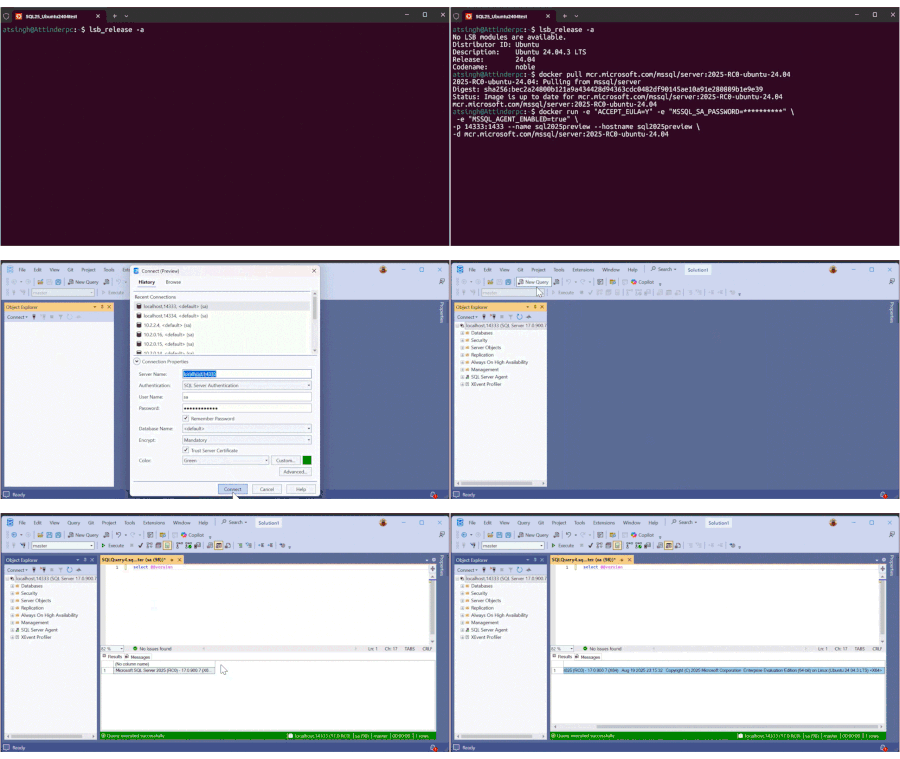
We are excited to introduce two key enhancements in the SQL Server 2025 Release Candidate 0 (RC0) for Linux: Ubuntu 24.04 and the addition of Transport Layer Security (TLS) 1.3 support. These updates enable developers, database administrators, and IT professionals to leverage the latest open-source technologies and security protocols, strengthening their data platforms. Ubuntu 24.04 Support in SQL Server 2025 RC0 SQL Server 2025 Preview now supports Ubuntu 24.04. This enables seamless deployment in Dev/Test environments using the Enterprise Evaluation Edition, which is valid for 180 days. Note: Production workloads on Ubuntu 24.04 are not yet supported; for production, use SQL Server 2022 on Ubuntu 22.04 or RHEL 9. How to Deploy SQL Server 2025 RC0 on Ubuntu 24.04 Getting started is easy! You can follow our Quickstart: Install SQL Server and create a database on Ubuntu to walks through everything—from prepping your system to installing and configuring SQL Server on Ubuntu. In this demo, I'll show you how to deploy SQL Server 2025 RC0 on Ubuntu 24.04 running inside WSL2. I've already set up Ubuntu 24.04 on WSL2 and Docker Desktop to manage containers. With just two commands, I was able to launch SQL Server 2025 RC0 in a container. I then connected to it using SQL Server Management Studio (SSMS), where you can see the version information displayed, confirming a successful deployment. lsb_release -a docker pull mcr.microsoft.com/mssql/server:2025-RC0-ubuntu-24.04 docker run -e "ACCEPT_EULA=Y" -e "MSSQL_SA_PASSWORD=<password>" \ -e "MSSQL_AGENT_ENABLED=true" \ -p 14333:1433 --name sql2025preview --hostname sql2025preview \ -d mcr.microsoft.com/mssql/server:2025-RC0-ubuntu-24.04 Here is the snippet of SQL Server ERRORLOG This shows the initial startup messages and confirms the SQL Server version running inside the container. TLS 1.3 Support in SQL Server 2025 RC0 Starting in SQL Server 2025 Preview (RC0), TLS 1.3 is enabled by default. To enable and validate TLS 1.3 for your SQL Server instance, follow the Learn guide: Encrypt Connections to SQL Server on Linux - SQL Server | Microsoft Learn Conclusion The addition of Ubuntu 24.04 and TLS 1.3 support in SQL Server 2025 Preview marks a significant step forward in providing modern, secure, and flexible data platform options. We encourage you to try out these new capabilities and share your feedback as we continue to improve SQL Server for the Linux ecosystem. We recommend you use any of the following options that suits you the best. 1) Send us an email with your feedback to sqlpreviewpackage@microsoft.com. 2) Another option would be to submit your comments directly on Azure Ideas (Use the SQL Server on Linux Group on the left side of the page) 3) Alternatively, you can open issues related to the preview packages Issues · microsoft/mssql-docker (github.com) on GitHub. We hope you give SQL Server 2025 preview on Ubuntu 24.04 a try and let us know what you think!1.2KViews0likes0Comments