sqlserver
71 TopicsSQL + AI: Get ready for a fun new experience, launching next week!
The SQL community is leveling up! We’re launching a lightweight, beginner friendly SQL + AI contest designed to spark awareness of SQL Server 2025’s new AI capabilities—from connecting to an AI model, to generating embeddings, to exploring what’s possible when natural language intelligence meets your database. Building on the momentum, each week in February unlocks a new chapter of the story - from your first steps connecting SQL to AI, to exploring embeddings, to experimenting with lightweight RAG patterns, and finally orchestrating full end-to-end workflows. This will be hands-on, guided, and fun! You don’t need to be an AI expert to participate. Each challenge builds on the last, helping you discover what’s possible when SQL’s new capabilities meet real world scenarios — all in a fun, approachable format designed to spark curiosity and get people talking. Join us for some SQL fun starting next week, February 5th! Stay tuned to this post for more details! Get ready to build, discover, and play. SQL + AI is here.5.1KViews9likes1Comment
Announcing SQLCon 2026: Better Together with FabCon!
We’re thrilled to unveil SQLCon 2026, the premier Microsoft SQL Community Conference, co-located with the Microsoft Fabric Community Conference (FabCon) from March 16–20, 2026! This year, we’re bringing the best of both worlds under one roof—uniting the vibrant SQL and Fabric communities for a truly next-level experience. Whether you’re passionate about SQL Server, Azure SQL, SQL in Fabric, SQL Tools, migration and modernization, database security, or building AI-powered apps with SQL, SQLCon 2026 has you covered. Dive into 50+ breakout sessions and 4 expert-led workshops designed to help you optimize, innovate, and connect. Why are SQLCon + FabCon better together? One registration, double the value: Register for either conference and get full access to both—mix and match sessions, keynotes, and community events to fit your interests. Shared spaces, shared energy: Enjoy the same expo hall, registration desk, conference app, and community lounge. Network with peers across the data platform spectrum. Unforgettable experiences: Join us for both keynotes at the State Farm Arena and celebrate at the legendary attendee party at the Georgia Aquarium. Our goal is to reignite the SQL Community spirit—restoring the robust networks, friendships, and career-building opportunities that make this ecosystem so special. SQLCon is just the beginning of a renewed commitment to connect at conferences, user groups, online, and at regional events. Early Access Pricing Extended! Register by November 14th and save $200 with code SQLCMTY200. Register Now! Want to share your expertise? The Call for Content is open until November 20th for both conferences! Let’s build the future of data—together. See you at SQLCon + FabCon!7.9KViews8likes1Comment
Query plan regressions got you down? Here's how Automatic Plan Correction can turn it around.
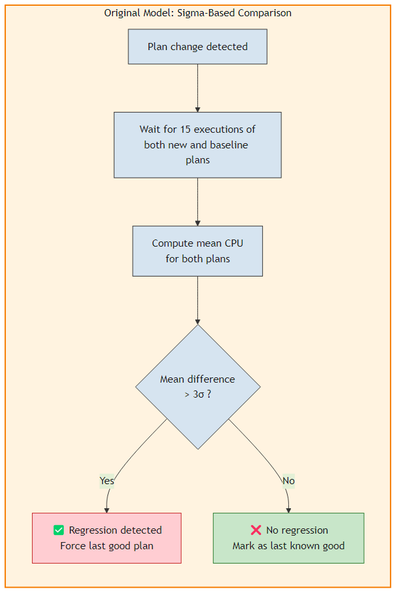
Automatic Plan Correction (APC) is one of the features that I find myself talking about quite a bit with customers, support engineers, and the broader SQL community. It is part of the Automatic Tuning family and has been quietly doing its job since SQL Server 2017, detecting query plan regressions and automatically forcing a previously known good plan to restore performance. But one of the questions that comes up often is: how does APC actually decide whether a regression has occurred? And how confident is it in that decision? With SQL Server 2022 CU4 and continuing into SQL Server 2025, we have made significant improvements to the statistical model that APC uses for regression detection. This blog post walks through what changed, why it matters, and how you can take advantage of it. ⚙️ Two Ways to Detect a Regression APC supports two statistical models for determining whether a query plan has regressed. Both analyze execution statistics captured by Query Store (such as CPU time) to compare the performance of a current plan against a previously known good plan. The original model: sigma-based comparison The original regression detection model uses a sigma-based comparison (commonly associated with the "three-sigma rule"). It computes whether the difference in average CPU time between the current plan and the last known good plan exceeds a threshold of 3 standard deviations. This approach works well when execution times follow a normal distribution with consistent variance. However, we found some limitations with this approach over time: High variance can mask regressions. If CPU times vary widely for a given plan (which is common in real workloads), the standard deviation becomes large. A regression where the mean CPU time doubles might still fall within the 3-sigma band, causing APC to miss it. It assumes equal variance. The model treats the variance of both the current and baseline plan populations as comparable. When they differ significantly (for example, the regressed plan has highly variable execution times while the good plan was stable), the comparison loses precision. It requires more executions. The model needs at least 15 executions of the current plan before it makes a determination. 🆕 The newer model: Welch's t-test The newer regression detection model uses the Welch's t-test, a well-established statistical hypothesis test designed specifically for comparing two populations that may have unequal variances and unequal sample sizes. If you are not familiar with the Welch's t-test, you can think of it as a more robust way to answer the question: "are these two sets of numbers actually different, or is the difference just noise?" Key improvements over the original model: Better accuracy with high-variance workloads. The Welch's t-test explicitly accounts for different variances between the current plan and the baseline plan. It won't be fooled by a plan that sometimes runs fast and sometimes runs very slow. It can still detect that the distribution has shifted unfavorably. Faster reaction time. APC can begin evaluating a plan after as few as 3 executions of the new plan, compared to 15 with the original model. When the performance difference is statistically significant, APC can detect and correct a regression much sooner. Adaptive sample sizing. If the initial sample of 3 executions produces an "uncertain" result, APC doesn't give up. It progressively increases the number of executions required before rechecking, until enough execution statistics have been gathered to make a confident determination. Multiple checks before final determination. The Welch's t-test model performs more than one check over the lifecycle of a potential regression. It re-evaluates as more data arrives, reducing the chance of both false positives and false negatives. With the Welch's t-test model, we have significantly improved both the accuracy of regression detection and the reaction time that APC takes with correcting a regression. 🧭 Enabling the Welch's t-test model The Welch's t-test model is the default regression detection model in: Azure SQL Database, SQL Database in Microsoft Fabric, Azure SQL Managed Instance (enabled by default, no action required) SQL Server 2025 (enabled by default, no action required) For SQL Server 2022, enable it with trace flag 12618 (available starting with CU4): -- Enable globally (startup trace flag) DBCC TRACEON (12618, -1); -- Or add as a startup parameter: -T12618 The original sigma-based model remains as a fallback and is used when trace flag 12618 is not enabled on SQL Server 2022 CU4+. As always, we strongly recommend applying the latest Cumulative Updates for SQL Server. 🧪 Handling long-running and timed-out queries Both regression detection models share a common bias that I want to call out: APC checks are triggered after a certain number of query executions complete. This means APC inherently evaluates the fastest-completing executions first and may miss regressions where the symptom is queries running for minutes or timing out entirely. Let me paint a picture of what this looks like. Imagine a situation where the overall CPU utilization on a server goes from an average of 10% to 100% unexpectedly and you find out that there had been a plan change for a particular query. The extended events may show that the query had executed a few times quickly, say 15 executions that completed in milliseconds. However, during your analysis you notice that there were a lot of other query executions that were running longer, maybe for a few minutes. Some of those longer running queries completed successfully, but others were timing out. By the time those slow executions finish and their statistics reach Query Store, APC has already made its regression decision based on the fast executions and concluded there was no regression. Trace flag 12656 addresses this by enabling a time-based delayed recheck. When enabled, APC schedules an additional check 5 minutes after a plan change is first detected. This delayed check re-evaluates the query using execution statistics that now include the slower and timed-out executions, providing a more complete picture. -- Enable globally DBCC TRACEON (12656, -1); Like trace flag 12618, trace flag 12656 is also available starting with SQL Server 2022 CU4. Per-query timed recheck with sp_configure_automatic_tuning While trace flag 12656 applies this recheck globally, you can also enable it on a per-query basis using the sp_configure_automatic_tuning stored procedure with the FORCE_LAST_GOOD_PLAN_EXTENDED_CHECK option. This is especially useful in Azure SQL Database, SQL Database in Microsoft Fabric, and Azure SQL Managed Instance where the global trace flag is not available. It provides the same 5-minute delayed recheck that trace flag 12656 enables, but scoped to only the queries you choose: -- Enable timed recheck for a specific query EXEC sp_configure_automatic_tuning @option = 'FORCE_LAST_GOOD_PLAN_EXTENDED_CHECK', @option_value = 'ON', @type = 'QUERY', @type_value = <query_id>; -- Disable timed recheck for a specific query EXEC sp_configure_automatic_tuning @option = 'FORCE_LAST_GOOD_PLAN_EXTENDED_CHECK', @option_value = 'OFF', @type = 'QUERY', @type_value = <query_id>; This allows you to target specific queries that are known to have long-running or timeout-prone execution patterns without imposing the overhead of timed rechecks on every query in the database. The following table summarizes the scope differences: Method Scope Where available Trace flag 12656 All queries on the instance (global) SQL Server 2022 CU4 and later versions (including SQL Server 2025 and later versions) sp_configure_automatic_tuning FORCE_LAST_GOOD_PLAN_EXTENDED_CHECK Individual queries (per-query) SQL Server 2022 CU4 and later versions, SQL Server 2025, Azure SQL Database, SQL Database in Microsoft Fabric, and Azure SQL Managed Instance 🔍 Monitoring APC decisions The illustration below can be used as a mental map of all of the phases that the automatic plan correction feature takes which can be monitored. sys.dm_db_tuning_recommendations The sys.dm_db_tuning_recommendations DMV can be used to see any actions that APC has taken if it is enabled and will also be populated if the feature is disabled, showing the action that it would have taken if it were enabled. The result set is in JSON format, so a query similar to the one below can be used to parse the output: SELECT JSON_VALUE([state], '$.currentValue') AS [state], script = JSON_VALUE(details, '$.implementationDetails.script'), planForceDetails.* FROM sys.dm_db_tuning_recommendations CROSS APPLY OPENJSON(Details, '$.planForceDetails') WITH ( [query_id] int '$.queryId', regressedPlanId int '$.regressedPlanId', recommendedPlanId int '$.recommendedPlanId', regressedPlanErrorCount int, recommendedPlanErrorCount int, regressedPlanExecutionCount int, regressedPlanCpuTimeAverage float, recommendedPlanExecutionCount int, recommendedPlanCpuTimeAverage float ) AS planForceDetails; ⚠️ Note: Data in sys.dm_db_tuning_recommendations is not persisted across Database Engine restarts. 📋 Extended events for deeper analysis It may also be a good idea to capture some of the APC extended events for additional insight and analysis. For general APC observability, the key events are: Extended event When it fires automatic_tuning_plan_regression_detection_check_completed APC finishes evaluating a plan for regression. Shows whether a regression was detected and corrected. automatic_tuning_plan_regression_verification_check_completed APC finishes validating a previously forced plan. automatic_tuning_check_abandoned APC abandons a check (for example, only one plan exists). automatic_tuning_recommendation_expired APC backs off from a forced plan that isn't helping. automatic_tuning_diagnostics Periodic health summary with check counts, detection counts, and correction counts. For analyzing the Welch's t-test model specifically, there is a dedicated event (not currently available for Azure SQL Database and SQL Database in Microsoft Fabric): Extended event When it fires automatic_tuning_wtest_details Fires during the Welch's t-test evaluation with detailed statistical information about the test. ⚠️ Note: The automatic_tuning_wtest_details event can be chattier than the other events. It is one way to validate the effects of having trace flag 12618 enabled if you are interested in comparing results in a workload between the old and new regression detection models, but consider the overhead before enabling it in production. Additionally, this event is not available in database-scoped sessions in Azure SQL Database and SQL Database in Microsoft Fabric. Here is a sample script to create a session that captures the key events: CREATE EVENT SESSION [APC_Welch_Monitor] ON SERVER ADD EVENT qds.automatic_tuning_plan_regression_detection_check_completed ( ACTION (sqlserver.database_id, sqlserver.database_name) ), ADD EVENT qds.automatic_tuning_plan_regression_verification_check_completed ( ACTION (sqlserver.database_id, sqlserver.database_name) ), ADD EVENT qds.automatic_tuning_wtest_details ( ACTION (sqlserver.database_id, sqlserver.database_name) ), ADD EVENT qds.automatic_tuning_diagnostics ( ACTION (sqlserver.database_id, sqlserver.database_name) ) ADD TARGET package0.event_file ( SET filename = N'APC_Welch_Monitor.xel', max_file_size = 50, max_rollover_files = 5 ) WITH ( MAX_MEMORY = 4096 KB, EVENT_RETENTION_MODE = ALLOW_SINGLE_EVENT_LOSS, MAX_DISPATCH_LATENCY = 5 SECONDS, STARTUP_STATE = OFF ); GO ALTER EVENT SESSION [APC_Welch_Monitor] ON SERVER STATE = START; 📊 Summary The table below provides a quick comparison between the two regression detection models. If you are on SQL Server 2022, I would encourage you to try trace flag 12618 and see how it improves APC's responsiveness for your workloads. If you are on SQL Server 2025 or Azure SQL Database SQL Database in Microsoft Fabric, or Azure SQL Managed Instance, the Welch's t-test model is already active by default. Regression detection models Aspect Original model (sigma-based) Welch's t-test model Statistical method 3-sigma threshold on mean CPU difference Welch's t-test (unequal variance t-test) Handles unequal variance No (assumes similar variance) Yes (explicitly models different variances) Min executions to evaluate 15 (current plan) As few as 3 (current plan), adapts exponentially Adaptive sample sizing No Yes (progressively increases required executions on uncertain results) Multiple checks Single check Multiple re-evaluations as data accumulates Default in Azure SQL DB, SQL Database in Microsoft Fabric, Azure SQL Managed Instance No (fallback) Yes Enable on SQL Server Default on SQL Server 2022 Default on SQL Server 2025; trace flag 12618 required for SQL Server 2022 CU4+ As we continue to make Automatic Plan Correction more reliable and more robust, I hope you find this blog helpful. We are always looking to hear from the community, so please continue to share your feedback and experiences at https://aka.ms/sqlfeedback. 📚 Learn More Automatic tuning sys.dm_db_tuning_recommendations Query Store overview1.4KViews5likes0CommentsSQL Server 2025 is Now Generally Available
Today at Ignite, we announce the general availability of SQL Server 2025. This marks the latest milestone in the more than 30-year history of SQL Server. It is also a key part of our commitment to the one consistent SQL promise, delivering consistent experience across on-premises, cloud, and SaaS environments, with one engine and one unified platform. Built on SQL Server’s foundation of best-in-class security, performance and availability, SQL Server 2025 is the AI-ready enterprise database and it redefines what's possible for enterprise data. With built-in AI and developer-first enhancements, SQL Server 2025 empowers customers to accelerate AI innovation using the data they already have, securely and at scale, all within SQL Server using the familiar T-SQL language. SQL Server 2025 is designed to meet customers where they are, whether on-premises, in the cloud, or in hybrid environments, helping you build intelligent, secure, scalable, and consistent solutions that drive real business outcomes. SQL Server 2025 is experiencing significant momentum, as evidenced by 10,000 organizations participating in the public preview and 100,000 active SQL Server 2025 databases. Leading customers like Mediterranean Shipping Company (MSC), Infios, and Buhler are already advancing with SQL Server 2025, supported by a robust ecosystem of technology partners including AMD, Canonical, HPE, Lenovo, NVIDIA, Pure Storage and Red Hat. Key Innovations in SQL Server 2025 AI built-in AI is now integrated directly into the SQL Server engine, enabling advanced semantic search for deeper insights and natural language experiences across enterprise data. Model management is built into T-SQL, supporting seamless integration with Microsoft Foundry, Azure OpenAI Service, OpenAI, Ollama, and more—deployable securely anywhere, from on premises to the cloud. Developers can easily switch between models without changing code, and essential AI building blocks like vector embedding, text chunking, and DiskANN indexing are natively supported. Integration with frameworks such as LangChain and Semantic Kernel accelerates AI-powered app development. At Ivanti, our mission is to elevate human potential by managing, protecting, and automating technology to drive continuous innovation. SQL Server 2025 plays a crucial role in helping us achieve this goal. By harnessing the advanced capabilities of SQL Server 2025 and Azure OpenAI, we are building intelligent, agentic tools that empower customers to access knowledge and resolve incidents faster. Sirjad Parakkat, Vice President, AI Engineering | Ivanti Made for developers This release is the most significant for SQL developers in a decade, streamlining development and boosting productivity. Native JSON support, REST APIs,RegEx and Fuzzy string match enable richer data enrichment and validation. Change event streaming allows real-time, event-driven applications by streaming changes directly from transaction to Azure Event Hubs, reducing resource overhead compared to CDC. SQL Tooling SQL Server 2025 delivers major updates across the data platform. SQL Server Management Studio (SSMS 22) is now generally available, offering official support for SQL Server 2025, enhanced AI assistance, and ARM64 support. SSMS 22 also includes AI assistance when you install the GitHub Copilot workload, which leverages the same GitHub subscription you use with GitHub Copilot in Visual Studio or VS Code. The Microsoft Python Driver for SQL Server (mssql-python) is generally available, providing a modern, high-performance connector with Entra ID authentication. "SQL Server 2025 offers two major functionalities which are very important to us and will bring SQL Server into the future – native API calls and RAG. In the past we’ve had to use custom assemblies for making API calls, which can be a huge problem when you have to make hundreds of thousands of API calls and the remote systems are slow to respond, creating large queues and high CPU load in SQL. With RAG and vector search, we can now implement countless AI possibilities, making data searchable in ways previously impossible.” Alex Ivanov, CTO, eDynamix Best-in-class security, performance, and availability SQL Server 2025 builds on its foundation as the most secure database in the last decade, introducing modern identity and encryption practices, including Microsoft Entra managed identities for improved credential management. Optimized locking reduces lock memory consumption, minimizes blocking, and boosts concurrency. Tempdb space resource governance improves server reliability. Optional parameter plan optimization makes query performance more stable. SQL Server 2025 continues to strengthen its mission-critical capabilities with enhancements to Always On availability groups (AGs) and disaster recovery options. The focus is on faster failover, improved diagnostics, and hybrid flexibility. Preliminary benchmarks show SQL Server 2025 running on AMD EPYC processors with HPE hardware delivers measurable gains in performance and value. For performance, the 10TB workload sets a new record for SQL Server. In price-performance, SQL Server 2025 achieves a 4% improvement in the 3TB category compared to previous results. “At Infios, we are very excited about several new features in SQL Server 2025 and the vast amount of opportunities for performance improvements. We are most excited about the optimized locking feature and how that can drastically help reduce locking across our customers and all their unique workloads. Optional Parameter Plan Optimization (OPPO) could also be huge for us with SQL Server being able to reduce parameter sniffing issues. Persisted statistics on secondary replicas will also be beneficial for the rare occurrence that we have a failover event. While we’ve been pleased with all the improvements to tempdb in previous versions, resource governance to prevent runaway queries and consuming large amounts of disk space in SQL 2025 is a big improvement for us. ” Tim Radney, SaaS Operations Manager, Infios Cloud agility through Azure and Fabric SQL Server 2025 enhances cloud agility with support for database mirroring in Fabric, enabling near real-time analytics with zero-ETL and offloading analytical workloads. Azure Arc integration continues to provide unified management, security, and governance for SQL estates across on-premises and cloud environments, empowering organizations to scale and modernize with confidence. “With Fabric Mirroring in SQL Server 2025, ExponentHR can effortlessly mirror numerous datasets to fabric, enabling near real-time analytics. This technology has alleviated the need for expensive and complex ETL operations and enables more productivity for our customers. Thanks to SQL Server 2025’s built-in cloud connectivity, we can directly process large amounts of data efficiently and overcome traditional bottlenecks.” -- Brent Carlson, IT Manager, ExponentHR SQL Server 2025 on Linux SQL Server 2025 on Linux introduces several important enhancements. Security is strengthened with TLS 1.3 support, custom password policies, and signed container images. Platform support expands to include RHEL 10 and Ubuntu 24.04, while performance is improved through tmpfs support for tempdb and container-based deployments. Advanced analytics are enabled with generic ODBC data source support via PolyBase. Developer experience is streamlined with Visual Studio Code integration for local container deployment using the mssql extension and validated deployment patterns in partnership with Red Hat, supporting modern workloads and AI scenarios across hybrid environments. "The work we’re doing with Microsoft to optimize SQL Server on Red Hat Enterprise Linux is a powerful testament to the strength of our collaboration. With the new features in SQL Server, including support for Red Hat Enterprise Linux 10 and enabling streamlined deployment via Red Hat Ansible Automation Platform, we are making it easier than ever for customers to deploy and manage this critical workload across the hybrid cloud. This collaboration extends beyond just enabling core performance to deliver innovative, validated patterns, such as leveraging Red Hat Enterprise Linux AI with SQL Server for retrieval-augmented generation (RAG) and generative AI scenarios, and providing a more consistent experience for customers, whether they are deploying via the Azure Marketplace or on-premises. Our mutual goal is to minimize complexity, increase confidence and help enterprises harness the full potential of their data and AI investments on a trusted, open foundation." - Gunner Hellekson, Vice President and General Manager, Red Hat Enterprise Linux, Red Hat SQL Server 2025 on Azure Virtual Machines Run SQL Server 2025—any edition, Standard, Enterprise, Enterprise Developer, or the new Standard Developer Edition—on Azure Virtual Machines, using optimized VM families like Mbdsv3, Ebdsv5/6, and FXmdsv2 for high performance. Pair with Premium SSD v2 or Ultra Disk storage to achieve fast throughput, low latency, and excellent scalability. Deploy quickly from the Azure portal with features including configurable settings, flexible licensing, storage setup for data, logs, and tempdb, automated patching, and Best Practice Assessment (BPA). Get started today to leverage SQL Server 2025 and Azure’s high performance and flexibility. Preview Features & Flexibility In SQL Server 2025, customers can explore new database features using an opt-in mechanism through database-scoped configurations. Certain features, such as vector indexes, are introduced this way, allowing customers to try them in preview even while SQL Server is generally available. These features will become fully available in a future SQL Server 2025 update, at which point the database-scoped configuration will no longer be required. Our goal is to make preview features generally available within approximately 12 months, guided by customer feedback and our commitment to delivering high-quality experiences. Learn more. Product Changes SQL Server 2025 brings important changes to the product lineup. Standard edition changes: Resource limits have increased to support up to 32 cores and 256 GB of memory. Resource governor is now available in Standard edition. The newly launched Standard Developer edition offers full feature parity with the Standard edition, enabling development and testing that mirrors production environment capabilities. Power BI Report Server entitlement is now included for all editions except the Express edition, adding value for customers. Express edition changes: The maximum database size is now increased to 50 GB per database. The Express Advanced mode has been consolidated into a single, unified SQL Express edition, featuring all feature capabilities that were available in Express Advanced. Discontinuing Web edition in SQL Server 2025 release: SQL Server 2022 is the final version of the Web edition, with SQL Server 2022 Web edition remaining supported until January 2033 in line with Microsoft’s fixed lifecycle policy. If you've been using the Web edition for cost-effective web applications, now is a great time to consider migrating to Azure SQL. Azure SQL offers an affordable, scalable solution that is well-suited for modern web workloads. For multi-tenant apps, Azure SQL Database elastic pools provide flexible pricing and easy management—making the move to Azure SQL a smart choice for future growth. If you remain on-premises or use Azure SQL Virtual Machines, upgrade to the Standard edition. Modern Reporting and Analytics On-premises SQL Server Reporting Service (SSRS) consolidated into Power BI Report Server is now the default reporting solution, unifying paginated and interactive reports for all paid SQL Server licenses. Learn more. SQL Server Analysis Services 2025 introduces major performance enhancements, including improved MDX query efficiency, parallel DirectQuery execution, and visual DAX calculations for simplified modeling. It also adds new DAX functions, client library updates, and deprecates PowerPivot for SharePoint, while discontinuing HTTP access via msmdpump.dll by default. Learn more. SQL Server Integration Services (SSIS) now introduces support for the Microsoft SqlClient Data Provider in ADO.NET connection manager, enhancing connectivity and modernizing data integration workflows. Learn more. Partner Momentum Partners such as AMD, Intel, and HPE are collaborating on advanced performance and high availability solutions, including benchmark testing on AMD EPYC and Intel Xeon processors, with HPE achieving world record results for performance and price/performance. NVIDIA is working with SQL Server 2025 to enable streamlined deployment of GPU-optimized AI models using built-in REST APIs, supporting flexible AI workloads across environments. Pure Storage is delivering high availability and fast backup solutions through deep integration with SQL Server 2025, including metadata-aware snapshots and automation for simplified operations. Additionally, Microsoft works closely with partners like Canonical and Red Hat to ensure SQL Server is integrated seamlessly and operates effectively within the Linux ecosystem, providing customers with robust and reliable database solutions across a broader range of environments. Get Started Today SQL Server 2025 reaffirms Microsoft’s commitment to innovation, performance, and developer empowerment. We thank our customers, partners, and community for your ongoing support and feedback. We look forward to seeing what you build next with the AI-ready enterprise database. Download SQL Server 2025 today One consistent SQL: the launchpad from legacy to innovation Learn more through documentation and our Mechanics video Master SQL Server 2025 with a full learning path and claim your badge Get started with Azure SQL Share your feedback at SQL Community52KViews4likes16CommentsAnnouncing the Public Preview of mssql-python
We’re excited to announce the public preview of the mssql-python driver with new platform support and powerful features for Microsoft SQL Server and the Azure SQL family, now available on GitHub: mssql-python. Join us and contribute in shaping the future of Python connectivity with SQL Server! MacOS Support The mssql-python driver is now compatible with macOS ARM-based systems, expanding support for developers using Apple Silicon (M-Series) devices. This adds to our growing cross-platform story, and we’re not done yet — Linux support is coming soon! Connection Pooling We’ve built a robust, configurable connection pooling system to help boost performance and optimize resource usage. Key highlights: Connection Reuse: Reuses existing alive connections instead of creating new ones, improving performance. Max Pool Size Limit: Enforces a configurable maximum number of connections per pool to limit resource consumption. Idle Connection Pruning: Automatically disconnects and removes connections idle beyond a configurable timeout to free resources. Multiple Pools by Connection String: Maintains separate pools keyed by connection string, supporting multiple distinct databases/endpoints. Thread Safety: Uses mutex locking for safe concurrent access in multi-threaded environments. Connection Health Checking: Validates connections are alive before reuse and discards dead ones. Explicit Connection Reset: Resets connections before reuse to clear session state and ensure clean context. Configurable Global Pool Settings: Provides a singleton manager to configure default max pool size and idle timeout for all pools. Simple Global API: Exposes easy-to-use functions to configure pooling and acquire pooled connections. Logging: Outputs console logs for major events like creation, acquisition, release, pruning, and errors for easy debugging. Note: This feature is currently available on Windows only. macOS and Linux support is in progress. What's Next Here’s a sneak peek at what we’re working on for upcoming releases: Linux Support Connection Pooling for macOS and Linux Support for Bulk Copy for accelerated data transfer Microsoft Entra ID (formerly Azure AD) Authentication for macOS and Linux Try It and Share Your Feedback! Ready to test the latest features? We invite you to: Try it out: Check-out the mssql-python driver and integrate it into your projects. Share your thoughts: Open issues, suggest features, and contribute to the project. Join the conversation: GitHub Discussions | SQL Server Tech Community. We look forward to your feedback and collaboration!1.4KViews4likes0CommentsAnnouncing Public Preview of DiskANN in SQL Server 2025
We are excited to announce the public preview of DiskANN in SQL Server 2025, a significant advancement in our AI capabilities. This release comes with full vector support, enabling the storing and querying of embeddings, which are essential for modern AI applications.3.1KViews4likes1CommentSQL Server 2025: introducing tempdb space resource governance
An old problem Since the early days of SQL Server, DBAs had to contend with a common problem – running out of space in the tempdb database. It has always struck me as odd that all I need to cause an outage on an SQL Server instance is access to the server where I can create a temp table that fills up tempdb, and there is no permission to stop me. - Erland Sommarskog (website), an independent SQL Server consultant and a Data Platform MVP Because tempdb is used for a multitude of purposes, the problem can occur without any explicit user action such as creating a temporary table. For example, executing a reporting query that spills data to tempdb and fills it up can cause an outage for all workloads using that SQL Server instance. Over the years, many DBAs developed custom solutions that monitor tempdb space and take action, for example kill sessions that consume a large amount of tempdb space. But that comes with extra effort and complexity. I have spent more hours in my career than I can count building solutions to manage TempDB space. Even with immense time and effort, there were still quirks and caveats that came up that created challenges - especially in multi-tenant environments with lots of databases and the noisy-neighbor problem. - Edward Pollack (LinkedIn), Data Architect at Transfinder and a Data Platform MVP A new solution in the SQL Server engine SQL Server 2025 brings a new solution for this old problem, built directly into the database engine. Starting with the CTP 2.0 release, you can use resource governor, a feature available since SQL Server 2008, to enforce limits on tempdb space consumption. We rely on Resource Governor to isolate workloads on our SQL Server instances by controlling CPU and memory usage. It helps us ensure that the core of our trading systems remains stable and runs with predictable performance, even when other parts of the systems share the same servers. - Ola Hallengren (website), Chief Data Platforms Engineer at Saxo Bank and a Data Platform MVP Similarly, if you have multiple workloads running on your server, each workload can have its own tempdb limit, lower than the maximum available tempdb space. This way, even if one workload hits its limit, other workloads continue running. Here's an example that limits the total tempdb space consumption by queries in the default workload group to 17 GB, using just two T-SQL statements: ALTER WORKLOAD GROUP [default] WITH (GROUP_MAX_TEMPDB_DATA_MB = 17408); ALTER RESOURCE GOVERNOR RECONFIGURE; The default group is used for all queries that aren’t classified into another workload group. You can create workload groups for specific applications, users, etc. and set limits for each group. When a query attempts to increase tempdb space consumption beyond the workload group limit, it is aborted with error 1138, severity 17, Could not allocate a new page for database 'tempdb' because that would exceed the limit set for workload group 'workload-group-name'. All other queries on the server continue to execute. Setting the limits You might be asking, “How do I know the right limits for the different workloads on my servers?” No need to guess. Tempdb space usage is tracked for each workload group at all times and reported in the sys.dm_resource_governor_workload_groups DMV. Usage is tracked even if no limits are set for the workload groups. You can establish representative usage patterns for each workload over time, then set the right limits. You can reconfigure the limits over time if workload patterns change. For example, the following query lets you see the current tempdb space usage, peak usage, and the number of times queries were aborted because they would otherwise exceed the limit per workload group: SELECT group_id, name, tempdb_data_space_kb, peak_tempdb_data_space_kb, total_tempdb_data_limit_violation_count FROM sys.dm_resource_governor_workload_groups; Peak usage and the number of query aborts (limit violations) are tracked since server restart. You can reset these and other resource governor statistics to restart tracking at any time and without restarting the server by executing ALTER RESOURCE GOVERNOR RESET STATISTICS; What about the transaction log? The limits you set for each workload group apply to space in the tempdb data files. But what about the tempdb transaction log? Couldn’t a large transaction fill up the log and cause an outage? This is where another feature in SQL Server 2025 comes in. You can now enable accelerated database recovery (ADR) in tempdb to get the benefit of aggressive log truncation, and drastically reduce the possibility of running out of log space in tempdb. For more information, see ADR improvements in SQL Server 2025. Learn more For more information about tempdb space resource governance, including examples, best practices, and the details of how it works, see Tempdb space resource governance in documentation. If you haven’t used resource governor in SQL Server before, here’s a good starting point: Tutorial: Resource governor configuration examples and best practices. Conclusion SQL Server 2025 brings a new, built-in solution for the age-old problem of tempdb space management. You can now use resource governor to set limits on tempdb usage and avoid server-wide outages because tempdb ran out of space. We are looking forward to your feedback on this and other SQL Server features during the public preview of SQL Server 2025 and beyond. You can leave comments on this blog post, email us at sql-rg-feedback@microsoft.com, or leave feedback at https://aka.ms/sqlfeedback.2.1KViews4likes0CommentsWriting a great session abstract for FabCon & SQLCon
Important Dates FabCon/SQLCon Europe in Barcelona, runs 2026 September 28 - Oct 1, 2026 Workshop Call for Content open Feb 17, 2026 to March 23, 2026 Breakout Session Call for Content open Feb 17, 2026 to April 17, 2026 When submitting a session to a conference, consider the following: Title: The title should answer the attendee's question what's in it for me? Why should I attend this session? Is it going to make me better at my job? Will it save my company money? Will it make my reports more organized or my database faster, more secure or modern? The title needs to make sense; it needs to inform. It doesn't need to be funny or contain a dad joke. It CAN, but that's secondary. It shouldn't just be the name of a product or even "Learn [product name]" because you can't teach me everything about it in 60 minutes or less. Abstract: The abstract should contain 3 things: It should define the problem you're trying to solve. It should introduce the solution. It should briefly describe what they'll learn about the solution. In the time allotted. The problem can be that the attendee doesn’t know how to create great visuals, performance tune, connect to Lakehouse, etc. If so, consider titles like “Creating Great Visuals Using...”, “Cutting Costs by Optimizing Your...”, or “Understanding Governance in…” The abstract can introduce a new feature or concept. If so, then the problem is "there's a new thing that you don't know about yet." The solution is "this feature does X, Y & Z." Then tell them that they'll learn everything about X or a little bit about X, Y & Z. If you include an acronym, make sure you spell it out first. Not everyone is going to know what it means, and you don't want only a room full of attendees that already know everything. Avoid using many buzz words in you title or abstract. Drop it into Copilot for a final check and use prompts to help improve your work. Use "make it more precise" if it's over the character count. Tey "make it more professional" if you think it's more casual than you intended. Final check: Before you hit submit, run your abstract by a friend. Does it make sense to the technical and/or non-technical? Do the grammar & spelling check out? With allowances for English not being your 1st language, the abstract should show that you can effectively communicate the topic to an audience. Does the level assigned match the abstract? Is it in the right track? Most calls for content provide definitions on what's a good fit for content in each topic. You can find the topic definitions for FabCon/SQLCon Europe here. Can you do ALL THIS in 60 minutes? Does it fit within the character count? Lastly, a few "don'ts" Don't include your name in the abstract if you know the review is done blind. Don't add it to every category or track. Be mindful. Don't email organizers to say you've submitted a session. They know. Don't demand feedback the very day you're declined. Well, never demand it, but waiting a week to politely ask never hurts. Respect the decision if they aren’t able to offer you feedback. Remember that 800 people might be asking the same question. Don't be entitled. No one *stole* your spot. It was never yours to begin with. Don't use AI to write your entire abstract. Reviewers typically know when it's not written by a human or there are tools that help them check. If you can't convey a concept on your own in 400 characters, how can we trust that you can speak on the concept for a full hour?1.1KViews3likes0CommentsAnnouncing General Availability of the mssql-python Driver
We’re thrilled to announce that the mssql-python driver is now Generally Available! 🎉 This milestone marks a major step forward in delivering a modern, high-performance, and developer-friendly experience for Python developers working with SQL Server, Azure SQL and SQL databases in Fabric. Why mssql-python? The mssql-python driver is a DB-API 2.0 compliant driver designed from the ground up to provide speed, simplicity, and security for Python applications connecting to SQL Server. We think data and devops engineers, analysts, and developers who use Python for configuration, analysis or AI will all find something they like. Here’s what makes it stand out: 🚀 Fast and Cross-platform The mssql-python driver is built on an optimized C++ core that delivers high performance and a consistent API across operating systems. Internal benchmarks show that the mssql-python driver performs well across common SQL operations such as SELECT, INSERT, UPDATE, and DELETE. Complex queries, joins, and stored procedures also perform well, making it ideal for both transactional and analytical workloads. 📦 One-Line Installation Whether you are just getting started or sharing scripts you have written, the mssql_python driver makes it easier than ever. Install the driver with a single command: pip install mssql-python No extra dependencies on Windows, no complicated configurations - just install and start coding. 🔐 Simplified Entra ID Authentication Security shouldn’t be hard. The mssql-python driver offers built-in support for Microsoft Entra ID (formerly Azure AD) authentication, reducing complexity and eliminating the need for custom token handling. This makes it easier to build secure, enterprise-grade applications without extra overhead. The mssql-python driver supports Active Directory Default authentication across all operating systems, making it easier to remove credentials from your code while still allowing you to share a script that just works. Key Highlights Cross-Platform Support: Works seamlessly on Windows, Linux, and macOS (including Apple Silicon). Connection Pooling: Efficient, configurable pooling for high-performance applications. Modern Python Experience: Clean APIs, better diagnostics, and improved error handling. Get Started Today Upgrade your Python data workflows with the new mssql-python driver: pip install mssql-python Check out the GitHub repository for documentation, examples, and to join the community. You can also go directly to our PyPI page to download the latest release. Visit the aka.ms/mssql-python#get-started to view more quickstarts. What’s Next? We’re committed to continuous improvement. Upcoming releases will focus on bulk insert optimizations, ORM integrations, and community-driven enhancements. Stay tuned for updates and share your feedback on GitHub!5KViews3likes0Comments