sql
218 TopicsDatabases on confidential computing: the foundation for sovereign AI
Databases are the most valuable assets an organization has. They hold enterprise data, intellectual property, conversations, and institutional knowledge, making them the systems of record for AI. Trusted AI needs protection across the full data lifecycle, including training, inference, agents, and databases. Organizations need choices that protect data while it is being used and align with their sovereignty, operational, and application requirements.206Views0likes0Comments
Capping tempdb in SQL Server 2025: Resource Governor in Standard Edition
The situation is familiar. One query spills to disk, tempdb grows until the volume fills and every other session on the instance starts failing. The engine has a lever for this since 2008: Resource Governor But for years years it was only available in Enterprise edition. If you were running Standard the only solution was monitoring alert. SQL Server 2025 changed that. Resource Governor is now available in Standard (and Standard Developer) edition and a new workload group setting caps how much tempdb data space a group of sessions can consume. However, there is a catch you should know before starting. On a default instance, the percentage form of the limit is stored but never enforced (even Reconfigure succeed), just a warning in the error log. Good to know What changed Two separate changes landed. Resource Governor moved down the edition ladder. This is now available in Enterprise, Enterprise Developer, Standard and Standard Developer. But tempdb space resource governance is new. Two new arguments on CREATE WORKLOAD GROUP and ALTER WORKLOAD GROUP, GROUP_MAX_TEMPDB_DATA_MB and GROUP_MAX_TEMPDB_DATA_PERCENT allow to cap the total tempdb data space consumed by all sessions in that group. How the limit behaves It is cumulative per group, not per request. The documentation is precise "The limit is for the total space consumed in tempdb by all sessions in a workload group." A session behaving correctly can be aborted because other sessions in its group already spent the budget. That is the intended design, you are protecting the instance not limiting individual queries. Enforcement is an abort, not a throttle. A request that would push the group over its limit aborts with error 1138, severity 17: Could not allocate a new page for database 'tempdb' because that would exceed the limit set for workload group <groupName> Accounting is in 8 KB pages. A page holding 1 row still costs 8 KB. Space is charged for temporary tables, table variables, table-valued parameters, cursors, non-temporary tables created in tempdb and structures such as spools, spills, worktables and workfiles. Another good thing to know: for global temporary tables and regular tables in tempdb, space is charged to the workload group that inserted the first row even if sessions in other groups add, modify or remove rows afterwards. If the group is dropped while the table still exists then the space stops being charged to anyone. Governance applies to tempdb data files only, not the transaction log. For log growth mitigation, Accelerated Database Recovery can now be used for the tempdb in SQL Server 2025. Version stores are also excluded, including the persistent version store (PVS) when Accelerated Database Recovery (ADR) is enabled in tempdb because it might be used by different workgroups. Before you limit Usage columns are maintained whether or not a limit is configured which makes a limitless deployment a free baselining tool :) On a new instance, enabling Resource Governor is one statement ALTER RESOURCE GOVERNOR RECONFIGURE Create your groups and classifier with no tempdb arguments then let it run during a representative period (including for instance month-end, index maintenance and whatever activity may overwhelmed your instance. You can the read the baseline from SELECT name, tempdb_data_space_kb / 1024.0 AS current_mb, peak_tempdb_data_space_kb / 1024.0 AS peak_mb, total_tempdb_data_limit_violation_count AS violations FROM sys.dm_resource_governor_workload_groups ORDER BY peak_tempdb_data_space_kb DESC These three columns are new in SQL Server 2025. (Note: peak_tempdb_data_space_kb and the violation counter reset with ALTER RESOURCE GOVERNOR RESET STATISTICS) Classify the workload The classifier runs at login and returns a workload group name. It executes for every connection and a slow classifier is a connectivity problem, not a performance problem. So keep it cheap. USE master GO CREATE WORKLOAD GROUP reporting_group GO CREATE FUNCTION dbo.rg_classifier() RETURNS sysname WITH SCHEMABINDING AS BEGIN DECLARE @group sysname = N'default'; IF APP_NAME() = N'ReportingService' SET @group = N'reporting_group'; RETURN @group; END GO ALTER RESOURCE GOVERNOR WITH (CLASSIFIER_FUNCTION = dbo.rg_classifier) GO ALTER RESOURCE GOVERNOR RECONFIGURE A caveat that matters if you are thinking of this as a control rather than a convenience. APP_NAME() is supplied by the client and can be set to anything. It is fine for separating cooperative workloads and useless against a caller who does not want to be classified. Prefer using authenticated identity Login, Server Role, host rather than a connection string attribute. And the DAC is never classified which is the escape you want when you have misconfigured something. Set a fixed limit ALTER WORKLOAD GROUP reporting_group WITH (GROUP_MAX_TEMPDB_DATA_MB = 20480) GO ALTER RESOURCE GOVERNOR RECONFIGURE 0 means the group may not allocate in tempdb at all, NULL removes the limit. Do not set a small limit and certainly not 0 on the default group. The warning is concrete, you might not be able to open Object Explorer in SQL Server Management Studio (SSMS). Everything unclassified lands in default, including your own troubleshooting session. Over-subscription is the documented and recommended pattern. The sum of group limits may exceed the size of tempdb, because the point is to stop any single group monopolising the file, the objective is not pre-partitioning. The percentage trap GROUP_MAX_TEMPDB_DATA_PERCENT takes effect in exactly two tempdb data file configurations: MAXSIZE is not UNLIMITED on all data files and FILEGROWTH is non-zero on all of them --> 100% is the sum of MAXSIZE. MAXSIZE is UNLIMITED on all data files and FILEGROWTH is zero on all of them --> 100% is the sum of SIZE. Every other configuration is unsupported and a new SQL Server instance got one of them: MAXSIZE is UNLIMITED and FILEGROWTH is greater than zero. The out-of-the-box configuration is precisely the one where percentages do not work. What makes this a trap is the failure mode. ALTER RESOURCE GOVERNOR RECONFIGURE succeeds. The percentage is stored. It is simply not enforced. The only signal is warning 10989, severity 10 which appears in the error log: GROUP_MAX_TEMPDB_DATA_PERCENT is not in effect because tempdb configuration requirements aren't met. Fix it by pre-growing the files and setting FILEGROWTH to zero or by giving every data file a finite MAXSIZE whose per-volume sum fits the available disk. Two further rules. A fixed MB limit always wins over a percentage on the same group, so set GROUP_MAX_TEMPDB_DATA_MB = NULL before switching to percentage. And if a percentage limit is in effect and you add, remove or resize a tempdb data file, run ALTER RESOURCE GOVERNOR RECONFIGURE again so the engine recalculates what 100% means. A note on Copilot Copilot in SSMS is worth pointing at the output of the baseline query rather than at the configuration itself. Select the result grid and ask it to interpret the numbers or use/explain on a DMV query you inherited. SSMS 22.8.0 added built-in agent skills for resource usage, wait category analysis, IO pressure and memory issues which are curated runbooks. Treat generated Resource Governor DDL as a first draft and check it against the documentation, particularly the interaction between the MB and percentage arguments, recent, conditional behaviour is what a language model gets confidently wrong. And note the security position which Microsoft states plainly: "The security boundary is SQL Server's permission enforcement, not Copilot's approval system." Copilot runs as the login you connect with. In conclusion, if you run Standard edition, this is the most consequential change in SQL Server 2025 for day-to-day operations. And if you take one thing away: after any percentage-based configuration, go and read the error log. A successful RECONFIGURE is not evidence that your limit is doing anything.
Database Backup in Azure VM with SQL
Hello, I have a Windows server 2016 with SQL 2016 EXPRESS uplifted to Azure. The Azure VM is backing up with recovery type as "Snapshot and Vault -Standard" with Application Consistent. When I checked on the database backup history, it shows databases are backing up as well, hope to get more knowledge on 1.How to view SQL database backup detail from Azure portal? 2.How to restore the databases since the databases have been backup to Azure. Thank you.143Views0likes1CommentImprove Campaign Reach and Measurement with Azure Confidential Clean Rooms
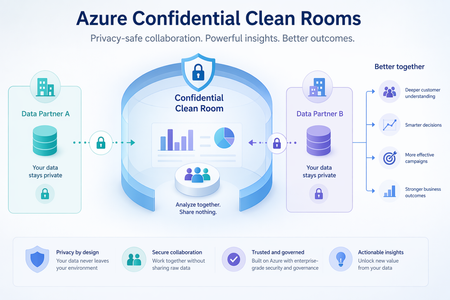
Why campaign performance now depends on trusted data collaboration For many years, third-party cookies helped advertisers, publishers, and measurement partners recognize users across parts of the open web. That model continues to evolve as browsers and mobile platforms introduce stronger privacy protections and limit access to certain cross-site and device-level identifiers. As a result, some advertisers and publishers are placing greater emphasis on the first-party data they collect directly to support audience activation and campaign measurement. Advertising partnerships may involve identifiers and behavioral data covered by privacy, data-protection, or industry rules. Data that has been altered to reduce direct identification—such as hashed email addresses or advertising identifiers—may still be linked to individuals and should not automatically be considered anonymous. Depending on the law and context, it may be treated as personally identifiable information (PII) or personal data under the European Union’s General Data Protection Regulation (GDPR). Organizations must have an appropriate legal basis and a clear purpose for using such data. The European Union’s Digital Markets Act (DMA) also affects how designated digital platforms combine certain personal data across services. In the United States, health information held by organizations covered by the Health Insurance Portability and Accountability Act (HIPAA) may be subject to additional restrictions, including for some marketing uses. The requirements for each collaboration depend on the parties, data, purpose, consent or authorization, and jurisdiction. Together, these changes create a practical challenge: campaign analysis increasingly depends on combining detailed records held by different organizations, but privacy, security, and governance obligations make unrestricted exchange of customer-level data difficult. Advertisers and publishers therefore need a controlled way to match audiences and measure outcomes using only authorized data—without exposing or freely sharing the underlying records. Azure Confidential Clean Rooms is designed to address this challenge. It allows each party’s detailed data to be used for an agreed analysis while helping protect raw data from access by other participants. This provides a controlled, verifiable environment for audience matching and campaign measurement without unrestricted file sharing. What campaign leaders should look for: the potential to broaden addressable audiences, strengthen evidence of campaign lift, reduce operational risk, and establish a repeatable model for trusted collaboration across media and measurement partners. Campaign decisions with secure multiparty analytics Azure Confidential Clean Rooms is a fully managed service that enables advertisers, publishers, agencies, and measurement partners to analyze sensitive datasets together while helping protect each participant’s raw data. The current preview supports analytics through Spark SQL queries agreed by the participants. These queries run in a hardware-protected environment called a Trusted Execution Environment (TEE), helping protect participants’ raw data from other collaborators and the Azure operator throughout its lifecycle. For a deeper explanation of the technology and architecture, see our earlier blog, Preview of multiparty analytics with Azure Confidential Clean Rooms. The following scenarios show how this model supports specific campaign decisions: Audience activation — Which high-value customers might this media partner reach? The advertiser contributes first-party customer data, such as securely transformed contact details, postal addresses, loyalty IDs, and purchase history. The publisher contributes its audience-matching data, on-site behavior, and consented interest or demographic segments. Azure Confidential Clean Rooms can compare identifiers that the participants have agreed to use for matching and release a reachable audience segment without exposing the underlying records. Campaign leaders can use the result to estimate potential reach and direct investment toward more relevant audiences. Identity enrichment — Can we improve match quality while protecting partner data? An agency or identity partner can contribute a third dataset to connect approved identifiers across email, mobile advertising IDs, devices, or households and add consented demographic or business attributes. Because the matching happens inside the confidential clean room, participants may improve match rates without exposing the identity partner’s underlying data or copying another party’s identifiers. Stronger matching can help expand reach and reduce media waste caused by fragmented customer identities. Measurement and attribution — Did the campaign contribute to additional business outcomes? The publisher contributes ad-exposure records, while the advertiser contributes outcomes such as purchases, order values, subscriptions, or app installs. Comparing these approved datasets can help measure unique reach and frequency, results across publishers, and the difference between groups that were and were not exposed to the campaign. For example, a retailer and a streaming publisher can compare exposure data with purchase outcomes to estimate campaign lift without revealing who saw a specific ad or made a purchase. This can give campaign leaders stronger evidence for campaign optimization and future budget allocation. These scenarios can help campaign leaders assess whether secure data collaboration may improve audience reach, matching quality, or confidence in campaign measurement. Why campaign leaders should consider Azure Confidential Clean Rooms The collaboration model is designed to give each participant greater control over how its data is accessed, used, and shared. Four capabilities are central to building trust among advertisers, publishers, agencies, and measurement partners: No centralized data pooling — Collaborators can keep source datasets in their own storage instead of copying them into a shared, permanent repository. The confidential environment verifies that expected code is running before it securely retrieves authorized data for temporary processing. This can reduce unnecessary data movement and exposure while supporting an approved analysis across partners. Controlled release of approved results — Before analysis begins, collaborators can agree which data may be used, approve the analysis, and specify who may receive the results. Safeguards can also prevent results for very small groups from being released, helping reduce the risk of identifying an individual. Verifiable governance and tamper-resistant audit trails — Participants can verify key properties of the environment instead of relying only on the clean-room provider’s claims. Open-source components and hardware-backed verification help participants confirm that the expected Microsoft-provided code is running. Tamper-resistant audit trails generated in the confidential environment can support compliance reviews. Data protection throughout the process — Each party can encrypt its data before it leaves its environment. Participants allow access to encryption keys only after the confidential environment verifies that expected code is running. Try Azure Confidential Clean Rooms Consider a campaign where better partner data could help improve audience reach, matching quality, or measurement confidence. Sign up to participate in a preview of multiparty analytics with Azure Confidential Clean Rooms. The Microsoft team will contact you to discuss the campaign scenario, participating datasets, and governance requirements. Learn more Sign-up: Preview of multiparty analytics with Azure Confidential Clean Rooms Preview blog: Multiparty analytics with Azure Confidential Clean Rooms Azure documentation: Confidential Clean Rooms
Feature Proposal: Ability to Exclude a column/subset of Columns in Select.
Summary I would like to propose a new T-SQL feature that allows developers to select all columns from a table while explicitly excluding a small subset of columns. Currently, when a table contains many columns and only one or two need to be omitted, developers are forced to mention every remaining column manually in the "Select" SQL. This leads to verbose queries, reduced maintainability, and a higher chance of mistakes when the schema evolves. Motivation Consider a table with 20 or more columns. Current approach, SELECT EmployeeId, FirstName, LastName, Department, Designation, Email, PhoneNumber, DateOfBirth, Address, City, State, Country, PostalCode, ManagerId, JoiningDate, LastModifiedDate, Status, IsActive, CreatedDate FROM Employees; If the intention is simply to exclude a single sensitive column such as Salary, the query becomes unnecessarily long. A more concise alternative could be: SELECT * FROM Employees EXCLUDE (Salary); The engine would expand * internally and remove the specified columns before execution. Benefits 1. Reduces boilerplate code. 2. Improves readability for wide tables. 3. Makes queries easier to maintain as schemas evolve. 4. Reduces the likelihood of accidentally omitting newly added columns. 5. Makes it simpler to exclude sensitive or internal-use columns from result sets. Expected Behavior Single column exclusion SELECT * FROM Employees EXCLUDE (Salary); Returns all columns except Salary. Multiple column exclusion SELECT * FROM Employees EXCLUDE (Salary, PasswordHash); Returns all columns except Salary and PasswordHash. Suggested Validation Rules 1. Every excluded column must exist in the projected result set. If an excluded column does not exist, compilation should fail with an appropriate error. 2. Duplicate column names in the exclusion list should either: be ignored, or produce a validation error. 3. If the exclusion list removes every projected column, the statement should fail. Example: SELECT * FROM Employees EXCLUDE (Employee, Name, Salary); If these are the only columns in the table, an error could be raised such as: The EXCLUDE clause cannot eliminate all columns from the SELECT list. Returning a zero-column result set would likely be confusing and less useful. Additional Considerations This syntax could also be valuable when selecting from joins, views, or derived tables, where developers frequently want "everything except a few fields." Closing Thoughts I believe this would be a practical quality-of-life enhancement for T-SQL that addresses a common developer pain point while remaining simple to understand and implement. It would reduce repetitive code and improve maintainability without affecting existing queries.503Views0likes1CommentWindows server 2025 SQL patching cluster problem.
Dear Team, I have a problem when I am patching upgrade windows server 2025 with KB5091157. After patching is the clustering is not able to join back; it shows the error with credentials. The log error is "Cannot connect sqlxxxxxxx." you do not have administrative privileges on the cluster. Contact your network administrator to request access. Note: The server is not in a different VLAN network.514Views0likes1CommentPreview of multiparty analytics with Azure Confidential Clean Rooms
Today, we are excited to announce the preview of multiparty analytics feature of Azure Confidential Clean Rooms, a fully managed service that allows customers and their partners to securely analyze privacy-sensitive datasets from multiple parties. It uses confidential compute enabled Apache Spark-based big-data analytics (Spark SQL) which helps protect their raw data from other collaborators and from the Azure operator by performing computations in a Trusted Execution Environment (TEE). Privacy-sensitive datasets include personally identifiable information (PII), protected health information (PHI) and cryptographic secrets. Organizations across industries are increasingly looking to supplement their data with data from business partners, to build a complete view of their business. For example, brands, publishers, and their partners need to collaborate using datasets containing Intellectual Property (IP) to improve the relevance of their campaigns. Confidential data clean rooms help solve this challenge by enabling organizations to share and analyze granular datasets in a secure environment that helps prevent raw data exfiltration—protecting intellectual property, preserving customer privacy, and addressing concerns around regulatory compliance. You can sign up for the preview here Key Features Fully Managed: Azure takes care of the infrastructure provisioning and scaling with no user intervention. This significantly reduces your onboarding effort allowing you to focus on the queries and insights, not on infra management. Confidential Spark SQL: Spark SQL allows you to query large datasets and run complex queries in a distributed computing environment. In the confidential computing enabled version, the Spark driver and executors are fully attested policy-governed enclaves running as virtual nodes on confidential Azure Container Instances (ACI) which helps prevent exfiltration of collaborators’ data during query execution. Governance: Helps manage membership to cleanrooms, enables and verifies approval for queries from relevant collaborators before executing them and verifies consent to access sensitive collaborator data. It also helps generate tamper-resistant audit trails containing salient clean room events. This is made possible with the help of an implementation of the Confidential Consortium Framework (CCF). Telemetry: Throughout every clean-room run, detailed logs are streamed out in real time to monitor performance, troubleshoot issues, and keep the analytics healthy — all without ever exposing the collaborators’ data at any time. Verifiable trust: Cryptographic remote attestation viz. full attestation based on confidential hardware reports allows independent verification of the TEE along with along with all components that are part of it, without just trusting the cloud provider, before sensitive data and decryption keys are made available to the TEE Open-source containers: All Microsoft provided cleanroom containers and sidecars are open-sourced here and can be verified for provenance and integrity guarantees using GitHub artifact attestation Use Cases Multi-party confidential big-data analytics unlocks value in scenarios where data sensitivity, regulatory pressure, or competitive concerns previously blocked collaboration. These are some early scenarios that can benefit from this. Media & Advertising Collaboration of advertiser CRM data with publisher data for audience targeting and segment activation. Collaboration of audience data with measurement partners for measurement and attribution. Banking & Finance Collaboration between banks and insurance firms to upsell relevant products to existing bank customers without sharing raw data from either side Collaboration with retailers to generate customized offers for bank customers, without exposing either party’s underlying data. Government & Public Sector Secure collaboration of data across government departments to deliver better citizen welfare outcomes. Secure collaboration between government and private enterprises on shared-interest workloads such as traffic monitoring and weather systems. Healthcare Enable healthcare firms — including biopharma organizations — to combine their data with third-party institutions to accelerate clinical development, like identifying eligible participants for a clinical trial, without exposing underlying patient data. Combine patient datasets across hospitals to study disease patterns or outcomes without exposing sensitive protected health information. "A higher standard for protecting user privacy and trust, the phase-out of third-party cookies, and global regulations demand more sophisticated data collaboration tools to support advertising marketplaces. Azure Confidential Cleanrooms (ACCR) provides a secure, feature-rich, and flexible foundation to implement privacy-preserving functions and enable insights without sharing privacy-sensitive data outside of organization boundaries. Built on the Azure Confidential Compute (ACC) platform and offering cohesion with Azure's diverse set of services, ACCR offers the attestation, audit, fine-grained access control, and verifiable trust tools required for secure and privacy-safe data collaboration in today's world." — Andrei Mackenzie, Engineering Manager, Microsoft AI "Azure Confidential Clean Rooms enabled our team to evaluate how clean room capabilities can support secure, governed data collaboration at scale. Through the Proof-of-Concept (PoC), we explored how privacy-preserving workflows, trusted access controls, and scalable compute can create a stronger foundation for responsibly leveraging first-party data. This helps reduce operational friction while supporting business growth, improving customer engagement, and enabling more relevant customer experiences." — Nic Dregne, Director, Microsoft AdTech Engineering Beyond Spark SQL Realizing other multi-party scenarios like custom analytics, ML training and inferencing on Azure Confidential Clean Rooms is in our roadmap. If you have such a scenario to be realized, you can fill in and submit the preview signup form with the details of your scenario and we’ll get back to you. Learn More · Signup for the preview of Azure Confidential Clean Rooms for Analytics · Confidential Consortium Framework (CCF) · Virtual Nodes on Azure Container InstancesSQL Server 2025 Express - service starts with delay of some hours after restart of computer
Dear Community, we started using SQL Server 2025 Express but experienced problems with the start of service at startup. When the computer is restarted, the service is not started. I observed this on nearly all installations and in one case it took kinda exactly 2 hours to start the service (or it was somehow delayed but without any trace in settings or windows logs). When we start the service manually or by batch script it is starting properly at startup ... What exactly causes this? We only have this issue with 2025 Express and i have not yet found similar cases in the internet. Thank you, kind regardsSolved822Views1like3CommentsLogic Apps, Windows auth, the On-Premises Data Gateway and you
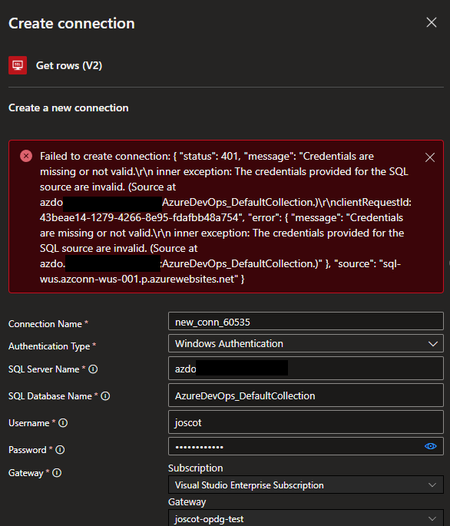
I was working with a customer recently who had a somewhat unusual situation, unusual in that I have become accustomed to most government customers having an Express Route or site-to-site VPN connection to connect their on-premises network to their Azure environment. However, this customer had a need to connect to an on-premises SQL instance via the on-premises data gateway (OPDG). The OPDG is installed as a Windows service on a machine inside the on-premises network and, when registered in Azure, allows Azure resources to connect to services on premises (more here). I did not have any direct experience with this tool but worked with the customer to get it installed on their network, which included getting it to work with their proxy (thanks to the larger Microsoft team for the assist and thanks to the customer for their patience figuring this out). We got the gateway registered in Azure and were ready to test it out. The customer is using Logic Apps and the SQL Connector to connect back to their on-premises SQL instance. The initial attempt to connect to SQL using SQL credentials was successful (Yay!!!) but the customer wanted to use Windows Authentication (which is a best practice). However, when trying to establish the connection with Windows Authentication, they were getting the error "status 401 - Credentials are missing or not valid...The credentials provided for the SQL source are invalid." Doing a little sleuthing in the Security logs on the SQL server, we could see that the authentication attempt being made, but with null credentials. Of course! We're passing our Windows credentials to the OPDG, but we haven't configured the gateway service account with delegation permissions to pass them on to SQL! To configure the on-premises data gateway account for delegation, do the following: Create a Service Principal Name (SPN) using the setspn command line tool for the OPDG service account: setspn -S gateway\gatewayMachineName domainname\gatewaySvcAcctName Open Active Directory Users and Computers (ADUC) and locate the OPDG service account Open the Delegation tab and select "Trust this user for delegation to specified services only" and "Use Kerberos Only" then add the services for which you want the OPDG to have delegation, e.g. SQL Server. Once this was done, we could create the Logic Apps SQL Connection successfully. A good check is to see if you can enumerate the list of tables in the database to which you are querying. As it turns out, there is fairly good documentation on this topic under the Power BI documentation, but searching for this under the context of Logic Apps didn't yield much success! In any case, I hope this helps someone else in the future!