sql
240 Topics
Database Backup in Azure VM with SQL
Hello, I have a Windows server 2016 with SQL 2016 EXPRESS uplifted to Azure. The Azure VM is backing up with recovery type as "Snapshot and Vault -Standard" with Application Consistent. When I checked on the database backup history, it shows databases are backing up as well, hope to get more knowledge on 1.How to view SQL database backup detail from Azure portal? 2.How to restore the databases since the databases have been backup to Azure. Thank you.38Views0likes1CommentMGDC for SharePoint FAQ: How to List SharePoint Webs or Subsites?
1. Introduction SharePoint uses a known object hierarchy to store your files, including, in order: Site Collection (site, SPSite) Web (site, subsite, SPWeb) List (SPList, Document Library, SPDocumentLibrary) Folder (SPFolder) List Item (documents, files, SPListItem, SPFile) If you are not familiar with all those, you can read more about them at What is in the Permissions dataset? 2.What we have in MGDC for SharePoint The SharePoint Sites dataset in Microsoft Graph Data Connect offers a list of all sites (site collections) in your tenant. The SharePoint Files will give you details about each file (document). However, there are no MGDC datasets that will give you one object per SharePoint Web (subsite) or SharePoint List (library). There is a workaround, though. If you pay attention to the schema for the SharePoint Sites and SharePoint Files datasets in MGDC, you will find that Sites includes a few interesting details about the Root Web (the main web in the site collection) and the total number of webs (subsites) in each site. Also, the Files dataset includes details about the web (subsite) and the list (library) where the file lives. You could group on these columns to expose more information about webs and lists. 3. One Web These days, if you create a modern SharePoint site, you will get one web (called the Root Web) and no obvious mechanism to create subsites or additional webs. For any sites created in the last few years, you likely have no additional webs outside the Root Web. Your SharePoint might have existed for many years and your company could have sites using old templates with multiple subsites. If you’re trying to find out if that’s the case for your tenant, the information is available in MGDC, if you are willing to dig a little deeper. 4. Finding Old Subsites The main task here is to create a custom query to join the Sites and Files datasets. You would then group that in a particular way to enumerate each subsites (Webs). You might also tag the Webs that are a Root Web, so that you can identify subsites that are not at the top of the Site hierarchy. If you pulled the Sites and Files datasets into a SQL Server or a Lakehouse in Microsoft Fabric, this is what that query could look like: SELECT Webs.SiteId, Sites.RootWeb.Title AS SiteTitle, Sites.Url AS SiteUrl, Sites.WebCount, Webs.WebId, CASE WHEN Root.RootWeb.Id IS NOT NULL THEN 1 ELSE 0 END AS IsRootWeb, Webs.FileCount, Webs.TotalSize, Webs.TotalSizeWithVersions FROM ( SELECT SiteId, WebId, COUNT(*) AS FileCount, SUM(SizeInBytes) AS TotalSize, SUM(SizeInBytesWithVersions) AS TotalSizeWithVersions FROM Files GROUP BY SiteId, WebId ) AS Webs LEFT JOIN Sites AS Sites ON Webs.SiteId = Sites.Id LEFT JOIN Sites AS Root ON Webs.SiteId = Root.Id AND Webs.WebId = Root.RootWeb.Id 4. Empty Webs, Web properties This technique will get you a nice list of Webs, but there are a few problems. First, if a specific web has no files, we won’t see that web in the Files dataset and therefore the query will fail to list that particular web. You would still see that Web counted in the WebCount property of the Sites dataset, but there would be no listing of that web in the query proposed above, since it has no files. Another problem is that there is no way to find in MGDC the details properties of the Web, like the Title. You get some of those for the Root Web in the Sites dataset, but not for the other Webs. For that, you would have to query the Web object using another source like the Graph API or PowerShell. 5. Conclusion I hope this article helped you find details about enumerating SharePoint Webs using the Microsoft Graph Data Connect. For recent deployments of SharePoint Online, you should have only one web per site and the Sites dataset (with Root Web details) should give you plenty of details. However, this might come in handy if you want to manage some of the old subsites of a slightly older SharePoint deployment. Finally, if you’re looking for a challenge, I would suggest adapting the SQL code above to enumerate all the document libraries using the Files dataset. It can be done following a similar pattern…Understanding the Notebooks in the Oversharing Template v2 (Microsoft Fabric)
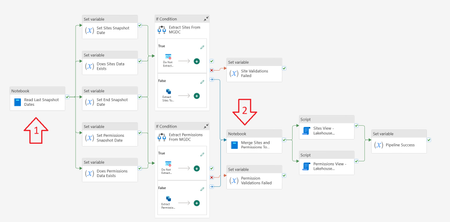
The Microsoft Graph Data Connect for SharePoint team published two notebooks used with Microsoft Fabric in the Information Oversharing v2 template. This blog explains what each code block inside these notebooks does. The goal was to help you understand what the notebooks do. Note that this document was written with help from Copilot, using simple prompts like “Analyze each section of this Jupyter notebook with PySpark and Scala code. Describe what each section does.” Notebook 1: Read Last Snapshot Dates This first notebook runs right as the pipeline starts. It checks the environment, verifies if the Sites and Permission tables exist in the Lakehouse, checks the last day data was gathered from MGDC and calculates the start and end date to use. It also cleans the staging tables and stores a few commands that are used in later steps. Section 0 – Set the Default Lakehouse for Notebook to Run %%configure { "defaultLakehouse": { "name": { "parameterName": "lakehouseName", "defaultValue": "defaultlakehousename" } } } This section uses the %%configure magic command to set a JSON configuration that defines a parameter (lakehouseName) with the default value "defaultlakehousename". This setting ensures that when the notebook is launched through a pipeline, it dynamically selects the target Lakehouse. Section 1 – Initialize Parameters import java.time.LocalDateTime import java.time.format.DateTimeFormatter import java.time.temporal.ChronoUnit import java.util.UUID import java.text.SimpleDateFormat import java.time.{LocalDate, LocalDateTime, Period} import java.time.format.DateTimeFormatter import java.time.temporal.ChronoUnit import java.util.Calendar import java.sql.Timestamp val runId = "00000000-0000-0000-0000-000000000000" val workspaceId = spark.conf.get("trident.workspace.id") val workspaceName = "LakeHouseTesting" val lakehouseId = spark.conf.get("trident.lakehouse.id") val lakehouseName = "IMAXDefault" val sitesStagingTableName = "Sites_Staging" val sitesFinalTableName = "Sites" val permissionsStagingTableName = "Permissions_Staging" val permissionsFinalTableName = "Permissions" val endTime = "2024-11-15T00:00:00Z" spark.conf.set("spark.sql.caseSensitive", true) This section imports various libraries for date/time handling and initializes key parameters for the ETL process. These include a run identifier (runId), workspace and Lakehouse information (with some values coming from Spark configuration), table names for staging and final datasets, and a fallback endTime. It also enforces case sensitivity in Spark SQL. Section 2 – Checking Required Final Tables Exist or Not val lakehouse = mssparkutils.lakehouse.get(lakehouseName) val lakehouseId = lakehouse.id val workspaceName = notebookutils.runtime.context("currentWorkspaceName") val permissionsStagingLocation = s"abfss://${workspaceName}@onelake.dfs.fabric.microsoft.com/${lakehouseName}.Lakehouse/Tables/${permissionsStagingTableName}" val sitesStagingLocation = s"abfss://${workspaceName}@onelake.dfs.fabric.microsoft.com/${lakehouseName}.Lakehouse/Tables/${sitesStagingTableName}" val sitesFinalLocation = s"abfss://${workspaceName}@onelake.dfs.fabric.microsoft.com/${lakehouseName}.Lakehouse/Tables/${sitesFinalTableName}" val permissionsFinalLocation = s"abfss://${workspaceName}@onelake.dfs.fabric.microsoft.com/${lakehouseName}.Lakehouse/Tables/${permissionsFinalTableName}" val tables = spark.catalog.listTables() val siteTableCount = tables.filter(col("name") === lit(sitesFinalTableName) and array_contains(col("namespace"), lakehouseName) ).count() val permissionsTableCount = tables.filter(col("name") === lit(permissionsFinalTableName) and array_contains(col("namespace"), lakehouseName)).count() val siteStagingTableCount = tables.filter(col("name") === lit(sitesStagingTableName) and array_contains(col("namespace"), lakehouseName) ).count() val permissionsStagingTableCount = tables.filter(col("name") === lit(permissionsStagingTableName) and array_contains(col("namespace"), lakehouseName)).count() This section retrieves the Lakehouse object and uses it to construct ABFS paths for both staging and final tables (for Sites and Permissions). It then checks for the existence of these tables by listing them in Spark’s catalog and filtering by name and namespace. Section 3 – Getting Snapshot Dates from Last Successful Extracts import org.apache.spark.sql.functions.{col, _} import org.apache.spark.sql.types._ import org.apache.spark.sql.{DataFrame, Row, SparkSession} import org.apache.spark.storage.StorageLevel val dtCurrentDateFormatt = DateTimeFormatter.ofPattern("yyyy-MM-dd HH:mm:ss.S") val dtRequiredtDateFormatt = DateTimeFormatter.ofPattern("yyyy-MM-dd'T'HH:mm:ss'Z'") var siteDataExists: Boolean = false var permissionsDataExists: Boolean = false val siteSnapshotDate = { if (siteTableCount == 1) { val dfSites = spark.sql(s"SELECT MAX(SnapshotDate) AS SnapshotDate FROM ${lakehouseName}.${sitesFinalTableName} ") val rowSites: Row = dfSites.select("SnapshotDate").head(1)(0) if (rowSites.get(0) == null) endTime else { siteDataExists = true println(s"Sites data Exists: ${siteDataExists}") LocalDateTime.parse(rowSites.get(0).toString(), dtCurrentDateFormatt) .format(dtRequiredtDateFormatt) } } else { endTime } } val permissionsSnapshotDate = { if (permissionsTableCount == 1) { val dfPermissions = spark.sql(s"SELECT MAX(SnapshotDate) AS SnapshotDate FROM ${lakehouseName}.${permissionsFinalTableName} ") val rowPermissions: Row = dfPermissions.select("SnapshotDate").head(1)(0) if (rowPermissions.get(0) == null) endTime else { permissionsDataExists = true println(s"Permissions data Exists: ${permissionsDataExists}") LocalDateTime.parse(rowPermissions.get(0).toString(), dtCurrentDateFormatt) .format(dtRequiredtDateFormatt) } } else { endTime } } This section queries the final tables to retrieve the latest SnapshotDate for both Sites and Permissions. It then reformats the date into an ISO-compliant format. If no snapshot date is found, it defaults to the predefined endTime, and two boolean flags (siteDataExists and permissionsDataExists) are toggled accordingly. Section 4 – Generate View Script for Sites val sitesView: String = s""" CREATE OR ALTER VIEW vw${sitesFinalTableName} AS SELECT *, [StorageQuotaFriendly] = (case when StorageQuota < 1048576 then concat(ceiling(StorageQuota / 1024.0), ' KB') when StorageQuota < 1073741824 then concat(ceiling(StorageQuota / 1048576.0), ' MB') when StorageQuota < 1099511627776 then concat(ceiling(StorageQuota / 1073741824.0), ' GB') when StorageQuota < 1125899906842624 then concat(ceiling(StorageQuota / 1099511627776.0), ' TB') else concat(ceiling(StorageQuota / 1125899906842624.0), ' PB') end ), [StorageUsedFriendly] = (case when StorageUsed < 1048576 then concat(ceiling(StorageUsed / 1024.0), ' KB') when StorageUsed < 1073741824 then concat(ceiling(StorageUsed / 1048576.0), ' MB') when StorageUsed < 1099511627776 then concat(ceiling(StorageUsed / 1073741824.0), ' GB') when StorageUsed < 1125899906842624 then concat(ceiling(StorageUsed / 1099511627776.0), ' TB') else concat(ceiling(StorageUsed / 1125899906842624.0), ' PB') end ) FROM ${sitesFinalTableName} """.stripMargin.replaceAll("[\n\r]"," ") println(sitesView) Here a SQL view (vwSites) is dynamically generated for the Sites final table. The view adds two computed columns (StorageQuotaFriendly and StorageUsedFriendly) that convert byte values into more digestible units such as KB, MB, GB, etc. This script will be stored and executed later. Section 5 – Generate View Script for Permissions val permissionsView: String = s""" CREATE OR ALTER VIEW vw${permissionsFinalTableName} AS SELECT *, ShareeDomain = CASE WHEN CHARINDEX('@', SharedWith_Email) > 0 AND CHARINDEX('.', SharedWith_Email) > 0 THEN SUBSTRING(SharedWith_Email,CHARINDEX('@', SharedWith_Email)+1,LEN(SharedWith_Email)) ELSE '' END, ShareeEMail = CASE WHEN CHARINDEX('@', SharedWith_Email) > 0 THEN SharedWith_Email ELSE '' END, PermissionsUniqueKey = CONCAT(SiteId,'_',RoleDefinition,'_',ScopeId,'_',COALESCE(LinkId,'00000000-0000-0000-0000-000000000000')), EEEUPermissionsCount = SUM(CASE WHEN SharedWith_Name LIKE 'Everyone except external users' THEN 1 ELSE NULL END ) OVER( PARTITION BY CONCAT(SiteId,'_',RoleDefinition,'_',ScopeId,'_',COALESCE(LinkId,'00000000-0000-0000-0000-000000000000'),SharedWith_Name) ), ExternalUserCount = SUM(CASE WHEN SharedWith_TypeV2 LIKE 'External' THEN 1 ELSE NULL END ) OVER( PARTITION BY CONCAT(SiteId,'_',RoleDefinition,'_',ScopeId,'_',COALESCE(LinkId,'00000000-0000-0000-0000-000000000000'),SharedWith_Name) ), B2BUserCount = SUM(CASE WHEN SharedWith_TypeV2 LIKE 'B2BUser' THEN 1 ELSE NULL END ) OVER( PARTITION BY CONCAT(SiteId,'_',RoleDefinition,'_',ScopeId,'_',COALESCE(LinkId,'00000000-0000-0000-0000-000000000000'),SharedWith_Name) ) FROM ${permissionsFinalTableName} """.stripMargin.replaceAll("[\n\r]"," ") println(permissionsView) This section builds a SQL view (vwPermissions) for the Permissions final table. It derives additional columns like ShareeDomain, ShareeEMail, and a composite key (PermissionsUniqueKey) while applying window functions to compute counts (e.g., for external or B2B users). This script will also be stored and executed later. Section 6 – Truncate the Staging Tables from Previous Runs if (siteStagingTableCount == 1) { spark.sql(s"DELETE FROM ${lakehouseName}.${sitesStagingTableName} ") println(s"Staging table deleted: ${lakehouseName}.${sitesStagingTableName}") } else { println(s"Staging table ${lakehouseName}.${sitesFinalTableName} not found") } if (permissionsStagingTableCount == 1) { spark.sql(s"DELETE FROM ${lakehouseName}.${permissionsStagingTableName} ") println(s"Staging table deleted: ${lakehouseName}.${permissionsStagingTableName}") } else { println(s"Staging table ${lakehouseName}.${permissionsStagingTableName} not found") } This section checks if the staging tables exist (by count) and, if found, issues a SQL DELETE command to remove existing data so that new data can be loaded. It prints messages indicating the action taken. Section 7 – Return Snapshot Dates Back to Pipeline import mssparkutils.notebook val returnData = s"""{\"LakehouseId\": \"${lakehouseId}\", \"SitesStagingTableName\": \"${sitesStagingTableName}\", \"SitesFinalTableName\": \"${sitesFinalTableName}\", \"SitesSnapshotDate\": \"${siteSnapshotDate}\", \"SitesDataExists\": ${siteDataExists}, \"SitesView\": \"${sitesView}\", \"PermissionsStagingTableName\": \"${permissionsStagingTableName}\", \"PermissionsFinalTableName\": \"${permissionsFinalTableName}\", \"PermissionsSnapshotDate\": \"${permissionsSnapshotDate}\", \"EndSnapshotDate\": \"${endTime}\", \"PermissionsDataExists\": ${permissionsDataExists}, \"PermissionsView\": \"${permissionsView}\"}""" println(returnData) mssparkutils.notebook.exit(returnData) This concluding section aggregates the key metadata—including Lakehouse information, table names, snapshot dates, existence flags, and the generated view scripts—into a JSON string. It then exits the notebook by returning that JSON to the pipeline. Notebook 2: Merge Sites and Permissions to Final Table This notebook runs after the Sites and Permissions data from MGDC has been collected successfully into the staging tables. If this is the first collection, it handles them as full datasets, storing the data directly in the final tables. If this is using MGDC for SharePoint delta datasets, it merges the new, updated or deleted objects from the staging tables into the final tables. Note: The word "Delta" here might refer to Delta Parquet (an efficient data storage format used by tables in a Microsoft Fabric Lakehouse) or to the MGDC for SharePoint Delta datasets (how MGDC can return only the objects that are new, updated or deleted between two dates). It can be a bit confusing, so be aware of the two interpretations of the word. Section 0 – Set the Default Lakehouse for Notebook to Run %%configure { "defaultLakehouse": { "name": { "parameterName": "lakehouseName", "defaultValue": "defaultlakehousename" } } } This section uses the same Lakehouse configuration as in Notebook 1. It sets the default Lakehouse through a parameter (lakehouseName) to support dynamic running of the notebook in different environments. Section 1 – Initialize Parameters import java.time.LocalDateTime import java.time.format.DateTimeFormatter import java.time.temporal.ChronoUnit import java.util.UUID import java.text.SimpleDateFormat import java.time.{LocalDate, LocalDateTime, Period} import java.time.format.DateTimeFormatter import java.time.temporal.ChronoUnit import java.util.Calendar val runId = "00000000-0000-0000-0000-000000000000" val workspaceId = spark.conf.get("trident.workspace.id") val workspaceName = "LakeHouseTesting" val lakehouseId = spark.conf.get("trident.lakehouse.id") val lakehouseName = spark.conf.get("trident.lakehouse.name") val sitesStagingTableName = "Sites_Staging" val sitesFinalTableName = "Sites" val permissionsStagingTableName = "Permissions_Staging" val permissionsFinalTableName = "Permissions" spark.conf.set("spark.sql.caseSensitive", true) This section is like Notebook 1’s Section 1 but here lakehouseName is retrieved from the configuration. It initializes variables needed for merging, such as run IDs, workspace/Lakehouse identifiers, and table names. Section 2 – Read Sites Dataset from Staging Table val lakehouse = mssparkutils.lakehouse.get(lakehouseName) val lakehouseId = lakehouse.id val workspaceName = notebookutils.runtime.context("currentWorkspaceName") println("Started reading Sites dataset") val sitesStagingLocation = s"abfss://${workspaceName}@onelake.dfs.fabric.microsoft.com/${lakehouseName}.Lakehouse/Tables/${sitesStagingTableName}" val dfSitesStaging = spark.read.format("delta").load(sitesStagingLocation) println("Completed reading Sites dataset") This section constructs the ABFS path for the Sites staging table and reads the dataset into a DataFrame using the Delta Parquet format. It includes print statements to track progress. Section 3 – Read Permissions Dataset from Staging Table println("Started reading Permissions dataset") val permissionsStagingLocation = s"abfss://${workspaceName}@onelake.dfs.fabric.microsoft.com/${lakehouseName}.Lakehouse/Tables/${permissionsStagingTableName}" val dfPermissionsStaging = spark.read.format("delta").load(permissionsStagingLocation) println("Completed reading Permissions dataset") This section performs the analogous operation for the Permissions staging table, loading the dataset into a DataFrame and providing console output for monitoring. Section 4 – Check Final Tables Exist or Not import io.delta.tables.DeltaTable val sitesFinalLocation = s"abfss://${workspaceName}@onelake.dfs.fabric.microsoft.com/${lakehouseName}.Lakehouse/Tables/${sitesFinalTableName}" val permissionsFinalLocation = s"abfss://${workspaceName}@onelake.dfs.fabric.microsoft.com/${lakehouseName}.Lakehouse/Tables/${permissionsFinalTableName}" val sitesFinalTableExists = DeltaTable.isDeltaTable(spark, sitesFinalLocation) if (!sitesFinalTableExists) { println("Final Sites table not exists. Creating final Sites table with schema only") dfSitesStaging.filter("1=2").write.format("delta").mode("overwrite").save(sitesFinalLocation) println("Final Sites table created") } else { println("Final Sites table exists already") } val permissionsFinalTableExists = DeltaTable.isDeltaTable(spark, permissionsFinalLocation) if (!permissionsFinalTableExists) { println("Final Permissions table not exists. Creating final Permissions table with schema only") dfPermissionsStaging.filter("1=2").write.format("delta").mode("overwrite").save(permissionsFinalLocation) println("Final Permissions table created") } else { println("Final Permissions table exists already") } This section checks whether the final tables for Sites and Permissions exist. If a table does not exist, it creates an empty table (schema only) from the staging DataFrame by filtering out data (filter("1=2")). Section 5 – Merge Sites Data from Staging Table to Final Table import io.delta.tables._ import org.apache.spark.sql.functions._ import org.apache.spark.sql.expressions.{Window, WindowSpec} import org.apache.spark.sql.functions.{coalesce, lit, sum, col, _} import org.apache.spark.sql.types.{StructField, _} import org.apache.spark.sql.{DataFrame, Row, SparkSession} import org.apache.spark.storage.StorageLevel val deltaTableSource = DeltaTable.forPath(spark, sitesStagingLocation) val deltaTableTarget = DeltaTable.forPath(spark, sitesFinalLocation) import spark.implicits._ val dfSource = deltaTableSource.toDF //Delete records that have Operation as Deleted println("Merging Sites dataset from current staging table") deltaTableTarget .as("target") .merge( dfSource.as("source"), "source.Id = target.Id") .whenMatched("source. Operation = 'Deleted'") .delete() .whenMatched("source.Operation != 'Deleted'") .updateAll() .whenNotMatched("source.Operation != 'Deleted'") .insertAll() .execute() println("Merging of Sites dataset completed") This section performs a Delta Lake merge (upsert) operation on the Sites data. The merge logic deletes matching records when the source’s Operation is 'Deleted', updates other matching records, and inserts new records that are not marked as 'Deleted'. Section 6 – Merge Permissions Data from Staging Table to Final Table import io.delta.tables._ import org.apache.spark.sql.functions._ import org.apache.spark.sql.expressions.{Window, WindowSpec} import org.apache.spark.sql.functions.{coalesce, lit, sum, col, _} import org.apache.spark.sql.types.{StructField, _} import org.apache.spark.sql.{DataFrame, Row, SparkSession} import org.apache.spark.storage.StorageLevel val deltaTablePermissionsSource = DeltaTable.forPath(spark, permissionsStagingLocation) val deltaTablePermissionsTarget = DeltaTable.forPath(spark, permissionsFinalLocation) import spark.implicits._ val dfPermissionsSource = deltaTablePermissionsSource.toDF //Delete records that have Operation as Deleted println("Merging Permissions dataset from current staging table") deltaTablePermissionsTarget .as("target") .merge( dfPermissionsSource.as("source"), """source.SiteId = target.SiteId and source.ScopeId = target.ScopeId and source.LinkId = target.LinkId and source.RoleDefinition = target.RoleDefinition and coalesce(source.SharedWith_Name,"") = coalesce(target.SharedWith_Name,"") and coalesce(source.SharedWith_TypeV2,"") = coalesce(target.SharedWith_TypeV2,"") and coalesce(source.SharedWith_Email,"") = coalesce(target.SharedWith_Email,"") and coalesce(source.SharedWith_AADObjectId,"") = coalesce(target.SharedWith_AADObjectId,"") """) .whenMatched("source. Operation = 'Deleted'") .delete() .whenMatched("source.Operation != 'Deleted'") .updateAll() .whenNotMatched("source.Operation != 'Deleted'") .insertAll() .execute() println("Merging of Permissions dataset completed") This section performs a merge operation on the Permissions data. The merge condition is more complex—comparing multiple columns (including handling nulls with coalesce) to identify matching records. The operation applies deletion for rows marked as 'Deleted', updates others, and inserts records where no match exists. Section 7 – Read and Display Sample TOP 10 Rows var sqlQuery = s"SELECT * FROM ${lakehouseName}.${sitesFinalTableName} order by SnapshotDate DESC LIMIT 10" val dfSitesAll = spark.sql(sqlQuery) display(dfSitesAll) sqlQuery = s"SELECT * FROM ${lakehouseName}.${permissionsFinalTableName} order by SnapshotDate DESC LIMIT 10" val dfPermissionsAll = spark.sql(sqlQuery) display(dfPermissionsAll) This final section executes SQL queries to retrieve and display the top 10 rows from both the Sites and Permissions final tables. The rows are ordered by SnapshotDate in descending order. This is typically used for sample or debugging purposes. Conclusion I hope this article helped you understand the notebooks included in the template. This might help you customize it later. These templates are intended as starting points for your work with many scenarios. Read more about MGDC for SharePoint at https://aka.ms/SharePointData.Improve Campaign Reach and Measurement with Azure Confidential Clean Rooms
Why campaign performance now depends on trusted data collaboration For many years, third-party cookies helped advertisers, publishers, and measurement partners recognize users across parts of the open web. That model continues to evolve as browsers and mobile platforms introduce stronger privacy protections and limit access to certain cross-site and device-level identifiers. As a result, some advertisers and publishers are placing greater emphasis on the first-party data they collect directly to support audience activation and campaign measurement. Advertising partnerships may involve identifiers and behavioral data covered by privacy, data-protection, or industry rules. Data that has been altered to reduce direct identification—such as hashed email addresses or advertising identifiers—may still be linked to individuals and should not automatically be considered anonymous. Depending on the law and context, it may be treated as personally identifiable information (PII) or personal data under the European Union’s General Data Protection Regulation (GDPR). Organizations must have an appropriate legal basis and a clear purpose for using such data. The European Union’s Digital Markets Act (DMA) also affects how designated digital platforms combine certain personal data across services. In the United States, health information held by organizations covered by the Health Insurance Portability and Accountability Act (HIPAA) may be subject to additional restrictions, including for some marketing uses. The requirements for each collaboration depend on the parties, data, purpose, consent or authorization, and jurisdiction. Together, these changes create a practical challenge: campaign analysis increasingly depends on combining detailed records held by different organizations, but privacy, security, and governance obligations make unrestricted exchange of customer-level data difficult. Advertisers and publishers therefore need a controlled way to match audiences and measure outcomes using only authorized data—without exposing or freely sharing the underlying records. Azure Confidential Clean Rooms is designed to address this challenge. It allows each party’s detailed data to be used for an agreed analysis while helping protect raw data from access by other participants. This provides a controlled, verifiable environment for audience matching and campaign measurement without unrestricted file sharing. What campaign leaders should look for: the potential to broaden addressable audiences, strengthen evidence of campaign lift, reduce operational risk, and establish a repeatable model for trusted collaboration across media and measurement partners. Campaign decisions with secure multiparty analytics Azure Confidential Clean Rooms is a fully managed service that enables advertisers, publishers, agencies, and measurement partners to analyze sensitive datasets together while helping protect each participant’s raw data. The current preview supports analytics through Spark SQL queries agreed by the participants. These queries run in a hardware-protected environment called a Trusted Execution Environment (TEE), helping protect participants’ raw data from other collaborators and the Azure operator throughout its lifecycle. For a deeper explanation of the technology and architecture, see our earlier blog, Preview of multiparty analytics with Azure Confidential Clean Rooms. The following scenarios show how this model supports specific campaign decisions: Audience activation — Which high-value customers might this media partner reach? The advertiser contributes first-party customer data, such as securely transformed contact details, postal addresses, loyalty IDs, and purchase history. The publisher contributes its audience-matching data, on-site behavior, and consented interest or demographic segments. Azure Confidential Clean Rooms can compare identifiers that the participants have agreed to use for matching and release a reachable audience segment without exposing the underlying records. Campaign leaders can use the result to estimate potential reach and direct investment toward more relevant audiences. Identity enrichment — Can we improve match quality while protecting partner data? An agency or identity partner can contribute a third dataset to connect approved identifiers across email, mobile advertising IDs, devices, or households and add consented demographic or business attributes. Because the matching happens inside the confidential clean room, participants may improve match rates without exposing the identity partner’s underlying data or copying another party’s identifiers. Stronger matching can help expand reach and reduce media waste caused by fragmented customer identities. Measurement and attribution — Did the campaign contribute to additional business outcomes? The publisher contributes ad-exposure records, while the advertiser contributes outcomes such as purchases, order values, subscriptions, or app installs. Comparing these approved datasets can help measure unique reach and frequency, results across publishers, and the difference between groups that were and were not exposed to the campaign. For example, a retailer and a streaming publisher can compare exposure data with purchase outcomes to estimate campaign lift without revealing who saw a specific ad or made a purchase. This can give campaign leaders stronger evidence for campaign optimization and future budget allocation. These scenarios can help campaign leaders assess whether secure data collaboration may improve audience reach, matching quality, or confidence in campaign measurement. Why campaign leaders should consider Azure Confidential Clean Rooms The collaboration model is designed to give each participant greater control over how its data is accessed, used, and shared. Four capabilities are central to building trust among advertisers, publishers, agencies, and measurement partners: No centralized data pooling — Collaborators can keep source datasets in their own storage instead of copying them into a shared, permanent repository. The confidential environment verifies that expected code is running before it securely retrieves authorized data for temporary processing. This can reduce unnecessary data movement and exposure while supporting an approved analysis across partners. Controlled release of approved results — Before analysis begins, collaborators can agree which data may be used, approve the analysis, and specify who may receive the results. Safeguards can also prevent results for very small groups from being released, helping reduce the risk of identifying an individual. Verifiable governance and tamper-resistant audit trails — Participants can verify key properties of the environment instead of relying only on the clean-room provider’s claims. Open-source components and hardware-backed verification help participants confirm that the expected Microsoft-provided code is running. Tamper-resistant audit trails generated in the confidential environment can support compliance reviews. Data protection throughout the process — Each party can encrypt its data before it leaves its environment. Participants allow access to encryption keys only after the confidential environment verifies that expected code is running. Try Azure Confidential Clean Rooms Consider a campaign where better partner data could help improve audience reach, matching quality, or measurement confidence. Sign up to participate in a preview of multiparty analytics with Azure Confidential Clean Rooms. The Microsoft team will contact you to discuss the campaign scenario, participating datasets, and governance requirements. Learn more Sign-up: Preview of multiparty analytics with Azure Confidential Clean Rooms Preview blog: Multiparty analytics with Azure Confidential Clean Rooms Azure documentation: Confidential Clean RoomsMicrosoft Defender for Cloud Customer Newsletter
*This will be the last monthly MDC newsletter. To keep up with the latest, please visit: What's new in MDC What's new in Defender for Cloud? Multiple container security features are now Generally Available: Container-level misconfiguration recommendations for Kubernetes, Upgrade AKS version recommendations, VA for runtime-discovered container images on EKS and GKE, Kubernetes notes VA for EKS and GKE, scanning support for Docker hardened container images. For more information, see this page here. Database-level recommendations for SQL VA now GA The SQL vulnerability assessment recommendations created as part of the transition from grouped to individual recommendations are now generally available. Each SQL vulnerability assessment rule is surfaced as its own recommendation, reported directly on the affected SQL database resource. For more details, please refer to this documentation . Blogs of the month In July, our team published the following blog posts we would like to share: 1. Built to Protect: The Architecture Behind Codename MDASH Customer journey Discover how other organizations successfully use Microsoft Defender for Cloud to protect their cloud workloads. This month we are featuring NTT Data. NTT Data, a top global IT services provider, leverages Azure, OpenAI and Microsoft Defender to launch their AI agents, adopting secure by design principles, to help enhance, competitiveness organization change and data usage. Defender for AI, and Defender CSPM, as part of the Defender family, address the emerging risks and threats like prompt injection and data poisoning that come with generative AI. Join our community! We offer several customer connection programs within our private communities. By signing up, you can help us shape our products through activities such as reviewing product roadmaps, participating in co-design, previewing features, and staying up-to-date with announcements. Sign up at aka.ms/JoinCCP. We greatly value your input on the types of content that enhance your understanding of our security products. Your insights are crucial in guiding the development of our future public content. We aim to deliver material that not only educates but also resonates with your daily security challenges. Whether it’s through in-depth live webinars, real-world case studies, comprehensive best practice guides through blogs, or the latest product updates, we want to ensure our content meets your needs. Please submit your feedback on which of these formats do you find most beneficial and are there any specific topics you’re interested in https://aka.ms/PublicContentFeedback. Note: If you want to stay current with Defender for Cloud and receive updates in your inbox, please consider subscribing to our monthly newsletter: https://aka.ms/MDCNewsSubscribe