sql
240 TopicsStep-By-Step: Creating a SQL Server Always On Availability Group
One of the most requested features in SQL, from as far back as SQL 2012, has been Always On Availability Groups. This takes disaster recovery and high availability to a new level by enabling multiple copies of the database to be highly available, enabling the possibility of Read-Only workloads and enabling the ability of offloading management tasks such as backups. Unlike database mirroring, Always On Availability Groups allow for failover of a group of databases in a single SQL Server instance. This step-by-step details the creation of a SQL Server 2016 / 2017 Always On Availability Group to ensure high availability of mission-critical databases.313KViews5likes3CommentsSAP on Azure General Update August 2022
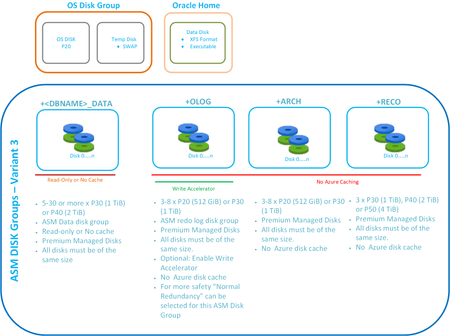
Woolworths Australia goes live on Azure, new recommendations for SAP on Oracle direct from Oracle themselves. Disk Bursting and VM Bursting and new SSD v2 in preview. SQL Server 2022, ODBC 18 and Windows 2022 News for Windows customers and news for Linux customers Important guidance for sizing boot disks on Linux.
Application pool keeps on stopping
One of my Application pool keeps on stopping which is impacting my User Profile Service Application and Workflow management service on SharePoint Server 2013. I have followed the below steps: Click on Application pools. Click on the particular Application pool for your site. Right-click Advanced settings. Set Enable 32-Bit Applications to False. Also I have found that below steps might help also: Restart the application pool IIS reset Stop Start User Profile Service However is there anything else that I can do which will not impact the Business?62KViews0likes3Comments
How to increase SQL query performance of a view?
Hi everyone, I am new to Microsoft community, so please let me know if this post is not in the right forum and if so which one would be the right one. issue: - Update & query (using Power BI) of my Sales Weekly View takes forever (>30min) and I would like to understand how I could improve this Current setup: - Sales Daily View: View containing aggregation and joins of two main sales tables and a date table - Sales Weekly View: View joining the "Sales Daily View", a sales table and two dimension tables and containing extensive logics (mainly aggregations) Please let me know if you have any idea how to streamline this and improve the performance of the view.56KViews0likes4Comments
SQL 2019 Fails to Start - Error 17051
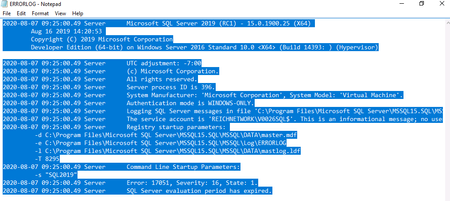
I have a fairly significant set of issues that I cannot figure out how to resolve that has brought down a bunch of systems. A windows update occurred and the SQL 2019 RC1 server rebooted itself (do not believe that this error is related just coincidental). This error indicates that the SQL Server evaluation period has expired. Upon reviewing the startup logs this concurs with my belief: I am confused about why I am running into this issue as I am running a developer version of SQL and not the evaluation version but none the less it currently appears to be a problem. To attempt to resolve this issue I have done the following: Attempted to do an edition upgrade and set everything back to developer and the process ran and completed successfully but the service will still not start. Attempted to upgrade editions to a licensed version of SQL (which I do also own) and I cannot complete the upgrade because the SQL server is not running. I attempted to follow instructions to turn back the computer time and set common files registry entry to "3" in an attempt to trick it into being active so that I could upgrade. My system automatically reverts the time back to the standard time almost immediately. Attempted to turn off network connection to disable time sync Defaulted the time settings for windows Unjoined the server from the domain thinking GPO might be interfering This system MUST be restored. Any ideas you have on how to get it back up and running again would be seriously appreciated!48KViews0likes1CommentNew Microsoft Certified: SQL AI Developer Associate Certification
AI is transforming how data-driven applications are built, and SQL professionals are at the center of this new era. Whether you're a database developer, administrator, analyst, or architect, your SQL expertise is more critical than ever. With the rise of AI, quality data and secure, optimized queries are foundational to building intelligent, scalable solutions. We’re introducing the Microsoft Certified: SQL AI Developer Associate Certification to help you validate your ability to integrate AI capabilities directly into SQL-based solutions without needing to move your data, learn entirely new platforms, or move away from the T-SQL skills you already use every day. To earn this new Certification, you need to pass Exam DP‑800: Developing AI‑Enabled Database Solutions, currently in beta. Is this the right Certification for you? The Microsoft Certified: SQL AI Developer Associate Certification is designed for SQL professionals who build and maintain SQL-based applications and who want to integrate AI capabilities directly into their data solutions. As you collaborate closely with application developers, database administrators, architects, AI engineers, and DevSecOps teams, skills validated by this certification support the delivery of scalable, secure, and high-performance AI‑enabled applications. This Certification demonstrates your ability to: Design and build database solutions using structured and semi-structured data. Use AI-assisted tools to accelerate SQL development and database management. Secure, optimize, and deploy enterprise-grade SQL solutions. Implement vectors, embeddings, and retrieval-augmented generation (RAG) patterns within SQL database architectures. As a candidate for this Certification, you should have experience writing T-SQL, developing databases on Microsoft SQL platforms, and working with continuous integration and continuous deployment (CI/CD) workflows in GitHub. We also recommend familiarity with AI concepts, such as embeddings, vectors, and models, in addition to AI-assisted development tools. Skills measured by the exam include: Applying advanced T-SQL techniques for AI-ready database solutions. Building vector and semantic search experiences directly in SQL. Implementing RAG workflows to ground large language model (LLM) outputs and reduce hallucinations. Integrating LLMs into SQL-based applications without migrating data. Designing secure, compliant, and scalable AI-enabled data solutions. Exposing SQL data through APIs by using Data API builder. Building and monitoring data APIs by using Data API builder and event-driven change patterns. These capabilities power use cases like semantic and hybrid search, chatbots, personalized recommendations, fraud detection, and predictive analytics. Ready to prove your skills? The first 300 candidates can save 80% Take advantage of the discounted beta exam offer. The first 300 people who take Exam DP-800 (beta) on or before April 3, 2026, can get 80% off. To receive the discount, when you register for the exam and are prompted for payment, use code DP800Belzoni. This is not a private access code. The seats are offered on a first-come, first-served basis. As noted, you must take the exam on or before April 3, 2026. Please note that this discount is not available in Turkey, Pakistan, India, or China. How to prepare Get ready to take Exam DP-800 (beta): Review the Exam DP-800 (beta) exam page for details. The Exam DP-800 study guide explores key topics covered in the exam. Work through the self-paced skilling Plan on Microsoft Learn: Become a SQL AI Developer: Prepare for Certification Exam DP-800. Connect with Microsoft Training Services Partners in your area for in-person offerings. Need other preparation ideas? Check out Just How Does One Prepare for Beta Exams? Ready to get started? Remember, the number of spots is limited to the first 300 candidates taking Exam DP-800 (beta) on or before April 3, 2026. Beta exam rescoring begins when the exam goes live, with final results released approximately 10 days later. For more details, read Creating high-quality exams: The path from beta to live. Stay tuned for general availability of this Certification in May 2026. Additional information You can take Certification exams online, from your home or office. Learn what to expect in Online proctored exams: What to expect and how to prepare. For more cloud and AI Certification updates, read our recent blog post, The AI job boom is here. Are you ready to showcase your skills? Get involved: Help shape future Microsoft Credentials. Join our Microsoft Worldwide Learning SME Group for Credentials on LinkedIn for beta exam alerts and opportunities to help shape future Microsoft learning and assessments. Explore Microsoft Credentials on AI Skills Navigator.28KViews9likes9CommentsCountdown to End of Support 2020!
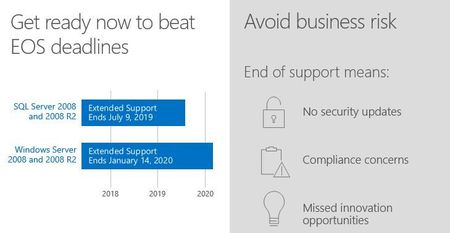
The support countdown clock is ticking. On January 14, 2020, support for several Microsoft products will end. That's 5 short months away when the end of regular security updates begins. Don't let your infrastructure and applications go unprotected.23KViews3likes0Comments