sound
14 Topics
Sharing sound
Teams screen sharing does not show “Include sound” option for multiple users I’m having an issue with Microsoft Teams screen sharing that I haven’t been able to resolve. I work in a call center, and we use Teams for peer coaching and training. When an agent shares their screen, I need to be able to hear both the agent and the customer they are speaking with through our call-center application (Amazon Connect). The problem is that most of our agents do not have the “Include sound” / “Include computer sound” option when they click Share in Teams. They can share their screen normally, and I can hear the agent speaking, but I cannot hear the audio from the call they are handling. What makes this especially strange is that the option does appear for me when I share my screen. Or if it doesn't show I can simply re-download the desktop version and it will fix itself.... but that doesn't work for anyone else. We have already tried: Reinstalling Teams Using the Teams desktop application Using Teams in a web browser Trying different browsers Restarting the computers Having multiple affected agents repeat the same troubleshooting Nothing has brought the audio-sharing option back for them Any suggestions for what we should check would be greatly appreciated.357Views0likes2Comments
Microsoft To Do: Problems with the Bell Sound
I love this app. It's easy to use and the sound it makes when I complete a task is amazing. My sounds have recently stopped working however and I am very disappointed. No matter how many times I turn them on and off in the preferences there is no change in the app. Does anyone have any recommendations? The number one reason I use this app is because of the sounds it makes. I use it with an iMac (my os is Catalina) in case this can help.35KViews2likes21Comments
Windows 10 LTSC 21H2 Audio Error
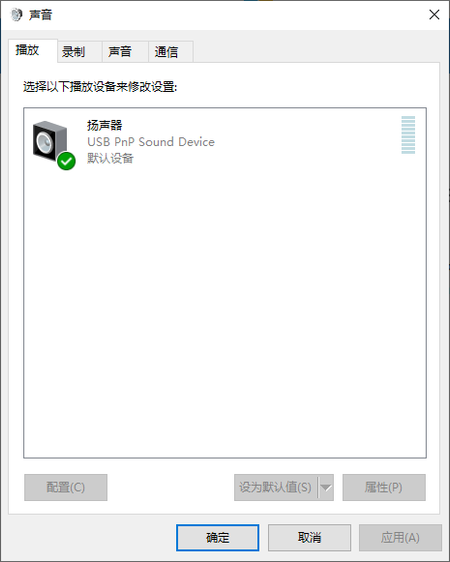
This night when I was listening to music, it suddenly didn't make any sound. I checked my Audio Settings(Right click the Speakers Icon). It didn't show my Realtek Sound Card Device, however, when I visit the DeviceManager, I could see the Realtek. How can I deal with it? I would appreciate it a lot if you could help me with the problem. Keenly anticipate your advices.889Views0likes2Comments
Usb problems with Teams
I teach music through Teams and use a Focusrite sound interface. I have two questions... 1- When using the interface with Skype and Zoom I am able to have 2 channels working together, one for instrument and the other for speech. When using Teams, only the first channel is recognised. Any ideas? 2- I want to add another webcam via USB but currently when I try to connect my USB mouse it stops the sound interface working. Any ideas? I currently use a Surface Pro with only 1 USB port and so I have tried using a 4 to 1 USB extension. This works really well for audio recording on my imac. Any help would be greatly appreciated! Thanks, Stuart33KViews3likes14CommentsGoogle Voice no sound in Edge
When using the browser interface to Google Voice, I get the warning banner: "Your browser might prevent calls from ringing. Change your browser settings to allow voice.google.com to play sound." I've not been able to figure out how to resolve the issue. Worse, I get no sound when I make phone calls despite my audio settings testing OK. Any suggestions? Thanks.12KViews0likes6CommentsBluetooth earphones doesn't work in Windows 11
Some Bluetooth earphones (like Haylou GT1) don't work on Windows 11 and it was working perfectly on Windows 10. I think the problem with the drivers and especially with the earphone driver not with the Bluetooth driver because the Bluetooth works normally with the controllers. Just to let you know when I disable the "Haylou-GT1 Avrcp Transport" driver and keep the "Haylou-GT1" driver enable it sometimes works but with very bad quality sound so I am some kind of sure it's a driver problem and that driver provider is Microsoft so I think you can fix it. There is a lot of people who had the same problem, look at this link: https://techcommunity.microsoft.com/t5/report-an-issue/bluetooth-earphones-doesnt-work-in-windows-11/m-p/2554552 I contacted Microsoft support and they say: "Only our engineers have the access to its Windows 11" So they advised me to post in here in windows insider (I don't know why, I am not a Windows insider member, I just downloaded windows 11 when it's released for everyone.)27KViews18likes20CommentsExpose each Edge's tab and PWAs sounds to Windows sound control separately
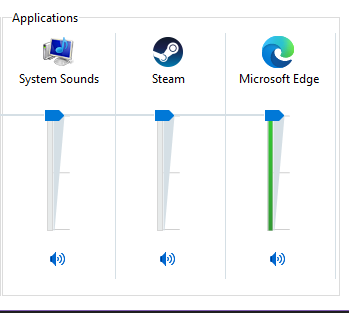
Expose each Edge's tab and PWAs sounds to Windows sound control separately so we can set different volume level for each of them When I install YouTube, Spotify web player or similar sites as a PWA (progressive web app) in Edge, or use them in different tabs, I want to be able to control each of their volumes separately using Windows sound control or the audio widget of Xbox Game bar, for more convenience and control over the sound we hear. currently, everything is shown and combined under "Edge". you can also upvote in feedback hub: https://aka.ms/AAckqfh6.9KViews2likes5CommentsNo sound on my Asus 543MA Laptop!
Hi, I have a very serious Windows 11 issue! When I watch my YouTube video yesterday it worked fine with my RealTek speakers and my BlueTooth Headphones. However.... My Bluetooth Headphones only worked and I got no sound at all from my RealTek Speakers at all! Microsoft needs to do something with this mess as they've been screwing up as of late!933Views0likes1Comment
El sonido del PC ha dejado de funcionar en la última actualización de Windows 11
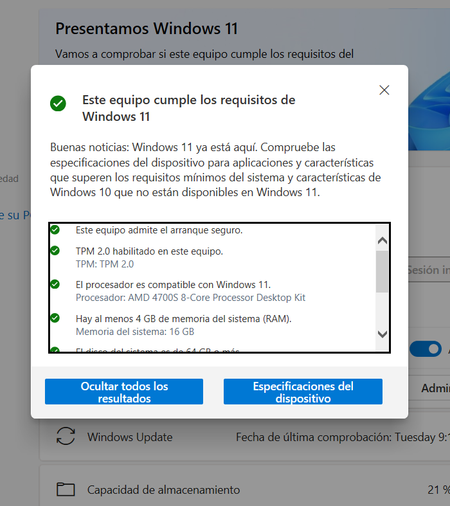
Llevo con Windows 11 unos 4 meses (estoy en el programa Insider), y no he tenido ningún problema hasta la última actualización en que el sonido ha dejado de funcionar. Microsoft confirmó que mi PC era compatible y sigue haciéndolo con el PC Health Check pero parece que no lo es. O hay un Bug en el PC Health Check o mi PC debería ser compatible y no tener ningún problema de sonido.880Views0likes0Comments