software update management
74 Topics
Upgrade task sequence skipping locations and failing
Upgrade task sequence using Operating System upgrade skipping http(s) paths Hi All SCCM Experts, I have an Upgrade to Windows 11 25H2 Task sequence which was working fine until lately. Now all devices on other networks outside my IT network. When it reaches the upgrade operating system step fails and does not download the content. Everything is fine with iis, and package is distributed successfully. The TS was working fine 3 weeks ago. I had success with a collection of devices. Boundary groups are still the same fine too. CAS log is fine no issues either. There is lots of disk space and the cache max size is good too. 1 primary site server which is the DP. *Has anybody encountered this happening with an in place upgrade ts before? If so what was the fix? It should not be skipping and the content should start to download because it does resolve and see the OS Upgrade Image package. The message in smsts.log is as follows: Package location: \_SMSTSCM100465, ://\*\*\*\*\*\*/sms\_dp\_smspkg$/cm100465,https://\*\*\*\*\*/ccmtokenauth\_sms\_dp\_smspkg$/cm100465 OSDUpgradeWindows 01/10/2026 09:06:18 28116 (0x6DD4) Skipping http(s) path: :/\*\*\*\*\*\*/sms\_dp\_smspkg$/cm100465 OSDUpgradeWindows 01/10/2026 09:06:18 28116 (0x6DD4) Skipping http(s) path: ://\*\*\*\*\*\*\*/ccmtokenauth\_sms\_dp\_smspkg$/cm100465 OSDUpgradeWindows 01/10/2026 09:06:18 28116 (0x6DD4)212Views0likes5Comments
Updates Not Installing by Install Deadline
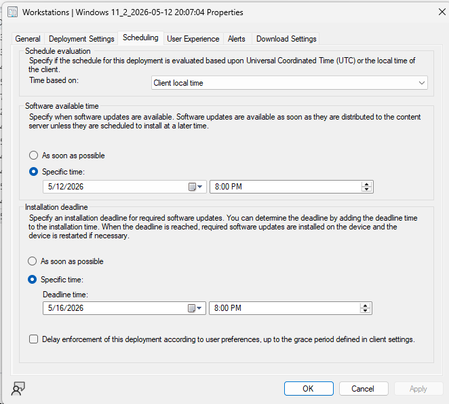
Hello all! We have an organization with about 12,000 Windows 11 Workstations. I'm noticing that even though install deadline is set, and updates are allowed to be installed before install deadline hits, we are noticing in Software Center that updates say "will install after _____" (deadline date). How can I change this? I want updates to install during the maintenance window as well as a reboot. What am I missing? Connor408Views0likes2CommentsSCCM - 23/24H2 to 25H2 Upgrade
Hello SCCM Community! Having an issue with upgrading devices from 23 and 24H2 to 25H2, I am downloading the newest version in SCCM under Windows Servicing and Feature Upgrades and deploying it to the targeted collection, but nothing shows in Software Center. Upon checking the UpdatesDeployment log, it shows Actionable Updates = 0 in one of the lines, but I'm wondering why WUA is determining updates do not apply to the machine. I believed this could be a GPO restriction but I've confirmed that there are no conflicting GPOs or Registry Edits. Any suggestions? Thanks!2.3KViews1like1Comment
SYSTEM CENTER IMPLEMENTATION & LICENSING Guide
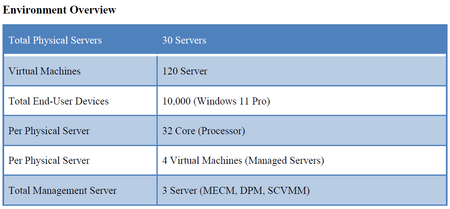
Dear Microsoft Community, Our organization is planning to deploy a comprehensive IT management solution using the Microsoft System Center Suite. The goal is to streamline infrastructure operations, enhance backup and recovery, manage both virtual and physical resources, oversee endpoints, and maintain security and compliance. We need guidance regarding the number and type of licenses required, specifically Client Management Licenses (CML), Server Management Licenses (ML), and System Center Suite licenses.1.4KViews0likes5CommentsConfiguration Manager ADR for Windows Servers Not Deploying Updates
Hi everyone, We recently deployed Configuration Manager 2503 in our environment. The environment consists of the following: 1 Primary Site Server including Distribution Point role in head office, 1 Distribution Point server for a field office location, and 1 Site database server. We followed some articles or links online to deploy the Software Update Point on the primary site server that includes the Distribution Point role. The SMS_WSUS_CONFIGURATION_MANAGER, SMS_WSUS_CONTROL_MANANGER, and SMS_WSUS_SYNC_MANAGER components show a green checkmark and OK status. We followed some online articles or links to also create an Automated Deployment Rule as well. Despite creating the Automated Deployment Rules, it does not seem that updates are deploying to the targeted servers that are part of a Device Collection in Configuration Manager. Please advise what we should review to remediate this issue. Thanks.284Views0likes1Comment
need help with a problem related to the system center
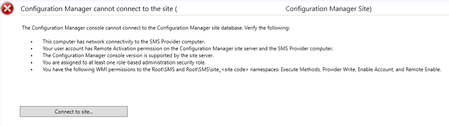
This problem started after the September database server update. I can't access the system center interface to view reports, see devices, check updates, track device status, etc. When I try to open it, I see the attached image. Has anyone else experienced this problem and resolved it? What is the solution for this issue?302Views0likes0Comments
Windows/Defender Updates not deployed to SCCM server (all clients work fine!)
After battling for a few weeks with this it finally occurred to me to reach out for help, and I found this forum. So here goes… I have a relatively small environment with Windows Updates managed by SCCM. Currently, all clients are receiving updates as expected, the only client that isn’t is the Windows Server that’s hosting SCCM itself. Should I be configuring the winhttp proxy settings on that one server to point to our proxy (I have tried it and it didn’t seem to make a difference)? Without the winhttp proxy set, when I check the Windows update log, it seems to be trying the automatic proxy settings and quite rightly failing. It runs out of options and tries the user proxy as a last resort. I have checked that I can reach the URL configured in the Windows Update settings in Group Policy from the SCCM server and it works fine. Is there something I need to do differently with the SCCM server versus all the other clients? The SCCM client is installed on the SCCM server and is reporting healthy status with expected policies applied like all other managed clients in the estate. The SCCM server is in the same boundary as other servers that are receiving updates. SCCM 2503 running on Windows Server 2019. WSUS is running on the same server. The Software Update Point is configured with proxy settings. Thanks in advance!!384Views0likes1CommentRe-Join SCCM Client to Intune for Co-Managed join Type
Hello, I have been using SCCM for a long time, I have it is setup for Co-management, and all my workloads are moved over to Intune. I have a few clients that for one reason or other have not been added to Intune. I can get them onboarded, but the join type always ends up Intune. I am trying to find out the correct recipe to reenroll an SCCM client to Intune. I have tried uninstalling the SCCM client and reinstalling. I have tried removing registry keys for Intune to ensure it joins again. I have used DSREGCMD to leave and join back. I have completely removed from Domain and deleted from Intune. I have tried combinations of all of these things together. I have yet to come up with a specific order to do them in. I still think there is some remnant that is preventing a rejoin. Does anyone have details that help me to get systems to rejoin via SCCM? Some may say what is the difference. The difference is there are tools that are not present if the Join type is incorrect. Best regards and thanks.239Views0likes0Comments
SCCM missing WSUS Updates for Exchange
Hello, since November 2024 our SCCM cant find any updates for Exchange therefore our Exchange Servers are Up-to-date accordingly to the SCCM but nfact are not. Is this a known issue? We connot find the KBs on the catalog site of micrsoft either.246Views0likes0Comments