slm
72 TopicsToken Economics: The New FinOps for Agentic AI
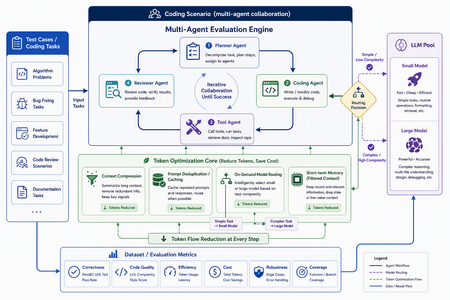
In AI applications, tokens are now cost — and token economics deserves architectural attention For a long time, AI application design started with model capability: Can the model write code? Can it reason? Can it use tools? Can it handle long context? Those questions still matter, but in the age of agentic applications, they are no longer sufficient. The more important production question is this: How many tokens does the architecture burn to complete one useful task? A classic chat application often maps one user turn to one model call. An agentic system is different. One user goal can trigger planning, retrieval, tool selection, tool execution, result interpretation, reflection, repair, and summarization. The user sees one instruction; the system may execute dozens of model calls behind the scenes. Tokens are no longer just a measure of text length. They become a measure of system design, runtime behavior, developer workflow, and business cost. GitHub Copilot’s 2026 move to usage-based billing through GitHub AI Credits captures the industry shift clearly. Usage is now aligned with token consumption, including input, output, and cached tokens. That matters because Copilot has evolved from an in-editor assistant into an agentic platform that can handle long, multi-step coding sessions across repositories. In that world, a tiny prompt and a multi-hour autonomous coding workflow should not be treated as the same economic unit. Token economics is therefore not about telling developers to “write shorter prompts.” It is about designing systems where: useful context is preserved, while noise is removed; repeated context is cached or deduplicated; simple tasks do not pay for frontier models; short-term state is managed structurally instead of copied repeatedly; every model call is metered, comparable, and governed. In short: token economics is the practice of making agentic AI economically sustainable. Scenario thinking: GitHub Copilot billing, Copilot SDK, GPT-5.5, Anthropic, and MAI-Code Model The new GitHub Copilot billing model provides a useful framing for developers. Copilot is no longer only autocomplete. It is becoming a programmable agentic platform. It can use models, call tools, work across files, stream responses, and participate in long-running coding workflows. With the GitHub Copilot SDK, developers can embed that agentic runtime into their own applications, services, and developer tools. That is powerful, but it also changes the cost model. Once an agent loop becomes programmable, token cost also needs to become programmable. If a system can plan, call tools, edit files, retry, repair, and summarize, it also needs to meter, route, cache, compress, and evaluate. EvalAgentic gives this idea a concrete playground. The project groups models into cost and capability tiers: Tier Example models Example price / 1K tokens Typical use LARGE claude-opus-4.8, gpt-5.5 $0.030 Agents, code generation, multi-step reasoning MID gpt-5.4-mini $0.012 Dialogue, summarization, extraction TINY gpt-5-mini $0.001 Classification, keyword matching, rule-like tasks This tiering lets us reason about real scenarios: GPT-5.5-class models are valuable for hard reasoning and engineering workflows, but they should not be the default for every step. Using a frontier model for simple classification is like hiring a principal architect to label folders. Anthropic high-capability models can be excellent for complex reasoning and coding, but they benefit from routing discipline. Requirements analysis, test interpretation, deployment explanation, and code generation may not need the same model tier. MAI-Code Model-style coding models should be treated as specialized capability layers. Their value is not just “better code generation”; it is deciding when code-specialized intelligence should be invoked in a larger agent pipeline. The real question is not “Which model is the best?” It is: Which model is the most economical and reliable for this step of this workflow? Four engineering techniques for saving tokens Context Compression: turn long text into executable structure Implementation principle Context Compression converts long natural-language context into the structured information an agent actually needs. Business documents are often verbose: resumes, contracts, product manuals, requirements, and support logs contain narrative text, boilerplate, repeated explanations, and low-value context. The next agent step may only need a few fields. EvalAgentic demonstrates this with a long resume-like input that is compressed into a compact JSON object. Instead of injecting the full original text into every prompt, the system extracts key fields and dynamically injects only the data required by the current task. A practical compression pipeline includes: Redundancy detection — identify long-tail text, repeated descriptions, stale history, and low-value context. Structured extraction — use Copilot or a mid-tier model to transform prose into JSON, tables, or typed schemas. Dynamic injection — inject only the fields needed for the next step. Recoverable references — preserve source pointers so compressed context remains auditable. How to evaluate Prompt token reduction before and after compression. Answer quality and task success rate. Schema fidelity and missing-field rate. Latency improvement. Cost per successful task. Compression is not summarization. Summaries are designed for humans. Structured compression is designed for agents. Prompt Deduplication / Cache: stop paying twice for the same context Implementation principle Many agent systems waste tokens because they repeatedly send the same context. The same resume, contract, repository README, user profile, API documentation, or business rule can be copied across turns and agents. Prompt Deduplication / Cache applies a simple principle: if context has already been processed, do not pay to process it again unless it has changed. A concrete design includes: compute a hash or semantic key for source context; reuse extracted structured results when content is identical or equivalent; apply a TTL for repeated entities, such as the 24-hour cache pattern shown in EvalAgentic; organize stable prompt prefixes to benefit from provider-level prompt caching where available; store shared context in an artifact store or memory layer so multiple agents do not copy the same blob. How to evaluate Cache hit rate. Cached token ratio. Duplicate prompt rate. Cost delta before and after caching. Correctness under cache, especially stale-cache failures. Caching is not “save everything forever.” Good caching knows when to reuse and when to invalidate. On-Demand Model Routing: let task complexity decide model tier Implementation principle On-Demand Model Routing routes each request to the cheapest model that can complete the task reliably. The entry point can use a rule tree, a lightweight classifier, or a hybrid complexity score. EvalAgentic’s routing tree is intentionally easy to explain: INCOMING REQUEST └─ Prompt < 500 tokens? ── YES ─→ TINY: classify / extract └─ NO ──→ multi-step reasoning? ├─ NO ─→ MID: dialogue / summary └─ YES ─→ LARGE: agent / code The engineering logic is straightforward: simple classification and keyword matching go to TINY; summarization and structured conversion go to MID; multi-step reasoning, coding, cross-file changes, and orchestration go to LARGE; code-specialized models such as MAI-Code Model can be placed in the coding phase rather than used across the whole pipeline. How to evaluate Routing accuracy. Cost per route. Quality regression by tier. Escalation rate from small models to larger models. End-to-end success rate. Routing does not mean “always use the smallest model.” It means frontier intelligence is reserved for the steps where it actually changes the outcome. Short-term Memory: preserve state instead of replaying history Implementation principle Short-term Memory controls context growth across multi-turn and multi-agent workflows. Without it, agents often replay the full conversation history, full tool outputs, and full intermediate reasoning on every turn. The context grows; quality may not improve; the bill definitely does. A better design stores state structurally: user goal; current plan; tool outputs and references; failure reasons; next actions; handoff artifacts between agents. In a multi-agent coding pipeline, the Requirements Agent should hand off a structured spec. The Coding Agent should read that spec, not the entire prior conversation. The Testing Agent should consume testable artifacts, not every word produced by the Coding Agent. How to evaluate Context growth curve across turns. Memory retrieval precision. Rework rate caused by missing state. Recovery quality after failed steps. Average input tokens per turn. Short-term memory is not about remembering everything. It is about remembering the next useful thing. EvalAgentic as a concrete evaluation example EvalAgentic is effective as an evangelism project because it turns token economics into an observable before/after system. The architecture has five layers: Frontend — frontend/index.html provides Tabs A / B / C, live SSE logs, and before/after charts. API — backend/server.py exposes FastAPI routes and Server-Sent Events streaming. Orchestration — eval.py handles A/B evaluation; coding_agents.py handles the multi-agent coding scenario. Core — compressor.py, router.py, gh_models.py, and token_meter.py implement compression, routing, Copilot SDK calls, and token metering. Providers — GitHub Copilot SDK and Microsoft Agent Framework provide model access and agent orchestration. Tab A: Compression comparison Tab A compares long-form context before and after structured compression. The key message is that token saving does not come from writing a clever sentence. It comes from converting verbose context into a structured artifact that downstream agents can consume efficiently. Tab B: On-demand model routing Tab B demonstrates that cost is not only about raw token count. If a system routes simple tasks to cheaper tiers and reserves expensive models for complex reasoning, total cost can fall even if some token counts increase. This is a subtle but important point: token economics is not token starvation; it is model portfolio optimization. Tab C: Coding scenario — multi-agent with Agent Framework Tab C is the most persuasive demo. The same deliverable — a Taobao-like goods-list site with HTML + JavaScript frontend, Flask backend, and Docker deployment — is produced twice by a four-agent pipeline: Requirements Agent; Coding Agent; Testing Agent; Deployment Agent. The before pipeline uses no compression and sends every agent to GPT-5.5 / LARGE. The after pipeline injects a compressed JSON spec and uses on-demand routing: requirements can use MID, coding can use LARGE, testing can use MID, and deployment can use TINY. This mirrors real enterprise development. Architecture and complex code generation may deserve frontier models. Test interpretation, deployment packaging, and simple validation often do not. Summary and refinement based on the project diagrams The EvalAgentic README describes three important visuals: the architecture flow, the routing tree, and the token-meter design. Together, they form a governance loop: User Scenario ↓ Context Compression ↓ Prompt Deduplication / Cache ↓ On-Demand Model Routing ↓ Short-term Memory ↓ Token Metering & Budget Actions ↓ Before / After Evaluation Optimize the path, not only the prompt Many teams start token optimization by editing prompt wording. That helps, but the largest waste usually lives in the execution path: how many calls are made, how much context is repeated, how often tools retry, and whether every step uses the same expensive model. EvalAgentic makes the path visible through A/B comparisons. Token Meter is the control plane of cost governance EvalAgentic’s token_meter.py uses a non-invasive interceptor pattern: INTERCEPTOR (@token_meter) ↓ COUNTER CORE: accounting / budget threshold / trigger ↓ ACTION HUB: throttle (>80% budget) / rollback (>budget) This is the right architectural instinct. Production systems need thresholds, throttling, rollback, and traceability. Without those controls, one retry loop can quietly turn a small user request into a budget incident. Cost metrics must be evaluated with quality metrics A system that cuts cost by 80% but drops success rate by 50% is not optimized. It is broken more cheaply. The evaluation matrix should combine cost, quality, latency, and reliability: Dimension Metric Why it matters Cost Cost per successful task Measures the real unit economics Token Input / output / cached tokens Identifies compression and cache opportunities Quality Pass rate / regression rate Ensures cheaper tiers do not break outcomes Efficiency Latency / retry count Prevents cheap models from causing expensive retries Governance Budget breach / rollback count Validates runtime control Narrative A simple three-line narrative works well for demos: Token is no longer a technical detail. It is the bill of your architecture. EvalAgentic shows the same scenario before and after cost-aware design. The goal is not to make models cheaper; the goal is to make agent systems economically governable. For a developer audience, the sharper version is: A good agent does not use the biggest model everywhere. It uses the right intelligence at the right step, with the right context, under the right budget. Practical recommendations for real projects Establish a token baseline first. Measure input, output, retries, tool calls, and cost per scenario before optimizing. Make compression a component, not a prompt habit. Define schemas, cache policies, and fallback behavior. Introduce a model routing matrix. Route by task type, complexity, risk, latency, and cost. Define handoff contracts between agents. Pass structured artifacts, not endless conversation history. Evaluate every optimization with A/B tests. Compare cost, quality, latency, and stability. Add budget actions. Throttle at a threshold, rollback on breach, and add circuit breakers for failed retries. Closing: token economics is the second curve of agent engineering The first phase of AI application development was about calling models. The second phase was about putting models into products. The next phase of agentic AI is about running those systems reliably, affordably, and governably. EvalAgentic matters because it turns Context Compression, Prompt Deduplication / Cache, On-Demand Model Routing, and Short-term Memory into something developers can run, compare, and explain. It moves token economics from opinion to instrumentation. Future AI applications will not only ask: How smart is this agent? They will ask: How many tokens does it spend per completed task? Which model did it use? Did it hit cache? Did retries run away? Did the system reserve frontier intelligence for the steps that deserved it? References kinfey/EvalAgentic GitHub Copilot is moving to usage-based billing Updates to GitHub Copilot billing and plans Copilot SDK - GitHub Docs7.2KViews4likes0CommentsKVStream: Smarter Memory Management for On-Device Language Model Inference
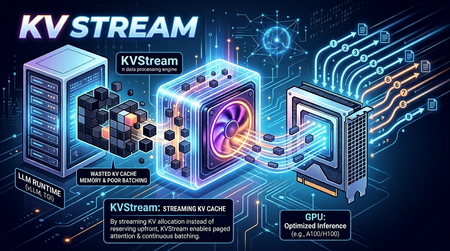
On-Device LLMs Are Starved for Memory Intelligence The shift toward on-device language model inference is accelerating. Platforms like Microsoft's Foundry Local, Ollama, and llama.cpp now make it possible to run capable models such as Phi-3-mini and Llama 3 entirely on local hardware, no cloud dependency, no data leaving the device. This is a meaningful leap for privacy-sensitive applications, offline scenarios, and latency-critical workloads. But on-device/edge inference surfaces a class of performance problems that cloud-based serving largely abstracts away. Memory is the bottleneck. When a language model generates text, it builds a Key-Value (KV) cache a memory structure that stores intermediate attention states so it doesn't have to recompute them for every new token. On a cloud server with hundreds of gigabytes of HBM (Hardware Bandwidth Memory), wasting KV cache memory is a rounding error. On a developer workstation or a GPU/NPU-equipped edge device, it is the difference between a usable system and a stalled one. The typical on-device runtime allocates KV cache memory statically and per-sequence. This creates three concrete problems: Fragmentation and over-reservation. A model has no way of knowing in advance how long a response will be. So, runtimes allocate a worst-case maximum context window of memory for every request even if the actual response is short. The result is a fragmented memory pool where most of the reserved space sits idle while queued requests wait for a slot to open. Research confirms the scale of this waste: production settings with variable-length or concurrent requests typically discard 60–80% of KV memory under monolithic static allocation; paged designs reduce this to under 5%. No batching across requests. Most local runtimes process one request at a time. If you fire four concurrent questions at Foundry Local or Ollama without a batching layer, they queue sequentially. Throughput scales linearly with latency instead of benefiting from the parallel processing the underlying hardware supports. Continuous batching the technique of admitting new sequences mid-generation rather than waiting for the whole batch to drain has been shown to yield up to 36.9× throughput improvement in the original Orca study, with production deployments regularly achieving 2–5× over static batching. Redundant computation. Real-world applications consistently include a shared system prompt instructions that tell the model how to behave. With a RAG pipeline or a chat assistant, the same few hundred tokens get prefilled on every single request, burning compute and TTFT (time-to-first-token) unnecessarily. External prefix caching layers addressing this problem have demonstrated up to 15× throughput improvement on multi-round workloads. These are not hypothetical inefficiencies. In practice, they translate to sluggish multi-turn conversation, poor throughput when multiple users or agent loops share the same local model, and wasted hardware potential on capable machines that could be doing much more. Crucially, while some of the cloud-scale inference engines embed these techniques internally, there is no equivalent orchestration layer for on-device runtimes a gap that enterprise deployments and the research community are now actively calling. Introducing KVStream: A Middleware Layer for Local LLM Runtimes KVStream is a lightweight Python middleware that sits between the application and any local LLM runtime, adding production-grade memory management and scheduling without requiring you to modify the backend or the client. The design principle is deliberate: KVStream is not a new inference engine. It does not replace Foundry Local or any other runtime. Instead, it solves the orchestration layer that on-device runtimes currently leave unaddressed the gap between a single model server and an application that expects the reliability and throughput of a managed serving system. KVStream exposes a fully OpenAI-compatible API on http://localhost:8080/v1. Any existing client the openai Python SDK, LangChain, httpx, or a curl command connects to it without modification. The backend continues to run unchanged. Architecture KVStream is composed of four cooperating subsystems. Understanding how they interact clarifies why the gains are meaningful and composable. 1.Paged KV-Cache Allocator: Inspired by the paged attention mechanism, KVStream manages KV cache memory as a pool of fixed-size pages (or blocks), each holding a configurable number of token states (default: 16 tokens per block). Rather than reserving a contiguous worst-case buffer per sequence, the allocator assigns pages on demand and reclaims them when a sequence finishes. Each sequence owns a logical page table, a mapping from logical page indices to physical block slots. Pages can be shared across sequences (enabling prefix deduplication) and migrated between GPU and CPU (enabling pre-emption). For Foundry Local and Ollama, this operates in soft-inject mode, the page table controls admission and logical accounting, while the actual KV tensors stay inside the backend. For llama.cpp, which exposes a /slots API for saving and restoring raw KV state, KVStream can operate in hard-inject mode, it manages a real tensor pool and performs zero re-compute cache reuse by physically restoring KV state between requests. 2.Continuous Batching Scheduler: The scheduler merges multiple queued sequences into a single batched forward pass, up to a configurable max_batch_size. Critically, it uses continuous batching new sequences can be admitted mid-generation, filling slots vacated by completed requests rather than waiting for the entire batch to finish. Two scheduling priorities are supported: fcfs (first-come, first-served): straightforward FIFO, best for fairness. sjf (shortest-job-first): minimizes average TTFT by prioritizing requests with shorter expected output lengths. When GPU page blocks are exhausted and a new sequence must be admitted, the scheduler applies a preemption policy: swap: the lowest-priority active sequence's pages are migrated to CPU RAM. The sequence resumes when GPU blocks become available again. recompute: pages are freed and the sequence is re-queued from scratch, lower memory overhead, higher latency for the preempted request. 3.Prefix Cache: The prefix cache deduplicates the KV computation for any shared token prefix across requests like system prompts, few-shot examples, RAG preambles, or any stable instruction block. The mechanism works in three steps: After a request completes its prefill phase, KVStream hashes the prompt tokens in block-aligned chunks and stores the canonical block table for that prefix. On a subsequent request whose prompt starts with the same prefix, the new sequence forks the canonical block table via copy-on-write, no re-computation occurs. Entries expire after a configurable TTL (default: 1 hour), or can be evicted manually. The practical consequence: in any application with a stable system prompt, only the first request pays the prefill cost for that prompt. Every subsequent request skips it entirely, reducing TTFT in proportion to the length of the shared prefix. 3.OpenAI-Compatible Proxy KVStream wraps all of the above behind a standard /v1/chat/completions interface. It handles both streaming (SSE) and non-streaming responses, translates between the OpenAI request format and the backend's native API, and serves a /health, /status, and /metrics endpoint for observability. The /status endpoint returns live scheduler and memory state: { "scheduler": { "waiting": 2, "running": 8, "swapped": 0, "gpu_blocks_free": 184, "gpu_utilization": 0.281 }, "prefix_cache": { "cached_prefixes": 3, "total_prefix_hits": 12, "cached_tokens": 768 } } A Prometheus-compatible /metrics endpoint is also available, with a pre-configured Grafana dashboard included in the Docker Compose stack. Getting Started with Foundry Local: Microsoft's Foundry Local is the primary integration target for KVStream. Foundry Local provides a high-quality on-device inference runtime with strong model support (Phi-3-mini, Phi-3.5, and others), NPU acceleration, and direct integration with the Windows AI platform. KVStream's Foundry backend adds continuous batching and prefix caching on top of that foundation without any changes to the Foundry runtime itself. Installation: pip install kvstream Start the KVStream Proxy: # 1. Start Foundry Local (if not already running) foundrylocal serve # 2. Start KVStream in front of it kvstream serve --backend foundry --model phi-3-mini --port 8080 KVStream's Foundry backend includes auto-discovery, if Foundry Local assigns an ephemeral OS port (which it typically does), KVStream scans localhost to locate the active service automatically, so you do not need to hardcode the backend port. Connect your existing client — unchanged: from openai import OpenAI client = OpenAI( base_url="http://localhost:8080/v1", api_key="not-required", ) response = client.chat.completions.create( model="phi-3-mini", messages=[ {"role": "system", "content": "You are a helpful assistant."}, {"role": "user", "content": "Explain paged attention in simple terms."}, ], max_tokens=512, ) print(response.choices[0].message.content) Any client that speaks the OpenAI protocol like LangChain, httpx, or a raw HTTP call, connects here without modification. Maximize prefix cache hits: Put the system prompt first; KVStream caches it after the first request and skips its computation for every subsequent one. import asyncio from openai import AsyncOpenAI client = AsyncOpenAI(base_url="http://localhost:8080/v1", api_key="not-required") SYSTEM = "You are an expert assistant specialized in on-device AI." async def ask(question: str) -> str: r = await client.chat.completions.create( model="phi-3-mini", messages=[ {"role": "system", "content": SYSTEM}, # cached after first call {"role": "user", "content": question}, ], max_tokens=256, ) return r.choices[0].message.content async def main(): questions = [ "What is NPU acceleration?", "How does Phi-3-mini differ from larger models?", "What is token streaming?", ] # KVStream batches these automatically; system prompt computed once answers = await asyncio.gather(*[ask(q) for q in questions]) for q, a in zip(questions, answers): print(f"Q: {q}\nA: {a}\n") asyncio.run(main()) Tuning memory for hardware: The single most impactful configuration knob is the GPU block pool size. For soft-inject mode (Foundry Local, Ollama), this controls admission concurrency, not actual VRAM allocation by KVStream. A practical starting table is as follows, Device VRAM / RAM num_gpu_blocks Suitable models (E.g.,) 4 GB 64 phi-3-mini 8 GB 128 llama3-8b, mistral-7b 16 GB 256 llama3-8b (q8) 24 GB 512 llama3-70b (q4), mixtral Via YAML configuration: # kvstream.yaml backend: type: foundry model: phi-3-mini memory: num_gpu_blocks: 128 num_cpu_blocks: 256 block_size: 16 scheduler: max_batch_size: 8 preemption_policy: swap priority: fcfs prefix_cache: enabled: true ttl_seconds: 3600 min_match_tokens: 16 Benchmarking KVStream ships with a built-in benchmarking command: kvstream bench \ --url http://localhost:8080 \ --model phi-3-mini \ --concurrency 8 \ --prompt-len 128 \ --output-len 64 \ --total-requests 100 Example output: ┌──────────────────────────┐ │ KVStream Benchmark │ ├──────────────┬───────────┤ │ Requests │ 100 │ │ Concurrency │ 8 │ │ Errors │ 0 │ │ Throughput │ 12.4 req/s│ │ p50 │ 612 ms │ │ p99 │ 1840 ms │ └──────────────┴───────────┘ KVStream covers the most common local inference runtimes today Foundry Local, Ollama, llama.cpp, and LM Studio through a single, consistent interface. If you are building on Foundry Local and running into the throughput or memory fragmentation issues described here, KVStream is designed to slot in with a single command and zero changes to your application code. pip install kvstream kvstream serve --backend foundry --model phi-3-mini The full integration guide, configuration reference, and Docker deployment instructions are available in the KVStream Documentation on Github. We are always looking to improve! If you want to help make KVStream even better, check out our Contributing Guide to get started on your first pull request.310Views0likes1CommentHybrid AI Agents in Python: Routing Between Foundry Local and Microsoft Foundry
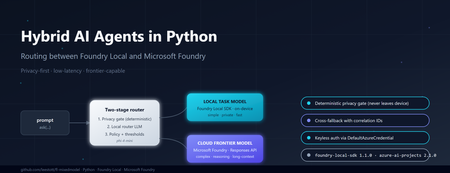
Why hybrid, and why now If you build AI features today, you are caught between three forces. Users want low latency and strong privacy. Product teams want frontier reasoning capability. Finance teams want predictable cost. No single model satisfies all three. Run everything on a small on-device model and you bottleneck on complex questions. Send everything to a frontier cloud model and you pay for trivial requests, leak sensitive data across a network boundary, and add hundreds of milliseconds of latency to greetings. The pragmatic answer is hybrid inference: a lightweight local model classifies every request first, simple or sensitive ones stay on the device, and only the genuinely hard or frontier-capability requests escalate to the cloud. Microsoft now ships both halves of that pattern as supported Python SDKs — foundry-local-sdk for on-device inference and azure-ai-projects for Microsoft Foundry cloud models. This post walks through a working reference implementation that combines them behind a single ask() call. The full source is at github.com/leestott/fl-mixedmodel. It is Python-only, secretless by design, and ships with a Gradio diagnostics UI, a CLI demo mode, and a full pytest suite. The contract: one schema, two paths The most important architectural decision is that callers never know which path served a request. Every response, local or cloud, returns the same dataclass: class InferencePath(str, Enum): LOCAL = "local" CLOUD = "cloud" LOCAL_FALLBACK = "local_fallback" # cloud attempted, fell back to local CLOUD_FALLBACK = "cloud_fallback" # local attempted, fell back to cloud @dataclass class AgentResponse: answer: str path: InferencePath model: str reason: str confidence: float latency_ms: float correlation_id: str prompt_tokens: Optional[int] = None completion_tokens: Optional[int] = None fallback: bool = False fallback_reason: Optional[str] = None metadata: dict = field(default_factory=dict) This is what makes the design honest. The router can change, the cloud model can be swapped from gpt-4o to gpt-5.4 , fallback policies can flip — and the calling code never breaks. The four InferencePath values give you full observability without leaking implementation details into the API surface. Architecture in one diagram ┌─────────────┐ prompt ┌──────────────────────────┐ │ caller │ ──────────► │ HybridAgentService │ └─────────────┘ │ .ask(prompt) │ └────────────┬─────────────┘ │ ┌────────────▼─────────────┐ │ RoutingPolicy │ │ 1. Heuristic gate │ │ 2. Local router LLM │ │ 3. Hard policy gates │ └─────┬─────────────┬──────┘ │ │ LOCAL ◄┘ └► CLOUD │ │ ┌──────────▼──┐ ┌──────▼───────┐ │ Foundry │ │ Microsoft │ │ Local SDK │ │ Foundry │ │ (phi-4-mini)│ │ (gpt-5.4) │ └─────────────┘ └──────────────┘ Best practice: the two-stage router pattern Before walking through the implementation, it is worth stating the design pattern explicitly, because it is the part that generalises beyond this specific repo. The cleanest design for hybrid inference is a two-stage router. Stage 1 — local router. A small local model performs intent and complexity classification first. It does not answer the question; it decides where the question should go. Stage 2 — route the answer. If the prompt is simple, private, latency-sensitive, or clearly within local capability, route to a local task model on the device. If the prompt is complex, needs deeper reasoning, a larger context window, or a capability unavailable locally, escalate to a cloud frontier model in Microsoft Foundry. Microsoft's current guidance for the cloud side is to use the Responses API and choose one of two control modes: Pass a specific deployment name (for example gpt-5.4 ) when you want deterministic control over which model serves the request, which is the right choice for regulated workloads, repeatable evaluations, or cost ceilings. Pass model-router as the deployment when you want Microsoft Foundry to automatically select the best available cloud model for each request. This is a sensible default for general-purpose agents where you would rather let the platform optimise the model choice as new ones are released. The reference repo exposes both as environment variables so you can switch without code changes: # .env.example FOUNDRY_CLOUD_MODEL_DEPLOYMENT=gpt-5.4 # deterministic FOUNDRY_CLOUD_ROUTER_DEPLOYMENT=model-router # auto-select Best practice: pin the right SDK versions Two SDKs do the heavy lifting and both have had recent breaking changes, so version discipline matters. Local development — foundry-local-sdk . The current public guidance is to use the Foundry Local SDK package foundry-local-sdk , which provides model discovery, download, cache, load, unload, chat completions, embeddings, audio transcription, and an optional built-in web service. Use version 1.1.0, released on 5 May 2026. Earlier versions used an OpenAI-compatible client surface that has since been replaced by the FoundryLocalManager → load_model → get_chat_client → complete_chat chain shown above. Pin it explicitly: # requirements.txt foundry-local-sdk>=1.1.0 Cloud orchestration and agents — azure-ai-projects . For cloud-side orchestration, Microsoft's current Python guidance is to use azure-ai-projects , which the docs describe as part of the Microsoft Foundry SDK and as the entry point for agents, deployments, connections, datasets, evaluations, and an OpenAI-compatible client returned by get_openai_client() . The current PyPI listing shows azure-ai-projects 2.1.0. Pin it explicitly: # requirements.txt azure-ai-projects>=2.1.0 azure-identity>=1.17.0 If you find yourself reading old samples that import azure.ai.inference as the cloud entry point, or that initialise Foundry Local through a raw openai.OpenAI(base_url=...) client, you are looking at pre-2026 patterns. The current shape is what the reference repo uses: FoundryLocalManager.initialize(Configuration(...)) for the device and AIProjectClient(...).get_openai_client() for the cloud. Stage 1: a deterministic privacy gate Before any model touches a prompt, a deterministic heuristic classifier scans for sensitive patterns — passwords, API keys, SSN/NHS numbers, PII signals, explicit "do not share" flags. If the heuristic returns PrivacyClass.RESTRICTED , the prompt is forced local. The router LLM is not called. The cloud provider is not called. The decision is auditable from a single regex pass. # app/routing/policy.py def decide(self, prompt: str, correlation_id: str = "") -> RoutingDecision: hint, privacy, complexity, h_reason = self._heuristic.classify(prompt) # Hard gate: restricted content never leaves the device if privacy == PrivacyClass.RESTRICTED: return self._make_decision( target=RouteTarget.LOCAL, confidence=1.0, reason=f"Policy hard-gate: {h_reason}", privacy=privacy, complexity=complexity, deterministic=True, correlation_id=correlation_id, ) # Hard gate: very high complexity always goes to cloud if complexity == ComplexityBand.VERY_HIGH: return self._make_decision( target=RouteTarget.CLOUD, confidence=1.0, reason="Policy hard-gate: very_high complexity requires frontier model", ... ) This is the most important responsible-AI control in the whole system. If your privacy review depends on an LLM correctly classifying every prompt, you do not have a privacy control — you have a probability distribution. Deterministic gates first, model judgement second. Stage 2: a local LLM as the router For everything that passes the privacy gate, a small local model classifies whether the prompt needs frontier capability. This is the bit that surprises most engineers: you can do useful routing with a 4B parameter model running on a laptop CPU. The router does not need to answer the question. It only needs to classify it. The reference implementation uses phi-4-mini via Foundry Local. Initialising it is two lines: # app/providers/local_provider.py (excerpt) from foundry_local import FoundryLocalManager from foundry_local.models import Configuration self._manager = FoundryLocalManager.initialize( Configuration(app_name="hybrid-agent") ) self._router_model = self._manager.load_model(self._config.local_router_alias) self._chat_client = self._router_model.get_chat_client() response = self._chat_client.complete_chat( messages=[ {"role": "system", "content": ROUTER_SYSTEM_PROMPT}, {"role": "user", "content": prompt}, ], ) The router prompt asks for a strict JSON response: { "target": "local|cloud", "confidence": 0.0-1.0, "complexity": "low|medium|high|very_high", "reason": "..." } . The application parses it, applies the confidence threshold from config (default 0.6), and falls back to the heuristic decision if the router LLM is unsure or its JSON is malformed. The router never blocks the answer path — that is a deliberate reliability choice. Cloud inference via Microsoft Foundry When the policy returns RouteTarget.CLOUD , the request goes through AIProjectClient , which gives you an openai.OpenAI -compatible client wired to your Foundry project with DefaultAzureCredential . No API keys. No secrets in .env . # app/providers/cloud_provider.py (excerpt) from azure.ai.projects import AIProjectClient from azure.identity import DefaultAzureCredential self._project = AIProjectClient( endpoint=self._config.foundry_project_endpoint, credential=DefaultAzureCredential(), ) self._openai_client = self._project.get_openai_client() response = self._openai_client.chat.completions.create( model=self._config.foundry_cloud_model_deployment, # e.g. "gpt-5.4" messages=messages, max_completion_tokens=max_tokens, ) A subtle gotcha worth flagging: gpt-5 and o-series deployments reject the legacy max_tokens parameter and require max_completion_tokens . They also reject custom temperature values. The reference repo handles this by trying the new parameter first and falling back to the legacy one only when the API returns the specific unsupported parameter error. That keeps the same code working against older deployments without forking the provider. Graceful degradation: the fallback paths Hybrid systems fail in interesting ways. The cloud can be down. The local model can throw because the GPU ran out of memory. A reasoning model can return an empty completion. The service handles all of these by attempting the alternative path and labelling the response so observability stays honest: Cloud route fails → local fallback. The response carries path=LOCAL_FALLBACK , fallback=true , and a populated fallback_reason . The user gets an answer instead of an error. Local route fails → cloud fallback, but only if privacy class is not RESTRICTED. A sensitive prompt that the local model could not handle never leaks to the cloud as a fallback. It returns a clear error instead. This is the second hard gate in the system. Both fail. A structured error response with a correlation ID, never a stack trace. That last rule — fallback respects privacy class — is the kind of decision that is easy to skip and impossible to bolt on later. Encode it once in the service layer and your privacy reviewers will thank you. What it looks like in practice The diagnostics panel in the Gradio UI shows the routing decision live: path, model, confidence, latency, privacy class, complexity band, and the full JSON response. Five canonical scenarios shake out the entire decision tree: "hello" → path=local, confidence=1.0, complexity=low . Heuristic only. No router LLM call. ~3 seconds end-to-end with phi-4-mini cached. "explain transformer self-attention in depth with maths" → path=cloud, model=gpt-5.4, complexity=high . Router LLM classifies, hard gate confirms. "my password is hunter2, suggest a stronger one" → path=local, privacy=restricted, deterministic=true . Privacy gate fires before any model sees it. "summarise this 8 KB document" with cloud unavailable → path=cloud_fallback (local handles it, response is labelled). Complex prompt with local model error → path=local_fallback , fallback_reason populated. You can reproduce all five without any models installed by running python -m app.main --demo . The demo mode swaps the providers for deterministic stubs so you can validate the routing logic and the response schema in under a second on any machine. Operational lessons learned Some things the reference implementation only gets right because it got them wrong first: Pick a non-reasoning model for the router. Reasoning-tuned local models (Phi-4-reasoning, o-style) wrap their output in <think> blocks and blow your JSON parser. phi-4-mini is faster and more reliable for classification. Cache the local model. First load can take 30–60 seconds while Foundry Local downloads weights. Initialise the service once at process startup, not per request. Use correlation IDs everywhere. The service attaches one per request and the structured JSON logger emits it on every event. When you are debugging a fallback path across two model providers, this is the difference between five minutes and five hours. Run the privacy heuristic on every fallback path too. A naive implementation might route locally, fail, and then send the same sensitive prompt to the cloud as a "graceful" fallback. That is not graceful, it is a data leak. Keep configuration in .env and out of code. Privacy mode, fallback toggles, confidence threshold, model aliases — all environment-driven. The config.py module is the only place that reads them. Responsible AI in a hybrid topology Hybrid does not make responsible AI harder, but it does make it different. Three controls earn their keep: Data residency by default. The local path keeps prompts and answers on the device. For RESTRICTED content this is mandatory; for everything else it is a free latency and cost win. Auditability. Every routing decision is logged with the deterministic reason, the heuristic class, the router LLM output, the confidence, and the correlation ID. You can answer "why did this prompt go to the cloud?" months later. Keyless auth. DefaultAzureCredential means there is no API key to leak, rotate, or commit by accident. The repo's .gitignore , SECURITY.md , and pre-push checklist enforce this end-to-end. Try it Five minutes, no Azure account needed for the demo: git clone https://github.com/leestott/fl-mixedmodel.git cd fl-mixedmodel python -m venv .venv .venv\Scripts\activate # Windows # source .venv/bin/activate # macOS / Linux pip install -r requirements.txt python -m app.main --demo # all five scenarios, no models required To run with real models, install Foundry Local, copy .env.example to .env , set your FOUNDRY_PROJECT_ENDPOINT , then: az login python -m app.main --ui --port 7860 Where to go next Repository: github.com/leestott/fl-mixedmodel — full source, tests, specification, screenshots. Foundry Local SDK: pypi.org/project/foundry-local-sdk and the Foundry Local docs. Azure AI Projects SDK: pypi.org/project/azure-ai-projects and the Microsoft Foundry docs. Azure Identity: DefaultAzureCredential reference. Phi-4-mini: Phi-4-mini on Hugging Face. Key takeaways The best-practice pattern is a two-stage router: local model classifies first, then either a local task model or a Microsoft Foundry cloud model answers. For cloud control, use the Responses API with either a named deployment (deterministic) or model-router (auto-select). Pin foundry-local-sdk >= 1.1.0 (5 May 2026) and azure-ai-projects >= 2.1.0 . The 2026 SDK surfaces are not backwards-compatible with pre-2026 samples. Hybrid inference is a routing problem, not a model problem. A small local model is enough to classify the request. Deterministic privacy gates beat probabilistic ones. Code the rules; let the LLM judge only what is left. Return the same response schema from every path. Label fallbacks honestly. Carry a correlation ID everywhere. Keep auth keyless with DefaultAzureCredential and your .env out of git. Test the routing decisions, not just the model outputs. Demo mode and a strong pytest suite pay back every time you swap a model. Hybrid AI is not a compromise between local and cloud. It is the supervisor pattern applied to inference — fast and private where you can be, frontier where you have to be, observable everywhere. The hard part is the contract, not the models.460Views1like0CommentsBuilding an On-Device Voice Assistant with Microsoft Foundry Local
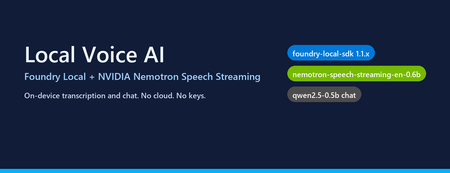
Why on-device voice still matters Most "voice AI" tutorials assume your audio leaves the machine. You ship a WAV to Whisper-API, your transcript to GPT-4, and a synthesized response back over the wire. That works — but it also means three round trips, three per-token bills, and three places your user's voice gets logged. The new wave of small, hardware-optimised models changes the trade-off. NVIDIA's Nemotron Speech Streaming En 0.6B is a 600M-parameter streaming ASR model published into the Microsoft Foundry Local catalog. Paired with a small chat model like qwen2.5-0.5b or phi-4-mini , you can run the entire capture → transcribe → reason → respond loop in-process on a developer laptop, with no API keys and no network egress. This post walks through how the fl-nemotron sample does it, the SDK pitfalls we hit on the way, and the design decisions that made the pipeline reliable. What we're building A browser-hosted assistant served by FastAPI at http://127.0.0.1:8000 . The page captures microphone audio, posts it to /api/transcribe , then streams the chat reply back over Server-Sent Events from /api/chat . All inference runs locally through two Foundry Local models loaded into the same process. The shape of the pipeline: Microphone (browser MediaRecorder) │ WebM/Opus blob ▼ Client-side WAV encoder (16 kHz, mono, PCM-16) │ multipart/form-data ▼ FastAPI /api/transcribe │ ▼ Nemotron Speech Streaming En 0.6B (Foundry Local audio client) │ transcript text ▼ Chat LLM e.g. qwen2.5-0.5b (Foundry Local chat client) │ streamed tokens ▼ FastAPI /api/chat → SSE → browser bubble The version that bit us: foundry-local-sdk >= 1.1.0 Before any code, the single most important fact about this project: The Nemotron Speech Streaming model only appears in the Foundry Local 1.1.x catalog. Older SDKs (0.5.x / 0.6.x) cannot resolve the alias nemotron-speech-streaming-en-0.6b and fail with model not found . The module name also changed in 1.1.0 — it is now foundry_local_sdk (with the underscore- sdk suffix), not foundry_local . The pip wheel for foundry-local-core is bundled, so there is no separate MSI / winget install to worry about. Pin it explicitly: pip install --upgrade "foundry-local-sdk>=1.1.0,<2" And verify before anything else: python -c "import importlib.metadata as m; print('sdk', m.version('foundry-local-sdk'))" # expect: sdk 1.1.0 Loading both models from one manager The 1.1.x SDK exposes a single FoundryLocalManager that owns the runtime. Each loaded model gives you back a per-model OpenAI-compatible client — get_chat_client() for text models and get_audio_client() for ASR. There is no need to bring your own openai Python package; the SDK ships its own thin client. The wrapper used in the repo ( src/foundry_client.py ) does this: from foundry_local_sdk import Configuration, FoundryLocalManager FoundryLocalManager.initialize(Configuration(app_name="fl-nemotron")) manager = FoundryLocalManager.instance chat_model = manager.load_model("qwen2.5-0.5b") stt_model = manager.load_model("nemotron-speech-streaming-en-0.6b") chat_client = chat_model.get_chat_client() audio_client = stt_model.get_audio_client() Both models are downloaded on first use into the Foundry Local cache and stay resident for the lifetime of the process. On a laptop with 16 GB RAM, the combined working set sits comfortably under 4 GB. The transcription surprise The first naive approach was the obvious one: with open(wav_path, "rb") as f: result = audio_client.transcribe(file=f, model="nemotron-speech-streaming-en-0.6b") That call fails on Nemotron. The bundled ONNX Runtime GenAI in foundry-local-core does not register the nemotron_speech multi-modal model type that the standard AudioClient.transcribe() path tries to instantiate. The error surfaces as a cryptic model-type registration failure deep inside the native runtime. The fix is to use the streaming session API instead — a different native entry point ( core_interop.start_audio_stream ) that the streaming model does support. The repo isolates this in src/_nemotron_live.py : def transcribe_wav_live(audio_client, wav_path, *, language="en"): with wave.open(str(wav_path), "rb") as w: sample_rate = w.getframerate() channels = w.getnchannels() sample_width = w.getsampwidth() pcm = w.readframes(w.getnframes()) session = audio_client.create_live_transcription_session() session.settings.sample_rate = sample_rate session.settings.channels = channels session.settings.bits_per_sample = sample_width * 8 session.settings.language = language session.start() # Feed PCM in ~100 ms chunks from a worker thread, then stop. bytes_per_sec = sample_rate * channels * sample_width chunk_bytes = max(bytes_per_sec // 10, 1024) def _pusher(): try: for offset in range(0, len(pcm), chunk_bytes): session.append(pcm[offset:offset + chunk_bytes]) finally: session.stop() threading.Thread(target=_pusher, daemon=True).start() parts = [] for resp in session.get_stream(): for cp in getattr(resp, "content", []) or []: text = getattr(cp, "text", "") or getattr(cp, "transcript", "") or "" if text: parts.append(text) return " ".join(p.strip() for p in parts if p.strip()).strip() Two things to notice: Push from a thread, read from the main coroutine. session.append() is a blocking write into the native stream and session.get_stream() is a blocking generator. Run one in a worker thread so the other can drain in parallel — otherwise you deadlock the session. Chunk to ~100 ms. Smaller chunks (e.g. 10 ms) spend more time crossing the FFI boundary than transcribing; larger chunks (e.g. 1 s) hold back partial results and hurt perceived latency. Always session.stop() . Without it the generator never terminates and the request hangs. The other transcription surprise: browsers don't send WAV Inside the browser, MediaRecorder defaults to audio/webm; codecs=opus . That's great for size but bad for our STT model, which expects a 16-bit mono PCM WAV at a known sample rate. Decoding WebM/Opus server-side would require ffmpeg as a runtime dependency — which is exactly the kind of friction this project exists to remove. The cleaner solution is to encode WAV on the client. AudioContext.decodeAudioData already understands WebM/Opus, so the page can decode the recording, resample to 16 kHz, mix to mono, and emit a PCM-16 WAV blob in 30 lines of JavaScript: // Inside src/static/index.html async function webmToWav(blob) { const ctx = new (window.AudioContext || window.webkitAudioContext)({ sampleRate: 16000 }); const buf = await ctx.decodeAudioData(await blob.arrayBuffer()); // Mix to mono const ch = buf.numberOfChannels; const mono = new Float32Array(buf.length); for (let c = 0; c < ch; c++) { const data = buf.getChannelData(c); for (let i = 0; i < data.length; i++) mono[i] += data[i] / ch; } return encodeWav(mono, 16000); } function encodeWav(samples, sampleRate) { const buffer = new ArrayBuffer(44 + samples.length * 2); const view = new DataView(buffer); // RIFF header writeStr(view, 0, "RIFF"); view.setUint32(4, 36 + samples.length * 2, true); writeStr(view, 8, "WAVE"); // fmt chunk writeStr(view, 12, "fmt "); view.setUint32(16, 16, true); // PCM chunk size view.setUint16(20, 1, true); // PCM format view.setUint16(22, 1, true); // mono view.setUint32(24, sampleRate, true); view.setUint32(28, sampleRate * 2, true); // byte rate view.setUint16(32, 2, true); // block align view.setUint16(34, 16, true); // bits per sample // data chunk writeStr(view, 36, "data"); view.setUint32(40, samples.length * 2, true); // PCM-16 samples let o = 44; for (let i = 0; i < samples.length; i++, o += 2) { const s = Math.max(-1, Math.min(1, samples[i])); view.setInt16(o, s < 0 ? s * 0x8000 : s * 0x7FFF, true); } return new Blob([view], { type: "audio/wav" }); } Now the server's /api/transcribe endpoint just writes the bytes to a temp file and hands them to transcribe_wav_live() — no audio decoding libraries on the Python side. Wiring it into FastAPI The server ( src/app.py ) is deliberately small. The notable detail is that the same process holds both Foundry Local model handles for its entire lifetime, so there is no warm-up cost per request: @app.post("/api/transcribe") async def transcribe(audio: UploadFile = File(...)): data = await audio.read() with tempfile.NamedTemporaryFile(suffix=".wav", delete=False) as f: f.write(data); path = f.name text = _ai_client.transcribe(path) return {"text": text} @app.post("/api/chat") async def chat(req: ChatRequest): if req.stream: return StreamingResponse( _sse(_ai_client.stream_completion(req.messages)), media_type="text/event-stream", ) return {"text": _ai_client.chat_completion(req.messages)} Streaming uses Server-Sent Events because they are trivially supported in both fetch() and the FastAPI runtime, and they don't require a WebSocket upgrade through any proxy a developer might have in front of localhost . What it looks like The repo includes screenshots of the running UI: a welcome screen with both models loaded, a streamed haiku reply, an inline code block with copy-to-clipboard, and the recording state for the microphone. Performance, honestly This is a small-model, CPU-friendly stack. On an Arm64 Surface running the x64 SDK under emulation: First model load (cold cache): tens of seconds — downloads ~600 MB for Nemotron and ~400 MB for qwen2.5-0.5b . Subsequent loads (warm cache): a few seconds per model. End-to-end transcription of a 5-second utterance: well under a second after warm-up. First chat token from qwen2.5-0.5b : typically 200–500 ms; full short reply within 1–2 s. On x64 silicon with a recent CPU the numbers improve substantially, and the SDK will pick the best execution provider it finds (CPU / DirectML / CUDA) for each model. Trade-offs to know about Model quality. qwen2.5-0.5b is a 500M-parameter model. It is fast and small enough to ship on a laptop, but it is not GPT-4. Swap in phi-4-mini or mistral-nemo-12b-instruct if you have the RAM and want better reasoning — the wrapper accepts any chat alias in the Foundry Local catalog. STT is English-only here. The current Nemotron streaming model in the catalog is ...-en-0.6b . Multilingual variants are likely to follow. Browser microphone needs a real browser. Headless / automated browsers (Playwright, Puppeteer) deny getUserMedia by default. Open the page in Edge / Chrome / Firefox to grant the permission and capture audio for real. No agent framework yet. This sample is deliberately a single-turn loop over a chat client — there is no tool calling, planning, or multi-agent orchestration. Adding the Microsoft Agent Framework on top would be a natural next step for richer behaviour. Responsible AI considerations Running locally removes the cloud-egress class of privacy concerns, but it does not remove responsibility: Disclose recording. The browser prompts for mic permission; your UI should make it obvious when capture is active. The sample shows a red ⏹ button and a "Recording…" banner for that reason. Don't log raw audio. The sample writes audio to a per-request NamedTemporaryFile and deletes it after transcription. Treat the WAV as sensitive data even when it never leaves the device. Small models hallucinate. A 0.5B chat model is great for snappy local replies, but unsuitable for high-stakes answers. Pair it with retrieval, ground it on your own data, or escalate to a larger model when accuracy matters. Try it Clone github.com/leestott/fl-nemotron. ./setup.ps1 (or ./setup.sh ) to create a virtualenv and install the pinned SDK. python scripts/prefetch.py nemotron-speech-streaming-en-0.6b qwen2.5-0.5b to download both models. .venv\Scripts\uvicorn.exe app:app --app-dir src --port 8000 Open http://127.0.0.1:8000 in a real browser and click the 🎤 button. Where to go next Foundry Local documentation — official docs for the runtime, catalog, and SDK. microsoft/Foundry-Local — upstream samples and issue tracker. NVIDIA Nemotron model family — background on the speech and language models being published into the catalog. leestott/fl-nemotron — the full source for this post. Key takeaways Pin foundry-local-sdk >= 1.1.0 . Earlier SDKs cannot see the Nemotron Speech Streaming model. Use the LiveAudioTranscriptionSession API for Nemotron, not AudioClient.transcribe() . Encode WAV in the browser. It eliminates a heavy server-side ffmpeg dependency for a few lines of JS. Push audio chunks on a worker thread and drain the response generator on the main one to avoid deadlocks. A small Foundry Local chat model plus Nemotron STT gives you a credible local voice loop in a single Python process — no cloud, no keys, no data egress.Agents League: The Esports-Inspired Hackathon Where AI Agents Battle for Glory
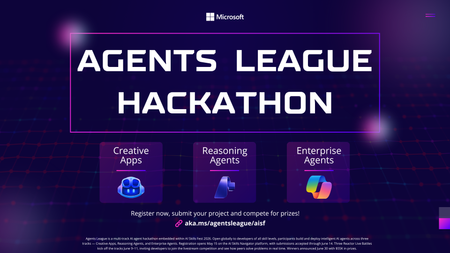
Ready to put your AI skills to the ultimate test? Agents League is here, a dynamic, esports-inspired developer challenge that brings the thrill of live competition to the world of agentic AI. Whether you're a seasoned AI developer or just getting started, this is your chance to build, compete, and win. What is Agents League? Agents League is a week-long hackathon running as part of AI Skills Fest (June 4–14, 2026). Unlike traditional hackathons, Agents League combines live AI coding battles, asynchronous project submissions, and a thriving Discord community all competing for a total prize pool of $55,000 USD. This isn't just about building it's about showcasing what's possible with agentic AI in a format that's fast, competitive, and globally accessible. Three Challenge Tracks Pick One or Compete in All 1. Creative Apps Build innovative applications using GitHub Copilot for AI-assisted development. Show off your creativity and demonstrate how AI can accelerate app creation from concept to code. 2. Reasoning Agents Create intelligent agents using Microsoft Foundry that solve complex problems through multi-step reasoning. This track is all about building agents that can think, plan, and execute. 3. Enterprise Agents Build business-ready knowledge agents integrated with Microsoft 365 Copilot, authored in Copilot Studio. Perfect for developers focused on real-world enterprise solutions. Live Microsoft Reactor Events—Don't Miss the Battles! The heart of Agents League beats through live Microsoft Reactor events. Watch experts go head-to-head in live coding battles, learn cutting-edge techniques, and get inspired for your own submissions: Event What You'll Learn Creative Apps Battle See GitHub Copilot in action as experts build innovative apps live Reasoning Agents Battle Watch multi-step reasoning agents come to life with Microsoft Foundry Enterprise Agents Battle Learn to build M365-integrated agents with Copilot Studio 👉 View the full event series Key Dates Registration Deadline: June 12, 2026, 12:00 PM PT Hacking Period: June 4–14, 2026 Submission Deadline: June 14, 2026, 11:59 PM PT What You Get Live coding battles with expert demonstrations Curated technical experiences and on-demand content Learning resources on Microsoft Learn and AI Skills Navigator Community support through Discord GitHub-based submissions for transparent, collaborative judging Why Participate? Agents League isn't just another hackathon. It's designed as a streamlined, competitive format that: ✅ Fits into your schedule with focused, time-boxed challenges ✅ Provides real-world product innovation experience ✅ Offers global accessibility—participate from anywhere ✅ Demonstrates the latest capabilities of agentic AI, including new IQ tools ✅ Connects you with a passionate developer community Ready to Enter the Arena? Register Now for Agents League Before you register: Review the Hackathon Rules and Regulations for prize categories and judging criteria Join the Microsoft Reactor event series for live battles and learning Check out the Microsoft Event Code of Conduct Join the Conversation Have questions? Want to connect with fellow competitors? Join the Agents League community on Discord and start strategizing with developers from around the world. Whether you're building creative apps, reasoning agents, or enterprise solutions—the arena awaits. May the best agent win! 🏆 Agents League hackathon is open to the public and offered at no cost. Government employees should check with their employers to ensure participation is permitted in accordance with applicable policies. Related Links: Agents League Hackathon Registration Microsoft Reactor Series AI Skills FestIf You're Building AI on Azure, ECS 2026 is Where You Need to Be
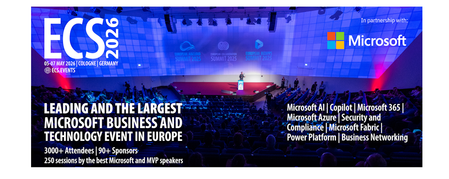
Let me be direct: there's a lot of noise in the conference calendar. Generic cloud events. Vendor showcases dressed up as technical content. Sessions that look great on paper but leave you with nothing you can actually ship on Monday. ECS 2026 isn't that. As someone who will be on stage at Cologne this May, I can tell you the European Collaboration Summit combined with the European AI & Cloud Summit and European Biz Apps Summit is one of the few events I've seen where engineers leave with real, production-applicable knowledge. Three days. Three summits. 3,000+ attendees. One of the largest Microsoft-focused events in Europe, and it keeps getting better. If you're building AI systems on Azure, designing cloud-native architectures, or trying to figure out how to take your AI experiments to production — this is where the conversation is happening. What ECS 2026 Actually Is ECS 2026 runs May 5–7 at Confex in Cologne, Germany. It brings together three co-located summits under one roof: European Collaboration Summit — Microsoft 365, Teams, Copilot, and governance European AI & Cloud Summit — Azure architecture, AI agents, cloud security, responsible AI European BizApps Summit — Power Platform, Microsoft Fabric, Dynamics For Azure engineers and AI developers, the European AI & Cloud Summit is your primary destination. But don't ignore the overlap, some of the most interesting AI conversations happen at the intersection of collaboration tooling and cloud infrastructure. The scale matters here: 3,000+ attendees, 100+ sessions, multiple deep-dive tracks, and a speaker lineup that includes Microsoft executives, Regional Directors, and MVPs who have built, broken, and rebuilt production systems. The Azure + AI Track - What's Actually On the Agenda The AI & Cloud Summit agenda is built around real technical depth. Not "intro to AI" content, actual architecture decisions, patterns that work, and lessons from things that didn't. Here's what you can expect: AI Agents and Agentic Systems This is where the energy is right now, and ECS is leaning in. Expect sessions covering how to design agent workflows, chain reasoning steps, handle memory and state, and integrate with Azure AI services. Marco Casalaina, VP of Products for Azure AI at Microsoft, is speaking if you want to understand the direction of the Azure AI platform from the people building it, this is a direct line. Azure Architecture at Scale Cloud-native patterns, microservices, containers, and the architectural decisions that determine whether your system holds up under real load. These sessions go beyond theory you'll hear from engineers who've shipped these designs at enterprise scale. Observability, DevOps, and Production AI Getting AI to production is harder than the demos suggest. Sessions here cover monitoring AI systems, integrating LLMs into CI/CD pipelines, and building the operational practices that keep AI in production reliable and governable. Cloud Security and Compliance Security isn't optional when you're putting AI in front of users or connecting it to enterprise data. Tracks cover identity, access patterns, responsible AI governance, and how to design systems that satisfy compliance requirements without becoming unmaintainable. Pre-Conference Deep Dives One underrated part of ECS: the pre-conference workshops. These are extended, hands-on sessions typically 3–6 hours that let you go deep on a single topic with an expert. Think of them as intensive short courses where you can actually work through the material, not just watch slides. If you're newer to a particular area of Azure AI, or you want to build fluency in a specific pattern before the main conference sessions, these are worth the early travel. The Speaker Quality Is Different Here The ECS speaker roster includes Microsoft executives, Microsoft MVPs, and Regional Directors, people who have real accountability for the products and patterns they're presenting. You'll hear from over 20 Microsoft speakers: Marco Casalaina — VP of Products, Azure AI at Microsoft Adam Harmetz — VP of Product at Microsoft, Enterprise Agent And dozens of MVPs and Regional Directors who are in the field every day, solving the same problems you are. These aren't keynote-only speakers — they're in the session rooms, at the hallway track, available for real conversations. The Hallway Track Is Not a Cliché I know "networking" sounds like a corporate afterthought. At ECS it genuinely isn't. When you put 3,000 practitioners, engineers, architects, DevOps leads, security specialists in one venue for three days, the conversations between sessions are often more valuable than the sessions themselves. You get candid answers to "how are you actually handling X in production?" that you won't find in documentation. The European Microsoft community is tight-knit and collaborative. ECS is where that community concentrates. Why This Matters Right Now We're in a period where AI development is moving fast but the engineering discipline around it is still maturing. Most teams are figuring out: How to move from AI prototype to production system How to instrument and observe AI behaviour reliably How to design agent systems that don't become unmaintainable How to satisfy security and compliance requirements in AI-integrated architectures ECS 2026 is one of the few places where you can get direct answers to these questions from people who've solved them — not theoretically, but in production, on Azure, in the last 12 months. If you go, you'll come back with practical patterns you can apply immediately. That's the bar I hold events to. ECS consistently clears it. Register and Explore the Agenda Register for ECS 2026: ecs.events Explore the AI & Cloud Summit agenda: cloudsummit.eu/en/agenda Dates: May 5–7, 2026 | Location: Confex, Cologne, Germany Early registration is worth it the pre-conference workshops fill up. And if you're coming, find me, I'll be the one talking too much about AI agents and Azure deployments. See you in Cologne.oBeaver — A Beaver That Runs LLMs on Your Machine 🦫
Hi there! I'm the creator of oBeaver. This project started from a pretty simple desire: I wanted to run large language models on my own computer. No data sent to the cloud. No API keys. No per-call charges. I'm guessing you've had the same thought. There are already great tools out there — Ollama being the most prominent. But in my day-to-day work, I spend a lot of time in the ONNX ecosystem — the cross-platform reach of ONNX Runtime, its native NPU support, the turnkey experience of Microsoft Foundry Local. It kept nagging at me: the ONNX ecosystem deserves a more complete local inference toolkit. That's how oBeaver was born. Here are the links if you want to jump straight in: GitHub: https://github.com/microsoft/obeaver Docs: https://microsoft.github.io/obeaver Up and Running in Three Minutes Getting started with oBeaver is dead simple. You need Python 3.12+, then it's clone, install, chat: git clone https://github.com/microsoft/obeaver.git cd obeaver pip install -e . # Initialize the model directory (auto-creates ort/, foundrylocal/, cache_dir/ sub-folders) obeaver init # Make sure everything looks good obeaver check If you're on macOS or Windows, install Foundry Local and you're one command away from chatting with a model: obeaver run phi-4-mini The first run downloads the model automatically — give it a minute. After that, it's instant. On Linux, or if you want to use models from Hugging Face, the ORT engine has you covered: # Convert Qwen3-0.6B from Hugging Face to ONNX format obeaver convert Qwen/Qwen3-0.6B # Run it with the ORT engine obeaver run --engine ort ./models/ort/Qwen3-0.6B_ONNX_INT4_CPU Want to turn your model into an HTTP service? One line: obeaver serve Phi-4-mini Then point any OpenAI-compatible client at it — just change one base_url and your existing code works as-is: from openai import OpenAI client = OpenAI(base_url="http://127.0.0.1:18000/v1", api_key="unused") response = client.chat.completions.create( model="Phi-4-mini", messages=[{"role": "user", "content": "What is the capital of France?"}], stream=True, ) for chunk in response: print(chunk.choices[0].delta.content or "", end="", flush=True) LangChain, LlamaIndex, Microsoft Agent Framework, CrewAI — anything that speaks the OpenAI protocol plugs right in. This was a non-negotiable design principle from day one: local inference shouldn't be an island; it should fit seamlessly into your existing dev workflow. "Why Not Just Use Ollama?" I get this question a lot, and it deserves a straight answer. Ollama is a fantastic project. It pioneered the "one command to run a model" experience and made local LLM inference accessible to everyone. If all you need is a quick way to chat with a model locally, Ollama is still a wonderful choice. oBeaver itself draws heavy inspiration from it. But Ollama and oBeaver take different technical paths. Ollama is built on llama.cpp and uses the GGUF model format. oBeaver is built on ONNX Runtime and uses the ONNX model format. Behind these two formats are two very different philosophies. GGUF: Grab and Go GGUF's strength is ultimate portability. One file bundles everything — weights, tokenizer, metadata. Hugging Face is packed with pre-quantized GGUF models ready to download and run. Quantization options are rich (Q2_K through Q8_0), and the community is incredibly active. For individual developers, this "grab and go" experience is hard to beat. ONNX: Convert Once, Accelerate Everywhere ONNX shines in a different dimension. As a cross-platform industrial standard, ONNX Runtime has something called Execution Providers — the same ONNX model, without any changes, can run on CPU, GPU, and even NPU. This matters more than it might seem at first glance. With chips like Intel Core Ultra, Qualcomm Snapdragon X, and Apple Neural Engine becoming mainstream, NPUs are quickly becoming standard hardware in AI PCs. ONNX Runtime already supports NPU acceleration natively, while the GGUF ecosystem doesn't have this capability yet. This means ONNX naturally adapts to a far wider range of devices — from servers to laptops, from desktops to edge devices, even phones and IoT endpoints. The ONNX model you run on CPU today can be accelerated on an NPU-equipped machine tomorrow — no re-conversion, no code changes, just switch the Execution Provider. ONNX does have a higher barrier to entry — models need to be converted first. But oBeaver's built-in obeaver convert command, powered by Microsoft's Olive toolkit, reduces that to a single line. Another project worth mentioning is oMLX, which also explores local inference in the ONNX ecosystem, but focuses specifically on Apple Silicon. oBeaver aims to be more comprehensive — spanning macOS, Windows, and Linux, covering text chat, embeddings, and vision-language scenarios. Here's a quick comparison of all three: Ollama oMLX oBeaver Model format GGUF ONNX ONNX Inference backend llama.cpp ONNX Runtime Foundry Local + ORT GenAI Platforms macOS/Linux/Windows macOS macOS/Windows/Linux NPU acceleration ❌ ❌ ✅ Embedding models ✅ ✅ ✅ VL models ✅ ✅ ✅ Function Calling ✅ ✅ ✅ Docker deployment ✅ ✅ ✅ I'm not saying oBeaver is better than Ollama. They serve different needs. But if your work involves the ONNX ecosystem, NPU acceleration, or a combination of embedding and multimodal capabilities, oBeaver offers a path that Ollama doesn't currently cover. Why a "Dual Engine"? This is oBeaver's most distinctive design decision, and the one I spent the most time thinking about. oBeaver has two inference engines under the hood: Foundry Local and ONNX Runtime GenAI (ORT). Why not just pick one? Because reality is messier than ideals. Foundry Local is Microsoft's local inference runtime, and the experience is lovely — pass a catalog alias like Phi-4-mini, and it auto-downloads, loads, and runs the model with smart hardware scheduling (NPU > GPU > CPU). But it has two clear limitations: first, the model catalog is still small, mostly centered around Microsoft's Phi family; second, it only supports macOS and Windows — Linux users are left out. ONNX Runtime GenAI fills exactly those gaps. It supports macOS, Windows, and Linux — all three platforms. And with obeaver convert, you can transform almost any model on Hugging Face into ONNX format, giving you a much wider model selection. Right now, oBeaver can already run models from Phi, Qwen, Gemma, GLM, and other SLM families through the ORT engine. On top of that, the ORT engine powers capabilities that Foundry Local simply can't do: Embedding models — The ORT engine includes a dedicated embedding engine supporting Qwen3-Embedding and EmbeddingGemma, perfect for local RAG pipelines: # Start the embedding service obeaver serve-embed ./models/Qwen3-Embedding-0.6B from openai import OpenAI client = OpenAI(base_url="http://127.0.0.1:18001/v1", api_key="unused") response = client.embeddings.create( model="Qwen3-Embedding-0.6B", input=["Hello, world!", "Embeddings are useful."], ) for item in response.data: print(f"index={item.index} dim={len(item.embedding)}") Vision-Language models (VL) — When the ORT engine detects vision.onnx in a model directory, it automatically switches to VL mode. Currently supported: Qwen-2.5-VL-3B and Qwen-3-VL-2B. You can send images alongside text for multimodal understanding: obeaver serve ./models/Qwen3-VL-2B-Instruct_VL_ONNX_INT4_CPU Converting a VL model is just one command too: obeaver convert Qwen/Qwen2.5-VL-3B-Instruct --type vl So the dual engine isn't redundancy — it's the optimal choice given reality: Foundry Local covers only macOS/Windows; ORT GenAI covers all platforms. Foundry Local has fewer models but zero friction; ORT GenAI has more models and more flexibility. oBeaver automatically picks the right engine for your platform and task — Foundry Local by default on macOS/Windows, ORT on Linux, auto-switching to ORT for embedding or VL workloads. You can always override with --engine ort. In short: Foundry Local handles the "just works" path, ORT handles the "I need more" path. Together, they give oBeaver an answer for every platform and every scenario. Cloud-Native? Of Course oBeaver isn't just a local toy. Deployment was baked into the design from the start. The architecture is cleanly layered: CLI (Typer) → FastAPI Server → pluggable inference engines. We ship a Docker image supporting both linux/amd64 and linux/arm64 (Apple Silicon included): # Build the image docker buildx build --platform=linux/amd64 \ -f docker/Dockerfile.cpu -t obeaver-cpu . # Start the API server docker run -d --rm -p 18000:18000 \ -v /path/to/models:/models \ obeaver-cpu serve -m /models -E ort --host 0.0.0.0 --port 18000 Local dev, CI/CD pipelines, headless servers, Kubernetes clusters — it all works. Combined with the OpenAI-compatible API, you can develop against oBeaver locally and switch to a cloud endpoint in production by changing a single URL. Not a single line of application code needs to change. Not Just a CLI — There's a Dashboard Too So far everything I've shown has been terminal commands. But sometimes you just want a visual interface — especially when you're evaluating models, comparing performance, or showing a demo. oBeaver ships with a built-in web dashboard. One command to launch: obeaver dashboard # Foundry Local engine (macOS/Windows) obeaver dashboard -e ort # ORT engine (scans local ONNX models) Open http://127.0.0.1:1573/ and you'll see something like this: It's a real-time monitoring and chat interface rolled into one. Here's what you get: Model Selector — Switch between your cached models on the fly. If a model supports NPU acceleration, it's marked with a ⚡ badge. With Foundry Local, you'll see the models from your local catalog: With the ORT engine, it scans your model directory for all available ONNX models: Chat + Live Benchmarking — Send messages and get streaming responses, with real-time performance stats right in the interface — TTFT (Time to First Token), tokens per second, total token count. This makes it incredibly easy to benchmark different models side by side: System Monitoring — Real-time memory gauges for CPU, GPU, NPU, and process memory. A system info bar shows the current model, engine type, platform, and health status at a glance. Inference Parameters — Adjust temperature, top-p, top-k, and max tokens with built-in presets, all without restarting the server. VL Mode — When you load a Vision-Language model in the ORT dashboard, the interface automatically switches to a dedicated VL mode where you can provide an image URL alongside your text prompt: And more — Conversation history with save/load, system prompt configuration, live server logs showing every request with method/path/status/timing, and export to JSON or Markdown. The dashboard isn't a separate product — it's just obeaver dashboard. Everything runs locally, nothing phones home. It's particularly useful when you want to quickly evaluate how a model performs on your hardware before committing to it in your application. Being Honest: CPU Only for Now oBeaver is currently in Tech Preview, and I want to be upfront about this — it only supports CPU inference right now. This is a deliberate, stage-by-stage choice. We wanted to make sure the entire toolchain — model conversion, inference, API serving, Docker deployment — is rock solid on CPU first. Almost every machine has a CPU; it's the best baseline for validating the complete workflow. But GPU and NPU support are coming soon. They're at the very top of the roadmap. ONNX Runtime already ships mature CUDA (GPU) and QNN/OpenVINO (NPU) Execution Providers. Foundry Local already has NPU > GPU > CPU auto-scheduling built in. What oBeaver needs to do is integrate these into its engine selection logic and model conversion pipeline — and that work is actively underway. Ultimately, one of the key reasons oBeaver chose the ONNX path is the NPU future. The AI PC era is arriving, and when NPUs become standard hardware, ONNX will be the ecosystem most ready for it. Acknowledgements oBeaver is inspired by and builds upon the ideas from the following excellent projects: Project Description Ollama Run large language models locally with a simple CLI OMLX Run large language models on Apple Silicon, ONNX-based vLLM High-throughput and memory-efficient inference engine for LLMs Foundry Local Microsoft's local model inference runtime with NPU/GPU/CPU acceleration ONNX Runtime GenAI Generative AI extensions for ONNX Runtime Olive Microsoft's model optimization toolkit for ONNX Runtime I Need Your Feedback That's the tour. But oBeaver is still in its early days, and there's so much room to improve. As the creator of this project, what I fear most isn't criticism — it's silence. So I genuinely hope you'll give it a try and let me know what you think: Which models do you most want to run? How urgent is GPU / NPU acceleration for your use case? What do you think of the dual-engine design — does it add value, or does it add complexity? In your real-world projects, what's the biggest pain point with local inference? What else does the Docker story need? Helm Charts? Compose files? GitHub Issues, PRs, or just reaching out on social media — any form of feedback is deeply appreciated. The name oBeaver comes from the beaver — nature's most remarkable engineer. Beavers build dams stick by stick, creating the environment they need to thrive. I hope oBeaver can help you do the same: build your local AI infrastructure, one piece at a time, on your own hardware. Build local. Dam the cloud. 🦫 GitHub: https://github.com/microsoft/obeaver Docs: https://microsoft.github.io/obeaver If you find oBeaver useful, a ⭐ on GitHub means the world to us!Build a Fully Offline AI App with Foundry Local and CAG
A hands-on guide to building an on-device AI support agent using Context-Augmented Generation, JavaScript, and Foundry Local. You have probably heard the AI pitch: "just call our API." But what happens when your application needs to work without an internet connection? Perhaps your users are field engineers standing next to a pipeline in the middle of nowhere, or your organisation has strict data privacy requirements, or you simply want to build something that works without a cloud bill. This post walks you through how to build a fully offline, on-device AI application using Foundry Local and a pattern called Context-Augmented Generation (CAG). By the end, you will have a clear understanding of what CAG is, how it compares to RAG, and the practical steps to build your own solution. The finished application: a browser-based AI support agent that runs entirely on your machine. What Is Context-Augmented Generation? Context-Augmented Generation (CAG) is a pattern for making AI models useful with your own domain-specific content. Instead of hoping the model "knows" the answer from its training data, you pre-load your entire knowledge base into the model's context window at startup. Every query the model handles has access to all of your documents, all of the time. The flow is straightforward: Load your documents into memory when the application starts. Inject the most relevant documents into the prompt alongside the user's question. Generate a response grounded in your content. There is no retrieval pipeline, no vector database, and no embedding model. Your documents are read from disc, held in memory, and selected per query using simple keyword scoring. The model generates answers grounded in your content rather than relying on what it learnt during training. CAG vs RAG: Understanding the Trade-offs If you have explored AI application patterns before, you have likely encountered Retrieval-Augmented Generation (RAG). Both CAG and RAG solve the same core problem: grounding an AI model's answers in your own content. They take different approaches, and each has genuine strengths and limitations. CAG (Context-Augmented Generation) How it works: All documents are loaded at startup. The most relevant ones are selected per query using keyword scoring and injected into the prompt. Strengths: Drastically simpler architecture with no vector database, no embeddings, and no retrieval pipeline Works fully offline with no external services Minimal dependencies (just two npm packages in this sample) Near-instant document selection with no embedding latency Easy to set up, debug, and reason about Limitations: Constrained by the model's context window size Best suited to small, curated document sets (tens of documents, not thousands) Keyword scoring is less precise than semantic similarity for ambiguous queries Adding documents requires an application restart RAG (Retrieval-Augmented Generation) How it works: Documents are chunked, embedded into vectors, and stored in a database. At query time, the most semantically similar chunks are retrieved and injected into the prompt. Strengths: Scales to thousands or millions of documents Semantic search finds relevant content even when the user's wording differs from the source material Documents can be added or updated dynamically without restarting Fine-grained retrieval (chunk-level) can be more token-efficient for large collections Limitations: More complex architecture: requires an embedding model, a vector database, and a chunking strategy Retrieval quality depends heavily on chunking, embedding model choice, and tuning Additional latency from the embedding and search steps More dependencies and infrastructure to manage Want to compare these patterns hands-on? There is a RAG-based implementation of the same gas field scenario using vector search and embeddings. Clone both repositories, run them side by side, and see how the architectures differ in practice. When Should You Choose Which? Consideration Choose CAG Choose RAG Document count Tens of documents Hundreds or thousands Offline requirement Essential Optional (can run locally too) Setup complexity Minimal Moderate to high Document updates Infrequent (restart to reload) Frequent or dynamic Query precision Good for keyword-matchable content Better for semantically diverse queries Infrastructure None beyond the runtime Vector database, embedding model For the sample application in this post (20 gas engineering procedure documents on a local machine), CAG is the clear winner. If your use case grows to hundreds of documents or requires real-time ingestion, RAG becomes the better choice. Both patterns can run offline using Foundry Local. Foundry Local: Your On-Device AI Runtime Foundry Local is a lightweight runtime from Microsoft that downloads, manages, and serves language models entirely on your device. No cloud account, no API keys, no outbound network calls (after the initial model download). In this sample, your application is responsible for deciding which model to use, and it does that through the foundry-local-sdk . The app creates a FoundryLocalManager , asks the SDK for the local model catalogue, and then runs a small selection policy from src/modelSelector.js . That policy looks at the machine's available RAM, filters out models that are too large, ranks the remaining chat models by preference, and then returns the best fit for that device. Why does it work this way? Because shipping one fixed model would either exclude lower-spec machines or underuse more capable ones. A 14B model may be perfectly reasonable on a 32 GB workstation, but the same choice would be slow or unusable on an 8 GB laptop. By selecting at runtime, the same codebase can run across a wider range of developer machines without manual tuning. What makes it particularly useful for developers: No GPU required — runs on CPU or NPU, making it accessible on standard laptops and desktops Native SDK bindings — in-process inference via the foundry-local-sdk npm package, with no HTTP round-trips to a local server Automatic model management — downloads, caches, and loads models automatically Dynamic model selection — the SDK can evaluate your device's available RAM and pick the best model from the catalogue Real-time progress callbacks — ideal for building loading UIs that show download and initialisation progress The integration code is refreshingly minimal. Here is the core pattern: import { FoundryLocalManager } from "foundry-local-sdk"; // Create a manager and get the model catalogue const manager = FoundryLocalManager.create({ appName: "my-app" }); // Auto-select the best model for this device based on available RAM const models = await manager.catalog.getModels(); const model = selectBestModel(models); // Download if not cached, then load into memory if (!model.isCached) { await model.download((progress) => { console.log(`Download: ${progress.toFixed(0)}%`); }); } await model.load(); // Create a chat client for direct in-process inference const chatClient = model.createChatClient(); const response = await chatClient.completeChat([ { role: "system", content: "You are a helpful assistant." }, { role: "user", content: "How do I detect a gas leak?" } ]); That is it. No server configuration, no authentication tokens, no cloud provisioning. The model runs in the same process as your application. The download step matters for a simple reason: offline inference only works once the model files exist locally. The SDK checks whether the chosen model is already cached on the machine. If it is not, the application asks Foundry Local to download it once, store it locally, and then load it into memory. After that first run, the cached model can be reused, which is why subsequent launches are much faster and can operate without any network dependency. Put another way, there are two cooperating pieces here. Your application chooses which model is appropriate for the device and the scenario. Foundry Local and its SDK handle the mechanics of making that model available locally, caching it, loading it, and exposing a chat client for inference. That separation keeps the application logic clear whilst letting the runtime handle the heavy lifting. The Technology Stack The sample application is deliberately simple. No frameworks, no build steps, no Docker: Layer Technology Purpose AI Model Foundry Local + auto-selected model Runs locally via native SDK bindings; best model chosen for your device Back end Node.js + Express Lightweight HTTP server, everyone knows it Context Markdown files pre-loaded at startup No vector database, no embeddings, no retrieval step Front end Single HTML file with inline CSS No build step, mobile-responsive, field-ready The total dependency footprint is two npm packages: express and foundry-local-sdk . Architecture Overview The four-layer architecture, all running on a single machine. The system has four layers, all running in a single process on your device: Client layer: a single HTML file served by Express, with quick-action buttons and a responsive chat interface Server layer: Express.js starts immediately and serves the UI plus an SSE status endpoint; API routes handle chat (streaming and non-streaming), context listing, and health checks CAG engine: loads all domain documents at startup, selects the most relevant ones per query using keyword scoring, and injects them into the prompt AI layer: Foundry Local runs the auto-selected model on CPU/NPU via native SDK bindings (in-process inference, no HTTP round-trips) Building the Solution Step by Step Prerequisites You need two things installed on your machine: Node.js 20 or later: download from nodejs.org Foundry Local: Microsoft's on-device AI runtime: winget install Microsoft.FoundryLocal Foundry Local will automatically select and download the best model for your device the first time you run the application. You can override this by setting the FOUNDRY_MODEL environment variable to a specific model alias. Getting the Code Running # Clone the repository git clone https://github.com/leestott/local-cag.git cd local-cag # Install dependencies npm install # Start the server npm start Open http://127.0.0.1:3000 in your browser. You will see a loading overlay with a progress bar whilst the model downloads (first run only) and loads into memory. Once the model is ready, the overlay fades away and you can start chatting. Desktop view Mobile view How the CAG Pipeline Works Let us trace what happens when a user asks: "How do I detect a gas leak?" The query flow from browser to model and back. 1 Server starts and loads documents When you run npm start , the Express server starts on port 3000. All .md files in the docs/ folder are read, parsed (with optional YAML front-matter for title, category, and ID), and grouped by category. A document index is built listing all available topics. 2 Model is selected and loaded The model selector evaluates your system's available RAM and picks the best model from the Foundry Local catalogue. If the model is not already cached, it downloads it (with progress streamed to the browser via SSE). The model is then loaded into memory for in-process inference. 3 User sends a question The question arrives at the Express server. The chat engine selects the top 3 most relevant documents using keyword scoring. 4 Prompt is constructed The engine builds a messages array containing: the system prompt (with safety-first instructions), the document index (so the model knows all available topics), the 3 selected documents (approximately 6,000 characters), the conversation history, and the user's question. 5 Model generates a grounded response The prompt is sent to the locally loaded model via the Foundry Local SDK's native bindings. The response streams back token by token through Server-Sent Events to the browser. A response with safety warnings and step-by-step guidance The sources panel shows which documents were used Key Code Walkthrough Loading Documents (the Context Module) The context module reads all markdown files from the docs/ folder at startup. Each document can have optional YAML front-matter for metadata: // src/context.js export function loadDocuments() { const files = fs.readdirSync(config.docsDir) .filter(f => f.endsWith(".md")) .sort(); const docs = []; for (const file of files) { const raw = fs.readFileSync(path.join(config.docsDir, file), "utf-8"); const { meta, body } = parseFrontMatter(raw); docs.push({ id: meta.id || path.basename(file, ".md"), title: meta.title || file, category: meta.category || "General", content: body.trim(), }); } return docs; } There is no chunking, no vector computation, and no database. The documents are held in memory as plain text. Dynamic Model Selection Rather than hard-coding a model, the application evaluates your system at runtime: // src/modelSelector.js const totalRamMb = os.totalmem() / (1024 * 1024); const budgetMb = totalRamMb * 0.6; // Use up to 60% of system RAM // Filter to models that fit, rank by quality, boost cached models const candidates = allModels.filter(m => m.task === "chat-completion" && m.fileSizeMb <= budgetMb ); // Returns the best model: e.g. phi-4 on a 32 GB machine, // or phi-3.5-mini on a laptop with 8 GB RAM This means the same application runs on a powerful workstation (selecting a 14B parameter model) or a constrained laptop (selecting a 3.8B model), with no code changes required. This is worth calling out because it is one of the most practical parts of the sample. Developers do not have to decide up front which single model every user should run. The application makes that decision at startup based on the hardware budget you set, then asks Foundry Local to fetch the model if it is missing. The result is a smoother first-run experience and fewer support headaches when the same app is used on mixed hardware. The System Prompt For safety-critical domains, the system prompt is engineered to prioritise safety, prevent hallucination, and enforce structured responses: // src/prompts.js export const SYSTEM_PROMPT = `You are a local, offline support agent for gas field inspection and maintenance engineers. Behaviour Rules: - Always prioritise safety. If a procedure involves risk, explicitly call it out. - Do not hallucinate procedures, measurements, or tolerances. - If the answer is not in the provided context, say: "This information is not available in the local knowledge base." Response Format: - Summary (1-2 lines) - Safety Warnings (if applicable) - Step-by-step Guidance - Reference (document name + section)`; This pattern is transferable to any safety-critical domain: medical devices, electrical work, aviation maintenance, or chemical handling. Adapting This for Your Own Domain The sample project is designed to be forked and adapted. Here is how to make it yours in three steps: 1. Replace the documents Delete the gas engineering documents in docs/ and add your own markdown files. The context module handles any markdown content with optional YAML front-matter: --- title: Troubleshooting Widget Errors category: Support id: KB-001 --- # Troubleshooting Widget Errors ...your content here... 2. Edit the system prompt Open src/prompts.js and rewrite the system prompt for your domain. Keep the structure (summary, safety, steps, reference) and update the language to match your users' expectations. 3. Override the model (optional) By default the application auto-selects the best model. To force a specific model: # See available models foundry model list # Force a smaller, faster model FOUNDRY_MODEL=phi-3.5-mini npm start # Or a larger, higher-quality model FOUNDRY_MODEL=phi-4 npm start Smaller models give faster responses on constrained devices. Larger models give better quality. The auto-selector picks the largest model that fits within 60% of your system RAM. Building a Field-Ready UI The front end is a single HTML file with inline CSS. No React, no build tooling, no bundler. This keeps the project accessible to beginners and easy to deploy. Design decisions that matter for field use: Dark, high-contrast theme with 18px base font size for readability in bright sunlight Large touch targets (minimum 48px) for operation with gloves or PPE Quick-action buttons for common questions, so engineers do not need to type on a phone Responsive layout that works from 320px to 1920px+ screen widths Streaming responses via SSE, so the user sees tokens arriving in real time The mobile chat experience, optimised for field use. Visual Startup Progress with SSE A standout feature of this application is the loading experience. When the user opens the browser, they see a progress overlay showing exactly what the application is doing: Loading domain documents Initialising the Foundry Local SDK Selecting the best model for the device Downloading the model (with a percentage progress bar, first run only) Loading the model into memory This works because the Express server starts before the model finishes loading. The browser connects immediately and receives real-time status updates via Server-Sent Events. Chat endpoints return 503 whilst the model is loading, so the UI cannot send queries prematurely. // Server-side: broadcast status to all connected browsers function broadcastStatus(state) { initState = state; const payload = `data: ${JSON.stringify(state)}\n\n`; for (const client of statusClients) { client.write(payload); } } // During initialisation: broadcastStatus({ stage: "downloading", message: "Downloading phi-4...", progress: 42 }); This pattern is worth adopting in any application where model loading takes more than a few seconds. Users should never stare at a blank screen wondering whether something is broken. Testing The project includes unit tests using the built-in Node.js test runner, with no extra test framework needed: # Run all tests npm test Tests cover configuration, server endpoints, and document loading. Use them as a starting point when you adapt the project for your own domain. Ideas for Extending the Project Once you have the basics running, there are plenty of directions to explore: Conversation memory: persist chat history across sessions using local storage or a lightweight database Hybrid CAG + RAG: add a vector retrieval step for larger document collections that exceed the context window Multi-modal support: add image-based queries (photographing a fault code, for example) PWA packaging: make it installable as a standalone offline application on mobile devices Custom model fine-tuning: fine-tune a model on your domain data for even better answers Ready to Build Your Own? Clone the CAG sample, swap in your own documents, and have an offline AI agent running in minutes. Or compare it with the RAG approach to see which pattern suits your use case best. Get the CAG Sample Get the RAG Sample Summary Building a local AI application does not require a PhD in machine learning or a cloud budget. With Foundry Local, Node.js, and a set of domain documents, you can create a fully offline, mobile-responsive AI agent that answers questions grounded in your own content. The key takeaways: CAG is ideal for small, curated document sets where simplicity and offline capability matter most. No vector database, no embeddings, no retrieval pipeline. RAG scales further when you have hundreds or thousands of documents, or need semantic search for ambiguous queries. See the local-rag sample to compare. Foundry Local makes on-device AI accessible: native SDK bindings, in-process inference, automatic model selection, and no GPU required. The architecture is transferable. Replace the gas engineering documents with your own content, update the system prompt, and you have a domain-specific AI agent for any field. Start simple, iterate outwards. Begin with CAG and a handful of documents. If your needs outgrow the context window, graduate to RAG. Both patterns can run entirely offline. Clone the repository, swap in your own documents, and start building. The best way to learn is to get your hands on the code. This project is open source under the MIT licence. It is a scenario sample for learning and experimentation, not production medical or safety advice. local-cag on GitHub · local-rag on GitHub · Foundry LocalBuilding Your First Local RAG Application with Foundry Local
A developer's guide to building an offline, mobile-responsive AI support agent using Retrieval-Augmented Generation, the Foundry Local SDK, and JavaScript. Imagine you are a gas field engineer standing beside a pipeline in a remote location. There is no Wi-Fi, no mobile signal, and you need a safety procedure right now. What do you do? This is the exact problem that inspired this project: a fully offline RAG-powered support agent that runs entirely on your machine. No cloud. No API keys. No outbound network calls. Just a local language model, a local vector store, and your own documents, all accessible from a browser on any device. In this post, you will learn how it works, how to build your own, and the key architectural decisions behind it. If you have ever wanted to build an AI application that runs locally and answers questions grounded in your own data, this is the place to start. The finished application: a browser-based AI support agent that runs entirely on your machine. What Is Retrieval-Augmented Generation? Retrieval-Augmented Generation (RAG) is a pattern that makes AI models genuinely useful for domain-specific tasks. Rather than hoping the model "knows" the answer from its training data, you: Retrieve relevant chunks from your own documents using a vector store Augment the model's prompt with those chunks as context Generate a response grounded in your actual data The result is fewer hallucinations, traceable answers with source attribution, and an AI that works with your content rather than relying on general knowledge. If you are building internal tools, customer support bots, field manuals, or knowledge bases, RAG is the pattern you want. RAG vs CAG: Understanding the Trade-offs If you have explored AI application patterns before, you have likely encountered Context-Augmented Generation (CAG). Both RAG and CAG solve the same core problem: grounding an AI model's answers in your own content. They take different approaches, and each has genuine strengths and limitations. RAG (Retrieval-Augmented Generation) How it works: Documents are split into chunks, vectorised, and stored in a database. At query time, the most relevant chunks are retrieved and injected into the prompt. Strengths: Scales to thousands or millions of documents Fine-grained retrieval at chunk level with source attribution Documents can be added or updated dynamically without restarting Token-efficient: only relevant chunks are sent to the model Supports runtime document upload via the web UI Limitations: More complex architecture: requires a vector store and chunking strategy Retrieval quality depends on chunking parameters and scoring method May miss relevant content if the retrieval step does not surface it CAG (Context-Augmented Generation) How it works: All documents are loaded at startup. The most relevant ones are selected per query using keyword scoring and injected into the prompt. Strengths: Drastically simpler architecture with no vector database or embeddings All information is always available to the model Minimal dependencies and easy to set up Near-instant document selection Limitations: Constrained by the model's context window size Best suited to small, curated document sets (tens of documents) Adding documents requires an application restart Want to compare these patterns hands-on? There is a CAG-based implementation of the same gas field scenario using whole-document context injection. Clone both repositories, run them side by side, and see how the architectures differ in practice. When Should You Choose Which? Consideration Choose RAG Choose CAG Document count Hundreds or thousands Tens of documents Document updates Frequent or dynamic (runtime upload) Infrequent (restart to reload) Source attribution Per-chunk with relevance scores Per-document Setup complexity Moderate (ingestion step required) Minimal Query precision Better for large or diverse collections Good for keyword-matchable content Infrastructure SQLite vector store (single file) None beyond the runtime For the sample application in this post (20 gas engineering procedure documents with runtime upload), RAG is the clear winner. If your document set is small and static, CAG may be simpler. Both patterns run fully offline using Foundry Local. Foundry Local: Your On-Device AI Runtime Foundry Local is a lightweight runtime from Microsoft that downloads, manages, and serves language models entirely on your device. No cloud account, no API keys, no outbound network calls (after the initial model download). What makes it particularly useful for developers: No GPU required: runs on CPU or NPU, making it accessible on standard laptops and desktops Native SDK bindings: in-process inference via the foundry-local-sdk npm package, with no HTTP round-trips to a local server Automatic model management: downloads, caches, and loads models automatically Hardware-optimised variant selection: the SDK picks the best variant for your hardware (GPU, NPU, or CPU) Real-time progress callbacks: ideal for building loading UIs that show download and initialisation progress The integration code is refreshingly minimal: import { FoundryLocalManager } from "foundry-local-sdk"; // Create a manager and discover models via the catalogue const manager = FoundryLocalManager.create({ appName: "gas-field-local-rag" }); const model = await manager.catalog.getModel("phi-3.5-mini"); // Download if not cached, then load into memory if (!model.isCached) { await model.download((progress) => { console.log(`Download: ${Math.round(progress * 100)}%`); }); } await model.load(); // Create a chat client for direct in-process inference const chatClient = model.createChatClient(); const response = await chatClient.completeChat([ { role: "system", content: "You are a helpful assistant." }, { role: "user", content: "How do I detect a gas leak?" } ]); That is it. No server configuration, no authentication tokens, no cloud provisioning. The model runs in the same process as your application. The Technology Stack The sample application is deliberately simple. No frameworks, no build steps, no Docker: Layer Technology Purpose AI Model Foundry Local + Phi-3.5 Mini Runs locally via native SDK bindings, no GPU required Back end Node.js + Express Lightweight HTTP server, everyone knows it Vector Store SQLite (via better-sqlite3 ) Zero infrastructure, single file on disc Retrieval TF-IDF + cosine similarity No embedding model required, fully offline Front end Single HTML file with inline CSS No build step, mobile-responsive, field-ready The total dependency footprint is three npm packages: express , foundry-local-sdk , and better-sqlite3 . Architecture Overview The five-layer architecture, all running on a single machine. The system has five layers, all running on a single machine: Client layer: a single HTML file served by Express, with quick-action buttons and a responsive chat interface Server layer: Express.js starts immediately and serves the UI plus SSE status and chat endpoints RAG pipeline: the chat engine orchestrates retrieval and generation; the chunker handles TF-IDF vectorisation; the prompts module provides safety-first system instructions Data layer: SQLite stores document chunks and their TF-IDF vectors; documents live as .md files in the docs/ folder AI layer: Foundry Local runs Phi-3.5 Mini on CPU or NPU via native SDK bindings Building the Solution Step by Step Prerequisites You need two things installed on your machine: Node.js 20 or later: download from nodejs.org Foundry Local: Microsoft's on-device AI runtime: winget install Microsoft.FoundryLocal The SDK will automatically download the Phi-3.5 Mini model (approximately 2 GB) the first time you run the application. Getting the Code Running # Clone the repository git clone https://github.com/leestott/local-rag.git cd local-rag # Install dependencies npm install # Ingest the 20 gas engineering documents into the vector store npm run ingest # Start the server npm start Open http://127.0.0.1:3000 in your browser. You will see the status indicator whilst the model loads. Once the model is ready, the status changes to "Offline Ready" and you can start chatting. Desktop view Mobile view How the RAG Pipeline Works Let us trace what happens when a user asks: "How do I detect a gas leak?" The query flow from browser to model and back. 1 Documents are ingested and indexed When you run npm run ingest , every .md file in the docs/ folder is read, parsed (with optional YAML front-matter for title, category, and ID), split into overlapping chunks of approximately 200 tokens, and stored in SQLite with TF-IDF vectors. 2 Model is loaded via the SDK The Foundry Local SDK discovers the model in the local catalogue and loads it into memory. If the model is not already cached, it downloads it first (with progress streamed to the browser via SSE). 3 User sends a question The question arrives at the Express server. The chat engine converts it into a TF-IDF vector, uses an inverted index to find candidate chunks, and scores them using cosine similarity. The top 3 chunks are returned in under 1 ms. 4 Prompt is constructed The engine builds a messages array containing: the system prompt (with safety-first instructions), the retrieved chunks as context, the conversation history, and the user's question. 5 Model generates a grounded response The prompt is sent to the locally loaded model via the Foundry Local SDK's native chat client. The response streams back token by token through Server-Sent Events to the browser. Source references with relevance scores are included. A response with safety warnings and step-by-step guidance The sources panel shows which chunks were used and their relevance Key Code Walkthrough The Vector Store (TF-IDF + SQLite) The vector store uses SQLite to persist document chunks alongside their TF-IDF vectors. At query time, an inverted index finds candidate chunks that share terms with the query, then cosine similarity ranks them: // src/vectorStore.js search(query, topK = 5) { const queryTf = termFrequency(query); this._ensureCache(); // Build in-memory cache on first access // Use inverted index to find candidates sharing at least one term const candidateIndices = new Set(); for (const term of queryTf.keys()) { const indices = this._invertedIndex.get(term); if (indices) { for (const idx of indices) candidateIndices.add(idx); } } // Score only candidates, not all rows const scored = []; for (const idx of candidateIndices) { const row = this._rowCache[idx]; const score = cosineSimilarity(queryTf, row.tf); if (score > 0) scored.push({ ...row, score }); } scored.sort((a, b) => b.score - a.score); return scored.slice(0, topK); } The inverted index, in-memory row cache, and prepared SQL statements bring retrieval time to sub-millisecond for typical query loads. Why TF-IDF Instead of Embeddings? Most RAG tutorials use embedding models for retrieval. This project uses TF-IDF because: Fully offline: no embedding model to download or run Zero latency: vectorisation is instantaneous (it is just maths on word frequencies) Good enough: for 20 domain-specific documents, TF-IDF retrieves the right chunks reliably Transparent: you can inspect the vocabulary and weights, unlike neural embeddings For larger collections or when semantic similarity matters more than keyword overlap, you would swap in an embedding model. For this use case, TF-IDF keeps the stack simple and dependency-free. The System Prompt For safety-critical domains, the system prompt is engineered to prioritise safety, prevent hallucination, and enforce structured responses: // src/prompts.js export const SYSTEM_PROMPT = `You are a local, offline support agent for gas field inspection and maintenance engineers. Behaviour Rules: - Always prioritise safety. If a procedure involves risk, explicitly call it out. - Do not hallucinate procedures, measurements, or tolerances. - If the answer is not in the provided context, say: "This information is not available in the local knowledge base." Response Format: - Summary (1-2 lines) - Safety Warnings (if applicable) - Step-by-step Guidance - Reference (document name + section)`; This pattern is transferable to any safety-critical domain: medical devices, electrical work, aviation maintenance, or chemical handling. Runtime Document Upload Unlike the CAG approach, RAG supports adding documents without restarting the server. Click the upload button to add new .md or .txt files. They are chunked, vectorised, and indexed immediately. The upload modal with the complete list of indexed documents. Adapting This for Your Own Domain The sample project is designed to be forked and adapted. Here is how to make it yours in four steps: 1. Replace the documents Delete the gas engineering documents in docs/ and add your own markdown files. The ingestion pipeline handles any markdown content with optional YAML front-matter: --- title: Troubleshooting Widget Errors category: Support id: KB-001 --- # Troubleshooting Widget Errors ...your content here... 2. Edit the system prompt Open src/prompts.js and rewrite the system prompt for your domain. Keep the structure (summary, safety, steps, reference) and update the language to match your users' expectations. 3. Tune the retrieval In src/config.js : chunkSize: 200 : smaller chunks give more precise retrieval, less context per chunk chunkOverlap: 25 : prevents information falling between chunks topK: 3 : how many chunks to retrieve per query (more gives more context but slower generation) 4. Swap the model Change config.model in src/config.js to any model available in the Foundry Local catalogue. Smaller models give faster responses on constrained devices; larger models give better quality. Building a Field-Ready UI The front end is a single HTML file with inline CSS. No React, no build tooling, no bundler. This keeps the project accessible to beginners and easy to deploy. Design decisions that matter for field use: Dark, high-contrast theme with 18px base font size for readability in bright sunlight Large touch targets (minimum 44px) for operation with gloves or PPE Quick-action buttons that wrap on mobile so all options are visible without scrolling Responsive layout that works from 320px to 1920px+ screen widths Streaming responses via SSE, so the user sees tokens arriving in real time The mobile chat experience, optimised for field use. Testing The project includes unit tests using the built-in Node.js test runner, with no extra test framework needed: # Run all tests npm test Tests cover the chunker, vector store, configuration, and server endpoints. Use them as a starting point when you adapt the project for your own domain. Ideas for Extending the Project Once you have the basics running, there are plenty of directions to explore: Embedding-based retrieval: use a local embedding model for better semantic matching on diverse queries Conversation memory: persist chat history across sessions using local storage or a lightweight database Multi-modal support: add image-based queries (photographing a fault code, for example) PWA packaging: make it installable as a standalone offline application on mobile devices Hybrid retrieval: combine TF-IDF keyword search with semantic embeddings for best results Try the CAG approach: compare with the local-cag sample to see which pattern suits your use case Ready to Build Your Own? Clone the RAG sample, swap in your own documents, and have an offline AI agent running in minutes. Or compare it with the CAG approach to see which pattern suits your use case best. Get the RAG Sample Get the CAG Sample Summary Building a local RAG application does not require a PhD in machine learning or a cloud budget. With Foundry Local, Node.js, and SQLite, you can create a fully offline, mobile-responsive AI agent that answers questions grounded in your own documents. The key takeaways: RAG is ideal for scalable, dynamic document sets where you need fine-grained retrieval with source attribution. Documents can be added at runtime without restarting. CAG is simpler when you have a small, stable set of documents that fit in the context window. See the local-cag sample to compare. Foundry Local makes on-device AI accessible: native SDK bindings, in-process inference, automatic model selection, and no GPU required. TF-IDF + SQLite is a viable vector store for small-to-medium collections, with sub-millisecond retrieval thanks to inverted indexing and in-memory caching. Start simple, iterate outwards. Begin with RAG and a handful of documents. If your needs are simpler, try CAG. Both patterns run entirely offline. Clone the repository, swap in your own documents, and start building. The best way to learn is to get your hands on the code. This project is open source under the MIT licence. It is a scenario sample for learning and experimentation, not production medical or safety advice. local-rag on GitHub · local-cag on GitHub · Foundry Local6.6KViews2likes0CommentsMicrosoft Foundry Labs: A Practical Fast Lane from Research to Real Developer Work
Why developers need a fast lane from research → prototypes AI engineering has a speed problem, but it is not a shortage of announcements. The hard part is turning research into a useful prototype before the next wave of models, tools, or agent patterns shows up. That gap matters. AI engineers want to compare quality, latency, and cost before they wire a model into a product. Full-stack teams want to test whether an agent workflow is real or just demo. Platform and operations teams want to know when an experiment can graduate into something observable and supportable. Microsoft makes that case directly in introducing Microsoft Foundry Labs: breakthroughs are arriving faster, and time from research to product has compressed from years to months. If you build real systems, the question is not "What is the coolest demo?" It is "Which experiments are worth my next hour, and how do I evaluate them without creating demo-ware?" That is where Microsoft Foundry Labs becomes interesting. What is Microsoft Foundry Labs? Microsoft Foundry Labs is a place to explore early-stage experiments and prototypes from Microsoft, with an explicit focus on research-driven innovation. The homepage describes it as a way to get a glimpse of potential future directions for AI through experimental technologies from Microsoft Research and more. The announcement adds the operating idea: Labs is a single access point for developers to experiment with new models from Microsoft, explore frameworks, and share feedback. That framing matters. Labs is not just a gallery of flashy ideas. It is a developer-facing exploration surface for projects that are still close to research: models, agent systems, UX ideas, and tool experiments. Here's some things you can do on Labs: Play with tomorrow’s AI, today: 30+ experimental projects—from models to agents—are openly available to fork and build upon, alongside direct access to breakthrough research from Microsoft. Go from prototype to production, fast: Seamless integration with Microsoft Foundry gives you access to 11,000+ models with built-in compute, safety, observability, and governance—so you can move from local experimentation to full-scale production without complex containerization or switching platforms. Build with the people shaping the future of AI: Join a thriving community of 25,000+ developers across Discord and GitHub with direct access to Microsoft researchers and engineers to share feedback and help shape the most promising technologies. What Labs is not: it is not a promise that every project has a production deployment path today, a long-term support commitment, or a hardened enterprise operating model. Spotlight: a few Labs experiments worth a developer's attention Phi-4-Reasoning-Vision-15B: A compact open-weight multimodal reasoning model that is interesting if you care about the quality-versus-efficiency tradeoff in smaller reasoning systems. BitNet: A native 1-bit large language model that is compelling for engineers who care about memory, compute, and energy efficiency. Fara-7B: An ultra-compact agentic small language model designed for computer use, which makes it relevant for builders exploring UI automation and on-device agents. OmniParser V2: A screen parsing module that turns interfaces into actionable elements, directly relevant to computer-use and UI-interaction agents. If you want to inspect actual code, the Labs project pages also expose official repository links for some of these experiments, including OmniParser, Magentic-UI, and BitNet. Labs vs. Foundry: how to think about the boundary The simplest mental model is this: Labs is the exploration edge; Foundry is the platform layer. The Microsoft Foundry documentation describes the broader platform as "the AI app and agent factory" to build, optimize, and govern AI apps and agents at scale. That is a different promise from Labs. Foundry is where you move from curiosity to implementation: model access, agent services, SDKs, observability, evaluation, monitoring, and governance. Labs helps you explore what might matter next. Foundry helps you build, optimize, and govern what matters now. Labs is where you test a research-shaped idea. Foundry is where you decide whether that idea can survive integration, evaluation, tracing, cost controls, and production scrutiny. That also means Labs is not a replacement for the broader Foundry workflow. If an experiment catches your attention, the next question is not "Can I ship this tomorrow?" It is "What is the integration path, and how will I measure whether it deserves promotion?" What's real today vs. what's experimental Real today: Labs is live as an official exploration hub, and Foundry is the broader platform for building, evaluating, monitoring, and governing AI apps and agents. Experimental by design: Labs projects are presented as experiments and prototypes, so they still need validation for your use case. A developer's lens: Models, Agents, Observability What makes Labs useful is not that it shows new things. It is that it gives developers a way to inspect those things through the same three concerns that matter in every serious AI system: model choice, agent design, and observability. Diagram description: imagine a loop with three boxes in a row: Models, Agents, and Observability. A forward arrow runs across the row, and a feedback arrow loops from Observability back to Models. The point is that evaluation data should change both model choices and agent design, instead of arriving too late. Models: what to look for in Labs experiments If you are model-curious, Labs should trigger an evaluation mindset, not a fandom mindset. When you see something like Phi-4-Reasoning-Vision-15B or BitNet on the Labs homepage, ask three things: what capability is being demonstrated, what constraints are obvious, and what the integration path would look like. This is where the Microsoft Foundry Playgrounds mindset is useful even if you started in Labs. The documentation emphasizes model comparison, prompt iteration, parameter tuning, tools, safety guardrails, and code export. It also pushes the right pre-production questions: price-to-performance, latency, tool integration, and code readiness. That is how I would use Labs for models: not to choose winners, but to generate hypotheses worth testing. If a Labs experiment looks promising, move quickly into a small evaluation matrix around capability, latency, cost, and integration friction. Agents: what Labs unlocks for agent builders Labs is especially interesting for agent builders because many of the projects point toward orchestration and tool-use patterns that matter in practice. The official announcement highlights projects across models and agentic frameworks, including Magentic-One and OmniParser v2. On the homepage, projects such as Fara-7B, OmniParser V2, TypeAgent, and Magentic-UI point in a similar direction: agents get more useful when they can reason over tools, interfaces, plans, and human feedback loops. For working developers, that means Labs can act as a scouting surface for agent patterns rather than just agent demos. Look for UI or computer-use style agents when your system needs to act through an interface rather than an API. Look for planning or tool-selection patterns when orchestration matters more than raw model quality. My suggestion: when a Labs project looks relevant to agent work, do not ask "Can I copy this architecture?" Ask "Which agent pattern is being explored here, and under what constraints would it be useful in my system?" Observability: how to experiment responsibly and measure what matters Observability is where prototypes usually go to die, because teams postpone it until after they have something flashy. That is backwards. If you care about real systems, tracing, evaluation, monitoring, and governance should start during prototyping. The Microsoft Foundry documentation already puts that operating model in plain view through guidance for tracing applications, evaluating agentic workflows, and monitoring generative AI apps. The Microsoft Foundry Playgrounds page is also explicit that the agents playground supports tracing and evaluation through AgentOps. At the governance layer, the AI gateway in Azure API Management documentation reinforces why this matters beyond demos. It covers monitoring and logging AI interactions, tracking token metrics, logging prompts and completions, managing quotas, applying safety policies, and governing models, agents, and tools. You do not need every one of those controls on day one, but you do need the habit: if a prototype cannot tell you what it did, why it failed, and what it cost, it is not ready to influence a roadmap. "Pick one and try it": a 20-minute hands-on path Keep this lightweight and tool-agnostic. The point is not to memorize a product UI. The point is to run a disciplined experiment. Browse Labs and pick an experiment aligned to your work. Start at Microsoft Foundry Labs and choose one project that is adjacent to a real problem you have: model efficiency, multimodal reasoning, UI agents, debugging workflows, or human-in-the-loop design. Read the project page and jump to the repo or paper if available. Use the Labs entry to understand the claim being made. Then read the supporting material, not just the summary sentence. Define one small test task and explicit success criteria. Keep it concrete: latency budget, accuracy target, cost ceiling, acceptable safety behavior, or failure rate under a narrow scenario. Capture telemetry from the start. At minimum, keep prompts or inputs, outputs, intermediate decisions, and failures. If the experiment involves tools or agents, include tool choices and obvious reasons for failure or recovery. Make a hard call. Decide whether to keep exploring or wait for a stronger production-grade path. "Interesting" is not the same as "ready for integration." Minimal experiment logger (my suggestion): if you want a lightweight way to avoid demo-ware, even a local JSONL log is enough to capture prompts, outputs, decisions, failures, and latency while you compare ideas from Labs. import json import time from pathlib import Path LOG_PATH = Path("experiment-log.jsonl") def record_event(name, payload): # Append one event per line so runs are easy to diff and analyze later. with LOG_PATH.open("a", encoding="utf-8") as handle: handle.write(json.dumps({"event": name, **payload}) + "\n") def run_experiment(user_input): started = time.time() try: # Replace this stub with your real model or agent call. output = user_input.upper() decision = "keep exploring" if len(output) < 80 else "wait" record_event( "experiment_result", { "input": user_input, "output": output, "decision": decision, "latency_ms": round((time.time() - started) * 1000, 2), "failure": None, }, ) except Exception as error: record_event( "experiment_result", { "input": user_input, "output": None, "decision": "failed", "latency_ms": round((time.time() - started) * 1000, 2), "failure": str(error), }, ) raise if __name__ == "__main__": run_experiment("Summarize the constraints of this Labs project.") That script is intentionally boring. That is the point. It gives you a repeatable, runnable starting point for comparing experiments without pretending you already have a full observability stack. Practical tips: how I evaluate Labs experiments before betting a roadmap on them Separate the idea from the implementation path. A strong research direction can still have a weak near-term integration story. Test one workload, not ten. Pick a narrow task that resembles your production reality and see whether the experiment moves the needle. Track cost and latency as first-class metrics. A novel capability that breaks your budget or response-time envelope is still a failed fit. Treat agent demos skeptically unless you can inspect behavior. Tool calls, traces, failure cases, and recovery paths matter more than polished output. Common pitfalls are predictable here. Do not confuse a research win with a deployment path. Labs is for exploration, so you still need to validate integration, safety, and operations. Do not evaluate with vague prompts. Use a narrow task and explicit success criteria, or you will end up comparing vibes instead of outcomes. Do not skip telemetry because the prototype is small. If you cannot inspect failures early, the prototype will teach you very little. Do not ignore known limitations. For example, the Fara-7B project page explicitly notes challenges on more complex tasks, instruction-following mistakes, and hallucinations, which is exactly the kind of constraint you should carry into evaluation. What to explore next Azure AI Foundry Labs matters because it gives developers a practical way to explore research-shaped ideas before they harden into mainstream patterns. The smart move is to use Labs as an input into better platform decisions: explore in Labs, validate with the discipline encouraged by Foundry playgrounds, and then bring the learnings back into the broader Foundry workflow. Takeaway 1: Labs is an exploration surface for early-stage, research-driven experiments and prototypes, not a blanket promise of production readiness. Takeaway 2: The right workflow is Labs for discovery, then Microsoft Foundry for implementation, optimization, evaluation, monitoring, and governance. Takeaway 3: Tracing, evaluations, and telemetry should start during prototyping, because that is how you avoid confusing a compelling demo with a viable system. If you are curious, start with Microsoft Foundry Labs, read the official context in Introducing Microsoft Foundry Labs, and then map what you learn into the platform guidance in Microsoft Foundry documentation. Try this next Open Microsoft Foundry Labs and choose one experiment that matches a real workload you care about. Use the mindset from Microsoft Foundry Playgrounds to define a small validation task around quality, latency, cost, and safety. Write down the minimum telemetry you need before continuing: inputs, outputs, decisions, failures, and token or cost signals. Read the relevant operating guidance in AI gateway in Azure API Management if your experiment may eventually need monitoring, quotas, safety policies, or governance. Promote only the experiments that can explain their value clearly in a Foundry-shaped build, evaluation, and observability workflow.