slm
74 TopicsLeveraging the power of NPU to run Gen AI tasks on Copilot+ PCs
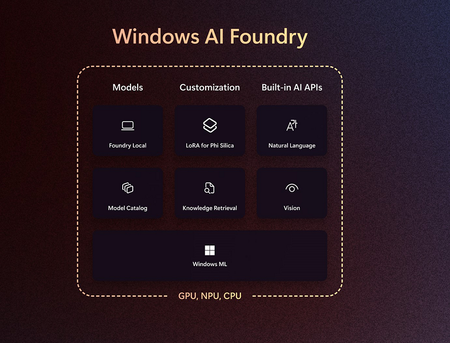
Thanks to their massive scale and impressive technical evolution, large language models (LLMs) have become the public face of Generative AI innovation. However, bigger isn’t always better. While LLMs like the ones behind Microsoft Copilot are incredibly capable at a wide range of tasks, less-discussed small language models (SLMs) expand the utility of Gen AI for real-time and edge applications. SLMs can run efficiently on a local device with low power consumption and fast performance, enabling new scenarios and cost models. SLMs can run on universally available chips like CPUs and GPUs, but their potential really comes alive running on Neural Processing Units (NPUs), such as the ones found in Microsoft Surface Copilot+ PCs. NPUs are specifically designed for processing machine learning workloads, leading to high performance per watt and thermal efficiency compared to CPUs or GPUs [1]. SLMs and NPUs together support running quite powerful Gen AI workloads efficiently on a laptop, even when running on battery power or multitasking. In this blog, we focus on running SLMs on Snapdragon® X Plus processors on the recently launched Surface Laptop 13-inch, using the Qualcomm® AI Hub, leading to efficient local inference, increased hardware utilization and minimal setup complexity. This is only one of many methods available - before diving into this specific use case, let’s first provide an overview of the possibilities for deploying small language models on Copilot+ PC NPUs. Qualcomm AI Engine Direct (QNN) SDK: This process requires converting SLMs into QNN binaries that can be executed through the NPU. The Qualcomm AI Hub provides a convenient way to compile any PyTorch, TensorFlow, or ONNX-converted models into QNN binaries executable by the Qualcomm AI Engine Direct SDK. Various precompiled models are directly available in the Qualcomm AI Hub, their collection of over 175 pre-optimized models, ready for download and integration into your application. ONNX Runtime: ONNX Runtime is an open-source inference engine from Microsoft designed to run models in the ONNX format. The QNN Execution Provider (EP) by Qualcomm Technologies optimizes inference on Snapdragon processors using AI acceleration hardware, mainly for mobile and embedded use. ONNX Runtime Gen AI is a specialized version optimized for generative AI tasks, including transformer-based models, aiming for high-performance inference in applications like large language models. Although ONNX Runtime with QNN EP can run models on Copilot+ PCs, some operator support is missing for Gen AI workloads. ONNX Runtime Gen AI is not yet publicly available for NPU; a private beta is currently out with an unclear ETA on public release at the time of releasing this blog. Here is the link to the Git repo for more info on upcoming releases microsoft/onnxruntime-genai: Generative AI extensions for onnxruntime Windows AI Foundry: Windows AI Foundry provides AI-supported features and APIs for Copilot+ PCs. It includes pre-built models such as Phi-Silica that can be inferred using Windows AI APIs. Additionally, it offers the capability to download models from the cloud for local inference on the device using Foundry Local. This feature is still in preview. You can learn more about Windows AI Foundry here: Windows AI Foundry | Microsoft Developer AI Toolkit for VS Code: The AI Toolkit for Visual Studio Code (VS Code) is a VS Code extension that simplifies generative AI app development by bringing together cutting-edge AI development tools and models from the Azure AI Foundry catalog and other catalogs like Hugging Face. This platform allows users to download multiple models either from the cloud or locally. It currently houses several models optimized to run on CPU, with support for NPU-based models forthcoming, starting with Deepseek R1. Comparison between different approaches Feature Qualcomm AI Hub ONNX Runtime (ORT) Windows AI Foundry AI Toolkit for VS code Availability of Models Wide set of AI models (vision, Gen AI, object detection, and audio). Any models can be integrated. NPU support for Gen AI tasks and ONNX Gen AI Runtime are not yet generally available. Phi Silica model is available through Windows AI APIs, additional AI models from cloud can be downloaded for local inference using Foundry Local Access to models from sources such as Azure AI Foundry and Hugging Face. Currently only supports Deepseek R1 and Phi 4 Mini models for NPU inference. Ease of development The API is user-friendly once the initial setup and end-to-end replication are complete. Simple setup, developer-friendly; however, limited support for custom operators means not all models deploy through ORT. Easiest framework to adopt—developers familiar with Windows App SDK face no learning curve. Intuitive interface for testing models via prompt-response, enabling quick experimentation and performance validation. Is processor or SoC independent No. Supports Qualcomm Technologies processors only. Models must be compiled and optimized for the specific SOC on the device. A list of supported chipsets is provided, and the resulting .bin files are SOC-specific. Limitations exist with QNN EP’s HTP backend: only quantized models and those with static shapes are currently supported. Yes. The tool can operate independently of SoC. It is part of the broader Windows Copilot Runtime framework, now rebranded as the Windows AI Foundry. Model-dependent. Easily deployable on-device; model download and inference are straightforward. As of writing this article and based on our team's research, we found Qualcomm AI Hub to be the most user-friendly and well-supported solution available at this time. In contrast, most other frameworks are still under development and not yet generally available. Before we dive into how to use Qualcomm AI Hub to run Small Language Models (SLMs), let’s first understand what Qualcomm AI Hub is. What is Qualcomm AI Hub? Qualcomm AI Hub is a platform designed to simplify the deployment of AI models for vision, audio, speech, and text applications on edge devices. It allows users to upload, optimize, and validate their models for specific target hardware—such as CPU, GPU, or NPU—within minutes. Models developed in PyTorch or ONNX are automatically converted for efficient on-device execution using frameworks like TensorFlow Lite, ONNX Runtime, or Qualcomm AI Engine Direct. The Qualcomm AI Hub offers access to a collection of over 100 pre-optimized models, with open-source deployment recipes available on GitHub and Hugging Face. Users can also test and profile these models on real devices with Snapdragon and Qualcomm platforms hosted in the cloud. In this blog we will be showing how you can use Qualcomm AI Hub to get a QNN context binary for models and use Qualcomm AI Engine to run those context binaries. The context binary is a SoC-specific deployment mechanism. When compiled for a device, it is expected that the model will be deployed to the same device. The format is operating system agnostic so the same model can be deployed on Android, Linux, or Windows. The context binary is designed only for the NPU. For more details on how to compile models in other formats, please visit the documentation here Overview of Qualcomm AI Hub — qai-hub documentation. The following case study details the efficient execution of the Phi-3.5 model using optimized, hardware-specific binaries on a Surface Laptop 13-inch powered by the Qualcomm Snapdragon X Plus processor, Hexagon™ NPU, and Qualcomm Al Hub. Microsoft Surface Engineering Case Study: Running Phi-3.5 Model Locally on Snapdragon X Plus on Surface Laptop 13-inch This case study details how the Phi-3.5 model was deployed on a Surface Laptop 13-inch powered by the Snapdragon X Plus processor. The study was developed and documented by the Surface DASH team, which specializes in delivering AI/ML solutions to Surface devices and generating data-driven insights through advanced telemetry. Using Qualcomm AI Hub, we obtained precompiled QNN context binaries tailored to the target SoC, enabling efficient local inference. This method maximizes hardware utilization and minimizes setup complexity. We used a Surface Laptop 13-inch with the Snapdragon X Plus processor as our test device. The steps below apply to the Snapdragon X Plus processor; however, the process remains similar for other Snapdragon X Series processors and devices as well. For the other processors, you may need to download different model variants of the desired models from Qualcomm AI Hub. Before you begin to follow along, please check the make and models of your NPU by navigating to Device Manager --> Neural Processors. We also used Visual Studio Code and Python (3.10.3.11, 3.12). We used the 3.11 version to run these steps below and recommend using the same, although there should be no difference in using a higher Python version. Before starting, let's create a new virtual environment in Python as a best practice. Follow the steps to create a new virtual environment here: https://code.visualstudio.com/docs/python/environments?from=20423#_creating-environments Create a folder named ‘genie_bundle’ store config and bin files. Download the QNN context binaries specific to your NPU and place the config files into the genie_bundle folder. Copy the .dll files from QNN SDK into the genie_bundle folder. Finally, execute the test prompt through genie-sdk in the required format for Phi-3.5. Setup steps in details Step 1: Setup local development environment Download QNN SDK: Go to the Qualcomm Software Center Qualcomm Neural Processing SDK | Qualcomm Developer and download the QNN SDK by clicking on Get Software (by default latest version of SDK gets downloaded). For the purpose of this demo, we used latest version available (2.34) . You may need to make an account on the Qualcomm website to access it. Step 2: Download QNN Context Binaries from Qualcomm AI Hub Models Download Binaries: Download the context binaries (.bin files) for the Phi-3.5-mini-instruct model from (Link to Download Phi-3.5 context binaries). Clone AI Hub Apps repo: Use the Genie SDK (Generative Runtime built on top of Qualcomm AI Direct Engine), and leverage the sample provided in https://github.com/quic/ai-hub-apps Setup folder structure to follow along the code: Create a folder named "genie_bundle" outside of the folder where AI Hub Apps repo was cloned. Selectively copy configuration files from AI Hub sample repo to 'genie_bundle' Step 3: Copy config files and edit files Copy config files to genie_bundle folder from ai-hub-apps. You will need two config files. You can use the PowerShell script below to copy the config files from repo to local genie folder created in previous steps. You also need to copy HTP backend config file as well as the genie config file from the repo # Define the source paths $sourceFile1 = "ai-hub-apps/tutorials/llm_on_genie/configs/htp/htp_backend_ext_config.json.template" $sourceFile2 = "ai-hub-apps/tutorials/llm_on_genie/configs/genie/phi_3_5_mini_instruct.json" # Define the local folder path $localFolder = "genie_bundle" # Define the destination file paths using the local folder $destinationFile1 = Join-Path -Path $localFolder -ChildPath "htp_backend_ext_config.json" $destinationFile2 = Join-Path -Path $localFolder -ChildPath "genie_config.json" # Create the local folder if it doesn't exist if (-not (Test-Path -Path $localFolder)) { New-Item -ItemType Directory -Path $localFolder } # Copy the files to the local folder Copy-Item -Path $sourceFile1 -Destination $destinationFile1 -Force Copy-Item -Path $sourceFile2 -Destination $destinationFile2 -Force Write-Host "Files have been successfully copied to the genie_bundle folder with updated names." After copying the files, you will need to make sure to change the default values of the parameters provided with template files copied. Edit HTP backend file in the newly pasted location - Change dsp_arch and soc_model to match with your configuration pdate soc model and dsp arch in HTP backend config files Edit genie_config file to include the downloaded binaries for Phi 3 models in previous steps Step 4: Download the tokenizer file from Hugging Face Visit the Hugging Face Website: Open your web browser and go to https://huggingface.co/microsoft/Phi-3.5-mini-instruct/tree/main Locate the Tokenizer File: On the Hugging Face page, find the tokenizer file for the Phi-3.5-mini-instruct model Download the File: Click on the download button to save the tokenizer file to your computer Save the File: Navigate to your genie_bundle folder and save the downloaded tokenizer file there. Note: There is an issue with the tokenizer.json file for the Phi 3.5 mini instruct model, where the output does not break words using spaces. To resolve this, you need to delete lines #192-197 in the tokenizer.json file. Download tokenizer files from the hugging face repo (Image Source - Hugging Face) Step 5: Copy files from QNN SDK Locate the QNN SDK Folder: Open the folder where you have installed the QNN SDK in step 1 and identify the required files. You need to copy the files from the below mentioned folder. Exact folder naming may change based on SDK version <QNN-SDK ROOT FOLDER>/qairt/2.34.0.250424/lib/hexagon-v75/unsigned <QNN-SDK ROOT FOLDER> /qairt/2.34.0.250424/lib/aarch64-windows-msvc <QNN-SDK ROOT FOLDER> /qairt/2.34.0.250424/bin/aarch64-windows-msvc Navigate to your genie_bundle folder and paste the copied files there. Step 6: Execute the Test Prompt Open Your Terminal: Navigate to your genie_bundle folder using your terminal or command prompt. Run the Command: Copy and paste the following command into your terminal: ./genie-t2t-run.exe -c genie_config.json -p "<|system|>\nYou are an assistant. Provide helpful and brief responses.\n<|user|>What is an NPU? \n<|end|>\n<|assistant|>\n" Check the Output: After running the command, you should see the response from the assistant in your terminal. This case study demonstrates the process of deploying a small language model (SLM) like Phi-3.5 on a Copilot+ PC using the Hexagon NPU and Qualcomm AI Hub. It outlines the setup steps, tooling, and configuration required for local inference using hardware-specific binaries. As deployment methods mature, this approach highlights a viable path toward efficient, scalable Gen AI execution directly on edge devices. Snapdragon® and Qualcomm® branded products are products of Qualcomm Technologies, Inc. and/or its subsidiaries. Qualcomm, Snapdragon and Hexagon™ are trademarks or registered trademarks of Qualcomm Incorporated.6.8KViews7likes2CommentsMicrosoft Semantic Kernel and AutoGen: Open Source Frameworks for AI Solutions
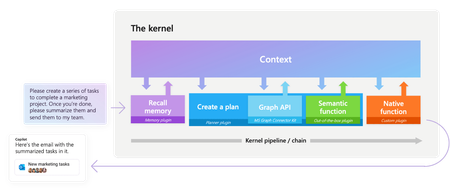
Explore Microsoft’s open-source frameworks, Semantic Kernel and AutoGen. Semantic Kernel enables developers to create AI solutions across various domains using a single Large Language Model (LLM). AutoGen, on the other hand, uses AI Agents to perform smart tasks through agent dialogues. Discover how these technologies serve different scenarios and can be used to build powerful AI applications.48KViews6likes1CommentEssential Microsoft Resources for MVPs & the Tech Community from the AI Tour
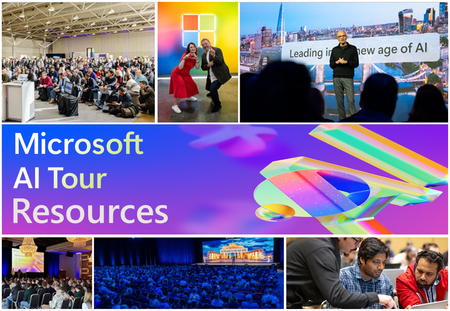
Unlock the power of Microsoft AI with redeliverable technical presentations, hands-on workshops, and open-source curriculum from the Microsoft AI Tour! Whether you’re a Microsoft MVP, Developer, or IT Professional, these expertly crafted resources empower you to teach, train, and lead AI adoption in your community. Explore top breakout sessions covering GitHub Copilot, Azure AI, Generative AI, and security best practices—designed to simplify AI integration and accelerate digital transformation. Dive into interactive workshops that provide real-world applications of AI technologies. Take it a step further with Microsoft’s Open-Source AI Curriculum, offering beginner-friendly courses on AI, Machine Learning, Data Science, Cybersecurity, and GitHub Copilot—perfect for upskilling teams and fostering innovation. Don’t just learn—lead. Access these resources, host impactful training sessions, and drive AI adoption in your organization. Start sharing today! Explore now: Microsoft AI Tour Resources.
Getting Started with the AI Dev Gallery
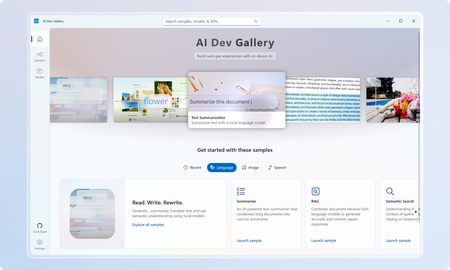
March Update: The Gallery is now available on the Microsoft Store! The AI Dev Gallery is a new open-source project designed to inspire and support developers in integrating on-device AI functionality into their Windows apps. It offers an intuitive UX for exploring and testing interactive AI samples powered by local models. Key features include: Quickly explore and download models from well-known sources on GitHub and HuggingFace. Test different models with interactive samples over 25 different scenarios, including text, image, audio, and video use cases. See all relevant code and library references for every sample. Switch between models that run on CPU and GPU depending on your device capabilities. Quickly get started with your own projects by exporting any sample to a fresh Visual Studio project that references the same model cache, preventing duplicate downloads. Part of the motivation behind the Gallery was exposing developers to the host of benefits that come with on-device AI. Some of these benefits include improved data security and privacy, increased control and parameterization, and no dependence on an internet connection or third-party cloud provider. Requirements Device Requirements Minimum OS Version: Windows 10, version 1809 (10.0; Build 17763) Architecture: x64, ARM64 Memory: At least 16 GB is recommended Disk Space: At least 20GB free space is recommended GPU: 8GB of VRAM is recommended for running samples on the GPU Using the Gallery The AI Dev Gallery has can be navigated in two ways: The Samples View The Models View Navigating Samples In this view, samples are broken up into categories (Text, Code, Image, etc.) and then into more specific samples, like in the Translate Text pictured below: On clicking a sample, you will be prompted to choose a model to download if you haven’t run this sample before: Next to the model you can see the size of the model, whether it will run on CPU or GPU, and the associated license. Pick the model that makes the most sense for your machine. You can also download new models and change the model for a sample later from the sample view. Just click the model drop down at the top of the sample: The last thing you can do from the Sample pane is view the sample code and export the project to Visual Studio. Both buttons are found in the top right corner of the sample, and the code view will look like this: Navigating Models If you would rather navigate by models instead of samples, the Gallery also provides the model view: The model view contains a similar navigation menu on the right to navigate between models based on category. Clicking on a model will allow you to see a description of the model, the versions of it that are available to download, and the samples that use the model. Clicking on a sample will take back over to the samples view where you can see the model in action. Deleting and Managing Models If you need to clear up space or see download details for the models you are using, you can head over the Settings page to manage your downloads: From here, you can easily see every model you have downloaded and how much space on your drive they are taking up. You can clear your entire cache for a fresh start or delete individual models that you are no longer using. Any deleted model can be redownload through either the models or samples view. Next Steps for the Gallery The AI Dev Gallery is still a work in progress, and we plan on adding more samples, models, APIs, and features, and we are evaluating adding support for NPUs to take the experience even further If you have feedback, noticed a bug, or any ideas for features or samples, head over to the issue board and submit an issue. We also have a discussion board for any other topics relevant to the Gallery. The Gallery is an open-source project, and we would love contribution, feedback, and ideation! Happy modeling!7.2KViews5likes3CommentsToken Economics: The New FinOps for Agentic AI
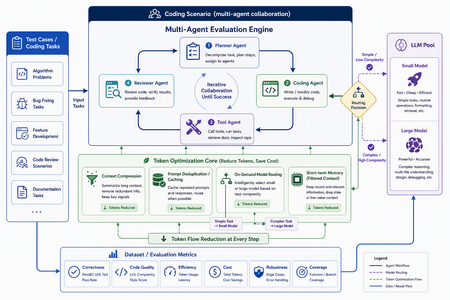
In AI applications, tokens are now cost — and token economics deserves architectural attention For a long time, AI application design started with model capability: Can the model write code? Can it reason? Can it use tools? Can it handle long context? Those questions still matter, but in the age of agentic applications, they are no longer sufficient. The more important production question is this: How many tokens does the architecture burn to complete one useful task? A classic chat application often maps one user turn to one model call. An agentic system is different. One user goal can trigger planning, retrieval, tool selection, tool execution, result interpretation, reflection, repair, and summarization. The user sees one instruction; the system may execute dozens of model calls behind the scenes. Tokens are no longer just a measure of text length. They become a measure of system design, runtime behavior, developer workflow, and business cost. GitHub Copilot’s 2026 move to usage-based billing through GitHub AI Credits captures the industry shift clearly. Usage is now aligned with token consumption, including input, output, and cached tokens. That matters because Copilot has evolved from an in-editor assistant into an agentic platform that can handle long, multi-step coding sessions across repositories. In that world, a tiny prompt and a multi-hour autonomous coding workflow should not be treated as the same economic unit. Token economics is therefore not about telling developers to “write shorter prompts.” It is about designing systems where: useful context is preserved, while noise is removed; repeated context is cached or deduplicated; simple tasks do not pay for frontier models; short-term state is managed structurally instead of copied repeatedly; every model call is metered, comparable, and governed. In short: token economics is the practice of making agentic AI economically sustainable. Scenario thinking: GitHub Copilot billing, Copilot SDK, GPT-5.5, Anthropic, and MAI-Code Model The new GitHub Copilot billing model provides a useful framing for developers. Copilot is no longer only autocomplete. It is becoming a programmable agentic platform. It can use models, call tools, work across files, stream responses, and participate in long-running coding workflows. With the GitHub Copilot SDK, developers can embed that agentic runtime into their own applications, services, and developer tools. That is powerful, but it also changes the cost model. Once an agent loop becomes programmable, token cost also needs to become programmable. If a system can plan, call tools, edit files, retry, repair, and summarize, it also needs to meter, route, cache, compress, and evaluate. EvalAgentic gives this idea a concrete playground. The project groups models into cost and capability tiers: Tier Example models Example price / 1K tokens Typical use LARGE claude-opus-4.8, gpt-5.5 $0.030 Agents, code generation, multi-step reasoning MID gpt-5.4-mini $0.012 Dialogue, summarization, extraction TINY gpt-5-mini $0.001 Classification, keyword matching, rule-like tasks This tiering lets us reason about real scenarios: GPT-5.5-class models are valuable for hard reasoning and engineering workflows, but they should not be the default for every step. Using a frontier model for simple classification is like hiring a principal architect to label folders. Anthropic high-capability models can be excellent for complex reasoning and coding, but they benefit from routing discipline. Requirements analysis, test interpretation, deployment explanation, and code generation may not need the same model tier. MAI-Code Model-style coding models should be treated as specialized capability layers. Their value is not just “better code generation”; it is deciding when code-specialized intelligence should be invoked in a larger agent pipeline. The real question is not “Which model is the best?” It is: Which model is the most economical and reliable for this step of this workflow? Four engineering techniques for saving tokens Context Compression: turn long text into executable structure Implementation principle Context Compression converts long natural-language context into the structured information an agent actually needs. Business documents are often verbose: resumes, contracts, product manuals, requirements, and support logs contain narrative text, boilerplate, repeated explanations, and low-value context. The next agent step may only need a few fields. EvalAgentic demonstrates this with a long resume-like input that is compressed into a compact JSON object. Instead of injecting the full original text into every prompt, the system extracts key fields and dynamically injects only the data required by the current task. A practical compression pipeline includes: Redundancy detection — identify long-tail text, repeated descriptions, stale history, and low-value context. Structured extraction — use Copilot or a mid-tier model to transform prose into JSON, tables, or typed schemas. Dynamic injection — inject only the fields needed for the next step. Recoverable references — preserve source pointers so compressed context remains auditable. How to evaluate Prompt token reduction before and after compression. Answer quality and task success rate. Schema fidelity and missing-field rate. Latency improvement. Cost per successful task. Compression is not summarization. Summaries are designed for humans. Structured compression is designed for agents. Prompt Deduplication / Cache: stop paying twice for the same context Implementation principle Many agent systems waste tokens because they repeatedly send the same context. The same resume, contract, repository README, user profile, API documentation, or business rule can be copied across turns and agents. Prompt Deduplication / Cache applies a simple principle: if context has already been processed, do not pay to process it again unless it has changed. A concrete design includes: compute a hash or semantic key for source context; reuse extracted structured results when content is identical or equivalent; apply a TTL for repeated entities, such as the 24-hour cache pattern shown in EvalAgentic; organize stable prompt prefixes to benefit from provider-level prompt caching where available; store shared context in an artifact store or memory layer so multiple agents do not copy the same blob. How to evaluate Cache hit rate. Cached token ratio. Duplicate prompt rate. Cost delta before and after caching. Correctness under cache, especially stale-cache failures. Caching is not “save everything forever.” Good caching knows when to reuse and when to invalidate. On-Demand Model Routing: let task complexity decide model tier Implementation principle On-Demand Model Routing routes each request to the cheapest model that can complete the task reliably. The entry point can use a rule tree, a lightweight classifier, or a hybrid complexity score. EvalAgentic’s routing tree is intentionally easy to explain: INCOMING REQUEST └─ Prompt < 500 tokens? ── YES ─→ TINY: classify / extract └─ NO ──→ multi-step reasoning? ├─ NO ─→ MID: dialogue / summary └─ YES ─→ LARGE: agent / code The engineering logic is straightforward: simple classification and keyword matching go to TINY; summarization and structured conversion go to MID; multi-step reasoning, coding, cross-file changes, and orchestration go to LARGE; code-specialized models such as MAI-Code Model can be placed in the coding phase rather than used across the whole pipeline. How to evaluate Routing accuracy. Cost per route. Quality regression by tier. Escalation rate from small models to larger models. End-to-end success rate. Routing does not mean “always use the smallest model.” It means frontier intelligence is reserved for the steps where it actually changes the outcome. Short-term Memory: preserve state instead of replaying history Implementation principle Short-term Memory controls context growth across multi-turn and multi-agent workflows. Without it, agents often replay the full conversation history, full tool outputs, and full intermediate reasoning on every turn. The context grows; quality may not improve; the bill definitely does. A better design stores state structurally: user goal; current plan; tool outputs and references; failure reasons; next actions; handoff artifacts between agents. In a multi-agent coding pipeline, the Requirements Agent should hand off a structured spec. The Coding Agent should read that spec, not the entire prior conversation. The Testing Agent should consume testable artifacts, not every word produced by the Coding Agent. How to evaluate Context growth curve across turns. Memory retrieval precision. Rework rate caused by missing state. Recovery quality after failed steps. Average input tokens per turn. Short-term memory is not about remembering everything. It is about remembering the next useful thing. EvalAgentic as a concrete evaluation example EvalAgentic is effective as an evangelism project because it turns token economics into an observable before/after system. The architecture has five layers: Frontend — frontend/index.html provides Tabs A / B / C, live SSE logs, and before/after charts. API — backend/server.py exposes FastAPI routes and Server-Sent Events streaming. Orchestration — eval.py handles A/B evaluation; coding_agents.py handles the multi-agent coding scenario. Core — compressor.py, router.py, gh_models.py, and token_meter.py implement compression, routing, Copilot SDK calls, and token metering. Providers — GitHub Copilot SDK and Microsoft Agent Framework provide model access and agent orchestration. Tab A: Compression comparison Tab A compares long-form context before and after structured compression. The key message is that token saving does not come from writing a clever sentence. It comes from converting verbose context into a structured artifact that downstream agents can consume efficiently. Tab B: On-demand model routing Tab B demonstrates that cost is not only about raw token count. If a system routes simple tasks to cheaper tiers and reserves expensive models for complex reasoning, total cost can fall even if some token counts increase. This is a subtle but important point: token economics is not token starvation; it is model portfolio optimization. Tab C: Coding scenario — multi-agent with Agent Framework Tab C is the most persuasive demo. The same deliverable — a Taobao-like goods-list site with HTML + JavaScript frontend, Flask backend, and Docker deployment — is produced twice by a four-agent pipeline: Requirements Agent; Coding Agent; Testing Agent; Deployment Agent. The before pipeline uses no compression and sends every agent to GPT-5.5 / LARGE. The after pipeline injects a compressed JSON spec and uses on-demand routing: requirements can use MID, coding can use LARGE, testing can use MID, and deployment can use TINY. This mirrors real enterprise development. Architecture and complex code generation may deserve frontier models. Test interpretation, deployment packaging, and simple validation often do not. Summary and refinement based on the project diagrams The EvalAgentic README describes three important visuals: the architecture flow, the routing tree, and the token-meter design. Together, they form a governance loop: User Scenario ↓ Context Compression ↓ Prompt Deduplication / Cache ↓ On-Demand Model Routing ↓ Short-term Memory ↓ Token Metering & Budget Actions ↓ Before / After Evaluation Optimize the path, not only the prompt Many teams start token optimization by editing prompt wording. That helps, but the largest waste usually lives in the execution path: how many calls are made, how much context is repeated, how often tools retry, and whether every step uses the same expensive model. EvalAgentic makes the path visible through A/B comparisons. Token Meter is the control plane of cost governance EvalAgentic’s token_meter.py uses a non-invasive interceptor pattern: INTERCEPTOR (@token_meter) ↓ COUNTER CORE: accounting / budget threshold / trigger ↓ ACTION HUB: throttle (>80% budget) / rollback (>budget) This is the right architectural instinct. Production systems need thresholds, throttling, rollback, and traceability. Without those controls, one retry loop can quietly turn a small user request into a budget incident. Cost metrics must be evaluated with quality metrics A system that cuts cost by 80% but drops success rate by 50% is not optimized. It is broken more cheaply. The evaluation matrix should combine cost, quality, latency, and reliability: Dimension Metric Why it matters Cost Cost per successful task Measures the real unit economics Token Input / output / cached tokens Identifies compression and cache opportunities Quality Pass rate / regression rate Ensures cheaper tiers do not break outcomes Efficiency Latency / retry count Prevents cheap models from causing expensive retries Governance Budget breach / rollback count Validates runtime control Narrative A simple three-line narrative works well for demos: Token is no longer a technical detail. It is the bill of your architecture. EvalAgentic shows the same scenario before and after cost-aware design. The goal is not to make models cheaper; the goal is to make agent systems economically governable. For a developer audience, the sharper version is: A good agent does not use the biggest model everywhere. It uses the right intelligence at the right step, with the right context, under the right budget. Practical recommendations for real projects Establish a token baseline first. Measure input, output, retries, tool calls, and cost per scenario before optimizing. Make compression a component, not a prompt habit. Define schemas, cache policies, and fallback behavior. Introduce a model routing matrix. Route by task type, complexity, risk, latency, and cost. Define handoff contracts between agents. Pass structured artifacts, not endless conversation history. Evaluate every optimization with A/B tests. Compare cost, quality, latency, and stability. Add budget actions. Throttle at a threshold, rollback on breach, and add circuit breakers for failed retries. Closing: token economics is the second curve of agent engineering The first phase of AI application development was about calling models. The second phase was about putting models into products. The next phase of agentic AI is about running those systems reliably, affordably, and governably. EvalAgentic matters because it turns Context Compression, Prompt Deduplication / Cache, On-Demand Model Routing, and Short-term Memory into something developers can run, compare, and explain. It moves token economics from opinion to instrumentation. Future AI applications will not only ask: How smart is this agent? They will ask: How many tokens does it spend per completed task? Which model did it use? Did it hit cache? Did retries run away? Did the system reserve frontier intelligence for the steps that deserved it? References kinfey/EvalAgentic GitHub Copilot is moving to usage-based billing Updates to GitHub Copilot billing and plans Copilot SDK - GitHub Docs8.4KViews4likes0CommentsUnderstanding Small Language Modes
Small Language Models (SLMs) bring AI from the cloud to your device. Unlike Large Language Models that require massive compute and energy, SLMs run locally, offering speed, privacy, and efficiency. They’re ideal for edge applications like mobile, robotics, and IoT.1.2KViews4likes0CommentsBringing AI to the edge: Hackathon Windows ML
AI Developer Hackathon Windows ML Hosted by Qualcomm on SnapDragonX We’re excited to announce our support and participation for the upcoming global series of Edge AI hackathons, hosted by Qualcomm Technologies. The first is on June 14-15 in Bangalore. We see a world of hybrid AI, developing rapidly as new generation of intelligent applications get built for diverse scenarios. These range from mobile, desktop, spatial computing and extending all the way to industrial and automotive. Mission critical workloads oscillate between decision-making in the moment, on device, to fine tuning models on the cloud. We believe we are in the early stages of development of agentic applications that efficiently run on the edge for scenarios needing local deployment and on-device inferencing. Microsoft Windows ML Windows ML – a cutting-edge runtime optimized for performant on-device model inference and simplified deployment, and the foundation of Windows AI Foundry. Windows ML is designed to support developers creating AI-infused applications with ease, harnessing the incredible strength of Windows’ diverse hardware ecosystem whether it’s for entry-level laptops, Copilot+ PCs or top-of-the-line AI workstations. It’s built to help developers leverage the client silicon best suited for their specific workload on any given device whether it’s an NPU for low-power and sustained inference, a GPU for raw horsepower or CPU for the broadest footprint and flexibility. Introducing Windows ML: The future of machine learning development on Windows - Windows Developer Blog Getting Started To get started, install AI Toolkit, leverage one of our conversion and optimization templates, or start building your own. Explore documentation and code samples available on Microsoft Learn, check out AI Dev Gallery (install, documentation) for demos and more samples to help you get started with Windows ML. Microsoft and Qualcomm Technologies: A strong collaboration Microsoft and Qualcomm Technologies’ collaboration bring new advanced AI features into Copilot+ PCs, leveraging the Snapdragon X Elite. Microsoft Research has played a pivotal role by optimizing new lightweight LLMs, such as Phi Silica, specifically for on-device execution with the Hexagon NPU. These models are designed to run efficiently on Hexagon NPUs, enabling multimodal AI experiences like vision-language tasks directly on Copilot+ PCs without relying on the cloud. Additionally, Microsoft has made DeepSeek R1 7B and 14B distilled models available via Azure AI Foundry, further expanding the AI ecosystem on the edge. This collaboration marks a significant step in democratizing AI by making powerful, efficient models accessible on everyday devices Windows AI Foundry expands AI capabilities by providing high-performance built-in models and supports developers' custom models with silicon performance. This developer platform plays a key role in this collaboration. Windows ML enables Windows 11 and Copilot+ PCs to use the Hexagon NPU for power efficient inference. Scaling optimization through Olive toolchain The Windows ML foundation of the Windows AI Foundry provides a unified platform for AI development across various hardware architectures and brings silicon performance using QNN Execution provider. This stack includes Windows ML and toolchains like Olive, easily accessible in AI Toolkit for VS Code, which streamlines model optimization and deployment. Qualcomm Technologies has contributed to Microsoft’s Olive, an open-source model optimization tool that enhances AI performance by optimizing models for efficient inference on client systems. This tool is particularly beneficial for running LLMs and GenAI workloads on Qualcomm Technologies’ platforms. Real-World Applications Through Qualcomm Technologies and Microsoft’s collaboration we have partnered with top developers to adopt Windows ML and have demonstrated impressive performance for their AI features. Independent Solution Vendors (ISVs) such as Powder, Topaz Labs, Camo and McAfee, Join us at the Hackathon With the recent launch of Qualcomm Snapdragon® X Elite-powered Windows laptops, developers can now take advantage of powerful NPUs (Neural Processing Units) to deploy AI applications that are both responsive and energy-efficient. These new devices open up a world of opportunities for developers to rethink how applications are built from productivity tools to creative assistants and intelligent agents all running directly on the device. Our mission has always been to enable high-quality AI experiences using compact, optimized models. These models are tailor-made for edge computing, offering faster inference, lower memory usage, and enhanced privacy without compromising performance. We encourage all application developers whether you’re building with open-source SLMs (small language models), working on smart assistants, or exploring new on-device AI use cases to join us at the event. You can register here: https://www.qualcomm.com/support/contact/forms/edge-ai-developer-hackathon-bengaluru-proposal-submission Dive deeper into these innovative developer solutions: Windows AI Foundry & Windows ML on Qualcomm NPU Microsoft and Qualcomm Technologies collaborate on Windows 11, Copilot+ PCs and Windows AI Foundry | Qualcomm Unlocking the power of Qualcomm QNN Execution Provider GPU backen Introducing Windows ML: The future of machine learning development on Windows - Windows Developer Blog874Views4likes0CommentsBuilding AI Agents on edge devices using Ollama + Phi-4-mini Function Calling
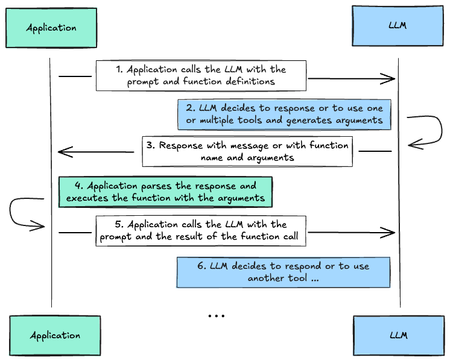
The new Phi-4-mini and Phi-4-multimodal now support Function Calling. This feature enables the models to connect with external tools and APIs. By deploying Phi-4-mini and Phi-4-multimodal with Function Calling capabilities on edge devices, we can achieve local expansion of knowledge capabilities and enhance their task execution efficiency. This blog will focus on how to use Phi-4-mini's Function Calling capabilities to build efficient AI Agents on edge devices. What‘s Function Calling How it works First we need to learn how Function Calling works Tool Integration: Function Calling allows LLM/SLM to interact with external tools and APIs, such as weather APIs, databases, or other services. Function Definition: Defines a function (tool) that LLM/SLM can call, specifying its name, parameters, and expected output. LLM Detection: LLM/SLM analyzes the user's input and determines if a function call is required and which function to use. JSON Output: LLM/SLM outputs a JSON object containing the name of the function to call and the parameters required by the function. External Execution: The application executes the function call using the parameters provided by LLM/SLM. Response to LLM: Returns the output of Function Calling to LLM/SLM, and LLM/SLM can use this information to generate a response to the user. Application scenarios Data retrieval: convert natural language queries into API calls to fetch data (e.g., "show my recent orders" triggers a database query) Operation execution: convert user requests into specific function calls (e.g., "schedule a meeting" becomes a calendar API call) Computational tasks: handle mathematical or logical operations through dedicated functions (e.g., calculate compound interest or statistical analysis) Data processing: chain multiple function calls together (e.g., get data → parse → transform → store) UI/UX integration: trigger interface updates based on user interactions (e.g., update map markers or display charts) Phi-4-mini / Phi-4-multimodal's Function Calling Phi-4-mini / Phi-4-multimodal supports single and parallel Function Calling. Things to note when calling You need to define Tools in System to start single or parallel Function Calling If you want to start parallel Function Calling, you also need to add 'some tools' to the System prompt The following is an example Single Function Calling tools = [ { "name": "get_match_result", "description": "get match result", "parameters": { "match": { "description": "The name of the match", "type": "str", "default": "Arsenal vs ManCity" } } }, ] messages = [ { "role": "system", "content": "You are a helpful assistant", "tools": json.dumps(tools), # pass the tools into system message using tools argument }, { "role": "user", "content": "What is the result of Arsenal vs ManCity today?" } ] Full Sample : Click Parallel Function Calling AGENT_TOOLS = { "booking_fight": { "name": "booking_fight", "description": "booking fight", "parameters": { "departure": { "description": "The name of Departure airport code", "type": "str", }, "destination": { "description": "The name of Destination airport code", "type": "str", }, "outbound_date": { "description": "The date of outbound flight", "type": "str", }, "return_date": { "description": "The date of return flight", "type": "str", } } }, "booking_hotel": { "name": "booking_hotel", "description": "booking hotel", "parameters": { "query": { "description": "The name of the city", "type": "str", }, "check_in_date": { "description": "The date of check in", "type": "str", }, "check_out_date": { "description": "The date of check out", "type": "str", } } }, } SYSTEM_PROMPT = """ You are my travel agent with some tools available. """ messages = [ { "role": "system", "content": SYSTEM_PROMPT, "tools": json.dumps(AGENT_TOOLS), # pass the tools into system message using tools argument }, { "role": "user", "content": """I have a business trip from London to New York in March 21 2025 to March 27 2025, can you help me to book a hotel and flight tickets""" } ] Full sample : click Using Ollama and Phi-4-mini Function Calling to Create AI Agents on Edge Devices Ollama is a popular free tool for deploying LLM/SLM locally and can be used in combination with AI Toolkit for VS Code. In addition to being deployed on your PC/Laptop, it can also be deployed on IoT, mobile phones, containers, etc. To use Phi-4-mini on Ollama, you need to use Ollama 0.5.13+. Different quantitative versions are supported on Ollama, as shown in the figure below: Using Ollama, we can deploy Phi-4-mini on the edge, and implement AI Agent with Function Calling under limited computing power, so that Generative AI can be applied more effectively on the edge. Current Issues A sad experience - If you directly use the interface to try to call Ollama in the above way, you will find that Function Calling will not be triggered. There are discussions on Ollama's GitHub Issue. You can enter the Issue https://github.com/ollama/ollama/issues/9437. By modifying the Phi-4-mini Template on the ModelFile to implement a single Function Calling, but the call to Parallel Function Calling still failed. Resolution We have implemented a fix by making a adjustments to the template. We have improved it according to Phi-4-mini's Chat Template and re-modified the Modelfile. Of course, the quantitative model has a huge impact on the results. The adjustments are as follows: TEMPLATE """ {{- if .Messages }} {{- if or .System .Tools }}<|system|> {{ if .System }}{{ .System }} {{- end }} In addition to plain text responses, you can chose to call one or more of the provided functions. Use the following rule to decide when to call a function: * if the response can be generated from your internal knowledge (e.g., as in the case of queries like "What is the capital of Poland?"), do so * if you need external information that can be obtained by calling one or more of the provided functions, generate a function calls If you decide to call functions: * prefix function calls with functools marker (no closing marker required) * all function calls should be generated in a single JSON list formatted as functools[{"name": [function name], "arguments": [function arguments as JSON]}, ...] * follow the provided JSON schema. Do not hallucinate arguments or values. Do to blindly copy values from the provided samples * respect the argument type formatting. E.g., if the type if number and format is float, write value 7 as 7.0 * make sure you pick the right functions that match the user intent Available functions as JSON spec: {{- if .Tools }} {{ .Tools }} {{- end }}<|end|> {{- end }} {{- range .Messages }} {{- if ne .Role "system" }}<|{{ .Role }}|> {{- if and .Content (eq .Role "tools") }} {"result": {{ .Content }}} {{- else if .Content }} {{ .Content }} {{- else if .ToolCalls }} functools[ {{- range .ToolCalls }}{{ "{" }}"name": "{{ .Function.Name }}", "arguments": {{ .Function.Arguments }}{{ "}" }} {{- end }}] {{- end }}<|end|> {{- end }} {{- end }}<|assistant|> {{ else }} {{- if .System }}<|system|> {{ .System }}<|end|>{{ end }}{{ if .Prompt }}<|user|> {{ .Prompt }}<|end|>{{ end }}<|assistant|> {{ end }}{{ .Response }}{{ if .Response }}<|user|>{{ end }} """ We have tested the solution using different quantitative models. In the laptop environment, we recommend that you use the following model to enable single/parallel Function Calling: phi4-mini:3.8b-fp16. Note: you need to bind the defined Modelfile and phi4-mini:3.8b-fp16 together to enable this to work. Please execute the following command in the command line: #If you haven't downloaded it yet, please execute this command firstr ollama run phi4-mini:3.8b-fp16 #Binding with the adjusted Modelfile ollama create phi4-mini:3.8b-fp16 -f {Your Modelfile Path} To test the single Function Calling and Parallel Function Calling of Phi-4-mini. Single Function Calling Parallel Function Calling Full Sample in notebook The above example is just a simple introduction. As we move forward with the development we hope to find simpler ways to apply it on the edge, use Function Calling to expand the scenarios of Phi-4-mini / Phi-4-multimodal, and also develop more usecases in vertical industries. Resources Phi-4 model on Hugging face https://huggingface.co/collections/microsoft/phi-4-677e9380e514feb5577a40e4 Phi-4-mini on Ollama https://ollama.com/library/phi4-mini Learn Function Calling https://huggingface.co/docs/hugs/en/guides/function-calling Phi Cookbook - Samples and Resources for Phi Models https://aka.ms/phicookbook8.7KViews4likes1CommentAI Toolkit for Visual Studio Code: October 2024 Update Highlights
The AI Toolkit’s October 2024 update revolutionizes Visual Studio Code with game-changing features for developers, researchers, and enthusiasts. Explore multi-model integration, including GitHub Models, ONNX, and Google Gemini, alongside custom model support. Dive into multi-modal capabilities for richer AI testing and seamless multi-platform compatibility across Windows, macOS, and Linux. Tailored for productivity, the enhanced Model Catalog simplifies choosing the best tools for your projects. Try it now and share feedback to shape the future of AI in VS Code!3.3KViews4likes0CommentsGetting Started - Generative AI with Phi-3-mini: A Guide to Inference and Deployment
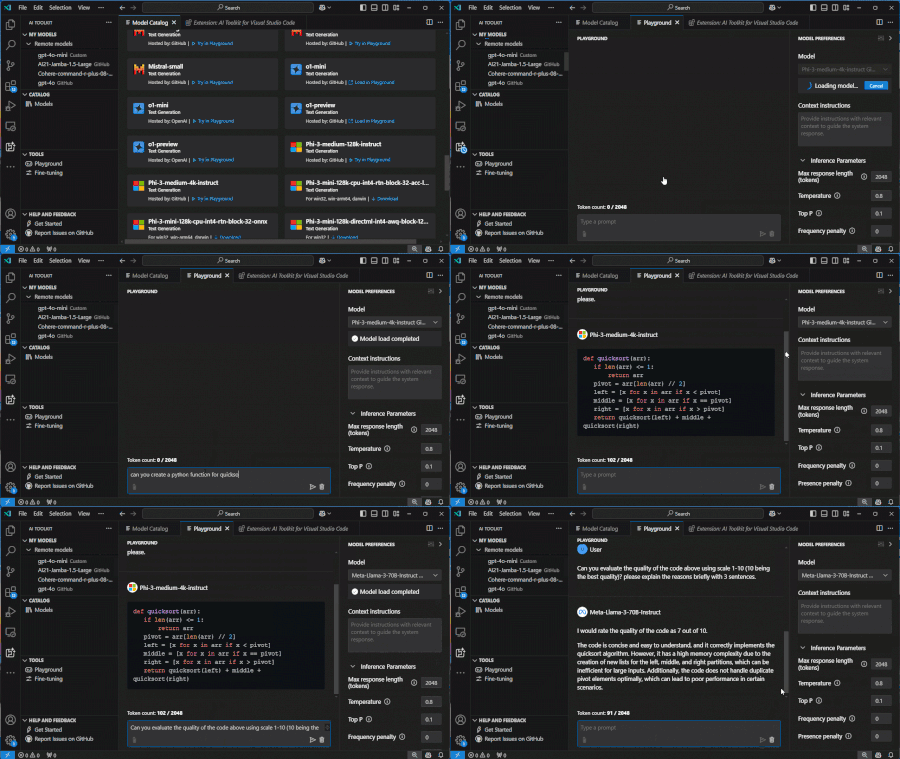
Getting started with Microsoft Phi-3-mini - Inference Phi-3-mini models, Discover how Phi-3-mini, a new series of models from Microsoft, enables deployment of Large Language Models (LLMs) on edge devices and IoT devices. Learn how to use Semantic Kernel, Ollama/LlamaEdge, and ONNX Runtime to access and infer phi3-mini models, and explore the possibilities of generative AI in various application scenarios52KViews4likes13Comments