slm
72 TopicsGetting Started - Generative AI with Phi-3-mini: A Guide to Inference and Deployment
Getting started with Microsoft Phi-3-mini - Inference Phi-3-mini models, Discover how Phi-3-mini, a new series of models from Microsoft, enables deployment of Large Language Models (LLMs) on edge devices and IoT devices. Learn how to use Semantic Kernel, Ollama/LlamaEdge, and ONNX Runtime to access and infer phi3-mini models, and explore the possibilities of generative AI in various application scenarios52KViews4likes13CommentsMicrosoft Semantic Kernel and AutoGen: Open Source Frameworks for AI Solutions
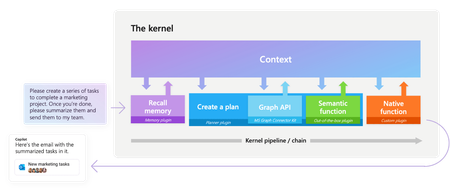
Explore Microsoft’s open-source frameworks, Semantic Kernel and AutoGen. Semantic Kernel enables developers to create AI solutions across various domains using a single Large Language Model (LLM). AutoGen, on the other hand, uses AI Agents to perform smart tasks through agent dialogues. Discover how these technologies serve different scenarios and can be used to build powerful AI applications.48KViews6likes1CommentGetting Started - Generative AI with Phi-3-mini: Running Phi-3-mini in Intel AI PC
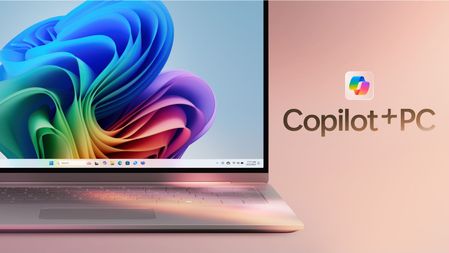
In 2024, with the empowerment of AI, we will enter the era of AI PC. On May 20, Microsoft also released the concept of Copilot + PC, which means that PC can run SLM/LLM more efficiently with the support of NPU. We can use models from different Phi-3 family combined with the new AI PC to build a simple personalized Copilot application for individuals. This content will combine Intel's AI PC, use Intel's OpenVINO, NPU Acceleration Library, and Microsoft's DirectML to create a local Copilot.33KViews2likes2CommentsFine-Tune and Integrate Custom Phi-3 Models with Prompt Flow in Azure AI Studio
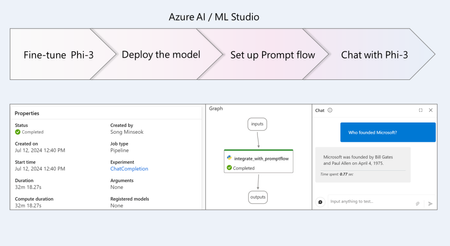
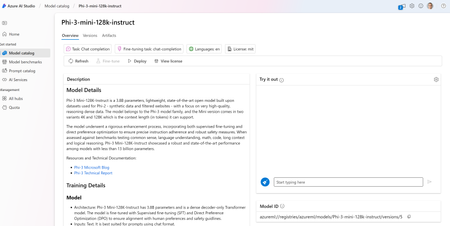
Phi-3 is a family of small language models (SLMs) developed by Microsoft that delivers exceptional performance and cost-effectiveness. In this tutorial, you will learn how to fine-tune the Phi-3 model and integrate the custom Phi-3 model with Prompt flow in Azure AI Studio. By leveraging Azure AI / ML Studio, you will establish a workflow for deploying and utilizing custom AI models.21KViews1like0CommentsGetting started with Microsoft Phi-3-mini - Try running the Phi-3-mini on iPhone with ONNX Runtime
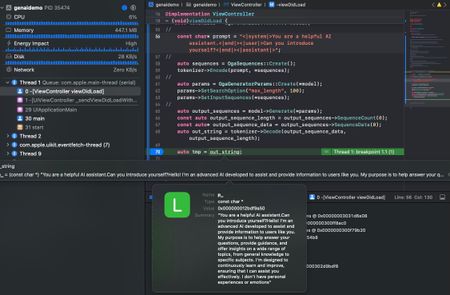
In this article, we explore how to deploy generative AI applications to mobile devices, specifically on iPhone, using ONNX Runtime. We cover the steps to compile ONNX Runtime for iOS and then create an App application in Xcode. We also show you how to copy the ONNX quantized INT4 model to the project and add the C++ API to generate text. This is a preliminary exploration of deploying generative AI on mobile devices, but it provides a good starting point for further development.20KViews2likes2CommentsExploring Microsoft's Phi-3 Family of Small Language Models (SLMs) with Azure AI
Dive into the world of small language models (SLMs) with Microsoft's Phi-3 family and learn how to integrate them into real-world applications using Azure AI. Discover step-by-step guidance, practical exercises, and a Gradio-powered chatbot interface to bolster your confidence in deploying and integrating AI. Keep learning and building with Azure AI17KViews2likes0CommentsAccelerate Phi-3 use on macOS: A Beginner's Guide to Using Apple MLX Framework
Learn how to use macOS and Apple Silicon to speed up machine learning models with this easy guide. We’ll cover the Apple MLX Framework, a tool that helps you run and fine-tune models like Phi-3-mini right on your Mac. First, install MLX by running pip install mlx-lm in your terminal. You can then use commands to run or fine-tune models. Apple's Metal Performance Shaders make this possible by using your Mac's GPU. We'll also show you how to use LoRA for better fine-tuning results and compare the performance of different models.14KViews2likes0CommentsGetting Started Using Phi-3-mini-4k-instruct-onnx for Text Generation with NLP Techniques
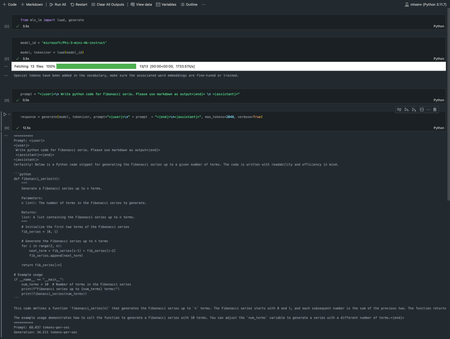
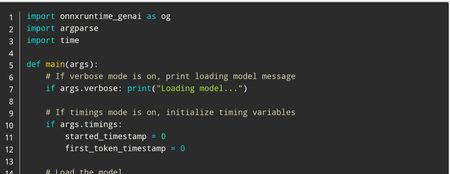
In this tutorial, we'll cover how to use the Phi-3 mini models for text generation using NLP techniques. Whether you're a beginner or an experienced AI developer, you'll learn how to download and run these powerful tools on your own computer. From setting up the Python environment to generating responses with the generate() API, we'll provide clear instructions and code examples throughout the tutorial. So, let's get started and see what the Phi-3 mini models can do!12KViews1like1CommentVisual Studio AI Toolkit : Building Phi-3 GenAI Applications
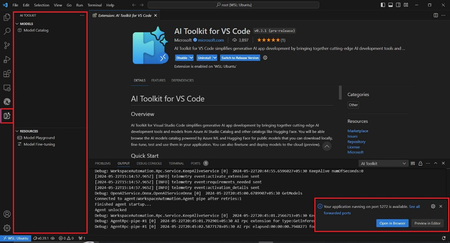
Port Forwarding, a valuable feature within the AI Toolkit, serves as a crucial gateway for seamless communication with the GenAI model. Whether it's through a straightforward API call or leveraging the SDKs, this functionality greatly enhances our ability to harness the power of the LLM/SLM. By enabling Port Forwarding, a plethora of new scenarios unfold, unlocking the full potential of our interactions with the model.10KViews2likes0CommentsEngineering a Local-First Agentic Podcast Studio: A Deep Dive into Multi-Agent Orchestration
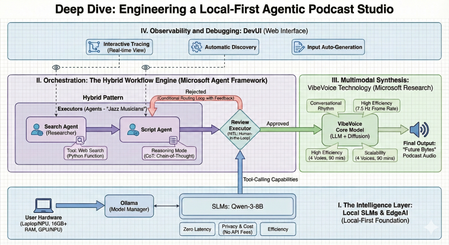
The transition from standalone Large Language Models (LLMs) to Agentic Orchestration marks the next frontier in AI development. We are moving away from simple "prompt-and-response" cycles toward a paradigm where specialized, autonomous units—AI Agents—collaborate to solve complex, multi-step problems. As a Technology Evangelist, my focus is on building these production-grade systems entirely on the edge, ensuring privacy, speed, and cost-efficiency. This technical guide explores the architecture and implementation of The AI Podcast Studio. This project demonstrates the seamless integration of the Microsoft Agent Framework, Local Small Language Models (SLMs), and VibeVoice to automate a complete tech podcast pipeline. I. The Strategic Intelligence Layer: Why Local-First? At the core of our studio is a Local-First philosophy. While cloud-based LLMs are powerful, they introduce friction in high-frequency, creative pipelines. By using Ollama as a model manager, we run SLMs like Qwen-3-8B directly on user hardware. 1. Architectural Comparison: Local vs. Cloud Choosing the deployment environment is a fundamental architectural decision. For an agentic podcasting workflow, the edge offers distinct advantages: Dimension Local Models (e.g., Qwen-3-8B) Cloud Models (e.g., GPT-5.2) Latency Zero/Ultra-low: Instant token generation without network "jitter". Variable: Dependent on network stability and API traffic. Privacy Total Sovereignty: Creative data and drafts never leave the local device. Shared Risk: Data is processed on third-party servers. Cost Zero API Fees: One-time hardware investment; free to run infinite tokens. Pay-as-you-go: Costs scale with token count and frequency of calls. Availability Offline: The studio remains functional without an internet connection. Online Only: Requires a stable, high-speed connection. 2. Reasoning and Tool-Calling on the Edge To move beyond simple chat, we implement Reasoning Mode, utilizing Chain-of-Thought (CoT) prompting. This allows our local agents to "think" through the podcast structure before writing. Furthermore, we grant them "superpowers" through Tool-Calling, allowing them to execute Python functions for real-time web searches to gather the latest news. II. The Orchestration Engine: Microsoft Agent Framework The true complexity of this project lies in Agent Orchestration—the coordination of specialized agents to work as a cohesive team. We distinguish between Agents, who act as "Jazz Musicians" making flexible decisions, and Workflows, which act as the "Orchestra" following a predefined score. 1. Advanced Orchestration Patterns Drawing from the WorkshopForAgentic architecture, the studio utilizes several sophisticated patterns: Sequential: A strict pipeline where the output of the Researcher flows into the Scriptwriter. Concurrent (Parallel): Multiple agents search different news sources simultaneously to speed up data gathering. Handoff: An agent dynamically "transfers" control to another specialist based on the context of the task. Magentic-One: A high-level "Manager" agent decides which specialist should handle the next task in real-time. III. Implementation: Code Analysis (Workshop Patterns) To maintain a production-grade codebase, we follow the modular structure found in the WorkshopForAgentic/code directory. This ensures that agents, clients, and workflows are decoupled and maintainable. 1. Configuration: Connecting to Local SLMs The first step is initializing the local model client using the framework's Ollama integration. # Based on WorkshopForAgentic/code/config.py from agent_framework.ollama import OllamaChatClient # Initialize the local client for Qwen-3-8B # Standard Ollama endpoint on localhost chat_client = OllamaChatClient( model_id="qwen3:8b", endpoint="http://localhost:11434" ) 2. Agent Definition: Specialized Roles Each agent is a ChatAgent instance defined by its persona and instructions. # Based on WorkshopForAgentic/code/agents.py from agent_framework import ChatAgent # The Researcher Agent: Responsible for web discovery researcher_agent = client.create_agent( name="SearchAgent", instructions="You are my assistant. Answer the questions based on the search engine.", tools=[web_search], ) # The Scriptwriter Agent: Responsible for conversational narrative generate_script_agent = client.create_agent( name="GenerateScriptAgent", instructions=""" You are my podcast script generation assistant. Please generate a 10-minute Chinese podcast script based on the provided content. The podcast script should be co-hosted by Lucy (the host) and Ken (the expert). The script content should be generated based on the input, and the final output format should be as follows: Speaker 1: …… Speaker 2: …… Speaker 1: …… Speaker 2: …… Speaker 1: …… Speaker 2: …… """ ) 3. Workflow Setup: The Sequential Pipeline For a deterministic production line, we use the WorkflowBuilder to connect our agents. # Based on WorkshopForAgentic/code/workflow_setup.py from agent_framework import WorkflowBuilder # Building the podcast pipeline search_executor = AgentExecutor(agent=search_agent, id="search_executor") gen_script_executor = AgentExecutor(agent=gen_script_agent, id="gen_script_executor") review_executor = ReviewExecutor(id="review_executor", genscript_agent_id="gen_script_executor") # Build workflow with approval loop # search_executor -> gen_script_executor -> review_executor # If not approved, review_executor -> gen_script_executor (loop back) workflow = ( WorkflowBuilder() .set_start_executor(search_executor) .add_edge(search_executor, gen_script_executor) .add_edge(gen_script_executor, review_executor) .add_edge(review_executor, gen_script_executor) # Loop back for regeneration .build() ) IV. Multimodal Synthesis: VibeVoice Technology The "Future Bytes" podcast is brought to life using VibeVoice, a specialized technology from Microsoft Research designed for natural conversational synthesis. Conversational Rhythm: It automatically handles natural turn-taking and speech cadences. High Efficiency: By operating at an ultra-low 7.5 Hz frame rate, it significantly reduces the compute power required for high-fidelity audio. Scalability: The system supports up to 4 distinct voices and can generate up to 90 minutes of continuous audio. V. Observability and Debugging: DevUI Building multi-agent systems requires deep visibility into the agentic "thinking" process. We leverage DevUI, a specialized web interface for testing and tracing: Interactive Tracing: Developers can watch the message flow and tool-calling in real-time. Automatic Discovery: DevUI auto-discovers agents defined within the project structure. Input Auto-Generation: The UI generates input fields based on workflow requirements, allowing for rapid iteration. VI. Technical Requirements for Edge Deployment Deploying this studio locally requires specific hardware and software configurations to handle simultaneous LLM and TTS inference: Software: Python 3.10+, Ollama, and the Microsoft Agent Framework. Hardware: 16GB+ RAM is the minimum requirement; 32GB is recommended for running multiple agents and VibeVoice concurrently. Compute: A modern GPU/NPU (e.g., NVIDIA RTX or Snapdragon X Elite) is essential for smooth inference. Final Perspective: From Coding to Directing The AI Podcast Studio represents a significant shift toward Agentic Content Creation. By mastering these orchestration patterns and leveraging local EdgeAI, developers move from simply writing code to directing entire ecosystems of intelligent agents. This "local-first" model ensures that the future of creativity is private, efficient, and infinitely scalable. Download sample Here Resource EdgeAI for Beginners - https://github.com/microsoft/edgeai-for-beginners Microsoft Agent Framework - https://github.com/microsoft/agent-framework Microsoft Agent Framework Samples - https://github.com/microsoft/agent-framework-samples9.3KViews3likes0Comments