site setup and client deployment
11 Topics
WinPE network adapter only works after manual drvload, despite driver present in SCCM boot image
Below are three sanitised versions suitable for an SCCM community forum. They retain the technical evidence needed for troubleshooting without disclosing internal server names, domains, IP addresses, MAC addresses, package IDs, or the organisation’s identity. Hi, I am building an SCCM OSD environment and have encountered an issue where the wired network adapter is not initialised automatically after WinPE loads. Environment Microsoft Configuration Manager Current Branch 2603 Current Windows ADK and WinPE add-on x64 WinPE boot image PXE-enabled Distribution Point Lenovo ThinkBook 14-IIL, Type 20SL Realtek PCIe GbE network adapter Realtek driver: rt640x64.inf Driver version: 10.43.723.2020 Symptoms The device successfully: Contacts the correct PXE server Downloads the x64 boot image Starts WinPE Reaches the Configuration Manager screen However, the Task Sequence Wizard does not continue. The task-sequence log shows that WinPE repeatedly fails to download the PXE variable file from the PXE server: Unable to download PXE variable file. Exit code=14. Failed to download PXE variable file after 6 retries. PxeGetPxeData failed with 0x8004016c. Running ipconfig at this point shows no active Ethernet adapter. Troubleshooting completed I have: Imported the Realtek PCIe GbE driver into SCCM Added the driver to the x64 boot image Confirmed the driver is listed under the boot image’s Drivers tab Reloaded the boot image using the current Windows ADK Updated the Distribution Point Confirmed the boot image is distributed successfully Confirmed the PXE copy of the WIM has a current timestamp Mounted the distributed WIM and confirmed the driver is present: Driver: oem5.inf OriginalFileName: rt640x64.inf ProviderName: Realtek ClassName: Net Version: 10.43.723.2020 The driver does not appear to bind or initialise automatically during WinPE startup. Manual workaround If I copy the complete Realtek driver folder to a USB drive and run: drvload "D:\LAN_V02\rt640x64.inf" wpeutil InitializeNetwork`` The driver loads successfully, the device receives a valid DHCP address, and it can reach the SCCM server. The task sequence then proceeds successfully if the driver is loaded before the PXE variable-file retries expire. Question Why would a network driver work correctly when loaded manually with drvload, but not initialise automatically when the same driver is confirmed as present in the distributed WinPE boot image? Is there a recommended way to make this driver load automatically that will scale across multiple laptop and desktop models? I would prefer to avoid: A model-specific prestart command Manually loading drivers from USB Adding complete model driver packs to the boot image Any advice on WinPE driver ranking, Plug and Play initialisation, driver versions, or recommended SCCM boot-image practices would be appreciated.164Views0likes1Comment
SCCM - 23/24H2 to 25H2 Upgrade
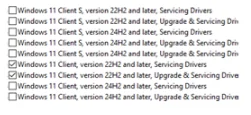
Hello SCCM Community! Having an issue with upgrading devices from 23 and 24H2 to 25H2, I am downloading the newest version in SCCM under Windows Servicing and Feature Upgrades and deploying it to the targeted collection, but nothing shows in Software Center. Upon checking the UpdatesDeployment log, it shows Actionable Updates = 0 in one of the lines, but I'm wondering why WUA is determining updates do not apply to the machine. I believed this could be a GPO restriction but I've confirmed that there are no conflicting GPOs or Registry Edits. Any suggestions? Thanks!2.2KViews1like1Comment
SYSTEM CENTER IMPLEMENTATION & LICENSING Guide
Dear Microsoft Community, Our organization is planning to deploy a comprehensive IT management solution using the Microsoft System Center Suite. The goal is to streamline infrastructure operations, enhance backup and recovery, manage both virtual and physical resources, oversee endpoints, and maintain security and compliance. We need guidance regarding the number and type of licenses required, specifically Client Management Licenses (CML), Server Management Licenses (ML), and System Center Suite licenses.1.3KViews0likes5CommentsAgents will install on 2 DC's but will not get configurations
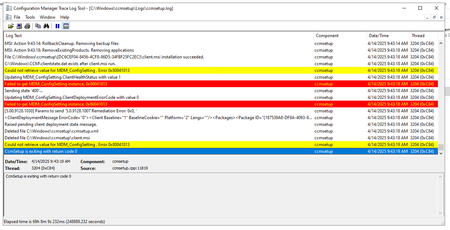
Hello, I have 2 DC's that when i install the MECM agent on them, they will install but will not get the configuration files and when i open the client on the machines its missing the configurations tab and the action tab only has 2 actions. also, on the general tab of the client, the Client Certificate says "none" I know the easy answer is this is a "boundary issue" but it is not. i have other servers with the same IP address range and they have no issue getting the client fully configured. It is not a local firewall issue as i tried turning it off and got the same results. in the ccmsetup logs i am seeing this "Failed to get MDM_ConfigSetting instance, 0x80041013" can anyone please help figure out what is going on here?? thanks in advance546Views0likes7Comments
Windows 11 23H2 Cumulative Updates not shown in WSUS/SCCM
Hi everyone, I want to start rolling out devices in my company with Windows 11 23H2 via SCCM. However, I first need to update the existing 23H2 image with the November 24 cumulative update (KB5046633). In SCCM and WSUS, I can't find the 23H2 product categories for synchronization, but 24H2 is showing up. What could be the reason for this?933Views0likes1Comment
Management point in another domain (no-trust)
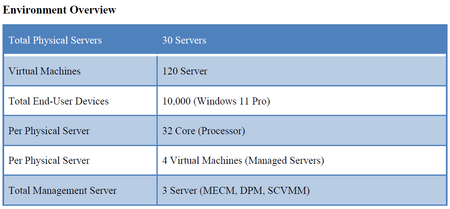
Hi folks, we have a situation where we would need to install a MP, DP and WSUS on a server that is in another domain to manage client that are in that domain. I was planning of installing the roles using a service account, import the CA cert from that domain in the Site server. Will there be any issues? I was reading about the communication between the sites roles and I also notice that the site server have to talk with a domain controller and the management point also have to talk with a DC. Which DC are we talking about and why it should talk with them. Does the MP in the other domain will try to reach the DC in the same domain? Does the site server will try to talk with the DC in the other domain? I know it's a strange one but it is the only way I manage to get to reduce the cost and be able to managed PCs that are on the other domain. Thanks! MathieuSolved1.5KViews0likes2CommentsIssue setting up the cmg connection point role
Hi! I deployed the cmg connection point role (only) to a new site server (MECM 1910 (5.0.8913.1000)), but the connection point just stayed disconnected from a functioning cmg. The log file sms_cloud_proxyconnector.log showed: "missing role certificate. reload in next cycle" every 60s. I ended up installing the mp role as well on the same server, and the cmg cp started working as intended. The certificate store on the site server has now a "cloud proxy connector" certificate under SMS\Certificates, which wasn't there before I installed the mp role. I've removed the mp role and its prerequisites and the cmg cp is still working. We're using "enhanced http" mode for client communication. Anybody else seen this behavior? Is it not supported to install the cmg cp role independently? Thanks!10KViews0likes3Comments
CreateProcessAsUser Error 5 - ServiceUI.exe
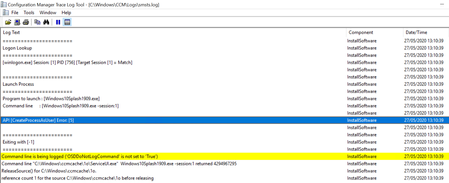
Hi All I've recently updated my SCCM Site version to v1910, since performing this update i've been having issues with my Upgrade Task Sequence. Previously i've had a command line step in the upgrade task sequence to run a manually built "Windows 10 Splash Screen" using ServiceUI.exe to allow the user to install or postpone the upgrade. This has been issue free until the update to SCCM 1910, since then when i try to run the task sequence the following step fails with this error. Has anyone got any idea how i can resolve this? Been racking my brain for days now...13KViews0likes9CommentsCollocating SQL or remote SQL
Hi All Wanted to bounce my thoughts with fellow members. I am about to embark on a mini project for a customer. It's for a small experiment and a new network and infrastructure environment will be created on-premises. Unfortunately for this piece of work cloud is not an option. So a Virtualisation environment, SAN, networking, firewalls will all be procured. I need to build MECM to help deploy a gold image to approx. 100 workstations, there are 2 variances of laptops I need to consider. As its an experiment it also not going to grow. I also need to ensure patching is configured for both clients and the small server estate being built. So my thoughts are to build a new VM with MECM 2006 with the SUP role for WSUS and then use the OSD techniques with TS to build the Windows 10 image using PXE. They will be building a SQL server to host a database for a third party application. My question is as its such a small environment should I put SQL on the same standalone server which will host the Primary site MECM server and SUP or it is doing a lot already and I should move the SQL stuff to a remote SQL rather than collocate? From reading the docs I understand some considerations need to be taken into account to host both WSUS and ConfigMgr DBs within SQL (difference instances?) but because the environment will be so small my personal preference would be to keep it on same box, easier for me to deploy and easier for the customer to manage. The security of the environment is high due to the nature of the customer. What would others recommend and what would your approach be? Many thanksSolved1.2KViews0likes2Comments
Error with HTTPS/PXE on DP
I am running into an error when trying to load the PXE provider on a DP that has been enabled for HTTPS communication utilizing an internal CA. I have followed all the guides for setting up the PKI environment and certificate requirements for this and have everything configured correctly I think on the DP/MP. Troubleshooting steps have included all the normal stuff: remove DP role, verify that WDS was uninstalled, remove RemoteInstall folder and everything else I could find, all to no avail. The issue looks like it doesn't recognize that the DP is configured for SSL, but it clearly is. Listed below is the section of the SMSPXE.log file that is showing the errors. ================= PXE Provider loaded. ===================== Machine is running Windows Longhorn. (NTVersion=0XA00, ServicePack=0) Cannot read the registry value of MACIgnoreListFile (00000000) MAC Ignore List Filename in registry is empty Begin validation of Certificate [Thumbprint 33FB3DF0E2583F55CE8CFBC0B724FF152A83B22B] issued to server.name' Completed validation of Certificate [Thumbprint 33FB3DF0E2583F55CE8CFBC0B724FF152A83B22B] issued to server.name ' Using values from 'AllowedMPs' key. Prioritizing local MP server.name. Client is set to use HTTPS when available. The current state is 1472. Not in SSL. RequestMPKeyInformation: Send() failed. Unsuccessful in getting MP key information. 80004005. PXE::MP_InitializeTransport failed; 0x80004005 PXE::MP_LookupDevice failed; 0x80070490 PXE Provider failed to initialize MP connection. Element not found. (Error: 80070490; Source: Windows) Using values from 'AllowedMPs' key. Prioritizing local MP server.name. Not in SSL. RequestMPKeyInformation: Send() failed. Unsuccessful in getting MP key information. 80004005. PXE::MP_InitializeTransport failed; 0x80004005 PXE::MP_ReportStatus failed; 0x80070490 PXE::CPolicyProvider::InitializeMPConnection failed; 0x80070490 PXE::CBootImageInfo::CBootImageInfo: key= Adding 04900FFC.10 Adding 04900FFF.7 Found new image 04900FFC Loaded Windows Imaging API DLL (version '10.0.18362.1') from location 'C:\Program Files (x86)\Windows Kits\10\Assessment and Deployment Kit\Deployment Tools\amd64\DISM\wimgapi.dll' Opening image file E:\RemoteInstall\SMSImages\04900FFC\WinPE.04900FFC.wim Found Image file: E:\RemoteInstall\SMSImages\04900FFC\WinPE.04900FFC.wim PackageID: 04900FFC ProductName: Microsoft® Windows® Operating System Architecture: 9 Description: Microsoft Windows PE (x64) Version: Creator: SystemDir: WINDOWS Closing image file E:\RemoteInstall\SMSImages\04900FFC\WinPE.04900FFC.wim Found new image 04900FFF Loaded Windows Imaging API DLL (version '10.0.18362.1') from location 'C:\Program Files (x86)\Windows Kits\10\Assessment and Deployment Kit\Deployment Tools\amd64\DISM\wimgapi.dll' Opening image file E:\RemoteInstall\SMSImages\04900FFF\WinPE.04900FFF.wim Found Image file: E:\RemoteInstall\SMSImages\04900FFF\WinPE.04900FFF.wim PackageID: 04900FFF ProductName: Microsoft® Windows® Operating System Architecture: 0 Description: Microsoft Windows PE (x86) Version: Creator: SystemDir: WINDOWS Closing image file E:\RemoteInstall\SMSImages\04900FFF\WinPE.04900FFF.wim Begin validation of Certificate [Thumbprint 33FB3DF0E2583F55CE8CFBC0B724FF152A83B22B] issued to server.name ' Completed validation of Certificate [Thumbprint 33FB3DF0E2583F55CE8CFBC0B724FF152A83B22B] issued to server.name ' PXE Provider finished loading. I need to know how to make it see that it is in HTTPS mode and use that mode to communicate with the MP. I have attached the screen shots of my MP/DP Communication Settings I have also added an IIS cert to my default website on this same server. Any help would be greatly appreciated.5.2KViews0likes0Comments