sharepoint
57 Topics
Locked out of Microsoft 365 Business Tenant
I am the sole global admin for my Microsoft 365 Business tenant and I have been completely locked out due to an MFA issue. I cannot access the admin portal, cannot reset MFA, and cannot verify my identity through the automated system. When I call Microsoft support, the automated system incorrectly states that I am not a global admin and immediately disconnects. All UK support numbers (0800 026 0329, 0344 800 6006, etc.) hang up instantly before reaching an agent. No callbacks have been received despite multiple requests. I now have an open case with the Data Protection team: Microsoft 365 Data Protection – TrackingID#2609030040002192 This situation has caused: Business disruption Financial loss Inability to manage users or services Customer service impact Complete loss of administrative control over our tenant I urgently need escalation to the Data Protection team for identity verification and MFA reset. The normal support channels are not functioning, and I cannot reach a human through any published phone number. Any assistance or escalation from Microsoft moderators or engineers would be greatly appreciated. Thank you.306Views0likes1Comment
Access and SharePoint Integration May Be Broken
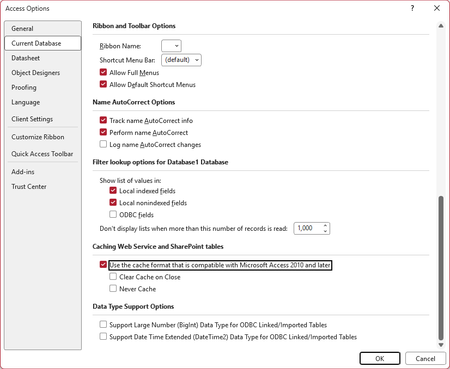
I am posting this here in the hopes that a Microsoft MVP or employee may see it, verify the issue, and report it to the right people at Microsoft. We have a fairly significant LOB application with the front-end hosted in Access and the back-end hosted in SharePoint Online lists. This application has been working well for several years. Sometime in the past few weeks (last known good date was June 23), a change in either Access or SharePoint (or maybe the Windows OneDrive sync client) seems to have broken integration between the products. When the modern cache format is enabled (the default), all SharePoint calculated columns unexpectedly show errors, as shown here (in a fresh database where I imported just one list from our site as a test): Naturally, this completely borks the application, with VB code throwing errors at startup. Using the legacy cache format, or disabling caching altogether, seems to restore functionality--(though this would come at a cost to performance): But there is a major caveat to this. Other functionality is apparently broken. We have straightforward update queries, for example, the hang indefinitely in these modes, rendering this an unacceptable work-around. I have been able to replicate this on several different PCs. Also, on several different SharePoint sites in our tenant. Currently, this is blocking work for us, and we are hoping to see it resolved as soon as possible. If anyone with knowledge of the right people at Microsoft to call attention to this, we would be grateful for any help. I am using the Access forum because the last time I tried to get help from SharePoint Online support for an Access-related query issue using SP list data, they had no idea what I was talking about. (Also, for Access database experts: please do not suggest that we avoid using calculated columns in SharePoint lists. This is a hybrid app with most of our users working with data strictly through SharePoint, and SharePoint views do not support the same features as queries do in Access. Making use of these SharePoint features are essential for these users.) Our Access version: Microsoft® Access® for Microsoft 365 MSO (Version 2607 Build 16.0.20228.20124) 64-bit Thank you in advance for any help.Solved1.2KViews0likes16Comments
Query failure in Windows 11
Hi I just had a new computer at work, and changed from windows 10 to windows 11. I have a query, which compare 2 tables, and add rows in table2 that dont exits in table1. This has been working for years, but now it, only sometimes, double all the rows. INSERT INTO MPS Columns from Table2 (Access linked to sharepoint) SELECT MPS2. Columns from table1 FROM MPS2 WHERE not exists (Select 1 from MPS WHERE MPS.[MPSid] = MPS2.[MPSid]); It compares a unik field MPSid It doubles the rows sometimes, and the MPSid is the same, in the doubled rows Has something changed, or is there a workaround? Best Regards Tony249Views0likes3Comments
New User - Looking for best option to share Access DB front-end using MS Teams
Office 365 Cloud Based - Sharepoint, MS Teams, MS Access - Windows 11 server (not dev.). I'm building a database in Access to store various document names and their corresponding processing instructions. I would like Team/Channel members to have permission-based access through the Teams app to be able to perform certain actions. At lowest level permissions, access means the ability to use the database through Teams to search for a given document name to retrieve the processing instructions for their level. At the highest permissions level, access means being able to make changes to select tables in the database. They may add/mod/delete the Document Names and the corresponding processing instructions. Can someone please help me with it? I don't want to spend too much time building out the database if it can't be used as an information resource for everyone. I would be grateful for any assistance, including a point toward good information that might help a novice like me to understand how to best accomplish this? All other users on our network (also Team members on my Channel) have the same software that I do, including those designated as Team Owners. Please let me know if any needed information is missing. Thanks in advance for your assistance!! :)967Views0likes5Comments
Linking Access to Excel does not work
I have created a simple Access that is connected to a linked table to an Excel file as a data source. I can run the Access without any problems. It accesses the data and everything is fine. But when my colleague wants to run the Access, she gets the following error message "Microsoft Access “C:\Users\User\ [Source Path] .xlsx” is not a valid path. Please ensure that the path is entered correctly and that you are connected to the server where the file is located." We use OneDrive/SharePoint in our company and the colleague has access to the folder where the Excel and Access files are located. But it doesn't work. I think it's the path, as it seems to be local. But I don't understand why. This Access in turn serves as a source for another Excel (the target file). There it has a similar error message: ‘’Microsoft Excel [DataFormat.Error] “ [File Name] .accdb” is not a valid path. Please ensure that the path is entered correctly and that you are connected to the server where the file is located." I can open and run both the Access and the target Excel without any problems. Thanks a lot in advance. I appreciate your help a lot.507Views0likes3Comments
Cant Create form Using 2 x Sharepoint Linked Tables
Hi I have 2 x tables Plant Orders and Plant Orders Details that are linked from Sharepoint. I have a user input Form whereby the Plant Orders Form is the Main Form and Plant Order Details is the Subform. I want to combine the records in these tables as an editable form in a datasheet view. If i use the wizard to create a form between these tables i get the message "one or more of these tables is not related". If i check the relationships on Access it is true there are no links between these tables. However the Master Child Relationship in the database is working correctly as the common field between the two tables - Order Number - updates in the Order Details table on Sharepoint but is not entered in the Subform. Ultimately what i am trying to achieve is a datasheet that can be edited that contains all the records for a particular job without having to scroll through each order number. Any suggestions?Solved400Views0likes7CommentsMultiple similar Tables in you database, is it possible to run queries etc by pre selecting.....
Hi, I have a number of similar linked sharepoint lists in a database, specific to different job sites, is it possible to run queries and forms on a particular job only, by selecting the job I want to work on by using a button / combo box on a menu screen?Solved296Views0likes4Comments
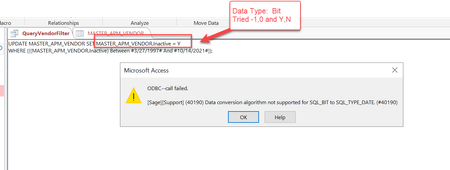
ODBC --call failed. [Sage][Support] (40190) Data conversion algorithm not supported for...
ODBC --call failed. [Sage][Support] (40190) Data conversion algorithm not supported for SQL_BIT to SQL_TYPE_DATE. (#40190) I'm trying to execute an update statement in MS Access using the following, but keep getting an error message: Any ideas what I'm doing wrong here? Appreciate any feedback.Solved579Views0likes6Comments
Patient Tracker and Package Tracker
Hi, I have two excel sheets one in which patient attendance is tracked with which therapist has been attended. Another sheet that says the type of package that the patients has bought. Every day I need to calculate the revenue by each Therapist. I have attached both the sheets, to show the type of data that is being generated from the system. From the software that we use we can generate the patient attendance tracker in excel (csv format). I would like to know can MS Access help me. The attendance sheet needs to be generated at the end of the day every day and needs to uploaded to MS Access, how will I be able to do that Patient Attendance Tracker Patient Name Patient ID Therapist Department Date Shyam Hani 153 Ryaan Occupational Therapy 02/10/2024 Shyam Hani 153 Ryaan Occupational Therapy 04/09/2024 Shyam Hani 153 Ryaan Occupational Therapy 06/09/2024 Shyam Hani 153 Sanju Speech Therapy 02/10/2024 Shyam Hani 153 Sanju Speech Therapy 04/09/2024 Shyam Hani 153 Sanju Speech Therapy 05/10/2024 Shyam Hani 153 Sanju Speech Therapy 06/09/2024 Shyam Hani 153 Sanju Speech Therapy 07/09/2024 Meera Hasan 152 Sanju Speech Therapy 09/10/2024 Meera Hasan 152 Sanju Speech Therapy 09/10/2024 Meera Hasan 152 Sanju Speech Therapy 10/08/2024 Meera Hasan 152 Sanju Speech Therapy 11/09/2024 Meera Hasan 152 Sanju Speech Therapy 11/09/2024 Meera Hasan 152 Sanju Speech Therapy 11/10/2024 Meera Hasan 152 Sanju Speech Therapy 11/10/2024 Meera Hasan 152 Sanju Speech Therapy 12/10/2024 Dev Mani 112 Sanju Occupational Therapy 01/10/2024 Dev Mani 112 Sanju Occupational Therapy 02/10/2024 Dev Mani 112 Sanju Occupational Therapy 04/10/2024 Dev Mani 112 Sanju Occupational Therapy 08/10/2024 Dev Mani 112 Sanju Occupational Therapy 09/10/2024 Dev Mani 112 Sanju Occupational Therapy 10/09/2024 Dev Mani 112 Sanju Occupational Therapy 10/10/2024 Dev Mani 112 Ryaan Occupational Therapy 11/09/2024 Dev Mani 112 Ryaan Occupational Therapy 11/10/2024 Dev Mani 112 Ryaan Occupational Therapy 12/09/2024 Dev Mani 112 Ryaan Occupational Therapy 01/10/2024 Dev Mani 112 Ryaan Occupational Therapy 04/10/2024 Dev Mani 112 Ryaan Occupational Therapy 08/10/2024 Dev Mani 112 Ryaan Occupational Therapy 10/10/2024 Patient Price Tracker Patient Name Therapist Patient ID Package From Package To Package Price Package Shyam Hani Sanju 153 Wednesday, 2 October 2024 Wednesday, 4 September 2024 100 Speech Therapy Shyam Hani Ryaan 153 Wednesday, 2 October 2024 0 Occupational Therapy Meera Hasan Sanju 152 Wednesday, 9 October 2024 Saturday, 12 October 2024 200 Occupational Therapy Dev Mani Sanju 112 Tuesday, 1 October 2024 Tuesday, 8 October 2024 300 Occupational Therapy Dev Mani Ryaan 112 Saturday, 27 July 2024 Tuesday, 27 August 2024 400 Occupational Therapy758Views1like8CommentsVBA XMLHTTP Post Error 2147024891 (0x80070005) acces denied
I'm using a Microsoft Access application where I'm doing some POST Rest api to sharepoint httpObject As New XMLHTTP httpRequest = "<?xml version='1.0' encoding='utf-8'?>" & _ "<soap:Envelope xmlnsxsi='http://www.w3.org/2001/XMLSchema-instance' xmlns:xsd='http://www.w3.org/2001/XMLSchema' xmlns:soap='http://schemas.xmlsoap.org/soap/envelope/'>" & _ "<soap:Body>" & _ "<GetCurrentUserInfo xmlns='http://schemas.microsoft.com/sharepoint/soap/directory/' />" & _ "</soap:Body>" & _ "</soap:Envelope>" soapAction = "http://schemas.microsoft.com/sharepoint/soap/directory/GetCurrentUserInfo" httpObject.Open "POST", servei_URL, False httpObject.setRequestHeader "Content-Type", "text/xml; charset=utf-8" httpObject.setRequestHeader "SOAPAction", soapAction httpObject.setRequestHeader "Connection", "Keep-Alive" httpObject.Send httpRequest This post method has an error result, because acces is denied. Before Internet Explorer was deactivated, this works perfectly, the application had the credentials and get some response. (Before, an Internet Explorer window was opened to log in Sharepoint. Now in these window appears a message like Internet Explorer is no longer available for Sharepoint) Now, I can't send the credentials into post method I tried to use WinHttpRequest and set the credentials into: Objecte_HTTP.setCredentials "domain\user", "password", 0 But I get a response within "Sign in to your account" PD: I have an active session logged in to Egde428Views0likes0Comments