sharepoint server 2019
21 Topics
SharePoint 2019 Home Page - Search Query Returns 401 Unauthorized
Hello, When working with SharePoint 2019, executing a Search query from the SharePoint Home/Start Page (i.e., sharepoint.aspx) results in 401 unauthorized. This only occurs when setting a Global Search Center URL (which is part of the requirements). See https://docs.microsoft.com/en-us/sharepoint/sites/enable-sharepoint-home-page-in-sharepoint-server-2019-farms for background. We have two hosts: https://home.domain.com https://my.domain.com The former hosts the Global Search Center and the latter hosts the SharePoint Home Page (sharepoint.aspx). If you run a search query, the following request is sent (supposing I search for the value "test"). https://home.domain.com/sites/search/_api/search/suggest?querytext='test'&inumberofquerysuggestions=3&culture=1033&inumberofresultsuggestions=0&fprequerysuggestions=true&fhithighlighting=true&fcapitalizefirstletters=false&fprefixmatchallterms=false&showpeoplenamesuggestions=false If I don't have a Global Search Center URL specified, then the search api query shown above will be sent to the MySites host and all is well. However, in this cross-domain scenario, where my.domain.com invokes the search api call on home.domain.com, it results in a 401 unauthorized response. My OPTIONS request (prior to the GET call) does pass with a 200 OK, so this doesn't appear to be CORS related on the surface; not dismissing any explanations though 🙂 Any advice on this? Have you successfully set this up and seen it work - mysites host calling the search api on a different host (due to having Global Search Center configured) through the SharePoint Home Page (sharepoint.aspx)? Thanks!Solved2.1KViews0likes1CommentSharePoint Server 2019 Anonymous users sporadically prompted for credentials
Hello, I'm having a weird behavior when accessing a public site with anonymous access on my SharePoint Server 2019 Farm. I sporadically get asked for my credentials to access the page and the times I don't get asked it just works as intended. I managed to find out that the times I get asked for credentials there's a cookie present with the name WSS_KeepSessionAuthenticated but I don't quite get why it's only showing up from time to time. Do you have any idea why this could be happening? Thank you.596Views0likes0Comments
Uploading files to SharePoint
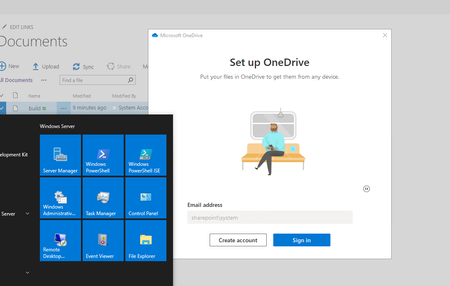
Hello. I'm very new to SharePoint development. I have managed to setup a SharePoint 2019 environment on one of my servers. I've setup a site. Now I need to upload files to this sites document folder (a lot of them, including folders). Now the problem is, how do I upload folders etc. to my local sharepoint site? I can't use OneDrive because there's no actual account I can login into (or can I somehow?). How can I still transfer folders to my site? Prompt says "Sign in with your SHAREPOINT\system account, if prompted.". But this doesn't work.1.6KViews0likes2Comments
Theming for classic mode sites in SP2019 not working for visitors
Hello, we are migrating our SP2016 sites to a new SP2019 OnPremise farm. We use our own Masterpage, css, spcolor and spfonts files for custom theming. All works fine in SP2016. But when we test our sitecollections in SP2019, not all users sees our company theme. Some users (visitors with small range of permissions) see some parts of our theme(Masterpage and css) but not the colors set by spcolor file. The tiles on the site content page are still in blue color, not in our company green. One cause could be our own permission level for visitors, in that we have removed the "Browse Directories - Enumerate files and folders in a Web site using SharePoint Designer and Web DAV interfaces." level for some reasons. If I add this permission to our visitor permissionlevel, they will see our complete company theme. Libraries for Masterpages and Themes are readable for all users. Any clue what can be the cause? Thanks, Lutz545Views0likes0Comments
Redirect modern search page to classic search center page in SharePoint 2019
Scenario: Consider you have a modern communication site in SP2019 where users perform search. Search query redirects to the modern search page whose look and feel is not the same as classic search page. Few users may not like the new look and feel. You are looking for ways to customize this new look and feel for modern search page. Cause: This is a by design behavior as you cannot customize the modern search page for modern sites in SharePoint 2019. Refer: https://docs.microsoft.com/en-us/sharepoint/search/differences-search-2016-2019 Workaround: Consider you have a classic search center site collection and are exploring options to redirect the search request from this modern search page to the classic search page. You can use below redirection using URL rewrite tool in IIS to achieve the goal. Modern Search page: http://Sharepoint/_layouts/15/search.aspx/sitefiles?q=document Classic search page: http://sharepoint/sites/search/Pages/results.aspx?k=document <rewrite> <rules> <clear /> <rule name="Modern to Classic" enabled="true" patternSyntax="Wildcard" stopProcessing="true"> <match url="*_layouts/15/search.aspx*" /> <conditions logicalGrouping="MatchAll" trackAllCaptures="true"> <add input="{QUERY_STRING}" pattern="*q=*" /> </conditions> <serverVariables> <set name="QUERY_STRING_A" value="{C:2}" /> </serverVariables> <action type="Redirect" url="http://SharePoint/sites/search/Pages/results.aspx?k={QUERY_STRING_A}" appendQueryString="false" redirectType="Found" /> </rule> </rules> </rewrite> Note: Please consider configuring URL rewrites using below article whether its supported or not by Microsoft. https://support.microsoft.com/en-us/office/supportability-of-rewrites-and-redirects-in-sharepoint-2016-2013-2010-and-2007-a74a19f2-a59a-4b39-8be4-ce63e50139fa2.7KViews0likes1Comment
RTL support in Sharepoint 2019 server communication site search page
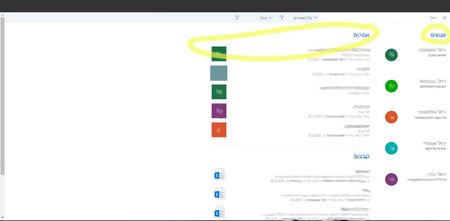
Hi, We built a communication site collection on Sharepoint 2019 Server platform. The site collection's langauage is Hebrew. The language of the browser and the operating system is Hebrew, too. All pages are right-to-left, like a mirror display of the LTR version, except for the search results page: People results are displayed before sites and documents results (in RTL display, they should be located on the left side of the screen). "Show all" link at the serach results section is displayed at the right side instaed of the left side, under the section title. Result thumbnail picture is located on the left side of the text (should be on the right). What can cause this problem? Is there a known issue with RTL support on sharepoint OOTB search results page? Thanks, Rumi1.6KViews0likes0CommentsAdding users to SharePoint 2019 group giving wrong user.
Dear support, The users are getting removed from the SharePoint group automatically on sundays. When adding the removed user back to the SharePoint site it is not taking the correct user and it is adding different user. When readding the user back, the people picker is showing the correct user, but after clicking on share it is shared to different user. We need your urgent support.1KViews0likes1CommentSharePoint display error message while opening home page
Hi Sir We have migrated sharepoint 2013 foundation to Sharepoint 2019 enterprise version and the migration went on well and there is no error message. But while opening the sharepoint, it is displaying the error message as shown below. Sorry, something went wrong Could not load file or assembly 'Havivi.SharePointVideoPlayer, Version=1.0.0.0, Culture=neutral, PublicKeyToken=87a631227aaa0363' or one of its dependencies. The system cannot find the file specified. Technical Details Troubleshoot issues with Microsoft SharePoint Foundation. Correlation ID: 5c14869f-c8dc-e055-d97d-8b244621edd0 Date and Time: 22/10/2020 12:27:17 ------------------------------------------------------------- Request you kindly go through and suggest the resolution1.9KViews0likes2Comments