sharepoint online
64 Topics
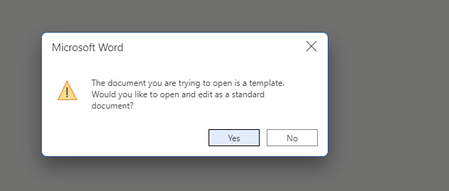
popup appear when create new document after Enable content type in document library
I have created document library and enable content type in that document library. But, after this when I create any document this kind of pop up appears. is there any way to get rid of it. Plus, I want default excel,notebook,etc.. Menu's back.1.1KViews0likes2Comments
SharePoint Online - Issue with REST API call on a List exceeded the threshold limit
I have a List in a SharePoint Online site collection which has exceeded 5000 items. I have indexed the columns that are needed in the REST API filter query during list creation itself. Below is the Rest API query I use to fetch the data from the list. https://people1v02.sharepoint.com/sites/spfxqaw44/_api/web/lists/getByTitle('Announcements')/items?$top=4999https://people1v02.sharepoint.com/sites/spfxqaw44/_api/web/lists/getByTitle(%27Load%27)/items?$filter=Title&xsdata=MDV8MDF8fGEyZmI0MWMzNTI0YjRkZjQyMjFlMDhkYWQ4ZWJmM2Q4fDVmMDdlNTU1ZDk5ODQ5MDBiNWM0OTAzZmFlMzA2MjgzfDB8MHw2MzgwNjA4MDUxNDYyODg2NzB8VW5rbm93bnxWR1ZoYlhOVFpXTjFjbWwwZVZObGNuWnBZMlY4ZXlKV0lqb2lNQzR3TGpBd01EQWlMQ0pRSWpvaVYybHVNeklpTENKQlRpSTZJazkwYUdWeUlpd2lWMVFpT2pFeGZRPT18MXxNVFkzTURRNE16Y3hNemszTWpzeE5qY3dORGd6TnpFek9UY3lPekU1T2pjMllUQTBNV0U0TFdGa1pUQXROR1F5T0MxaVkyUTBMV1ZpTVdFMFl6QTJPVFF6Wmw5a1pUSmhaalE0T1MwMlpXSTNMVFJqWXpNdFlURmpZeTFrT0RJeE5UUXlORGRoTkRSQWRXNXhMbWRpYkM1emNHRmpaWE09fDMyZGZjY2RiMmU5ZTRkNGQyMjFlMDhkYWQ4ZWJmM2Q4fGUxNWM3MGM5MmFmOTQ4MmM5ZDkxNzFhMmEzMTI5OGYz&sdata=eXFZS28xbGZvcCtOWmN0MW5yZjBvMjNZWFdVdURMakxRVTNEWEwyN29tRT0%3D&ovuser=5f07e555-d998-4900-b5c4-903fae306283%2Cnagarajan.muthukumar%40eleviant.comhttps://people1v02.sharepoint.com/sites/spfxqaw44/_api/web/lists/getByTitle('Announcements')/items?$top=4999 &$filter=(Expires ge '2022-12-06T18:30:00.000Z') and (RecordDate le '2022-12-06T18:30:00.000Z') and IsActive eq 1 and WorkflowCompleted eq 1 &$select=Id,Title,Expires,ShortDescription,Created,RecordDate,Attachments,LangTrans&$expand=AttachmentFiles&$orderby=RecordDate desc The above query gave me an error as threshold limit exceeded. So I have created a simple list and made a API call as below, https://people1v02.sharepoint.com/sites/spfxqaw44/_api/web/lists/getByTitle(%27Load%27)/items?$filter=Title&xsdata=MDV8MDF8fGEyZmI0MWMzNTI0YjRkZjQyMjFlMDhkYWQ4ZWJmM2Q4fDVmMDdlNTU1ZDk5ODQ5MDBiNWM0OTAzZmFlMzA2MjgzfDB8MHw2MzgwNjA4MDUxNDYyODg2NzB8VW5rbm93bnxWR1ZoYlhOVFpXTjFjbWwwZVZObGNuWnBZMlY4ZXlKV0lqb2lNQzR3TGpBd01EQWlMQ0pRSWpvaVYybHVNeklpTENKQlRpSTZJazkwYUdWeUlpd2lWMVFpT2pFeGZRPT18MXxNVFkzTURRNE16Y3hNemszTWpzeE5qY3dORGd6TnpFek9UY3lPekU1T2pjMllUQTBNV0U0TFdGa1pUQXROR1F5T0MxaVkyUTBMV1ZpTVdFMFl6QTJPVFF6Wmw5a1pUSmhaalE0T1MwMlpXSTNMVFJqWXpNdFlURmpZeTFrT0RJeE5UUXlORGRoTkRSQWRXNXhMbWRpYkM1emNHRmpaWE09fDMyZGZjY2RiMmU5ZTRkNGQyMjFlMDhkYWQ4ZWJmM2Q4fGUxNWM3MGM5MmFmOTQ4MmM5ZDkxNzFhMmEzMTI5OGYz&sdata=eXFZS28xbGZvcCtOWmN0MW5yZjBvMjNZWFdVdURMakxRVTNEWEwyN29tRT0%3D&ovuser=5f07e555-d998-4900-b5c4-903fae306283%2Cnagarajan.muthukumar%40eleviant.com ne 'Load Test'&$top=4999 Generally the return data count should be 4999 but I am able to get only 4970 items as response data. Also this response count is unpredictable, for some other lists I got response count less than 4000. Any idea on this inconsistent behavior?6.7KViews0likes2Comments
Can SPFX field customizer be applied to managed metadata type columns?
I have created a spfx field customizer which works fine with all column except managed metadata type column. Is there any limitation to that or there is some issues with my code? @NanddeepNachan Do you have any idea on this?2.4KViews0likes5CommentsPNP xml Template to multiple site collections (CSV)
Hi all, im a little lost here. I have created a template in xml format from an existing site collection (source site) in our SharePoint Online tenant which I have deployed to another site collection that works fine. However I have multiple site collections (alot) which I want to deploy to with the same template. Is it possible to create a CSV file to read from with the site collections I want the template applied too, run the PS script and one by one via script deploy the template? this would help alot from me doing this manually. Cheers1KViews0likes1CommentCSOM SystemUpdate() cannot update Editor field
In a SharePoint Online Document Library I've a file that is in published status (version x.0). I am updating various fields of this file with the listItem.SystemUpdate() command. I need this sort of update because is the only one that can be used on a published file that not increase the version. (UpdateOverrideVersion return an error on published documents) When I try to update the Editor fields this is not updated. (_currentItem is a File object) var user = _ctx.Web.EnsureUser(publishinfo.currentUser_email); _ctx.Load(user); _ctx.ExecuteQuery(); _currentItem.ListItemAllFields["Editor"] = user; _currentItem.ListItemAllFields.SystemUpdate(); _ctx.ExecuteQuery(); All other fields of the item can be updated. "Editor" and "Modified" are the only two that are not working. (Author for example is correctly updated in this way) Any idea? Thanks2.3KViews0likes1Comment
SharePoint Online - Add custom field to list settings page
Is it possible to add a link to an external page to configure app-specific settings for a list to a SharePoint List settings page? This is for SharePoint Online using a provider-hosted SharePoint Add-in. I tried using the directions provided here, which could achieve exactly what I'm looking for, but it doesn't work it seems: https://www.c-sharpcorner.com/article/add-custom-action-to-listlibrary-settings-in-sharepoint-using-visual-studio-fea2/#:~:text=Click%20Custom%20Action%20menu%20in,Click%20OK..955Views0likes1Comment
DLP Now allowing images or Js files
Our organization has enabled DLP and once the DLP is enabled, my SPFX web parts and extensions aren't working. If I log in using my company device, the DLP message doesn't appear and no issue with the custom SPFx extension or web parts. The Extension uses <Img src=""> and the image is not displayed if accessed using a personal device. If the URL is outside SharePoint, it works. Similar case with the web part where there are files stored in SiteAssets and if DLP gets triggered it's not able to either show the images or load any of the referred js files.. What can I do now?517Views0likes0Comments