sharepoint online list
13 TopicsRegarding SharePoint list data storage
Hi Team, Que 1: I have created SharePoint list and I would like to see that data in SQL server where it stored? How I can view that? Or else anyone can you please tell me How I can save into SQL server. Que 2: I have created employee list in SharePoint I would like to use the same list data into my ASP.NET Core web application. How I can integrate SharePoint to .Net application.1.4KViews0likes2Comments
HELP WITH VALIDATION IN SHAREPOINT LIST (IF, AND, OR)
Hello guys, i need some help coz im triyng and burn my brains out and i cant figure out whats going on. i have a need: if [estado]= "concluido" > turn into mandatory columns [Diagnostico Final] and [Atribuído a] and if [estado]= "Executando Trabalho" or "em transito" or "em Pausa" > turn mandatory only the column [Atribuido a] and if [estado] = "Aguardando Atribuição" or "Cancelada" then do nothing... here's the formula im triyng to apply =IF(AND([Estado]<>"Aguardando Atribuição";[Estado]<>"Cancelada");IF([Estado]="Concluído";IF(AND([Atribuído a]<>"";[Diagnóstico Final]<>"")TRUE;FALSE);IF([Atribuído a]<>"";TRUE;FALSE));TRUE)678Views0likes0CommentsNon-developer here, how do I write SharePoint Calculations for:
I am counting number of days a project is On Hold (a yes/no column) with calculated column: Hold Days =DATEDIF([Hold Begin Date],TODAY(),"d") My question - When project is not On Hold, I want "d" to display "0" Continuing the story above, when the Hold End Date is selected the Hold Days should only display the total days between Hold Begin Date and Hold End Date (right now it still accumulates days). Some background, I'm a writer rarely an excel user or formula developer. Please, explain what to do and why so I learn; looks like I may be "writing" more formulas (or begging for your help!). Thank you so, so much!Solved1.4KViews0likes2Comments
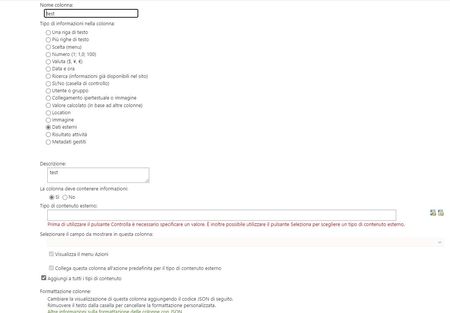
External data in list column
hello everyone, I'm trying to connect a column of a SharePoint list with a column of an Excel file in OneDrive to have the list of social names of customers, I arrived at the screen that I attach but I do not know if it can be done and in case how. Can anyone help me?1.4KViews0likes2Comments
Deploy SharePoint List from one SharePoint Site to Another SharePoint Site
Hello everyone, I'm using SharePoint as a backend in the Power Apps Canvas App. I'm having 2 SharePoint sites let's say DEV_Site and PROD_Site which will have the same structure i.e. PROD_SIte will be the exact replica of DEV_Site (Just to distinguish Development and Production environment). Now, my concern is how I can deploy all the lists from DEV_Site to Prod_Site once I made appropriate changes to the lists of DEV_Site. The ultimate goal is to Update existing lists and Add new lists in the PROD_Site based on DEV_Site. Can anyone know how I can do this? Any suggestion or solution will be highly appreciated.850Views0likes0Comments
SharePoint online Column Formatting
Hi I have a sharePoint multiline column (rich text enabled) in a library and using flow I have added data as: <div>item1</div><div>item2</div>.. When I view the library I can see the items arranged vertically (as I want) but the view gets truncated after the 4th item, otherwise the row height would get too large. Is it possible, on hover over that all the items in the column field can be shown- maybe in a custom card or something else. I've added divs around every item but havent added a container div as this gets difficult to implement through flow, especially when I need to update and maintain previous data. I've looked at MS docs but there is no example where an outer div is not used. - https://docs.microsoft.com/en-us/sharepoint/dev/declarative-customization/column-formatting#get-started-with-column-formatting986Views0likes0Comments
How does a SharePoint Folder link to a SharePoint Online List
Hi I am building a Power BI dashboard that links to a SharePoint Folder. I have added the Approve and Reject option for a document. I was hoping to pull this data into my PBI dashboard. So I am using the SharePoint Folder connect or to get this, however this does not contain the Accept or Reject status - so I am assuming this stored in the Documents section of a SharePoint Online List. But I don't see how these two entities link together See attached screen shots of what I am trying to do Any thoughts would be greatly appreciated IG1.2KViews0likes0CommentsGet Create by name not being retrive
I'm trying to format a list view via JSON, and am trying to retrieve the name of the person who created the new entry via the below and nothing works, even with different capitalizations. Any ideas? "[$Author.title]" "[$Author.DisplayName]" "[$Author.Name]" Thank you Pepe T789Views0likes0Comments
Update field value based on lookup field value selection in MS FLOW in SharePoint online
Hi All. Can anyone please help me here? New to MS FLOW. I have list A: Having Empname, Plant Name(is lookup field), and ZoneManager (is hidden in new form)fields. List B: Having Plant, ZoneManagers. when a user submits List A form, by filling the Empname and Plant name entry will be added to list A and workflow will be triggered and Zone Manger will be auto-updated by picking the respective field ZoneManger name from ListB, this is working fine in SharePoint workflow. Example: List B : Plant ZoneManagers INDIA -- XXXName USA-- YYYName RUSSIA--ZZZName When the user enters in LIST A: Empname as CHRIS and Plant as the USA and saves, then ZoneManager field has to update as YYYName How to achieve this in MS FLow, Any suggestions, please? Thanks in Advance.