sharepoint 2016
53 Topics
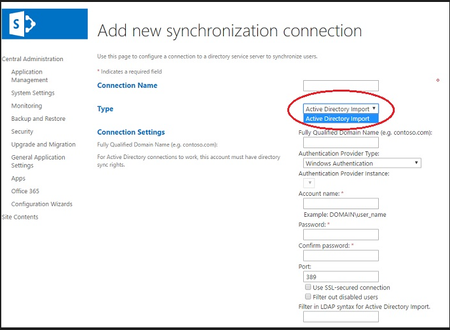
BDC choice does not appear in Type dropdown on the Create New Connection in SharePoint 2016 ups sync
There is no type option for Business Data connectivity in User profile AD Sync connection in SharePoint 2016. Is there any workaround to enable the Business Data connectivity in connection type?364Views0likes0Comments
SharePoint (2016) subsite only visible in Internet Explorer and not in current browsers
Hello, I'm not sure what happened or where to begin troubleshooting but it seems like one of my subsites has been reverted to an older UI maybe? Lost its CSS? Because when I try to access the site in a current browser (Edge, Chrome), it looks like there's no styling applied to the page but when I access it in Internet Explorer, the page works and everything looks normal except it looks like an older version or something of that sort... I found an image online that someone else posted and seemed to have the same issue but there was nothing stated on how to really fix. Please help?! Thanks681Views0likes0Comments
Sharepoint 2016 Farm 403 Forbidden Error and Refreshing Page or Clear cache will solve the issue
Sharepoint 2016 Farm 403 Forbidden Error and Refreshing Page or Clear cache will solve the issue.Its quite frequent for the user. We are using ADFS Server as a middle one for authentication. There is no error mentioned for the problem facing Users neither in ADFS Nor In Sharepoint 2016 Kindly help us to solve the issue. Thanks & Regards Gopakumar1.4KViews0likes0Comments
Sharepoint Powershell View filter updated, but list displays with not items
0 In Sharepoint 2016 powershell, When I used date as filter and ran the script the view filter is updated. But the view is not displaying no data. But after i ran the script, open the view and just SAVE it WITHOUT doing any changes, the data SHOWS up. I tried the filter with a text field and ran the script, the view is filter is updated and data is showing without opening the view and saving it. Any ideas why the date field filter is not showing the data empty though it has the filter value updated? Add-PSSnapin Microsoft.SharePoint.PowerShell -ErrorAction SilentlyContinue $ListName = "Tracker" $ViewName = "PrevMonth" $w = Get-SPWeb https://www.testtest.com/subsite" $l = $w.Lists[$ListName]; $view = $l.Views | ? { $_.Title -eq $ViewName } $viewQuery="11/20/2021" if($view -ne $null) { $view.Query = $ViewQuery $view.Update() $l.Update() #Send message to output console write-host "View Updated Successfully!" -foregroundcolor green } else { write-host "Could Not find: " -foregroundcolor red }Solved2.5KViews0likes1CommentSP 2016 On-Premise Document Library New button gives error
hi all we have SP 2016 on-pemise version and we use infopath forms a lot. we had some updates applied to the server and since then when users tried to add a new form by clicking NEW button on the library opens up upload dialog instead of opening infopath server. I am very sure this is because of the windows update but the update is a permanent change and cannot reverse it, any help is greatly appriciated.!1.1KViews0likes0Comments
Cannot SET AUTO_UPDATE_STATISTICS and AUTO_UPDATE_STATISTICS_ASYNC status to FALSE.
Hi, Have been using SharePoint 2016 with SQL Server 2016. For compliance issues, we need to set SET AUTO_UPDATE_STATISTICS and AUTO_UPDATE_STATISTICS_ASYNC status to False. Whenever we set to false its automatically back to True after certain time. We don't have any SQL Server Agent Jobs running. My DBA suspect this could be due to some hardening settings at SharePoint. If anyone knows the solution, Please advise how to resolve.673Views0likes0Comments
How to disable/bypass/hide edit form that pops up after uploading new file in Document Set (SP 2016)
Hi, I have created a Document Set Content Type named "Contract" with 2 shared columns (Start Date, End Date). I have also created a Document Library named "Contracts" which use this content Type. I have created a new contract "Contract 1" based on the "Contract" Content Type then I have uploaded a word document within the "Contract 1" Document Set, then a Edit form popped up asking for updating the Start Date and End Date properties but these 2 properties have already inherited the values of the document set 's properties and I dont want values of these properties to be updated at the file level (I want them to be always the same as the values of the Document Set 's properties) So I am asking you if there is a way to prevent the user from changing the properties values of the uploaded document, so that they always stay the same as the ones inherited from the document set which it belongs to. Thanks, Regards920Views0likes0CommentsSite Usage Analysis for a List on Sharepoint 2016
We are having SP 2016 and we need to see the trend usage of lists on SP2016.List File tab missing Popularity Trend and Have seen the article saying that enabling Cross site Publication site feature will show the Popularity trend button back. We could enable Cross-Site Publication feature but is there any impact on doing that on a production site? Is there any Powershell Script to get the usage stats of a particular list on SP 2016? Kindly advise Gops593Views0likes0CommentsSharePoint 2016 view filter by subsite name
Hi, I have a list webpart who give project info. Title of the project Description of the project. This list is create at the site collection level. When I fill the new project forms one elements is create in this list. A workflow start at the creation and a subsite is create for the new project with a subsite template. I have create another list at the site collection level where I have a workflow who start at the creation too. This one generate user access for the subsite. The goal is to make the work more easy for the user who create the project. So I have create a wikipage at the site collection level who are an import of the list use to create the project. I have create this page in SPDesigner 2013 and via designer I have export this page like custom webpart. Like this, I could add this custom webpart on a wikipage create in the project subsite. Like this custom webpart is linked with the list at the site collection level, if I add elements on it, the list is updated at the site collection level and vice versa. That's work great, but this kind of link view doesn't have all list properties Like Connection option. So when I generate a new subsite project, my wikipage present all project and all user access. My goal is to present on each wikipage in each subsite, only the information in link with this project. Ex: one line with the name of the project and the description where the name of the project is the name of the subsite. So If i create a project name test5, my workflow create a subsite name test5 with the URL http://sharepointxxx.com/sites/project/test5 I would like than the webpart present only the elements in link with project title test5. I have find than I could create a view filter with the active user properties. When I check the code of the page I have this query. I would like change "UserID" for Site title. But each test I have make give an error or no result in the list. <Query> <Where> <Eq> <FieldRef Name="Author"/> <Value Type="Integer"> <UserID Type="Integer"/> </Value> </Eq> </Where> </Query> Actually in the view forms I use a filter 'create by' with the connected user properties between [ ]. Any hint is welcome.Solved1.6KViews0likes2Comments