security
5876 TopicsBattery swelling causing physical damage or short circuits
My laptop battery has swollen significantly, causing noticeable physical damage to the device and making it difficult to close or use properly. I am concerned about potential short circuits or safety hazards and need advice on how to handle the situation safely, including steps for proper disposal and replacement of the swollen battery.12Views0likes0CommentsPersistent POST (Power-On Self Test) issues preventing boot
I'm facing persistent POST issues that prevent my computer from completing the Power-On Self Test, resulting in failure to boot properly. Despite multiple attempts to troubleshoot, the problem persists, and my system gets stuck during POST, making it difficult to access the operating system or perform any further troubleshooting steps.6Views0likes0Comments
GPU or integrated graphics card malfunction causing graphical artifacts or black screens
My PC is experiencing severe graphical issues, with distorted screen artifacts, flickering lines, and sudden black screens that occur randomly during both gaming and regular desktop use. I have already tried updating my GPU drivers, reseating the graphics card, and testing different monitors, but the problem persists, suggesting either a failing dedicated GPU or an issue with the integrated graphics.6Views0likes0Comments
Inability to detect or initialize internal storage devices (SSD/HDD)
My Windows 11 system fails to detect or initialize my internal SSD and HDD, with drives not appearing in File Explorer or Disk Management even after rebooting and checking cables. I have already updated chipset drivers and tried different SATA ports, but the storage devices remain unrecognized, preventing me from accessing my files or installing new software.6Views0likes0CommentsBricked embedded Controller (EC) or Super I/O chips
my embedded controller or Super I/O chips being bricked on Windows 11, which causes hardware malfunctions and system instability. Despite attempts to update or reinstall drivers, the chips remain unresponsive, preventing proper hardware operation and leading to system errors that are difficult to resolve.11Views0likes0CommentsWindows 11 PC Unexpected system crashes
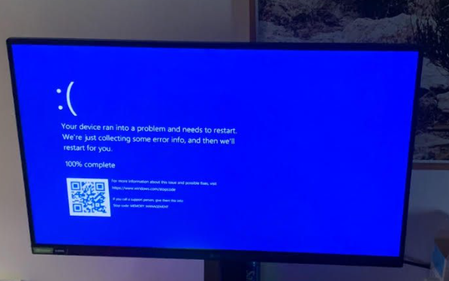
My Windows 11 PC experiences unexpected system crashes, often happening without warning and causing the system to shut down abruptly. These crashes occur randomly during different tasks, and I have tried updating drivers and checking for updates without success, making it difficult to identify the cause or find a reliable solution to prevent the crashes.16Views0likes2CommentsToken Limit Exceeded? What's Actually Going On and What to Do About It ?
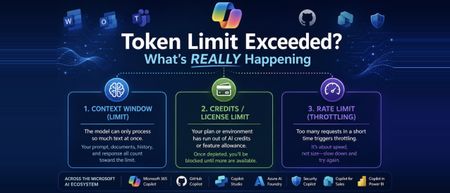
Hi All, Based on some recent experience across the organisation with token limit issues, I wanted to put my thoughts down and actually dig into what's happening under the hood, rather than just chalking it up to "we need a bigger plan." If you work anywhere near the Microsoft ecosystem these days, you're probably touching more AI tools than you realize. Copilot in Word and Excel, GitHub Copilot while you code, Copilot Studio if you're building agents, maybe Security Copilot or Copilot for Sales depending on your role, and increasingly Azure AI Foundry if your team is building anything custom. I work across a good chunk of this stack day to day, and at some point, almost everyone runs into the same wall: "Token limit exceeded." "You've reached your usage limit." "Upgrade to continue." The first instinct is usually to assume you did something wrong wrote too much, uploaded too big a file, or just need a fatter subscription. Sometimes that's the actual story. But honestly, often, that error message is standing in for three completely different problems that all happen to look identical from the outside. One is about how much text a model can physically process at once. One is about your license or credits running dry. And one has nothing to do with size at all it's just about how fast you're sending requests. Once you know which of these three, you're dealing with, the fix becomes obvious. Until then, "upgrade your plan" feels like the only lever you've got even when it isn't. This post walks through what a token is, why Microsoft's various Copilots each handle this differently, and what habits genuinely cut down on these interruptions instead of just throwing money at the problem. Part 1: So What Is a Token, Really? A token isn't a word, and it isn't a character it's somewhere in between. It's the small chunk of text a model's tokenizer breaks your input into before it can do anything with it. Take a word like "unbelievable." A tokenizer might split it into three pieces something like "un," "believ," and "able." Short, everyday words usually come out as a single token. But code, technical jargon, acronyms, and non-English text tend to fragment into a lot more tokens than you'd guess just by looking at the word count. This is why every AI tool has a ceiling on how much it can handle in one go, and that ceiling isn't measured in words or characters it's measured in tokens. Your prompt, any documents or emails it pulls in as context, the back-and-forth history of your conversation, and the response itself all draw from the same pool. Once that pool runs dry, something has to give: the tool truncates, rejects the request outright, or quietly summarizes older context to make room. The part that trips people up: token count doesn't map cleanly to word count. A short, dense paragraph full of code or acronyms can eat up more tokens than a much longer plain-English message. Part 2: Three Different Limits, One Confusing Error Message This isn't always obvious upfront, even to a lot of admins managing these tools: "token limit exceeded" is really a stand-in phrase for three separate limits, and they don't behave the same way. This isn't unique to Microsoft either every major AI platform bundles these same three things behind similarly vague error messages. Microsoft's stack just makes a good case study because so many of us touch multiple pieces of it in the same week. The context window is the ceiling on how much text a specific model can process in a single request everything from your prompt to retrieved documents to chat history. This is tied to the model itself, not your subscription. Swap from one model to another inside the same tool, and this ceiling can move without you doing anything differently. Your license, credits, or feature allowance is a completely separate thing. This is what Microsoft 365 Copilot plans track through AI credits and feature limits, and it's what Copilot Studio measures through Copilot credits at the environment level. A single action summarizing an inbox, generating an agent response, running an analysis deducts from this pool regardless of how small your actual prompt felt. Run out, and you get blocked, even if you're nowhere near any context window limit. The rate limit is about speed, not size. Copilot Studio, for instance, enforces quotas measured in requests per minute or per hour to keep the system stable under load. Send messages too quickly, which happens easily with automations, flows, or bots, and you can get throttled even with a tiny prompt and plenty of credits left. The reason this matters: a plan upgrade only ever fixes the second one. If you're actually running into the model's context window or getting rate-limited, paying for a bigger license won't change anything, and that mismatch is exactly where most of the frustration comes from. Part 3: How This Plays Out Across the Microsoft AI Stack The Microsoft ecosystem isn't one AI tool wearing different outfits it's genuinely several different systems, each handling tokens and limits in its own way. Here's a tour of the ones people run into most. Microsoft 365 Copilot (the one living inside Word, Excel, Outlook, Teams) doesn't work off a single published token number the way a developer tool would. Instead, it dynamically pulls together your prompt, recent chat history, and relevant snippets retrieved from Microsoft Graph your files, emails, and messages and quietly summarizes or drops older material to stay within bounds. Where this usually breaks isn't the context window at all; it's the AI credit and feature-limit system running out, often without much warning until you're mid-task. GitHub Copilot Chat is more like a traditional developer tool. It has a fixed, published token window tied to whichever model you've selected, and that limit applies consistently whether you're in the browser, VS Code, or the CLI. The failure mode here is usually a long conversation or a big multi-file context quietly creeping past that ceiling. Copilot Studio, where a lot of custom agent-building happens, runs on Copilot credits per interaction, plus its own requests-per-minute and requests-per-hour quotas at the environment level. If you're grounding an agent in SharePoint content, there's also a separate file-size ceiling to watch content over a certain size can get silently excluded from generative answers depending on your tenant's licensing. Azure AI Foundry (recently renamed to Microsoft Foundry, in case you've seen both names floating around) is where this gets more directly in your control. If your team is building custom applications on top of Azure OpenAI or other models in the Foundry catalog, which now includes everything from GPT to Phi to Claude to Llama, you're working with explicit, published context windows per model, and you're billed per token rather than per credit. It's a different mental model entirely: less "you hit a wall," more "you're paying by the word, so design accordingly." Security Copilot, if your org uses it for threat analysis and incident response, runs on its own capacity model pooled compute units at the tenant level rather than a simple per-user cap. It's easy to assume this behaves like M365 Copilot license limits; it doesn't. Copilot for Sales, embedded in Outlook and Teams for CRM-connected work, and Copilot in Power BI, which now goes beyond generating summaries to actually helping build and refine semantic models, both draw from their own feature-specific allowances layered on top of whatever base Microsoft 365 or Power Platform license you're on. And then there's the multi-model wrinkle that trips up teams the most: because tools like Copilot Studio and GitHub Copilot let you choose between GPT-based models, Claude, and others, the exact same prompt can have a different effective context window and a different token cost purely based on which model handled it that day. This is a big, underrated reason behind the "it worked fine yesterday, why not now" complaint. Part 4: What Actually Helps ? Some of this is genuinely outside your control, but a fair amount isn't. If you're just using these tools day to day, the single biggest habit shift is not letting conversations run forever. Long threads in Copilot Chat or Copilot Studio keep accumulating history, and that history eats into the same budget as whatever you're asking right now. Starting fresh periodically costs you nothing and buys back a lot of headroom. Large documents are worth splitting up before you feed them in, especially for SharePoint-grounded agents, where oversized files can get quietly excluded rather than cleanly rejected you won't necessarily know it happened unless you're looking for it. And it's worth resisting the urge to default to the heaviest, most capable model for every single task. Lighter models are usually faster, cheaper, and often sit under a more generous limit than the flagship ones, and most everyday tasks genuinely don't need the biggest model available. Before you go asking IT for a license upgrade, it's worth a quick sanity check on which limit you actually hit. If it's a rate limit, waiting a minute and retrying usually solves it outright. If it's a context window problem, trimming your prompt or starting a new session fixes it. An upgrade only helps if you've genuinely run out of credits or feature allowance, and that's worth confirming before you file the request. If you're on the building side Copilot Studio agents, Foundry applications, anything with RAG-style grounding a couple of things pay off quickly. Keep an eye on credit or token consumption proactively rather than discovering it's gone when the agent goes down mid-conversation. Be deliberate about what goes into system prompts and orchestration instructions, since those draw from the same budget as the end user's actual message, often invisibly to whoever's chatting with the agent. And spend real time getting chunk size right for knowledge sources too large and you're burning budget on irrelevant context, too small and the agent loses the thread. Part 5: Quick Checklist Before You Escalate Is this actually a context window problem -prompt, history, and attachments too big for the model in use? Have you genuinely run out of credits or feature allowance on your plan? Could this be a rate limit -too many requests too fast, especially from a flow or automation? Did the underlying model change since last time, quietly shifting the effective window? For Studio or Foundry work, is this a tenant or environment-level limit rather than something tied to you personally? Closing Thoughts Tokenization is one of those things that stays completely invisible right up until it isn't. Across a stack as sprawling as Microsoft's M365 Copilot, GitHub Copilot, Copilot Studio, Foundry, Security Copilot, and everything layered on top "token limit exceeded" almost never means one single thing. It means you've hit one of three very different walls, and each one needs a different response. If your team builds or maintains any of these tools, this is genuinely worth putting in front of people early. Most of the "why did this break" tickets in this space aren't about tokens at all. They're about nobody knowing which limit actually got hit, or where in this increasingly large ecosystem it happened. I'm curious how this shows up for others has your team standardized on one model across these tools, or are you juggling several depending on the task? I'd love to hear what patterns you've run into. Cheers, and happy reading. - By Surya Vennapusa, MCT117Views0likes0CommentsCustom Detection Rules as Code in Sentinel Repositories: What Your Pipeline Owns Now
While going through the June Sentinel updates I almost scrolled past this one, and I think that would have been a mistake: custom detection rules can now be managed as code in Sentinel Repositories, the same way analytics rules, playbooks, parsers and workbooks already are. You connect a GitHub or Azure DevOps repo, enable the Custom Detection Rules content type, and rules are synced on every commit. There is also a standalone path via the Bicep CLI for teams running their own pipelines. The feature is in preview per the Learn documentation, and in my view it matters more than the low-key rollout suggests. Microsoft has been positioning custom detections as the unified experience for building rules over both Defender XDR and Sentinel data since late 2025. If custom detections are becoming the primary detection type, then this preview is the moment your primary detection type becomes pipeline-managed. I spent some time in the documentation to understand what that actually means, and there is one implication I have not seen anyone talk about yet. How it works Custom detection rules use a different mechanism than every other content type in Repositories. Analytics rules deploy as Microsoft.OperationalInsights/workspaces/providers/alertRules resources, with the Microsoft.SecurityInsights provider sitting in the resource name. Custom detection rules instead use a dedicated Bicep extension. You declare it in a `bicepconfig.json` at the repo root: { "extensions": { "MicrosoftSecurity": "br:mcr.microsoft.com/bicep/extensions/microsoftsecurity:v1.0.1" } } The rule itself is a `Microsoft.Security/detectionRules` resource. This is the structure from the Microsoft documentation: extension MicrosoftSecurity resource detectionRule 'Microsoft.Security/detectionRules@2026-06-01-preview' = { id: 'custom-rule-id' displayName: 'Custom Rule Display Name' status: 'enabled' queryCondition: { queryText: 'DeviceProcessEvents | take 10 | project DeviceId, Timestamp, FileName' } schedule: { frequency: 'PT1H' } detectionAction: { alertTemplate: { title: '<ruleTitle>' description: 'Custom detection rule' severity: 'medium' tactics: [ { tactic: 'Execution' techniques: [ { technique: 'T1059' } ] } ] entityMappings: { hosts: [ { id: 'h' deviceIdColumn: 'DeviceId' } ] } } } } Rules are uniquely identified by the `id` property, which you provide in the template. Deployment is either the automatic Repositories sync or a plain `az deployment group create` against a resource group. That last part is what I like most about the design: any CI/CD system that can run Azure CLI can ship these rules. Prerequisites beyond the standard Repositories setup: a Microsoft 365 E5 license or equivalent that includes Defender XDR, and a Sentinel workspace onboarded to the Defender portal. Two preview limitations are documented: custom frequency for Sentinel-only data is not supported yet, and neither are custom details. The part that made me stop reading and think Repositories are designed as the single source of truth. The documentation is explicit that content in your repo overwrites changes made through the portal. That is the whole point of the feature, and for analytics rules it has been mostly harmless. For custom detections I see a wrinkle. When Microsoft renames tables or columns in the advanced hunting schema, those naming changes are applied automatically to queries saved in Microsoft Defender, including the queries inside custom detection rules. The docs are equally explicit that this automatic migration does not cover queries run via API or saved anywhere outside Defender. A Git repo is outside Defender. Play that forward with a current example. The `AIAgentsInfo` table stopped being accessible on July 1, 2026, replaced by the unified `AgentsInfo` table with a changed column set. A portal-managed custom detection referencing the old table got migrated automatically. The same rule managed as code did not, because the authoritative copy of the query now lives in your repo, and nothing in the sync path rewrites your Bicep files. Your repo is now the thing standing between Microsoft's server-side fix and your production detection. Either the sync starts failing, or the stale query gets reasserted over the migrated rule. The documentation does not say which of the two happens, and honestly, neither is good. No alert fires for either. And if smart deployments, which skip files that have not changed since the last deployment, apply to this content type the same way they do to the rest of Repositories, it gets slightly worse in a way I find almost funny: a stale rule would sit untouched until someone happens to edit it. What I would put in front of the merge To be clear, none of this is an argument against the feature. I want detections in Git, and I suspect most people reading this do too. It is an argument that moving custom detections into a repo moves the schema lifecycle responsibility into your review process, because the portal safety net explicitly does not reach into source control. Concretely, a PR touching detection content should be checked for references to deprecated or transitioning advanced hunting tables, for the result columns the custom detection docs recommend (`Timestamp` or `TimeGenerated`, plus `DeviceId` or `DeviceName` for Defender for Endpoint tables, plus `Timestamp` and `ReportId` from the same event for the other Defender tables), and for complete entity mappings, since entities drive how alerts group into incidents. One more detail from the custom detection docs that I suspect will trip up people coming from analytics rules, because it goes against years of muscle memory: avoid filtering on `Timestamp` or `TimeGenerated` in the query itself. The service prefilters data based on the detection lookback using ingestion time. The scheduled-analytics-rule reflex of always pinning a time window works against you here. Whether you enforce these checks with a homegrown script or a linting step in the pipeline matters less than doing it before merge rather than discovering it in the alert queue. The deployment mechanics are now solved. The content governance is yours. Full transparency: I have worked through the documentation and the sample content, but I have not yet run a retired-table scenario through the sync myself. So if you are testing the preview, I would genuinely like to hear how it behaves in your environment when a repo-managed rule references a table like `AIAgentsInfo`. That failure mode is the one I want to understand before this reaches GA. Beyond that specific case, I am curious where you all stand: are you moving custom detections into Git now, or waiting for GA? And if you already run detections as code for analytics rules, what checks have earned a permanent place in your PR pipeline? My used references: Manage content as code with Microsoft Sentinel repositories: https://learn.microsoft.com/en-us/azure/sentinel/ci-cd-custom-content Advanced hunting schema naming changes: https://learn.microsoft.com/en-us/defender-xdr/advanced-hunting-schema-changes Create custom detection rules in Microsoft Defender XDR: https://learn.microsoft.com/en-us/defender-xdr/custom-detection-rules Custom detections as the unified detection experience: https://techcommunity.microsoft.com/t5/microsoft-defender-threat-protection/custom-detections-are-now-the-unified-experience-for-creating/ba-p/4463875
My Computer doesn't charge consistently
My computer's battery doesn't charge reliably, often stopping and starting unexpectedly or showing inconsistent charge levels. It sometimes refuses to charge even when plugged in properly, and the battery percentage fluctuates rapidly, making it difficult to use the device unplugged or gauge its actual remaining power accurately.16Views0likes2Comments