security groups
9 Topics
Microsoft values a hacker's disposable email more than your email linked to Microsoft for 8 years
My Pc was compromised and my session tokens were stolen . I had security info connected with my email and phone number . I also had passkey setup on both my pc (after reset) and my phone . It took one click for the hacker to remove the security features . They setup their own security info and added a disposable email instead of mine . I was somehow able to log in to the account using my pc passkey , as it was already signed in . First I requested to change the hacker's email to my one , which was useless cause the wait time period was 30 days . But in doing so I locked myself out of recovering the account with the mail that notified me that my security info was changed . I went to account recovery which only allowed me to change the password not the email so its still connected to the hacker's email . My frustration is the hacker can 1 click change my forever linked email since accounts creation . But when i try to do so they prevents me to do that stating that "there was recent security information change and the account will not allow for additional change for 30 years" . I opened up "account recovery form" and filled it out , point to be noted there were no fields where I could enter my details of my problem they just ask some basic information . After sometime they send a mail stating provided information is not enough . How am i suppose to provide more information if there are no fields for additional information . I contacted Microsoft agent , they guided me to reply to the account recovery form mail which did not worked as I was not allowed to reply on such email . I contacted Microsoft agent again , this time they told me I will be getting an email with account recovery form and I should mention every details . Well it was the same recovery form I used earlier with limited fields . I still field out the form and after sometime I was mailed by mailto:email address removed for privacy reasons to provide additional details for my identify , I was again requested to submit an account recovery form on https://account.live.com/acsr?cs=1 which was the same link with limited fields to provide information . I proceeded but in the end I was told that I have reached the daily limit for submitting form for this account . Just to be sure I mailed mailto:email address removed for privacy reasons the requested details .66Views0likes0CommentsAccount Hacked
Hello Community, My account has been hacked, copied and/or duplicated with some other account as I was originally Sids1 with this email for more than 6 months now and this has changed somehow. It's very concerning to me since I also found some other person named Siddhartha when I was logging into my account. I reported that to the Microsoft Account Team but have not received any replies yet. Please suggest anything that can be done to catch this hacker who is stealing my identity to and fro. Best Regards Siddhartha SharmaSolved1.4KViews1like4Comments
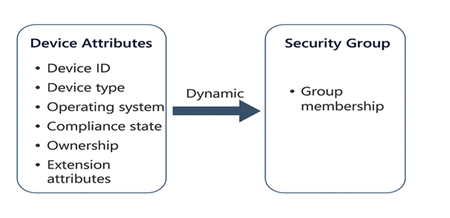
Update Entra ID Device Extension Attributes via PowerShell & Create Dynamic Security Groups.
2) Overview of Extension Attributes and Updating via PowerShell What Are Extension Attributes? Extension attributes (1–15) are predefined string fields available on Entra ID device objects. They are exposed to Microsoft Graph as the extensionAttributes property. These attributes can store custom values like department, environment tags (e.g., Prod, Dev), or ownership details. Why Use Them? Dynamic Group Membership: Use extension attributes in membership rules for security or Microsoft 365 groups. Policy Targeting: Apply Defender for Endpoint (MDE) policies, Conditional Access or Intune policies to devices based on custom tags. For details on configuration of the policies refer below documentation links. https://learn.microsoft.com/en-us/defender-endpoint/manage-security-policies https://learn.microsoft.com/en-us/intune/intune-service/ https://learn.microsoft.com/en-us/entra/identity/conditional-access/ Updating Extension Attributes via PowerShell and Graph API Use Microsoft Graph PowerShell to authenticate and update device properties. Required permission: “Device.ReadWrite.All”. 3) Using PowerShell to Update Extension Attributes create app registration in Entra ID with permissions Device.ReadWriteall and Grant admin Consent. Register an app How to register an app in Microsoft Entra ID - Microsoft identity platform | Microsoft Learn Graph API permissions Reference. For updating Entra ID device properties you need “Device.ReadWrite.all” permission and Intune administrator role to run the script. Microsoft Graph permissions reference - Microsoft Graph | Microsoft Learn Below is the script Important things to note and update the script with your custom values. a) update the path of the excel file in the script. column header is 'DeviceName' Note: You may want to use CSV instead of excel file if Excel is not available on the admin workstation running this process. b) update the credential details - tenantId,clientId & clientSecret in the script. Client id and client secret are created as a part of app registration. c) update the Externsionattribute and value in the script. This is the value of the extension attribute you want to use in dynamic membership rule creation. ___________________________________________________________________________ #Acquire token $tenantId = "xxxxxxxxxxxxxxxxxxxxx" $clientId = "xxxxxxxxxxxxxxxx" $clientSecret = "xxxxxxxxxxxxxxxxxxxx" $excelFilePath = "C:\Temp\devices.xlsx" # Update with actual path $tokenResponse = Invoke-RestMethod -Uri "https://login.microsoftonline.com/ $tenantId/oauth2/v2.0/token" -Method POST -Body $tokenBody $accessToken = $tokenResponse.access_token # Import Excel module and read device names Import-Module ImportExcel $deviceList = Import-Excel -Path $excelFilePath foreach ($device in $deviceList) { $deviceName = $device.DeviceName # Assumes column header is 'DeviceName' Get device ID by name $headers = @{ "Authorization" = "Bearer $accessToken"} $deviceLookupUri = "https://graph.microsoft.com/beta/devices?`$filter=displayName eq '$deviceName'" try { $deviceResponse = Invoke-RestMethod -Uri $deviceLookupUri -Headers $headers -Method GET } catch { Write-Host "Error querying device: $deviceName - $_" continue } if ($null -eq $deviceResponse.value -or $deviceResponse.value.Count -eq 0) { Write-Host "Device not found: $deviceName" continue } $deviceId = $deviceResponse.value[0].id # Prepare PATCH request $uri = "https://graph.microsoft.com/beta/devices/$deviceId" $headers["Content-Type"] = "application/json" $body = @{ extensionAttributes = @{ extensionAttribute6 = "MDE" } } | ConvertTo-Json -Depth 3 try { $response = Invoke-RestMethod -Uri $uri -Method Patch -Headers $headers -Body $body Write-Host "Updated device: $deviceName"} catch { Write-Host "Failed to update device: $deviceName - $_" } } Write-Host "Script execution completed." ________________________________________________________________________________________________________________________ Here’s a simple summary of what the script does: Gets an access token from Microsoft Entra ID using the app’s tenant ID, client ID, and client secret (OAuth 2.0 client credentials flow). Reads an Excel file (update the path in $excelFilePath, and ensure the column header is DeviceName) to get a list of device names. Loops through each device name from the Excel file: Calls Microsoft Graph API to find the device ID by its display name. If the device is found, sends a PATCH request to Microsoft Graph to update extensionAttribute6 with the value "MDE". Logs the result for each device (success or failure) and prints messages to the console. 4) Using Extension Attributes in Dynamic Device Groups Once extension attributes are set, you can create a dynamic security group in Entra ID: Go to Microsoft Entra admin center → Groups → New group. Select Security as the group type and choose Dynamic Device membership. Add a membership rule, for example: (device.extensionAttributes.extensionAttribute6 -eq "MDE") 4. Save the group. Devices with extensionAttribute6 = MDE will automatically join. 5) Summary Extension attributes in Entra ID allow custom tagging of devices for automation and policy targeting. You can update these attributes using Microsoft Graph PowerShell. These attributes can be used in dynamic device group rules, enabling granular MDE policies, Conditional Access and Intune deployments. Disclaimer This script is provided "as-is" without any warranties or guarantees. It is intended for educational and informational purposes only. Microsoft and the author assume no responsibility for any issues that may arise from the use or misuse of this script. Before deploying in a production environment, thoroughly test the script in a controlled setting and review it for compliance with your organization's security and operational policies.
Entra-ID Privileged Identity Management for Groups
We have used PIM for groups to assign certain Azure Security groups to eligible users. For example a group which provides the contributor role to a certain subscription. This group is added in PIM for groups, and eligible users have been assigned to the group, in which they can provide themselves with the privileges if required to do so for maximum 8 hours. However, when we assign a user to a PIM protected group, then there is no way to tell from the user's properties, that the user has been assigned (eligible) to a PIM protected group. Therefore wouldn't it be better to create PIM groups and add the assigned user as a member of a PIM group, and assign the PIM group as eligible to the PIM protected group? Then you would able to see from the Groups list if the user is illegible for any PIM groups.474Views0likes3Comments
Authenticator app not working on new phone - old phone with app is gone
Hello Tech Community, I have trouble with my email (hotmail) account. About 12 months ago I downloaded and activated the authenticator app after having hackers trying to enter my hotmail account. A few months ago I changed my phone and I have never been asked for second factor authentication until today (so I did not pay much attention to it as I could see it. The phone number attached is old and have no access to it and that device is long gone too). BIG PROBLEM! I have the app on my new phone but it is not linked to my account (and cannot do a Cloud Recovery). If I try to do anything with my account (forward emails or change anything) it asks me for the authenticator approval/code (that I do not have access to). I am scared about doing something that will log me out of my email (which I still have access to) but cannot make any changes nor log out. Please help. Can I deactivate the authenticator app somehow? or re-set it-up to work again? Can I migrate all my emails to a new account so I do not lose years of information if I get logged out? Can I set the forwarding emails option without having to pass by second facto authentication? Looking forward to hearing from you wise community, Thank you36KViews0likes7CommentsAdding Distributed COM Users group in the built-in groups for AD
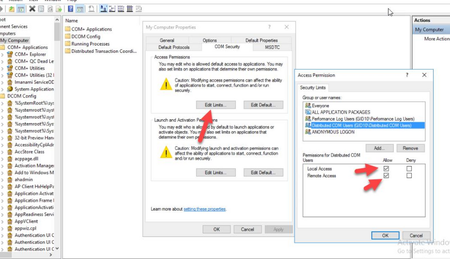
I came across this question from one of my connections in my network. "A user was added to the Distributed COM Users group in the https://bit.ly/2U7Zarc however it seems to be doing nothing for allowing that user to access dcom on the servers. Isn't the point of the built-in groups is that they are already defaulted to the correct permissions and setup on object in the AD structure? Is there a way to test? An effective access on an OU with that group was done and it was all denied. Is this the right way to test those particular permissions" I suggested the following: As the added users are not able to access the dcom server. In that case it is good to check the dcom remote access permissions in the component services. Remote access and local access should be enabled. If it is not then any user part of distributed com users group will not be able to access the dcom servers. Let me what are your thoughts on this. Thanks.1.8KViews0likes0CommentsSharePoint Online - Security Groups - Inheritance
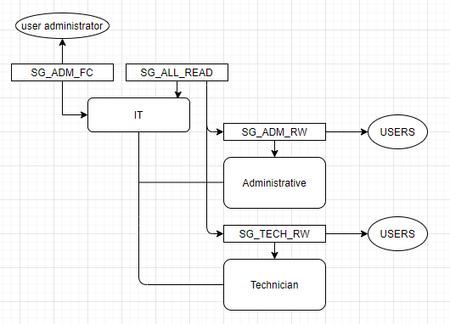
Hello, I have on interesting question about SharePoint Online and Security Groups. I site for example "Customer", where is document library. In that library is folder "IT" and in that folder are two subfolders "Administrative" and "Technician". Folder "IT" - two security groups SG_ALL_READ everyone in this security group have permission read folder IT members of this groups: SG_ADM_RW SG_TECH_RW SG_ADM_FC everyone in this security group have permission full control in the folder "IT" members of this groups are users administrators Subfolder "Administrative" - Inheritance is disabled SG_ADM_RW members of this groups are users from administrative with permission read and write Subfolder "Technician" - Inheritance is disabled SG_TECH_RW members of this groups are users technicians with permission read and write When administrator from security group SG_ADM_FC will create new subfolder in folder "IT", for example "Others", this folder "Others" will automatically inherit security groups SG_ALL_READ and SG_ADM_FC. Which means that all users (administrators, users from administrative, users technician) have access for new folder "Other" (no matter what permission). My questions is: Is there any way how to tell security group SG_ALL_READ "do not automatically inherit yourself" when new subfolder is created? This scenario is for regular users. That is why I need this. I know me as administrator can do it but I need something more easier for regular user. I tried to create diagram .. hope it is understandable :-). Thank you very much for your help!!933Views0likes0Comments
Add Mail Enabled Security Group to MS Teams
I have set-up a mail enabled security group with Azure AD. I am now trying to assign the mail enabled security group to a new MS teams via the add members yet the security group does not show up. Can somebody please advise if this is possible?20KViews1like5Comments