search
21 Topics
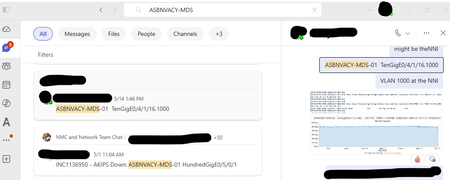
No option to go to message from search without opening side panel
When I search for a term (whether using All or Messages) and click on a result, I intend to go to that message in the chat or direct message with the whole window, just as if I had navigated there manually. I do NOT want to open an awkward side panel with that conversation. There are no right click options on the search results. How can I get rid of the side panel and just [Go to message]?309Views0likes1Comment
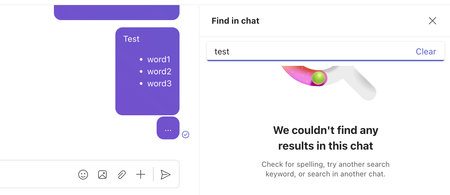
BUG: Teams "search"/"find" functionality totally broken with rich (formatted) text
Consider the following formatted/rich text comment: Test word1 word2 word3 Using "search"/"find" (either the global "Search", or the "Find in chat" function) will fail to match the comment when searching for either "test", "word1", "word2", or "word3". This is because buggy Teams just strips the formatting (instead of replacing the formatting with breaks), effectively glueing all words together in the index; searching for "testword1word2word3" (one word) DOES match the comment. 🤦🤦🤦60Views0likes0CommentsTeams Gets a KeyQL-Powered Search Box
Microsoft is introducing a new KeyQL-powered capability for a revamped search box in Teams. The new implementation promises faster and more precise searching. First impressions are good, and the only doubt that I have is about how users will embrace this kind of searching. After all, some still use simple keyword searches. https://office365itpros.com/2025/08/08/teams-search-box-enhanced/123Views0likes0Comments
Teams search changed, and is now useless
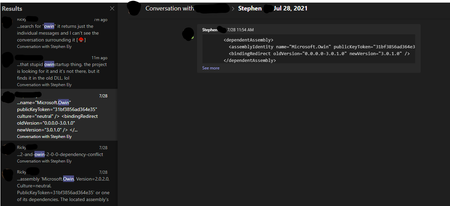
I don't know when this happened but search has changed in teams recently, and it's unbelievably useless. Searching within a single conversation isn't intuitive. Took me forever to figure out how that works. But the biggest problem is that now when I search it returns results and in the past when I'd click the item in the results list, it would take me to that point in time of the entire conversation. Now it just shows me the single message and I can't see the entire conversation surrounding it. Since the conversation was back in July, and this is a person I talk to all day every day scrolling back to that point in time would take a VERY long time. Basically we're encountering an issue in our development environment that happened previously and I fixed it back in July but it's happening again and I don't remember what we did to fix it. So I search for the term I need, get the messages around that time in July, and I see just that one message but I need to see the entire conversation. This is a terrible change that wasn't thought through. How can I get it to rewind to that point in time without having to scroll up for 20 minutes?24KViews9likes22Comments
How To Fix When Quick_Books Open But Not Showing
When Quick_Books opens but doesn't display properly, several troubleshooting steps can resolve the issue: Check Display Settings: Ensure Quick_Books isn't off-screen or minimized. Use Alt + Tab to cycle through open windows. Restart Quick_Books: Close and reopen the program to refresh its display. Update Graphics Drivers: Outdated drivers can cause display issues. Update them from the device manager. Adjust Compatibility Settings: Right-click Quick_Books icon > Properties > Compatibility tab > Run compatibility troubleshooter. Repair Quick_Books Installation: Go to Control Panel > Programs > Programs and Features > Quick_Books > Repair. Reset Quick_Books Settings: Press and hold Ctrl while opening Quick_Books to reset preferences. These steps should help resolve most display-related issues in Quick_Books.461Views0likes0Comments
Search and Filter adaptive cards in bot
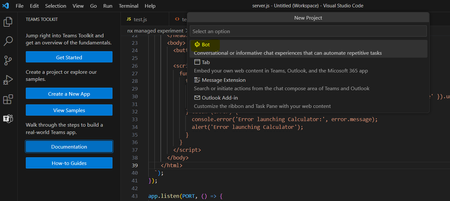
Hello Team, Our requirement is as follows: Requirement : We have created a bot using teams toolkit. We further want to add a search bar within the bot which will search adaptive cards and filter them. As in show only searched cards and hide rest. Is it possible to add search bar in bot? One option we could think of is creating tab using fluent so that we can search the adaptive cards. Is their any way to directly implement it in a bot? Thanks!1.5KViews0likes5CommentsSearch in chats and channels
According to https://adoption.microsoft.com/en-us/new-microsoft-teams/ Search in chats and channels should be available now. While the normal search is working. I cannot use CTRL+F which I would expect by now to work again to search only in this one Channel or Chat. Does this work for anyone else?SolvedSearching for AutoAttendants in tab CALLS (in type name or number) does not show all available
Hi all, Lately I receive more and more complains from the endusers that when searching for an AutoAttendant on displayname does not give all of the results. Now they are experiencing some of the AutoAttendants unfindable. Example AA's -> "Dept. Microsoft", "Dept. Contoso", "Dept. Autumn" Searching on "Dept." gives only Contoso as result, not the other ones. The AA's are created more than 7 days ago. Should be synchronised by now. Anyone else experiencing issues like this? Or know how to force more search results? Kind regards, Benjamin.468Views0likes0Comments
Is there a way to search 'part' of people name in teams?
In Malaysia it is common to have names like Nooraisyah. The specialty about these kind of names is that even if it is split into two - it gives 2 names. Noor + Aisyah. So we call this person either Noor or Aisyah. Now coming to the real problem, we are used to calling this person Aisyah as it is unique to this person and Noor is common with many names. So I always tend to search 'aisyah' in the search box and it never returns any results. Teams can now only search the start of first name, middle name or surname. Is there a setting to change the way how search works or is there a workaround for this?1.5KViews0likes2CommentsAny issue with Search function in MS-Teams lately?
Hi MS Teams users across the horizon, Has anyone encountered any issue with their Search function in MS-Teams? When I perform a keyword search in SharePoint Online for the different sites(aka Teams), the results are OK. It managed to find the keyword. But when I search for the same keyword in MS-Teams ; nothing is displayed and it says "We didn't find any matches". Please help.7.5KViews2likes7Comments