sdk and powershell
24 Topics
Using REST API to get / set device variables
Hi, I'm trying to set a couple of variables against a machine name, through using the REST API. These are the variables that are set that you can see in the console if you right click properties on a device and go to the 'Variables' tab. These are handy because they can later be referenced during Task Sequences / OSD. I just can't figure out how to do it with the REST API. I have no issues doing it with the powershell module using the 'New-CMDeviceVariable' command, but my solution i'm building at the moment requires the solution to be done with rest api, not with ps modules... I can connect to REST API using powershell using commands such as the below. This all works fine. $ConfigMgrServerURL = "https://SCCMserver.domain.local" $MachineName = "MachineName1" # Following command is a sample GET request, which works. (Invoke-RestMethod -Method Get -Uri "$ConfigMgrServerURL/AdminService/wmi/SMS_R_System?`$filter=Name eq '$MachineName'" -Credential $Credential) #I can also fetch "Custom Properties" via this command (Invoke-RestMethod -Method Get -Uri "$ConfigMgrServerURL/AdminService/v1.0/Device($ResourceID)/AdminService.GetExtensionData" -Credential $Credential) Now i just can't see where i can go to set a variable on the machine. Does anyone have any ideas ? Thanks!153Views0likes0Comments
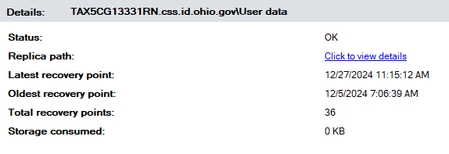
0 storage consumed on protected devices
Hello! My System Center 2022 DPM console shows that some protected devices take up 0kb of storage. I know its inaccurate because I can recover data from those devices. Any idea as to how to get the accurate storage consumed number to show? I tried running the "Update-DPMProductionServer" command via the DPM management shell and it tells me that it cant convert the value.161Views0likes0CommentsVMM Module in PowerShell 7
With the latest news in the tech industry, when can we expect to see the System Center PowerShell modules to be supported in PowerShell 7.0? I believe MECM/MEM works in pwsh7 already but VMM doesn't at this point. Requiring a Windows machine to use the VMM module doesn't make a ton of sense.1.2KViews2likes4Comments
AdminService add/delete rules in collection
Hi I'm trying to add and delete devices from a collection via AdminService on Configuration manager 2203 from PowerShell. When I try the below command I receive an error Invoke-RestMethod -Method Post -Uri "https://<ServerName>/AdminService/wmi/SMS_Collection('<CollectionID>')/AdminService.AddMembershipRule" -Credential $Credentials -Body "{'collectionRule':{'RuleName':'<DeviceName>'}}" -ContentType "application/json" Error: Invoke-RestMethod : {"error":{"code":"500","message":"An error with description \"Could not get CCollectionRule* from instance\" occurred when performing MethodExecution operation on WMI class: SMS_Collection."}} At line:1 char:1 Error log AdminService.log Management exception caught: Could not get CCollectionRule* from instance System.Management.ManagementException: Not found at System.Management.ManagementException.ThrowWithExtendedInfo(ManagementStatus errorCode) at System.Management.ManagementObject.InvokeMethod(String methodName, ManagementBaseObject inParameters, InvokeMethodOptions options) at Microsoft.ConfigurationManager.AdminService.ManagementObjectAbstraction.InvokeMethod(String methodName, IManagementBaseObject inParams, InvokeMethodOptions invokeOptions, WindowsIdentity windowsIdentity) I get the same error if I try to delete a device from a collection. Anybody able to help ?? Regards Martin2KViews0likes1CommentUpdate 2203 for Microsoft Endpoint Configuration Manager current branch is now available
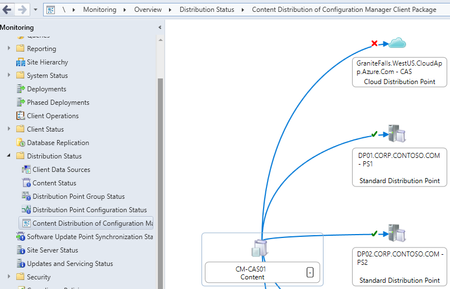
Update 2203 for Microsoft Endpoint Configuration Manager current branch is now available. One of the exciting new features is the content distribution status visualizer. With it you can now monitor content distribution path and status in a graphical format.31KViews7likes11CommentsOrganize packages and update groups in Configuration Manager TP 2202
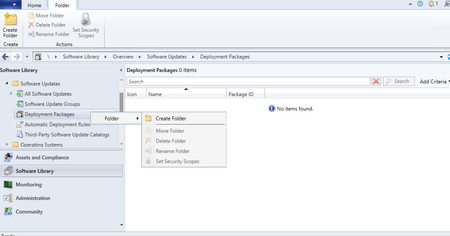
Update 2202 for the Technical Preview Branch of Microsoft Endpoint Configuration Manager has been released. In this release, Admins will be able to organize packages and update groups in a much better way using folders.13KViews3likes3CommentsUpdate 2111 for Microsoft Endpoint Configuration Manager current branch is now available
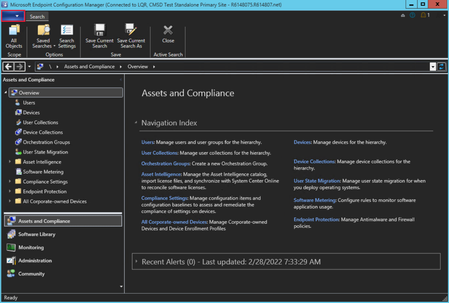
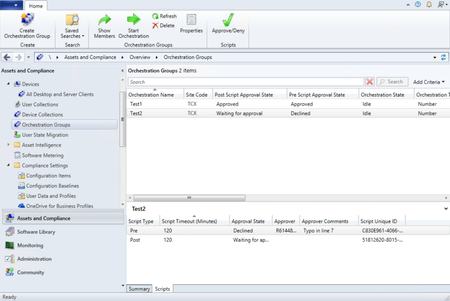
Update 2111 for Microsoft Endpoint Configuration Manager current branch is now available. We are excited to announce that two popular pre-release features, orchestration groups and application groups are now full features in this release.33KViews3likes8CommentsImprovements to the Windows Servicing Dashboard in Configuration Manager Technical Preview 2111
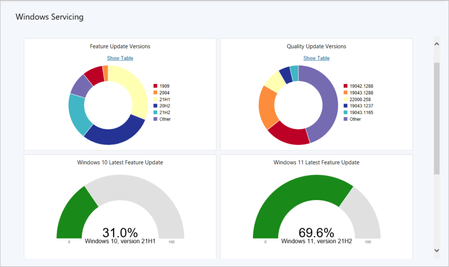
Update 2111 for the Technical Preview Branch of Microsoft Endpoint Configuration Manager has been released. We now display a Windows 11 Latest Feature Updates chart in the Windows Servicing dashboard.11KViews1like0CommentsUse Windows Update native experience with Configuration Manager Technical Preview 2105.2
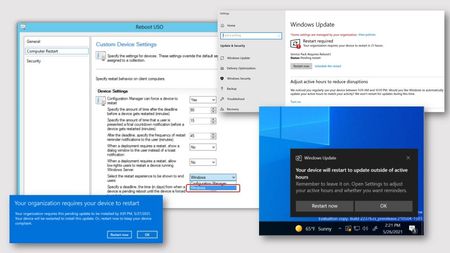
Update 2105.2 for the Technical Preview Branch of Microsoft Endpoint Configuration Manager has been released. When installing software updates from Configuration Manager, you can now choose to use the native Windows Update interface and restart experience.31KViews4likes4Comments