sandbox
12 TopicsRe-enable the Authenticator access code setup for an Microsoft Developer Sandbox Admin account?
I have been using Microsoft Program Developer Sandbox for learning purpose for couple of years now and the MSFT authentication was working perfectly until recently 2 changes happened in my life - Changed my geolocation from USA to India and changed mobile phone. After this, now when i login using my admin account, the access code is not generated in my new phone and so the authentication is not complete blocking my login. I have tried removing and reading the authenticator but the one time password code settings didn't generate. What all are the options available to reset the admin account and continue using the account?91Views0likes0Comments
Foundry Agent deployed to Copilot/Teams Can't Display Images Generated via Code Interpreter
Hello everyone, I’ve been developing an agent in the new Microsoft Foundry and enabled the Code Interpreter tool for it. In Agent Playground, I can successfully start a new chat and have the agent generate a chart/image using Code Interpreter. This works as expected in both the old and new Foundry experiences. However, after publishing the agent to Copilot/Teams for my organization, the same prompt that works in Agent Playground does not function properly. The agent appears to execute the code, but the image is not accessible in Teams. When reviewing the agent traces (via the Traces tab in Foundry), I can see that the agent generates a link to the image in the Code Interpreter sandbox environment, for example: `[Download the bar chart](sandbox:/mnt/data/bar_chart.png)` This works correctly within Foundry, but the sandbox path is not accessible from Teams, so the link fails there. Is there an officially supported way to surface Code Interpreter–generated files/images when the agent is deployed to Copilot/Teams, or is the recommended approach perhaps to implement a custom tool that uploads generated files to an external storage location (e.g., SharePoint, Blob Storage, or another file hosting service) and returns a publicly accessible link instead? I've been having trouble finding anything about this online. Any guidance would be greatly appreciated. Thank you!M365 Developer Instant Sandbox
Cut your configuration time from days to seconds. Be your own administrator and prototype apps and solutions on your fully pre-provisioned sandbox subscription. Includes 25 user licenses for development purposes Preconfigured for sideloading Teams apps Fully loaded sample data with 16 sample users, user data, and content to help you model your solutions. Easy access to pre-provisioned core Microsoft 365 workloads and capabilities (Windows not included), including: All Office 365 apps Everything you need for Power Platform development Office 365 Advanced Threat Protection Advanced analytics with Power BI Enterprise Mobility + Security (EMS) for compliance and information protection Azure Active Directory for building advanced identity and access management solutions26KViews2likes5Comments
Windows sandbox wrong language
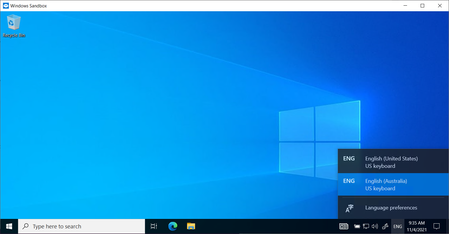
Hi All, I opened windows sandbox for the first time in months, and noticed it had the "news and interests" widget. The only installed languages are English (same for the host PC), yet the news widget is in Chinese. Any ideas on how to fix the language, and (preferably) actually disable the widget? Cheers Rob16KViews2likes17CommentsWindows Insider: Beta Channel (Discounted/Free 11 Home to 11 Pro)
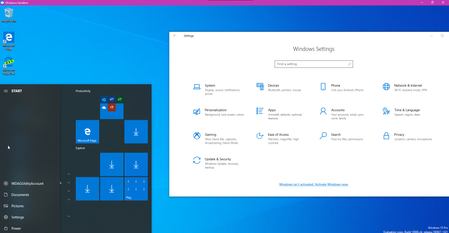
Hey Everyone, I'm not sure I'm in the correct place. I've never posted on here before. I'm on Windows 11 Home Edition through the beta channel. I was wondering if anyone knows a way to move from 11 Home Edition to 11 Pro Edition (or is there another better suited?). I am a student. Majoring in software development. I have interests in joining the developer program here, I'm just a bit nervous it's too advanced for me. I would really like to access the features that are available on other versions of Windows. I was able to enable Hyper-V. But I would like to have access to the sandbox (Not sure if that's even available on the PRO edition), screencasting. I can sometimes cast a youtube and some other things, but not just screencast my full desktop, for example) and Bitlocker. My device is definitely capable. I checked and the status of my TPM, it says Status: Ready to use. I have 32gb RAM and 1tb SSD (also a couple external HDD/SSD) Anyways, I can't afford to pay for the pro version. I was wondering what the absolute cheapest way to get it would be. Or if there are work arounds like there is for enabling Hyper-V. Thank You, John873Views0likes0CommentsSome parts of the Privacy Sandbox land on Edge Canary
This flag edge://flags/#use-first-party-set which was added today to Edge Version 89.0.749.0 (Official build) canary (64-bit) it's one of many privacy-related features for Privacy Sandbox, the goal of which is to ultimately get rid of 3rd party cookies. Use First-Party Sets First-Party Sets are sets of registrable domains (or origins). The browser uses these sets to allow websites that have multiple domains to treat their related domains as if they were first-party domains. This enables less restricted cross-domain communication across all the domains in a First-Party Set. – Mac, Windows, Linux Enable domains to belong to the same first party Goal: Enable entities to declare that related domain names are owned by the same first party. Many organizations own sites across multiple domains. This can become a problem if restrictions are imposed on tracking user identity across sites that are seen as 'third-party' but actually belong to the same organization. First Party Sets aims to make the web's concept of first and third parties more closely aligned with the real world's by enabling multiple domains to declare themselves as belonging to the same first party. more info: Digging into the Privacy Sandbox (web.dev) privacycg/first-party-sets (github.com)4KViews1like1Comment
MS Learn Sandbox - Unauthorized Sandbox use detected. Your sandbox has been terminated
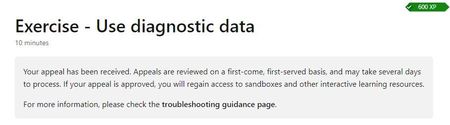
I get blocked access to Sandbox resources in following learning example: "Monitor the health of your Azure virtual machine by using Azure Metrics Explorer and metric alerts", direct link: https://docs.microsoft.com/en-us/learn/modules/monitor-azure-vm-using-diagnostic-data/ I can believe that command sequence in unit 8 which should stress VM CPU, cause issue: sudo stress --cpu 16 -v -t 10m Directly after execution of the sequence my access to Sandbox resources was blocked, I sent appeal as requested. As well I sent feedback - content of the online course must be reviewed, and instructions to stop the CPU stress sequence added, before user leave Azure CLI session or move to next example.Solved3.5KViews0likes4CommentsWindows Sandbox has the old legacy Edge instead of new Edge browser, in Windows insider 20H2 Beta
This is the Windows 10 build that the new Edge officially replaces the legacy Edge by default, but in Windows Sandbox's image, the old Edge is still there, no sign of new Edge. OS Build: 19042.610 insider beta Feedback hub: https://aka.ms/AA9yilc3.3KViews2likes0Comments