rule
3 Topics
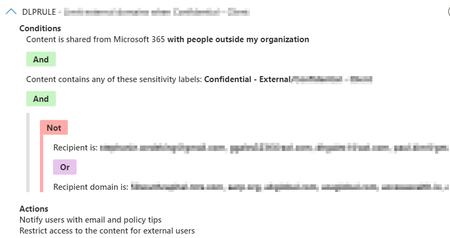
DLP Rule for Exchange using ExceptIfRecipientDomainIs not working any more
Hello, we had setup a DLP Rule for Exchange workloads that only allows sending to specific external recipients in a list we provide via populating the ExceptIfRecipientDomainIs attribute. This has been working fine until a few days back, when suddenly the rule was failing to apply on end users (domain is listed in the Rule's ExceptIfRecipientDomainIs) and email gets blocked. I then realized that the attribute is not populated anymore via Powershell and comes back empty! (Get-DlpComplianceRule -Identity "DLPRULE").ExceptIfRecipientDomainIs At the same time, the Rule on the compliance.microsoft.com portal shows up properly with the domains in question. I then noticed that those domains now only appear under the AdvancedRule attribute only. (Get-DlpComplianceRule -Identity "DLPRULE") | select -expand advancedrule So it seems there has been some change in DLP rules by the compliance team at Microsoft?2KViews1like3Comments
Exchange rule issue with "Prepend the subject of the message with"
Dear all, I am encountering an issue that I have been unable to resolve despite researching extensively online. Contextually, I need to forward all incoming emails from a distribution list to a shared mailbox. To identify these forwarded emails in the shared mailbox, I attempted to add a text to the subject line (namely, "The DL should no longer be used by my colleagues in a few months"). Here's what I've done so far: Condition: "Recipient", "Address matches any of these patterns" (I've also tried "The sender address includes") Actions: "Add the recipient:" "to the Cc Box" => my shared mailbox "Prepend the subject of the message with" The forwarding is working as expected, but the subject line is not being prepended with the chosen text. Have I missed something? Thank you all in advance for your help. Best regards, Guillaume6.5KViews0likes10Comments