roles
18 Topics
Microsoft Feedback Portal account issue
I changed my Microsoft email a year ago, and it updated everywhere other than the Feedback Portal. As a result, I get an error when I try to login, or do anything on the page. Microsoft account support's suggestion was to login to the Feedback Portal which is insane given I'm having issues accessing it. How can I get this issue resolved? I've got three separate support tickets now and they keep asking me to wait 24 hours to get the issue resolved. Can someone from the Feedback Portal team please contact me to resolve this? This is what Microsoft Support have said: "understand your frustration, and yes—this is an account‑related issue because the Feedback Portal is still tied to your old alias, which causes login conflicts and forces you out. Your Microsoft account itself signs in correctly, but the Feedback Portal is pulling outdated identity data that you cannot update on your own. Since you cannot access the Portal to submit feedback, directing you back there is not a workable solution. What you need is for Support to escalate this to the internal Identity/Feedback Platform engineering team so they can manually correct the outdated alias mapping on the backend. In this situation, the Feedback Portal and Tech Community teams are the ones who manage and maintain that specific platform. Because the issue appears on the Feedback Portal side—even though your Microsoft account is working normally—only their dedicated team can make the necessary corrections on their end. That’s why we are guiding you to connect with them through the links provided: https://techcommunity.microsoft.com/ or https://feedbackportal.microsoft.com/feedback. They will be able to review the portal‑specific account data and assist you further. I understand why this is frustrating. Since you’re unable to stay signed in to the Feedback Portal, I completely see why posting there isn’t possible for you. However, I do need to be transparent: I’m not able to escalate this issue directly to the Feedback Portal team, as they don’t provide internal escalation channels for us and only accept requests through their own platform."361Views0likes2Comments
Microsoft Purview Roles for Data Consumers in a Data Mesh & Data Democratisation Environment
Reformatted Discussion for Community Feedback Recommended Microsoft Purview Roles for Data Consumers in a Data Mesh & Data Democratisation Environment I’m seeking guidance on whether the following set of Microsoft Purview roles is appropriate for typical data consumers within a Data Mesh-aligned organisation. The approach aims to support data democratisation while maintaining least-privilege access. Data consumers (All users) would be placed into a dedicated security group assigned to these roles, ensuring they have the best possible search experience across the Microsoft Purview Unified Catalogue, Data Map, and Data Health features. Unified Catalog Settings Global Catalog Reader Provides read-only visibility of all catalogued assets across the organisation. This role supports governance, compliance, and data discovery without granting modification rights. Using Global Catalog Reader simplifies onboarding and improves usability by giving users a consistent view of published business concepts and data products across all governance domains. Without it, visibility must be managed domain by domain through roles such as Governance Domain Reader or Local Catalog Reader, which increases administrative effort and limits discoverability. Sensitive domains can still apply additional scoped roles where required. Data Health Reader Allows users to view data health metrics such as completeness, freshness, and anomaly indicators. This supports data stewards, quality teams, and analysts in monitoring reliability without the ability to change data or rules. Unified Catalog Governance Domain Roles Data Quality Reader Provides insight into data quality rules and results within a governance domain. Useful for users who need to understand quality issues or compliance status without editing capabilities. Data Profile Reader (Conditional) Enables access to profiling information such as distributions, null counts, and detected patterns. However, profiling data may reveal sensitive information, so this role is best reserved for trusted analysts or stewards rather than being broadly granted to all data consumers. Data Map Role Assignments Data Reader Grants read-only access to metadata and lineage across the data map. This transparency is important for impact assessments, understanding dependencies, and supporting governance processes. Insights Reader Provides access to Purview Insights dashboards, including usage statistics, scanning activity, and classification trends. This role is typically valuable for managers or governance leads monitoring adoption and compliance. Summary Together, these roles aim to give data consumers the access they need for discovery, quality awareness, and understanding lineage; without exposing sensitive data or granting any capability to modify assets. The intention is to follow least-privilege practice while enabling meaningful self-service analytics.Solved329Views0likes2Comments
Volume Activation role questions
We have a DC, running Server 2016 to decommission (call it old server). One of the roles it had was Volume Activation (VA). This is Active Directory based and the keys AD holds are both for clients (Win11) and servers (2016/19/22/25). I have removed the VA role from the server and tested with a server which I added to the domain and the OS activated successfully, so it looks like it is working. I noticed the _vlmcs SRV DNS record was not deleted and is still pointing to the old server. Since the old server is no longer having the VA role, is it safe to delete the DNS record for the _vlmcs SRV record? What else do I need to take into account? Thanks in advance85Views0likes0CommentsAZ-500: Microsoft Azure Security Technologies Study Guide
The AZ-500 certification provides professionals with the skills and knowledge needed to secure Azure infrastructure, services, and data. The exam covers identity and access management, data protection, platform security, and governance in Azure. Learners can prepare for the exam with Microsoft's self-paced curriculum, instructor-led course, and documentation. The certification measures the learner’s knowledge of managing, monitoring, and implementing security for resources in Azure, multi-cloud, and hybrid environments. Azure Firewall, Key Vault, and Azure Active Directory are some of the topics covered in the exam.23KViews4likes3Commentspg_signal_autovacuum_worker Role for Managing Autovacuum in Azure Database for PostgreSQL
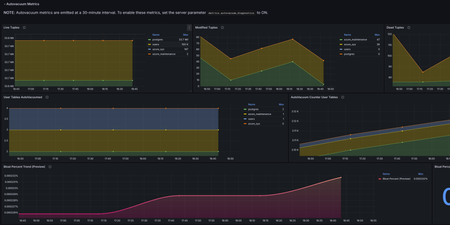
Have you ever faced a situation where your database is taking longer than expected to execute a DDL command? It can be a frustrating experience when a pending command execution blocks your workflow. If you’re wondering which process might be blocking your DDL command, there could be different reasons. One of the primary reasons could be when autovacuum process is executing for the table in the background. Let me explain this with the help of an example. Consider we have a table "accounts” in our Azure Database for PostgreSQL flexible server instance database. We want to add a field and execute an ALTER statement on it. When this statement is in the process of execution, you may observe the database has significantly slowed down or stopped responding to the read/write queries for a while, resulting in a latency spike. In this scenario, the first approach would be to make sure there are no concurrent processes working on the table before executing the ALTER statement. If one of these processes is autovacuum, you will have to wait until the autovacuum process is executed on the table, which will cause a delay in committing this statement. In managed services, giving a system-level access to users can cause severe security and database integrity concerns, so users cannot manage the critical background processes like autovacuum in a controlled manner. With the recent update, we have backported 'pg_signal_autovacuum_worker' role from PostgreSQL version 18, with this approach it is now possible to control the autovacuum process without giving system level access to the users by using 'pg_terminate_backend' command in Azure Database for PostgreSQL Flexible Server in PostgreSQL versions 15 and higher. This role helps non-super users interact with autovacuum process in a secure and controlled manner. Let’s learn more about the autovacuum process and how this new role 'pg_signal_autovacuum_worker' helps you to manage the process more securely with controlled access for non-super users. What is the autovacuum process? PostgreSQL uses various maintenance processes to handle heavy server loads, one of them being autovacuum. Autovacuum removes obsolete versions of tuples that were created by UPDATE or DELETE statements, and that aren’t accessible anymore by any outstanding transaction. The autovacuum_naptime and autovacuum_max_workers are important parameters for the autovacuum process. This process gets launched every autovacuum_naptime seconds, the autovacuum worker gets triggered based on the number of proportion of dead tuples in the table. You can read more about the autovacuum process and how it’s triggered here. Common Problems with autovacuum Autovacuum process is an important background process as it helps with regular cleanup of dead tuples. However if it conflicts with a long running transaction or in a write-heavy environment there can be following issues: Autovacuum Blocking DDL Operations: Normal Autovacuum: Autovacuum jobs cancel themselves after deadlock_timeout (default value is 1 second) when a user triggers DDL on the table. But in some cases, users can experience significant latency up to the value of deadlock_timeout while executing read/write queries on the table. Wraparound protection Autovacuum: This type of autovacuum does not cancel itself and blocks DDL until the job is completed. Challenges with Updating Parameters in Ongoing Autovacuum Processes: Autovacuum configuration can be tuned using server parameters like autovacuum_naptime, autovacuum_max_workers, autovacuum_analyze_scale_factor etc. When you have an autovacuum process that is running for a long time, the changed parameters do not get reflected in already running autovacuum process. Azure Database for PostgreSQL - Flexible Server customers have faced the challenge of not being able to terminate the process securely with more granular control over the autovacuum process. If the autovacuum process is triggered simultaneously with a business-critical DDL process and users do not have controlled access on this process, it can lead to frustrating experience. In our latest release, we have implemented a solution that is secure, backward-compatible, and easy to integrate. New role pg_signal_autovacuum_worker We addressed this challenge by backporting the ‘pg_signal_autovacuum_worker’ role (which will be introduced in PostgreSQL 18) to all Azure Database for PostgreSQL flexible server versions 15 and higher. The ‘pg_signal_autovacuum_worker’ role helps you manage autovacuum tasks more effectively and allows non-superusers to terminate the autovacuum processes. Users get controlled access for the autovacuum process with this new role. Advantages of backporting the pg_signal_autovacuum_worker role Backporting the 'pg_signal_autovacuum_worker' role has some important advantages: Compatibility: Backporting this role to previous versions ensures a seamless upgrade experience for existing PostgreSQL servers. Security: Users do not have access to this role by default. The role is granted to non-superusers without granting broader system-level access. It gives a more granular and secure way to manage autovacuum processes without compromising database integrity. Steps to add pg_signal_autovacuum_worker role 1. Let's create a new user using the below command: CREATE USER john WITH PASSWORD 'Pass123'; 2. Next, grant 'pg_signal_autovacuum_worker' role to the newly created user GRANT pg_signal_autovacuum_worker TO john; 3. Now, confirm if 'pg_signal_autovacuum_worker' role is assigned SELECT oid, rolname FROM pg_roles WHERE Pg_has_role('john', oid, 'member'); oid | rolname -------+----------------------------- 8916 | pg_signal_autovacuum_worker 24826 | john 4. Now 'john' without being a member of 'azure_superuser' can terminate the autovacuum process. SELECT Pg_terminate_backend(pid) FROM pg_stat_activity WHERE backend_type = 'autovacuum worker'; Conclusion Managing autovacuum processes has always been tricky, especially for non-superusers who couldn’t directly control them in a managed service environment. Now with the introduction of the 'pg_signal_autovacuum_worker' role available in Azure Database for PostgreSQL flexible server, this is possible. Database users have a secure and flexible way to manage autovacuum process without needing superuser access, making database maintenance easier and more efficient.1.2KViews7likes4Comments
Co-organizer cannot unmute or share
For a recurring Teams meeting in which I am the organizer, one of my co-organizers was not permitted to to unmute or share during a call where I was not present. We tested the meeting later, together, and even after I joined, the co-organizer's camera, mic and share buttons remained grayed-out, and this co-organizer was listed in my People pane as an Attendee. Here are the Meeting Option settings I have: This person is included in the 'Choose co-organizers' list 'Who can present' is set to 'Only organizers and co-organizers'. 'Who can bypass the lobby' is set to 'People in my org, trusted orgs, and guests'. This person is in my organization (same company). This person joined from their Outlook calendar. Does anyone have any suggestions on how to fix so that my co-organizers can conduct a meeting that I (as the organizer) cannot join? Thank you327Views0likes1Comment
Ensure users installing Outlook add-ins is not allowed affecting integrated apps/add-ins
I'm working on the usual chasing Microsoft Secure Score, one that we have that gives points and takes them away on a weekly basis is this one below. We don't have the three items unchecked in User Roles to accommodate this recommendation. So I figure it is a bugged recommendation. Ensure users installing Outlook add-ins is not allowed However it would be nice to permanently make it so. However, we have another area in M365 Admin that has integrated apps configured for a handful of third party add-ins and of course the Teams Add-In for Outlook. Would this be affected by turning on the above recommendation? Or is this just if the end user goes to add one on their own? Thank you.2KViews0likes2Comments
RBAC Intune - Can not see devices
Hi @all :-), I have defined a custom role for our admins in different departments (see screenshot). The administrators are in a group, the group is assigned to that role. Scope groups are assigned (users and devices in the department) and scope tags are set. But the department admin can not access the device list (not authorized). What permission is missing? I hope someone can give me a hint. 🙂2.9KViews0likes3CommentsGlobal Reader role to be able to view audit logs - error don't have the right permissions
I asked my Global Administrator to add my administrator account to be a Global Reader. I would like to read the audit logs. I have logged out of the webbrowser and it has been over an hour since I was granted this access. I have had my account for over a year. I am going to Microsoft 365 Compliance, Audit, search. Before I was given Global Reader, I could get to this area but the search button was grayed out. Now I can enter a search query. https://compliance.microsoft.com/auditlogsearch?viewid=Test%20Tab I fill in the details and I get an error after I click on the search button. Error Looks like you don't have the right permissions to view this page or this feature isn't part of your organization's Microsoft 365 subscription. To get access, contact the person who assigns permissions or makes purchasing decisions. If you're a new user or were recently assigned permissions, try again in 15 minutes.11KViews0likes1Comment