remoteapp
19 Topics
Windows App iOS RemoteApp Won't Reconnect
We are building a RemoteApp environment using AVD for the session hosts. On iOS, what happens is the screen powers off/device goes to sleep. When a user logs back into the iPad, the RemoteApp was still the focus, so they see buttons to reconnect or disconnect. If we press reconnect, it will either spin endlessly OR it will report an error on reconnection attempt. If we then close the error OR if we press disconnect where it drops us into the Windows App, then reopen the exact same Windows App it immediately reconnects. This does not happen in Windows at all, we have no Android deployments to test, and are trying iOS deployments on iPad and troubleshooting with iPhones. Both device types experience the issue. To troubleshoot, I've tried multiple iOS devices by multiple users; same problem. Those same users connecting to our AVD desktops, not RemoteApps, reconnect without issue. Our AVD and RemoteApp session hosts all use the same Group Policies and are, at this point, only domain joined, not Entra or Hybrid. Any thoughts on why this happens? Would logs be helpful?310Views0likes3Comments
Remote desktop app hangs when opening a new process
I have a windows remote desktop server, windows server 2022. We have a few programs we allow access to people published as remote apps. One of the programs exports to Excel by opening excel, creates the workbook/worksheet, but the window does not show and the program hangs waiting for excel to close. The user can't see excel and therefore can't close excel so they are stuck. as an admin, I can connect to the remote desktop server and end task on their excel instance and then they can continue working. Is there a way to allow the excel window to show when opened by a remote app? We prefer to only allow our users access to the one app they need to run instead of a desktop.269Views0likes2Comments
RemoteApp for Word/Excel with Google Drive
I want to set up RemoteApp so users can use Word and Excel remotely. At the same time, I want them to be able to access and save files directly from Google Drive within those apps. We currently only have 3 users who need this, but we plan to expand in the future. What’s the best way to do this? Do I need a specific setup, plugin, or service to make Google Drive work seamlessly with Word/Excel in a RemoteApp environment?377Views0likes2CommentsAVD RemoteApp disconnects after sleep — any way to mimic Citrix Session Reliability?
In Azure Virtual Desktop (AVD), whenever my laptop goes into sleep/hibernate and I wake it up, my RemoteApp disconnects and throws an error. With Citrix, the session stays “alive” because of Session Reliability, but AVD doesn’t seem to handle this the same way. I’ve already set session timeouts and keep-alive settings via RDP properties/GPO, but the problem isn’t policy-related — it’s triggered by the local device going to sleep and dropping the network. I have full permissions to configure and manage host pools, session hosts, and RDP properties. Is there any way to mimic Citrix’s behavior (Session Reliability / seamless resume) so users don’t get disconnected after sleep? Or is this simply a limitation of the AVD client?450Views0likes1Comment
Remote Desktop Services Deployment fails with exceptions
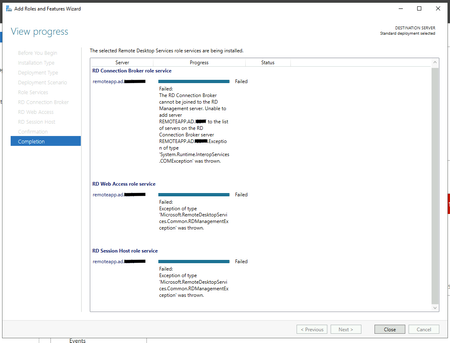
I'm trying to deploy Remote Desktop Services on a single server on Windows Server 2019 Standard. I've tried both Standard Deployment and Quick Start with a Session-based desktop development but I'm getting the following error during the installation: Unable to add server REMOTEAPP.AD.DOMAIN.COM to the list of servers on the RD Connection Broker server REMOTEAPP.AD.DOMAIN.COM..Exception of type 'System.Runtime.InteropServices.COMException' was thrown. I searched for some hint about this problem but I had not find anything useful. I cannot even find any useful log into the events log, and I tried one more time after reinstalling the server from scratch. Could you help me please? Thank you very much!27KViews0likes3Comments
AVD RemoteApp not showing in web client taskbar
Hi, We have setup a new AVD RemoteApp environment for one of our customers (about 50 users). They will primarily use the AVD webclient (https://learn.microsoft.com/en-us/azure/virtual-desktop/users/connect-web). Upon testing we have noticed that some of our apps aren't displaying in the top taskbar of the webclient (see screenshot). The app opens fine, but just isn't displaying the in the taskbar. This is annoying because upon minimizing the app there is no way to open the app again... Has anyone seen this before? Any workarounds? Help appreciated,Solved2KViews0likes4CommentsAzure VM - RemoteApps Mouse Focus Issue
Seeing an issue this morning on multiple VMs and hostpools where Remoteapps have not handling Window Focus correctly. Situation: A maximized app and a secondary app smaller and on the same screen. If attempting to click or use the smaller app. The maximized app is receiving the mouse clicks. In some situations it will even pull to the front covering the smaller app. The only way to interact with the smaller window is to minimize or move the larger window out of the way. Both applications in the scenario are remote apps. Naturally anything running natively off the client PC is unaffected. No updates to the client PC. Trying to identify what would cause this behavior overnight.8.4KViews0likes14CommentsRemoteApp problem
I am setting up a RemoteApp server (2022) with assorted small programs and utilities so that we don't need multiple installations of of them. One of these is Git: https://git-scm.com/download/win (64 bit version) It installs fine and appears to publish OK, but as soon as it has been published the web portal for the server (https://(hostname removed)/RDWeb/Pages/en-US/Default.aspx) fails to load - I get a runtime error (see attached image). The above Git package installs three programs, and if any or all of them are published as RemoteApps this happens. All the other programs which I have installed on the server publish without issue, and provided none of the Git ones are published the web portal loads normally. If I publish one of the Git ones, get the runtime error, then unpublish and refresh the page the portal then loads again. Anyone have any idea of a workaround for this? I've had it working in the past on Server 2019 in this way, but it's unclear whether the problem is the OS version or a newer version of the Git software. Thanks1.8KViews0likes1CommentRemote App in Azure Virtual Desktop Pool
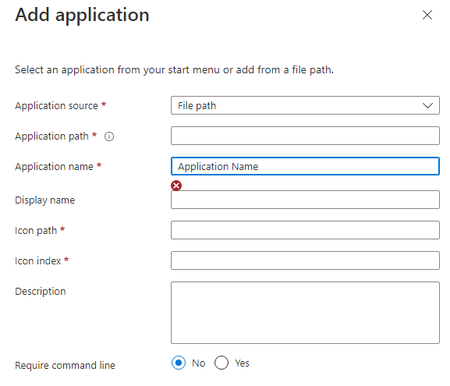
Hi, I'm trying to create a remote app in a POOL using a File Path as the application source but for the life of it I can't fill up the Application name field as it doesn't allow me and it's a mandatory field. I have no idea what I'm doing wrong here. According to the https://learn.microsoft.com/en-us/azure/virtual-desktop/manage-app-groups?toc=%2Fazure%2Fvirtual-desktop%2Fremote-app-streaming%2Ftoc.json&bc=%2Fazure%2Fvirtual-desktop%2Fbreadcrumb%2Ftoc.json, I'm doing everything correctly but it doesn't work. Can someone help, please? Thanks, Lucian2.5KViews0likes2CommentsRDS 2019 Remote Apps RDWEB event id 10
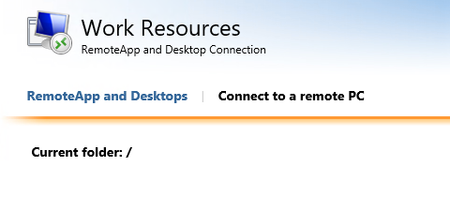
Hi everyone, I have a server that I was able to publish remote apps before several new applications installations today. I was also able to use the GPO "Specify the default connection URL After the installation of the new software, I wanted to publish it. However, it didn't work. I check it using the rdweb URL and found this: When I went to the server I found event id 10: "RD Web Access was unable to access RDSSerever, which is the server that is specified as running the RemoteApp and Desktop Connection Management service. Ensure that the computer account of the RD Web Access server is a member of the TS Web Access Computers security group on RDSServer." I tried multiple solutions, but: 1. I don't have a group called TS Web Access Computers Security group 2. Even after changing the authentication to a domain admin it still doesn't work... Is my only option to remove and add the RDS again? Rahamim.3.9KViews1like1Comment